 NChartPro
Turned into something you can act on. Live prices, the daily floor sheet that records every completed trade, and company fundamentals — from a paid market-data feed, pulled into one workspace and turned into charts, filters and screens you work in during the session, not a report you read after it.
An email and a password · the market data is already hereKarela — our own chart engine, written here
C++ · compiled to WebAssembly · developed by Amrit
Karela Chart is our own engine, not a skin over somebody else’s library. The 92 drawing tools, the 276 indicators and the 130 mark detectors — SMC, chart patterns, candle names, cup and handle, divergence, liquidity — are C++ compiled to WebAssembly, running in your browser and drawing through WebGL2. So is the Elliott Wave engine, which reads a wave count by GRAMMAR: 13,000 lines of C++20 parsing the market’s structure, not a script joining up swing highs. Nepal’s market, charted by an engine built in Nepal.
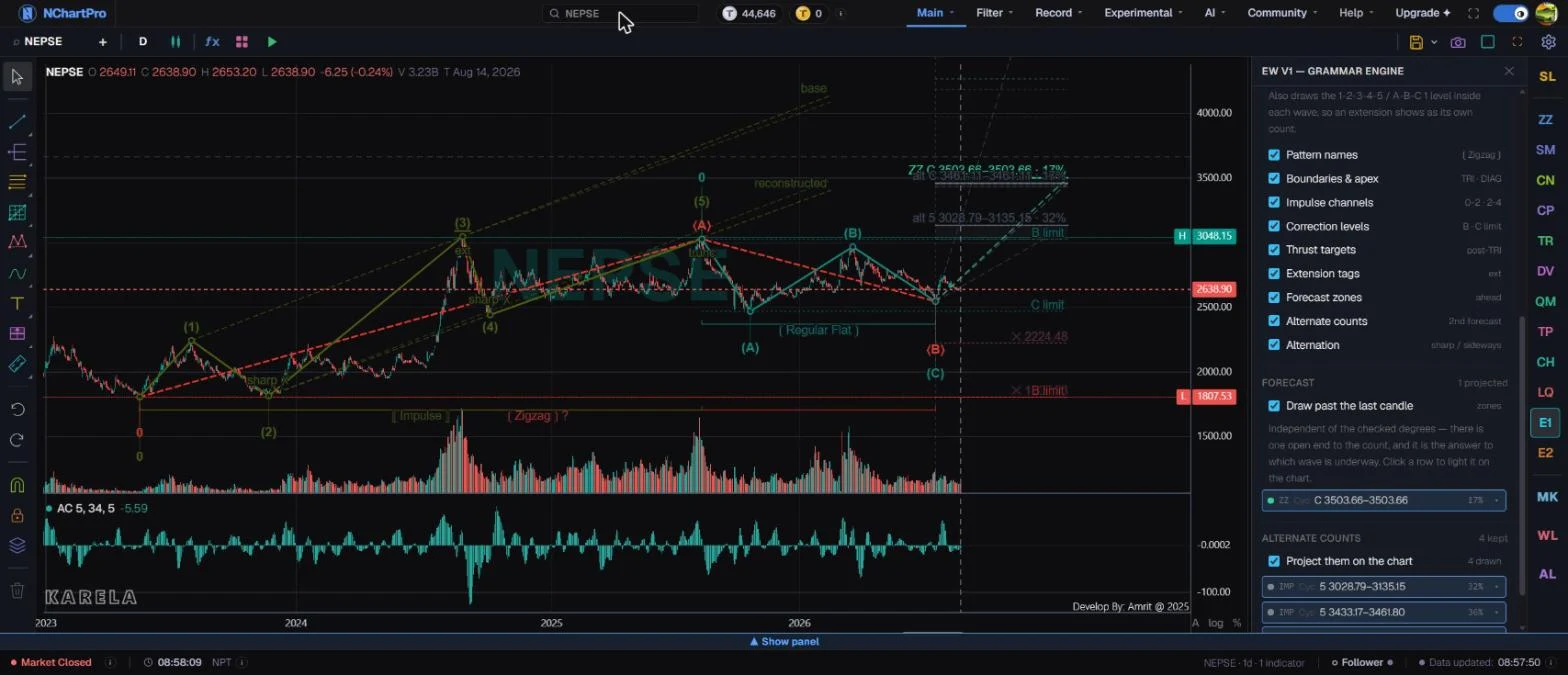
Main → Karela Chart — the NEPSE index on the daily with the Elliott Wave panel open: a complete (1)–(5) impulse and its (A)–(B)–(C) correction, the impulse channels, the invalidation levels and two alternate counts, all read by the grammar engine
Built into the chart
Elliott Wave
Over 300 conditions in the engine check every count — including 25 Elliott rules (17 hard, 8 guidelines) and 26 Fibonacci targets — across Impulse, Diagonal, Zigzag, Flat, Triangle and Combination. A wave that breaks a hard rule is never drawn, and each count comes with a target and the price that proves it wrong.
Auto SMC
BOS, CHoCH, order blocks, fair value gaps, liquidity sweeps, premium and discount and more — marked for you, each shown as still valid or already used.
Price Action
Support and resistance, supply and demand, trend lines and channels, liquidity setups and rounding patterns. The key levels are drawn before you start.
QML
Quasimodo levels and their reversal, continuation and 2R/2S setups — the failed-break reversal, caught when the level forms.
Chart Pattern
Head and shoulders, double and triple tops and bottoms, triangles, wedges, channels, broadening shapes, flags and pennants.
Candle Pattern
Doji, hammer, engulfing, harami, stars and more on your chart — plus a 53-pattern scanner that searches the whole market on 4 timeframes.
Divergence
Strong, medium, weak and hidden, bullish and bearish, on RSI, MACD, Stochastic, CCI, MFI, OBV and four more. Price and momentum disagreeing, found for you.
Back Play
Go back to any day and replay the chart one candle at a time. Practise reading the marks without knowing what happens next.
And 276 indicators and 92 drawing tools, on the same chart.
Where the data comes fromand what we do not claim
A paid market-data feed
Prices, NEPSE and sector indices, and the floor sheet come from the MDP (Market Data Provider) API by Source Code Pvt. Ltd., under a paid contract. During the session prices refresh about every 15 seconds.
About MDP →A backup, never a double
If the main feed is late, a second feed fills the gap. Only one record is kept for each moment, so no trade or candle is counted twice.
Checked again after the close
When the market closes, the whole day’s floor sheet is downloaded again and the minute candles are rebuilt from it. Trades under 10 shares are left out, as in the exchange’s own figures.
Every reply kept as it came
Each answer from the feed is stored raw, day by day, so any day can be looked up again and checked against what the app showed.
You can see how fresh it is
Pages show the trading day their data belongs to, and the bottom bar shows when it last updated — so a stopped feed never looks like a quiet market.
Bonus and right adjustment
The chart can show prices as traded or adjusted. Adjustment is applied stock by stock by our team and is not yet automatic for every new bonus or right share.
Signals are tools, not promises
We do not claim any indicator or mark predicts the price. Every formula is credited to its inventor. Trading Horizon (experimental) back-tests built-in strategies on NEPSE history with 0.4% commission each side and the T+2 sell rule.
Credits →What is finished, and what is not
One public page marks every area Ready, Experimental or Not built yet. Every change to the site is dated in What’s New.
Status page →Nine more things it doespick one, or keep scrolling
The whole session on one screen
The NEPSE meter and a meter per sector, the index chart, the brokers who bought and sold the most, gainers, losers, top volume and the advance–decline split. Laid out so the first ten seconds of the day tell you where the money went.
- NEPSE meter
- Sector meters
- Top buyer / seller
- Gainers & losers
- Top volume
- Advance / decline
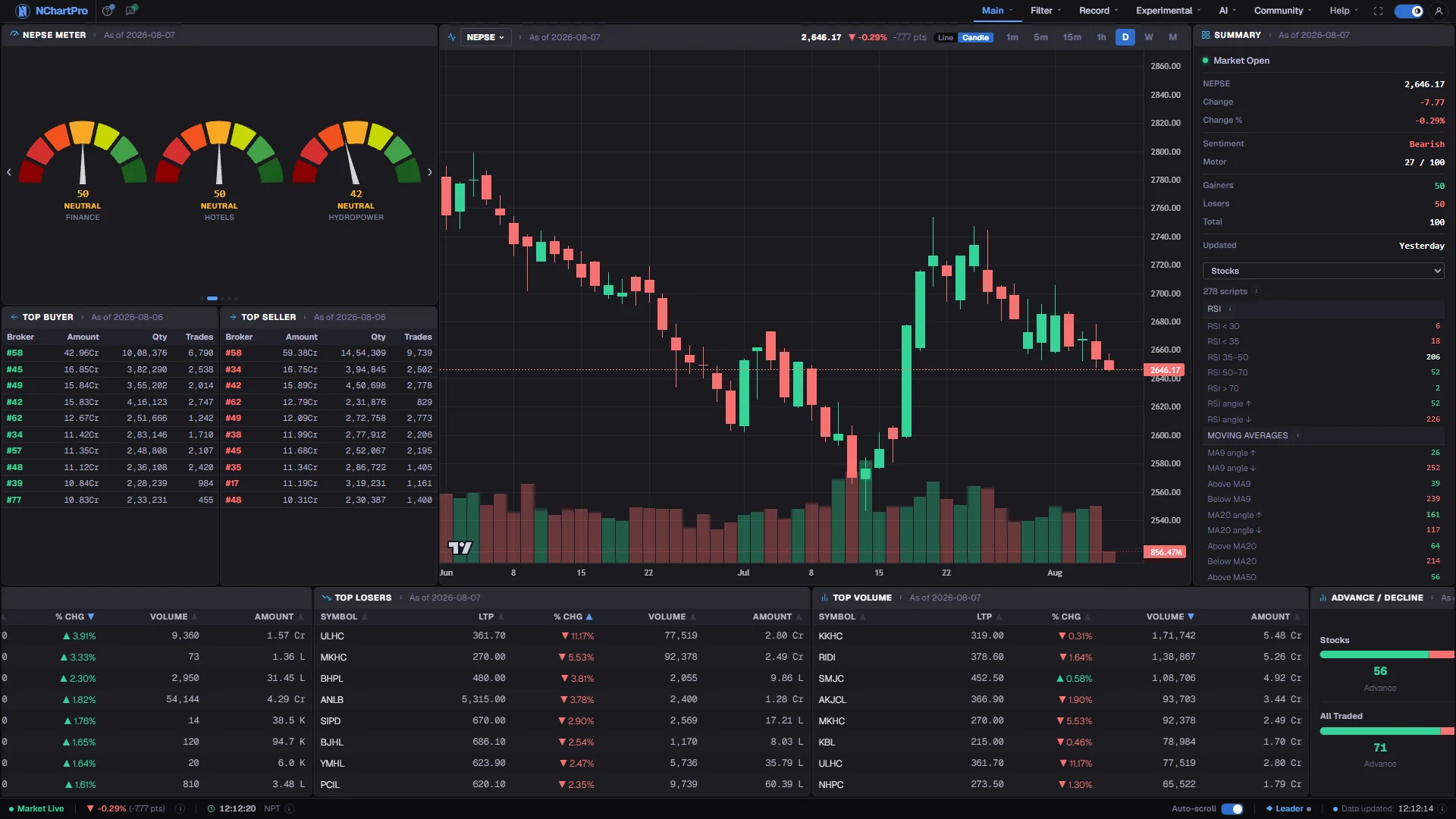
Main → Dashboard — sentiment meters, the broker leaderboard and the advance/decline split, all computed from the app’s own ingest
One symbol, every angle at once
Indicator readings, price-action levels, smart-money structure, the live buyer and seller depth, capital and earnings, the floor-sheet meters, the company’s news and the automated reading of the day — for a single stock, on a single screen. No tab hopping to assemble a view.
- Indicators
- Price action
- SMC structure
- Buyer / seller depth
- Fundamentals
- News
- AI reading
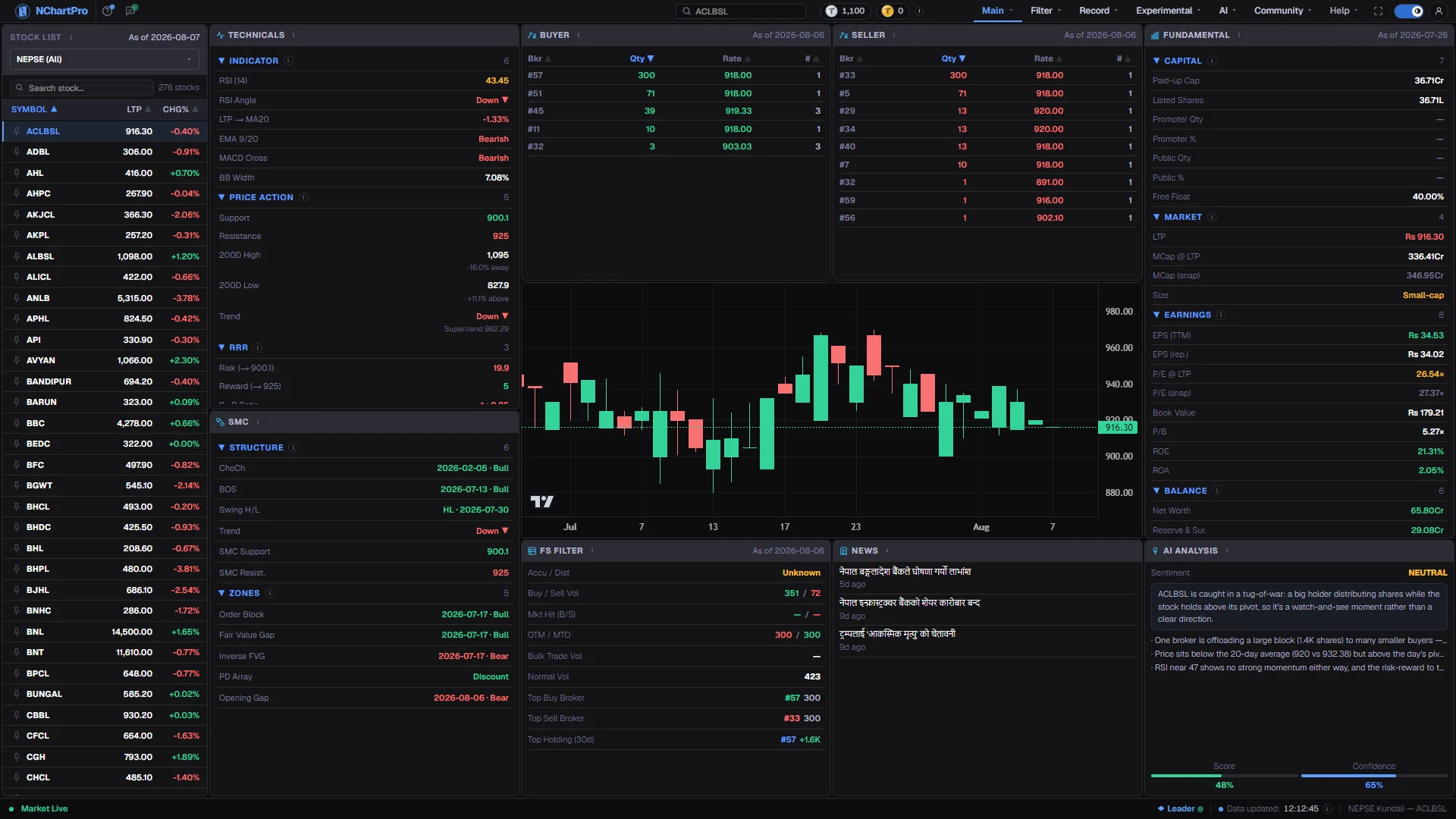
Main → Kundali — RSI, Supertrend, order blocks, broker depth, paid-up capital and EPS for one stock side by side
The session as it happens
The live floor-sheet tape with bulk, sweep and press views next to volume spikes ranked by relative volume, range breakouts, moving-average crossovers, circuit breakers and the day’s most volatile names — all moving while the market is open.
- Live tape
- Volume spikes
- Range breakouts
- MA crossovers
- Circuit breaker
- Volatility
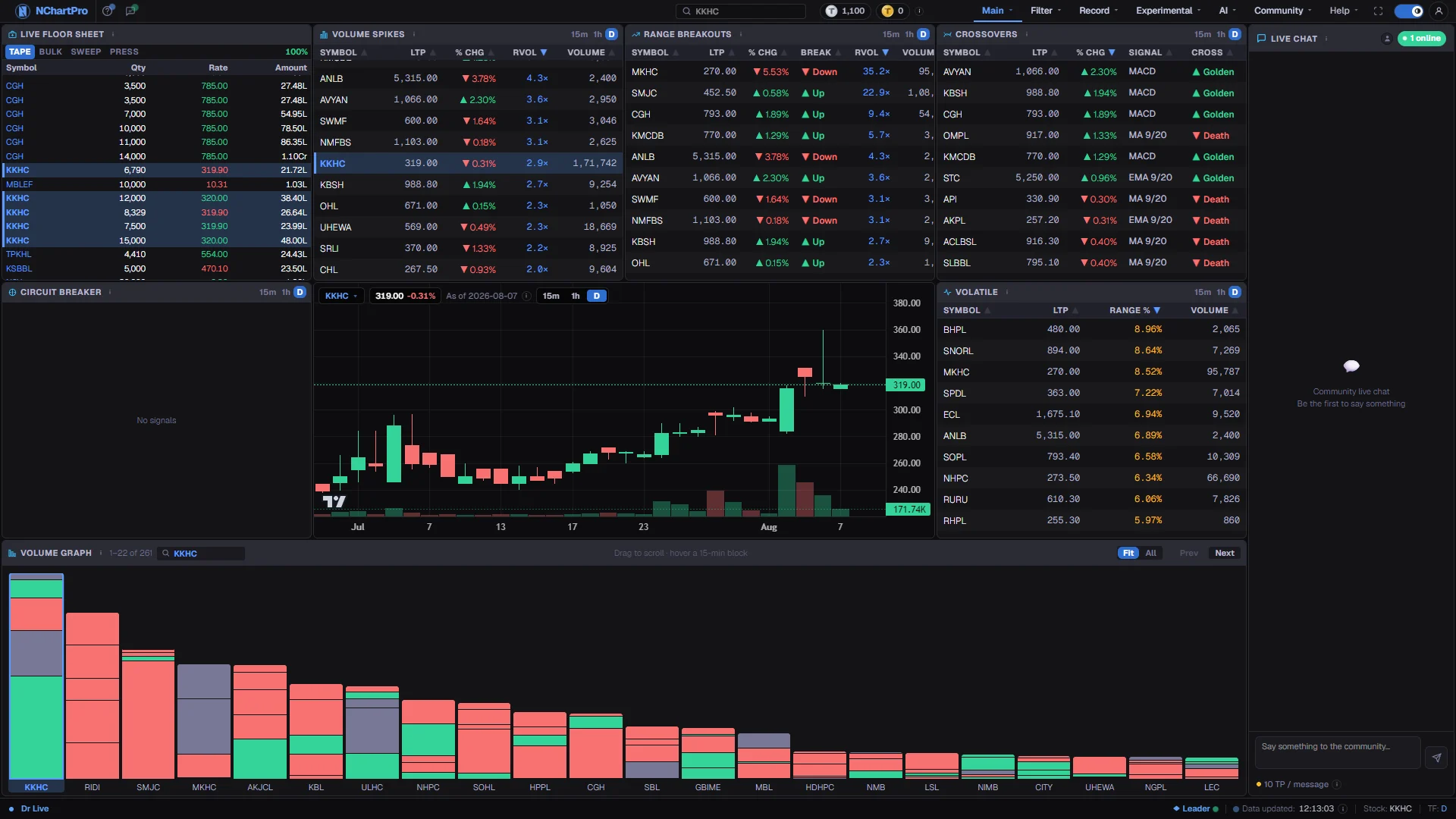
Main → Dr Live — the live tape, RVOL spikes and golden/death crosses during an open session
Every completed trade, sorted into an answer
A day of NEPSE is tens of thousands of rows, and rows are not information until something sorts them. NChartPro ranks buying and selling brokers per stock, separates bulk and block deals from ordinary volume, and gives accumulation, one-to-many broker patterns, concentrated surges and sector rotation each their own filter.
- Daily filter
- Broker ranking
- Bulk trade
- Normal volume
- Accumulation / distribution
- OTM
- Pump & dump
- Sector invest
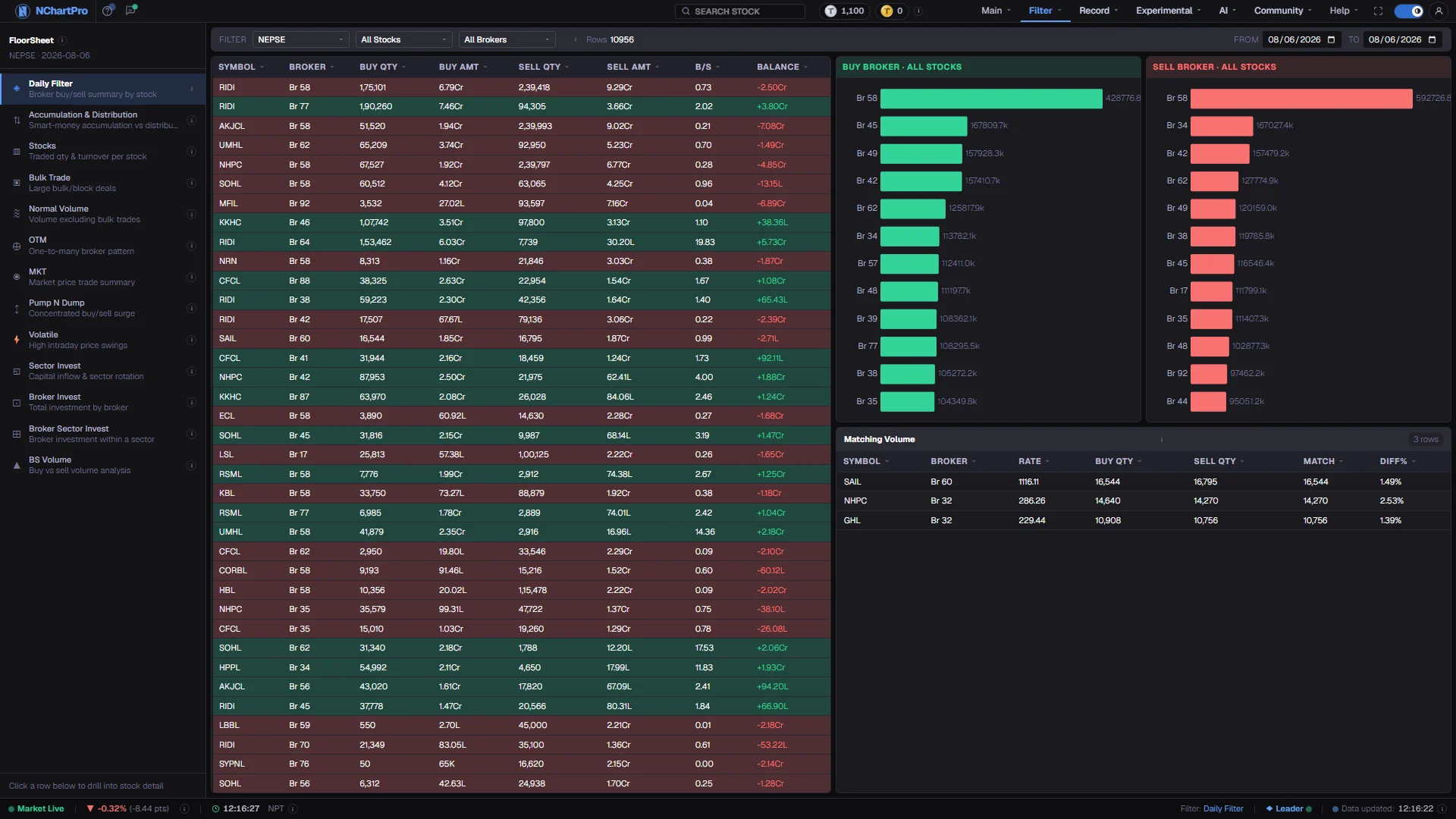
Filter → FloorSheet — 10,956 rows for a single session, ranked by net broker position, with sixteen ways to cut them down the left
From the whole board to the four you care about
Set the sector, the price band, the turnover and the beta, then layer RSI, MACD, Stochastic, ADX, CCI, MFI, Williams %R, Bollinger, SuperTrend and trend on top of it. Sort by any column. What comes back is a working list you can act on, not a report you file.
- Sector & price
- Turnover
- Beta
- RSI / MACD / ADX
- Bollinger
- SuperTrend
- Technical
- Fundamental
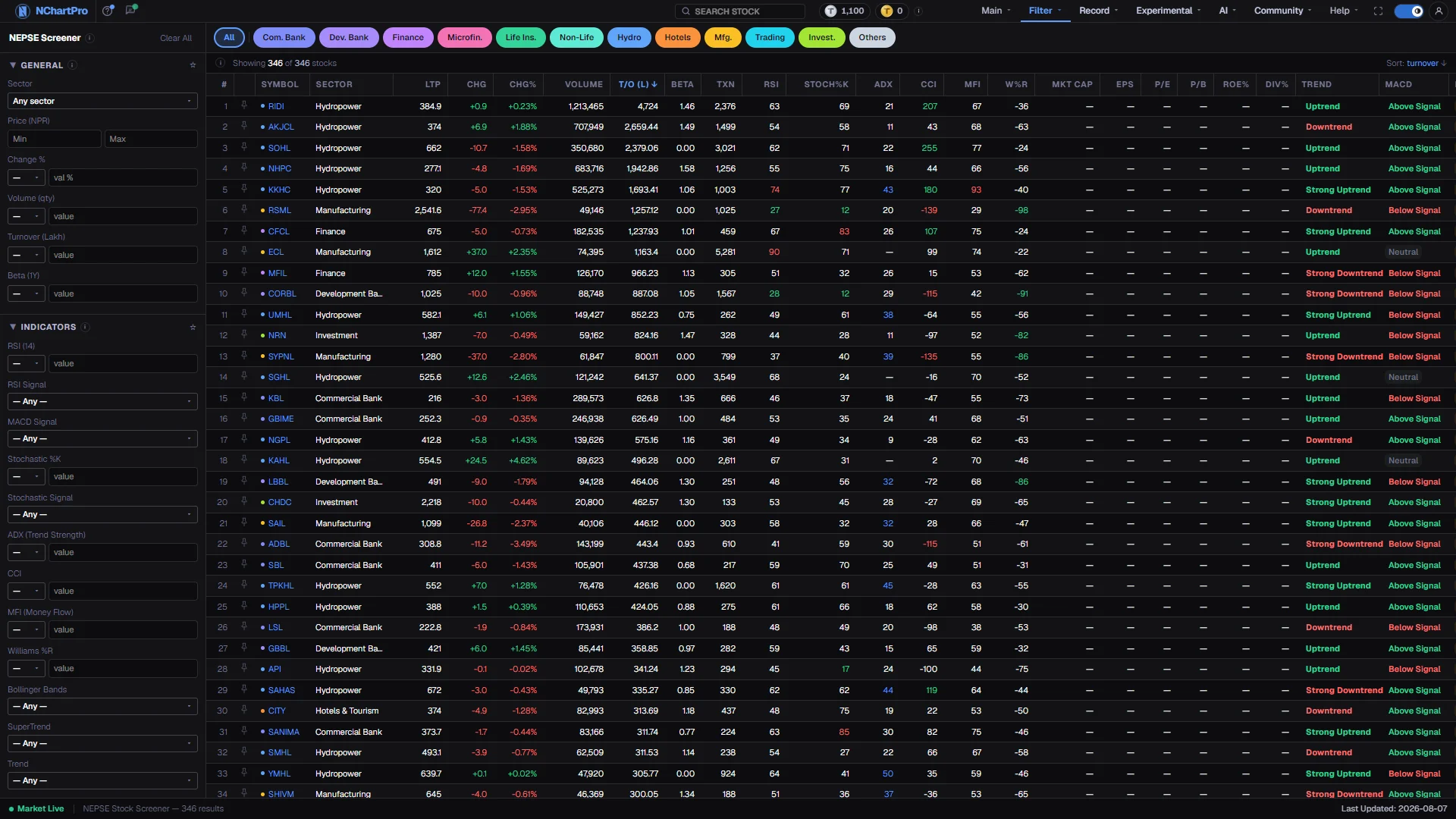
Filter → Screener — 346 of 346 stocks, with the general and indicator criteria applied together
Where the turnover actually went
The market as one treemap — sized by turnover or by traded volume, coloured by the move, grouped into the sectors NEPSE itself uses. Daily, weekly and monthly, with the bulk-trade map and the buyer and seller queues alongside it.
- Sized by turnover
- Sector groups
- Daily / weekly / monthly
- Bulk trade
- Buyer & seller queue
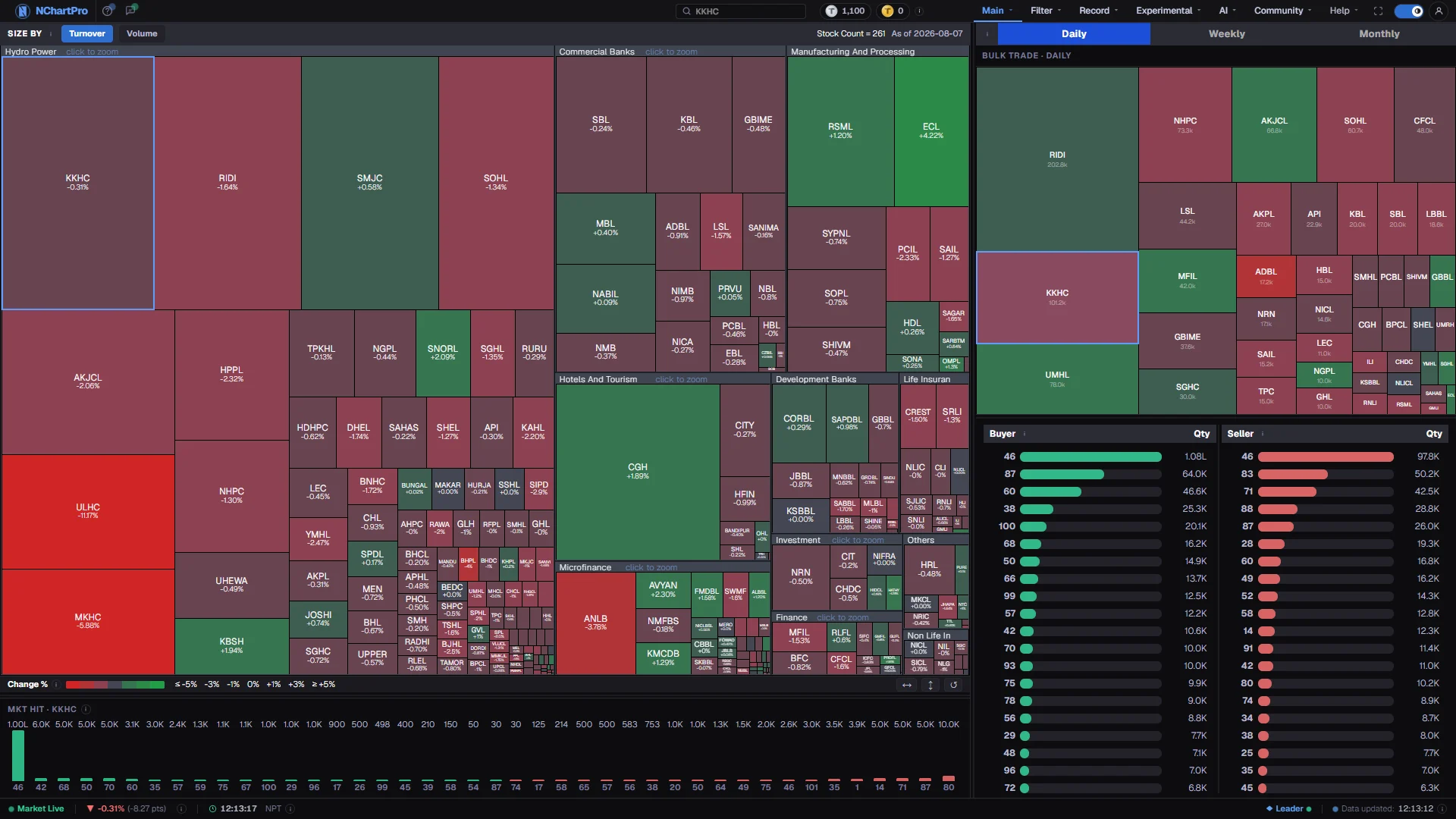
Main → Heat Map — 261 stocks grouped by sector, sized by turnover and coloured by the day’s change
Your positions, worked out — never guessed
Holdings, the cash ledger, today’s change, realised and unrealised P&L, risk, behaviour and a trade journal. Every figure on these pages is arithmetic over your own trades and live prices — no model, no forecast, no “insight” you cannot trace back to a rule. That is not a promise in the marketing: a build check fails if a portfolio page so much as imports the AI section.
- Holdings
- Cash ledger
- Day change
- Performance
- Risk
- Behaviour
- Journal
- Alerts
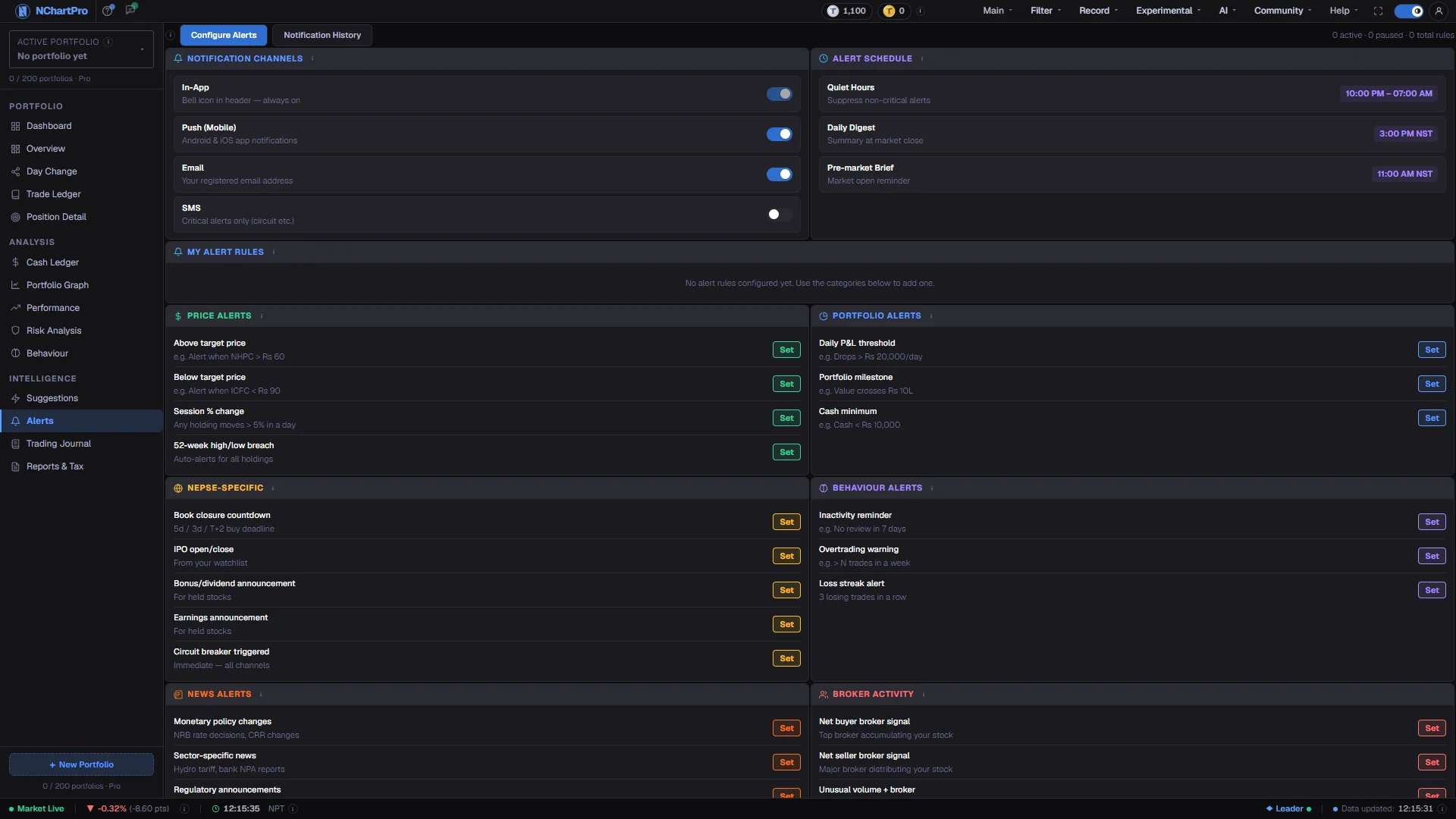
Main → Portfolio → Alerts — the fourteen portfolio pages down the left, and price, P&L, NEPSE-event and behaviour alerts on the right
Test a rule before you trade it
Write your own buy and sell rules with any of the chart’s 276 indicators, or start from one of 74 samples, and replay them over a stock’s whole history on the Karela chart. Orders fill at the next day’s open with NEPSE broker commission, SEBON fee, DP charge, capital gains tax, T+2 and circuit limits. Then test it honestly: on years it was not tuned on, on the 20 to 100 most traded stocks at once, with a sweep and a walk-forward. Your own Scripts work here too.
- 276 indicators
- 74 samples
- NEPSE costs & tax
- T+2
- Out-of-sample
- Many stocks
- Best values
- Walk-forward
- Saved runs
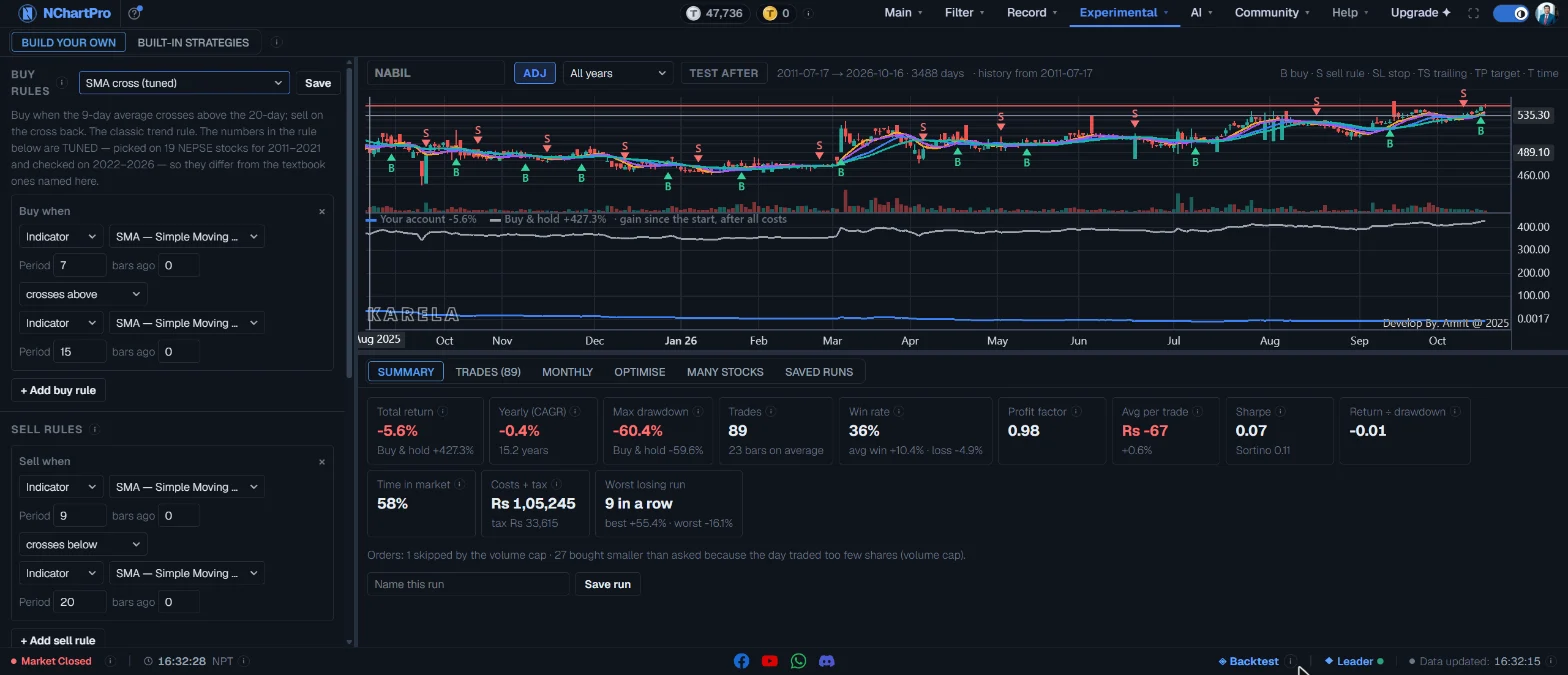
Experimental → Trading Horizon — the tuned SMA cross on NABIL since 2011: every trade on the Karela chart, the account against buy and hold in the pane below, and the result after all costs
A reading of the day, with its reasons attached
A per-symbol summary carrying a score and a stated confidence, then story cards for MACD, price levels, moving averages and broker behaviour that show the numbers each reading came from. Ask the rest in plain language. Every screen of it is labelled automated and educational, because it is.
- Per-symbol summary
- Stated confidence
- Story cards
- Plain-language chat
- Sources shown
- Education-only labelling
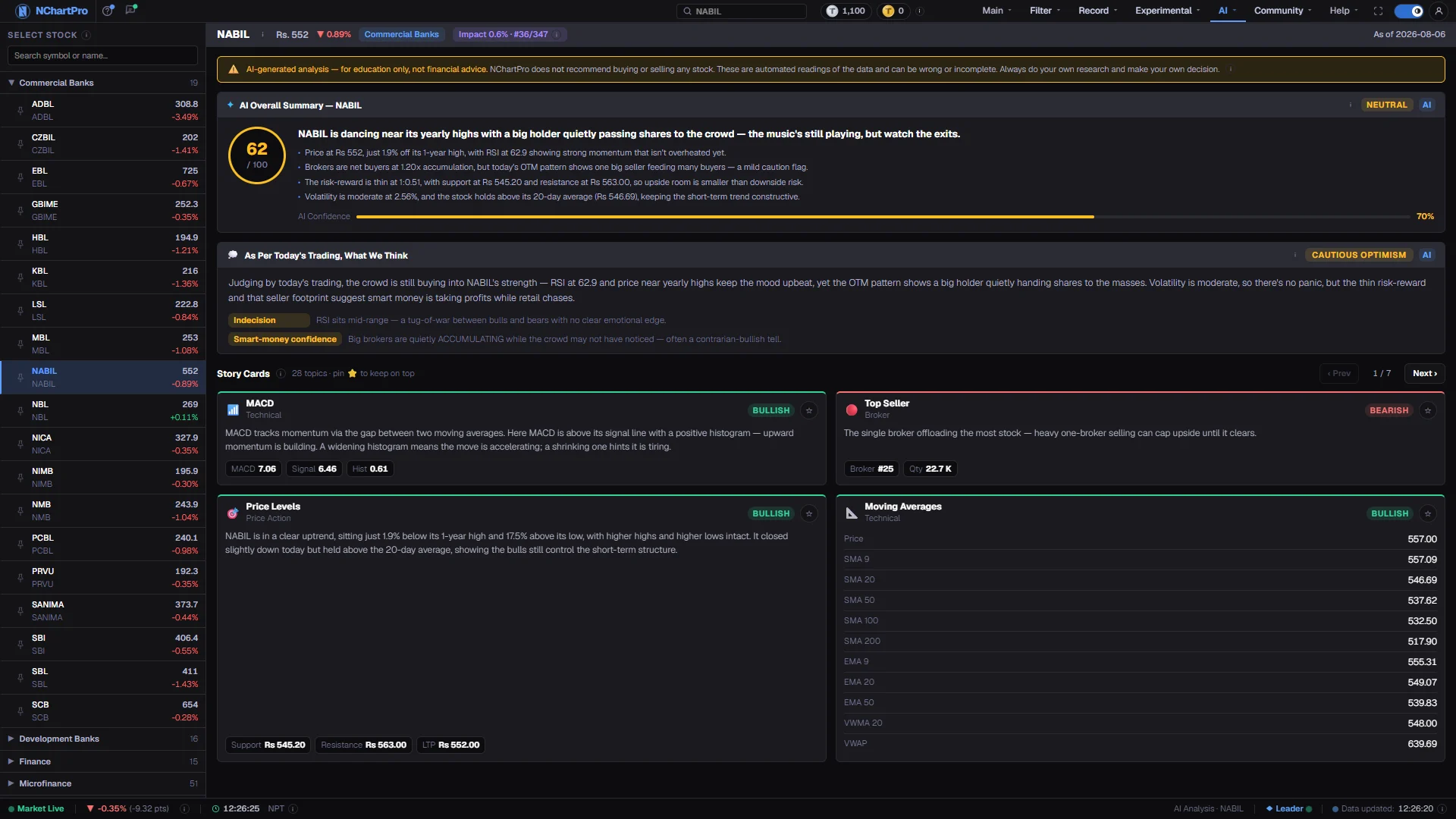
AI → Analysis — NABIL read at 62/100 with 70% stated confidence, and the four cards the score was built from
The calendar, the archive, and the people trading it
The corporate calendar, shared charts, open discussion and public-choice polls sit beside the reference archive: company reports, news, mutual funds and a knowledge base covering IPOs and FPOs, right shares, bonus and dividend, auctions, mergers, name changes and AGM notices.
- Calendar
- Share Here
- Discussion
- Public Choice
- Reports
- News
- Mutual funds
- Knowledge base
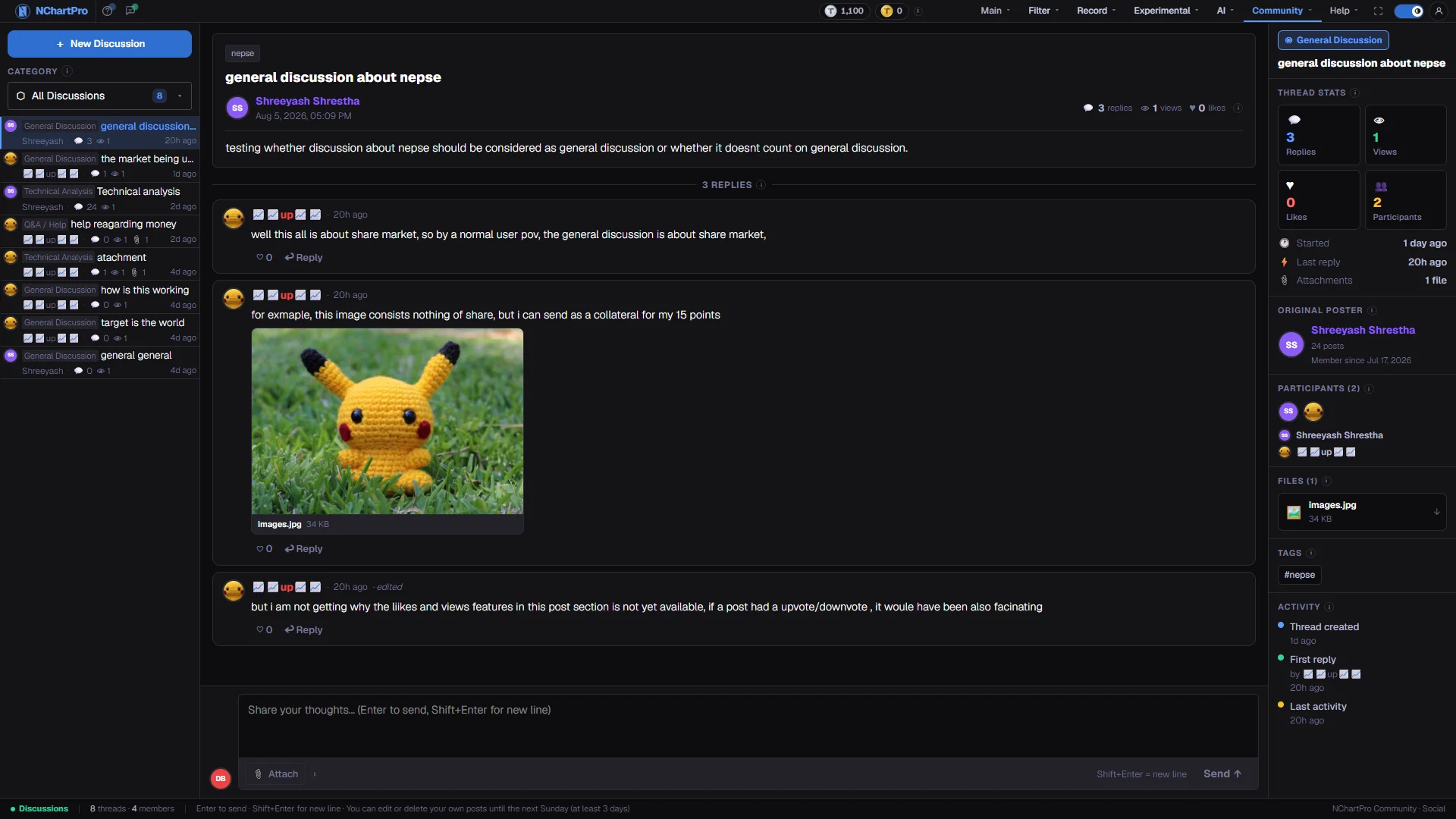
Community → Discussion — one of the community surfaces, next to the Record archive in the same menu

Ready when you are.Create an account and open the workspace.
NChartPro is built for people who trade the market every session. If the chart you need does not exist yet, that is a feature request — not a dead end.
NChartPro is an analysis tool, not investment advice. Indicators, screens, probabilities and AI-written commentary describe what the data has done — they are not a recommendation to buy or sell, and they can be wrong. Verify anything you act on against the exchange's own published figures.
the older NChartPro is on YouTube
Prices, floor sheet and disclosures originate with the exchange and reach us through the MDP API of Source Code Pvt. Ltd. under a paid contract · Trading Horizon and Probability are experimental