

Report
Where the market's opinion of a company meets the company's own filed numbers — four quarters of profit, capital and ratios for one symbol at a time.
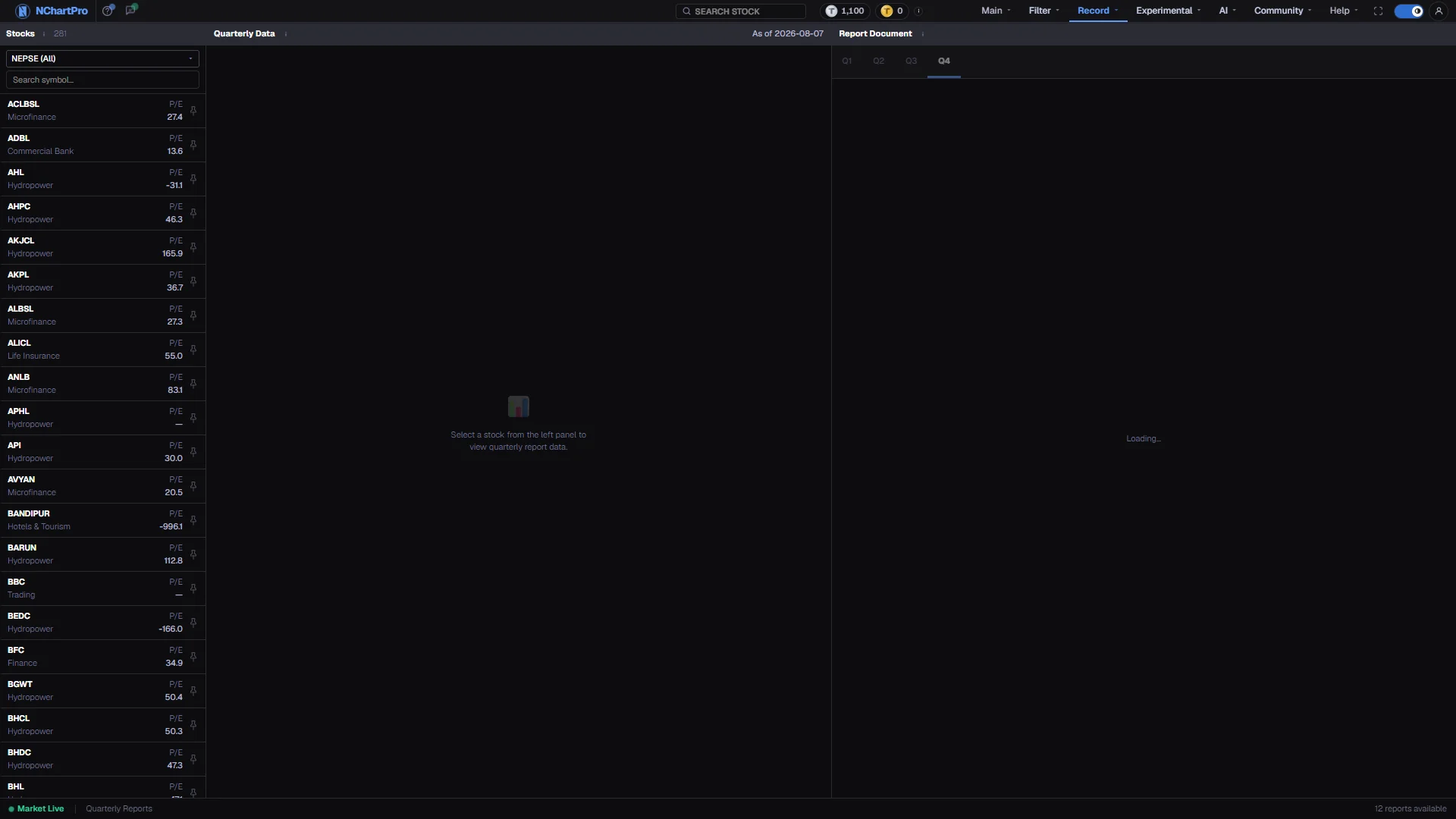
What this page is
Every company listed on NEPSE publishes its results four times a year. This page takes one company and lays those four quarters out as four columns, so a figure can be read across the year instead of one filing at a time.
The left panel is the numbers: profit, earnings per share, book value, capital and reserves, ROE and P/E, plus four extra rows for banks. The right panel is the filed document itself, split by quarter.
Nothing here is a price or a signal. It is the accounting record a price is eventually judged against.
Why it helps you
- Results season moves prices sharply in Nepal, and the move usually starts before the number is widely read. Knowing which quarter a company has already filed tells you whether a run-up is informed or speculative.
- A quarter that misses badly can reset a stock for weeks. Check the filed figure before assuming a sharp fall is an overreaction worth buying.
- Use it as a filter on your own watchlist rather than a scanner. Comparing companies is faster in Filter → Fundamental.
- This is the page that answers whether the business behind the share is actually growing. Price can drift for a year on sentiment; nine months of cumulative profit cannot.
- Read the same quarter against the same quarter a year earlier. Because the figures are cumulative, Q3 against Q2 compares nine months with six and always looks like growth.
- For banks, the NPL and CAR rows matter more than earnings. A bank growing profit while bad loans climb is borrowing that profit from a later year.
When to use it, and where to find it
- In the weeks after a quarter closes — mid-October, mid-January, mid-April and mid-July — as companies file.
- Before you buy anything you intend to hold, as the last check after the chart and the sector.
- After a large price move you cannot explain from news or the floor sheet.
Try it — a short walkthrough
- 1Pick a companyChoose a sector in the left list, or type a symbol into the search box, then click the row. Both panels on the right refill for that symbol.See this part in detail →
- 2Read the fiscal year firstThe header names the Nepali fiscal year the figures belong to. FY 2081/82 runs mid-July to mid-July, so it is not a calendar year.See this part in detail →
- 3Read one row across, not one column downPick Net Profit and follow it left to right. Rising quarter numbers are expected — the figures are cumulative — so what you are looking for is the size of each step.See this part in detail →
- 4Check ROE against the capital rowsA high ROE on a small paid-up capital is easier than the same ROE after a large bonus issue. Read the two together.See this part in detail →
- 5Open the filed quarterClick a quarter tab in the right panel to see whether a stored document exists for it. A dim tab means nothing is stored for that quarter.See this part in detail →
Every part of the page
In the order you meet them on screen, each with a close-up of the real thing. The numbers match the dots on the figure above.
Pick the company
The full list of symbols, grouped by sector. Whatever you click here becomes the subject of both panels on the right.
How — Narrow the list with the sector box (NEPSE = every stock) or type into the search field, then click a row. The pin button keeps a symbol in your quick-access list across the whole app.
- The sector list comes from the app's shared stock classification, so it matches the sector picker on every other page.
- P/E on the right of each row is price divided by yearly earnings per share. A dash means no fundamental data has been loaded for that symbol.
Quarterly Data — the header
The title bar of the left panel. When a report is loaded it also shows the fiscal year it covers and the words "cumulative figures", plus an "As of" date taken from the report itself.
How — Read the fiscal year first — Nepali FY runs mid-July to mid-July, so FY 2081/82 is not the same window as a calendar year.
- The quarters end mid-October (Q1), mid-January (Q2), mid-April (Q3) and mid-July (Q4).
The four quarters
One column per quarter, one row per figure: Net Profit and Operating Profit in Rs Lakh, EPS (annualised), Book Value per share, Paid Capital / Reserve / Total Assets in Rs Crore, ROE, P/E, and any Bonus or Cash Dividend declared. Banks get four extra rows — NII, NPL, CAR and C/D Ratio.
How — The numbers are CUMULATIVE, so Q3 means the first nine months added up. Compare Q3 with LAST year's Q3, never with this year's Q2.
- ROE and P/E are computed by the backend: ROE = net profit ÷ (paid capital + reserves), P/E = the stock's LTP ÷ annualised EPS.
- NPL (bad loans as a % of total loans) is colour-coded: above 3% red, above 1.5% amber, below that green. Lower is better.
- Because the quarterly-report table has no rows loaded yet, this panel usually reads "No quarterly report data available for <SYMBOL> yet." That is the honest state, not an error.
Report Document — the header
The title bar of the right panel. When you pick a company that has no stored report it shows "Not available" in amber right here.
How — Use this panel to check a number in its original context instead of trusting the table on the left.
The published report
Four tabs, Q1 to Q4. When we have that quarter's report link, the panel shows the fiscal year, the dates we have, the website it comes from, and an "Open report" button.
How — Click a quarter tab to switch. A dim tab means we have no link for that quarter. The report opens on the company's own website, in a new tab.
- Right now no report links are stored yet, so every quarter says "not uploaded yet". That is the true state, not an error.
The status bar
The strip at the very bottom. It shows which symbol you are viewing on the right, next to a green "Market Live" label and a count.
How — Use the "Viewing:" symbol to confirm the panels above really switched to the company you clicked.
- The green "Market Live" text is fixed label text on this page — it does not check whether NEPSE is actually open. NEPSE trades Monday to Friday, 11:00 to 15:00 Nepal time.
- The "reports available" number comes from the sector list, not from the report table, so treat it as a rough figure and not as a count of stored reports.
Reading the numbers
- All figures are cumulative from the start of the fiscal year. Q3 is the first nine months added together, not the third quarter on its own.
- Net Profit and Operating Profit are in Rs Lakh. Paid Capital, Reserve and Total Assets are in Rs Crore. EPS is annualised.
- ROE is net profit divided by paid capital plus reserves. P/E is the stock's last traded price divided by annualised EPS — so P/E moves every day even when the filing does not.
- NPL is bad loans as a percentage of total loans, and lower is better: above 3 per cent shows red, above 1.5 per cent amber, below that green.
What it does not do
- The quarterly-report table in the database has no rows loaded. Most companies show "No quarterly report data available for <SYMBOL> yet." That is the honest state of the data, not a fault on the page.
- A fabricated demo seed that once filled this table for fourteen real companies was deliberately deleted rather than shipped as if it were real.
- The Report Document panel opens the report the company actually filed, as a PDF in a new tab. A quarter with no stored report says so, and no sample document is shown in its place.
- The "reports available" count in the footer is fed by the sector list, not by the report table, so it is not a count of stored reports.
- The green "Market Live" label in the footer is fixed text on this page. It does not check whether NEPSE is open.
Questions people ask
Because the figures accumulate. Q4 is the whole year; Q1 is three months. Compare a quarter with the same quarter of the previous year instead.
Both, at different moments. P/E here uses the latest traded price against annualised EPS from the filing, so it changes with the price every day.
Filter → Fundamental. This page is built for one company in depth; that page ranks the whole market on the same fields.