

Rotation
Every sector against NEPSE, and every stock against its own sector, placed on the same four boxes as the 101 panel's Rotation card — so you can see who is leading, who is fading and who is turning up.
What this page is
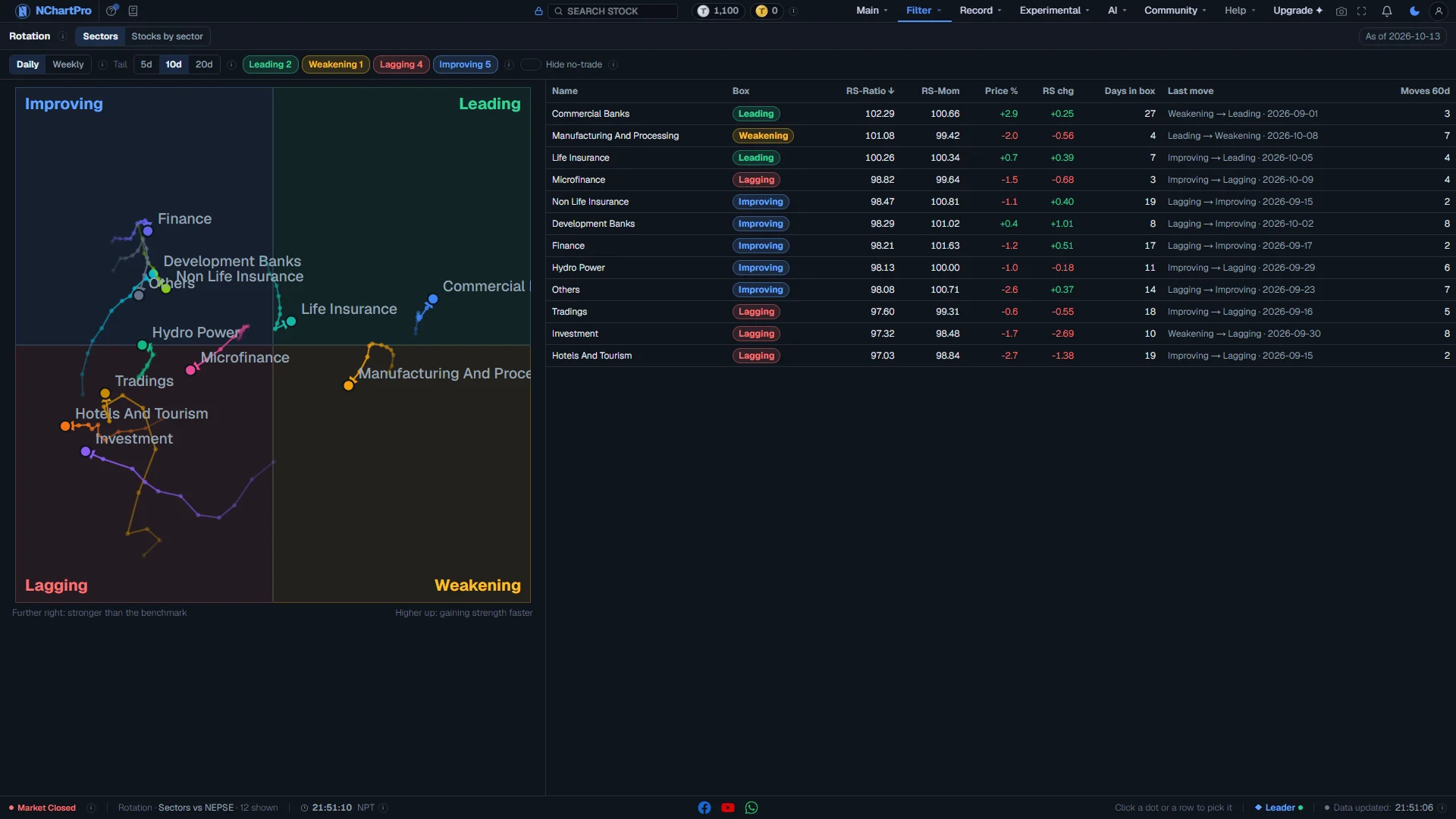
Each dot is a sector index or a stock compared with a benchmark. Left to right is relative strength (RS-Ratio): right of the centre line means stronger than the benchmark. Bottom to top is the speed of that strength (RS-Momentum): above the centre line means it is getting stronger.
The four boxes are Improving (top-left), Leading (top-right), Weakening (bottom-right) and Lagging (bottom-left). Each dot has a tail that shows where it came from, older points fainter, with an arrow on the newest move.
The numbers are made once a day after the close by the same indicator code the chart's 101 panel uses, on bonus-adjusted daily prices. A dot here matches the 101 card for the same stock.
Why it helps you
- Sectors usually turn clockwise: Improving → Leading → Weakening → Lagging. A sector moving from Improving into Leading is often where fresh money is going.
- Inside a strong sector, the stocks in Leading against their own sector index are the sector's leaders. Switch the benchmark to NEPSE to check they also beat the whole market.
- A slow way to see which industries the market is rewarding this quarter. Use Weekly and a 12-week tail to cut out daily noise.
- A stock deep in Lagging for many weeks is losing to its own sector. That is worth knowing before you add to it.
When to use it, and where to find it
- After the close, once the day's data is made. The As of badge shows the last trading day in the data.
- At the start of a week, to see which sectors turned since last week.
- Before picking stocks inside a sector, to start from the strongest names.
Try it — a short walkthrough
- 1Pick sectors or stocksSectors shows the twelve sector indices against NEPSE. Stocks by sector shows one sector's stocks. Searching a stock in the top bar opens its sector and lights up its dot.See this part in detail →
- 2Set daily or weekly, and the tailDaily is one point per trading day, with a tail of 5, 10 or 20 days. Weekly is the last trading day of each week (weeks start on Sunday), with a tail of 4, 8 or 12 weeks. On Stocks by sector, pick the sector and the benchmark here: the sector index or NEPSE.See this part in detail →
- 3Hide boxes you do not needClick a box name to hide or show its dots and rows. The number beside each name is how many are in that box now. The Hide no-trade switch hides stocks with no trade in the last 5 trading days.See this part in detail →
- 4Read the planeThe dot is where it is now and the tail is where it came from. On Stocks by sector, the dashed ring is the sector itself. Click a dot to pick it; a card shows its numbers and an Open chart button.See this part in detail →
- 5Sort the tableEvery dot is a row. Click a heading to sort by box, RS-Ratio, RS-Mom, price change or RS change over the tail, days in the box, the last box change, or how often it changed box in 60 days. Click a row to find its dot.See this part in detail →
- 6Check the dateThe As of badge is the last trading day in the data. During market hours it shows the last closed day, not live prices.See this part in detail →
The Stocks by sector tab, part by part
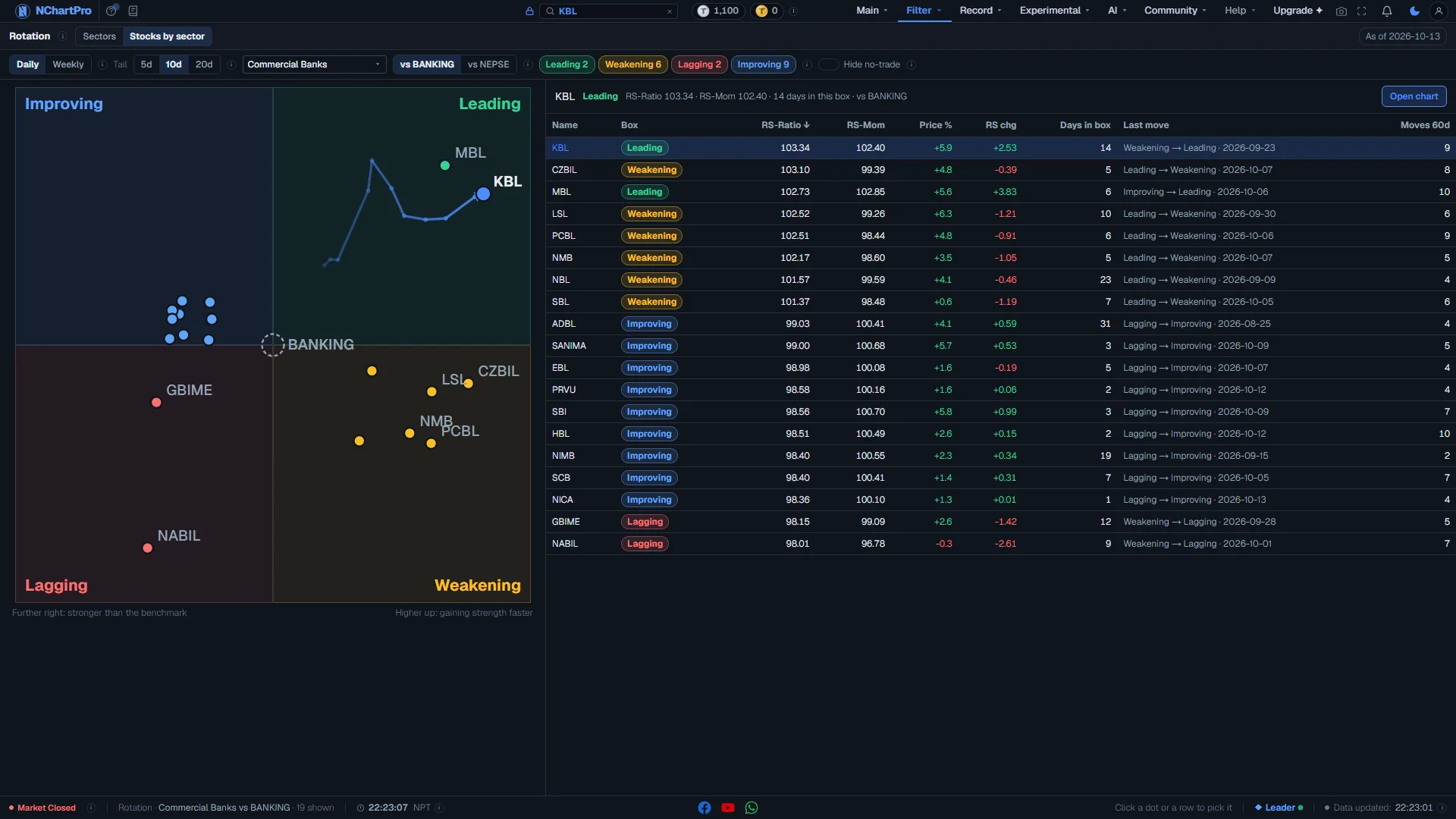
Rotation, Stocks by sector tab — the banks against their sector index, one bank picked. Each part with a close-up of the real screen; the numbers match the dots on the picture.
Sector
The sector whose stocks are on the plane. The page opens on Banking.
How — Pick another sector from the list. Searching a stock in the top bar also opens its sector and lights up its dot.
Benchmark: vs the sector index, or vs NEPSE
What every stock is compared with.
How — Use "vs" the sector index to find the leaders inside the sector. Switch to "vs NEPSE" to check that they also beat the whole market.
- vs the sector index: a stock in Leading is beating the other stocks of its own sector.
- vs NEPSE: a stock in Leading is beating the whole market.
- A stock can lead a weak sector and still lag the market, so the same stock can sit in a different box after the switch.
Hide no-trade
Hides stocks with no trade in the last 5 trading days.
How — Switch it on to clean up the plane. When it is off, those stocks are shown grey, with the day they last traded.
The plane, for one sector
Each dot is a stock. The dashed ring is the sector itself.
How — Hover a dot to see its name and tail. Click a dot to pick it. Only the 8 dots furthest from the centre, plus the one you picked or point at, carry a name, so the plane stays readable.
- Against the sector index, the ring sits at the centre — the sector is its own benchmark.
- Against NEPSE, the ring shows where the whole sector stands against the market. A stock right of the ring is stronger than its sector.
- The dot is where the stock is now; the tail is where it came from, older points fainter, with an arrow on the newest move.
The picked stock
The numbers of the dot or row you clicked, in one line, and an Open chart button.
How — Press Open chart to see the stock on the chart, where the 101 panel's Rotation card shows the same dot.
- The box it is in, in that box's colour.
- RS-Ratio and RS-Mom now, how many trading days it has stayed in this box, and the benchmark.
- "No trade since …" when the stock has not traded for 5 trading days.
- "Too new" when it has fewer than 143 trading days of history, so there is no dot yet.
The table
Every dot as a row, with the numbers behind it.
How — Click a heading to sort by it; click again to reverse. Click a row to pick that stock and find its dot.
- Box: the box the newest point is in.
- RS-Ratio and RS-Mom: see "Reading the numbers" below.
- Price %: the price change over the tail you picked. RS chg: how far RS-Ratio moved over the same tail.
- Days in box: trading days in the current box without a break. A long stay in Leading is strength that lasts; a long stay in Lagging is weakness that lasts.
- Last move: the newest box change, "from → to", and the day it happened — for example "Improving → Leading · 2026-10-08".
- Moves 60d: how many times it changed box in the last 60 trading days. A high number means it jumps around, so its box means less.
Every part of the page
In the order you meet them on screen, each with a close-up of the real thing. The numbers match the dots on the figure above.
Sectors or stocks
Sectors shows the 12 sector indices against NEPSE. Stocks by sector shows the stocks of one sector.
How — Start with Sectors to see which sector is moving. Then open that sector under Stocks by sector.
Daily, weekly and the tail
Daily shows one point per trading day. Weekly shows the last trading day of each week. The tail is how far back each line reaches.
How — On Stocks by sector, pick the sector here, and compare with the sector index or with NEPSE.
- The Price % and RS chg columns are measured over the same tail.
The four boxes
Improving: weaker, but getting stronger. Leading: stronger and still rising. Weakening: stronger, but losing speed. Lagging: weaker and still falling.
How — Click a box name to hide or show its dots and rows. The number is how many are in that box now.
- The usual path is a clockwise turn: Improving → Leading → Weakening → Lagging.
Reading the plane
The dot is where it is now. The line behind it shows where it came from; older points are fainter. The arrow shows the newest move.
How — Click a dot to pick it. Its row in the table lights up, and a card shows its numbers with an Open chart button.
- On Stocks by sector the dashed ring is the sector itself.
- A grey dot has had no trade in the last 5 trading days.
The table
Every dot as a row: its box, RS-Ratio, RS-Mom, price change and RS change over the tail, days in the box, the last box change and how many changes in 60 days.
How — Click a heading to sort. Click a row to find its dot.
- "Too new" means under 143 trading days of history, so there is no dot yet.
As of
The last trading day in this data. It is made once a day after the market closes.
How — During the day it shows the last closed day, not live prices.
Reading the numbers
- RS-Ratio (left to right): how strong the dot is compared with the benchmark, against its own usual level. It is shown around 100. 100 means the same as usual; 101 is one standard step stronger; 99 one step weaker. Right of the centre line is stronger.
- RS-Momentum (bottom to top): how fast RS-Ratio is changing. Also around 100. Above the centre line it is getting stronger; below, it is getting weaker.
- Leading (top right, green): stronger than the benchmark and still getting stronger.
- Weakening (bottom right, amber): still stronger, but losing speed. Often the first sign that a leader is tiring.
- Lagging (bottom left, red): weaker, and still getting weaker.
- Improving (top left, blue): still weaker, but getting stronger. Often where the next leaders come from.
- Most dots turn clockwise: Improving → Leading → Weakening → Lagging → Improving. A dot that turns the other way — from Weakening back to Leading, say — is going against the usual cycle.
- The tail: daily is one point per trading day (5, 10 or 20 days); weekly is the last trading day of each week (4, 8 or 12 weeks). A long tail means a fast move; a short, curled tail means it is hardly moving.
- Price % is the price change over the tail you picked. RS chg is how far RS-Ratio moved over the same tail.
- Days in box counts trading days in the current box without a break. Last move is the newest box change and the day it happened. Moves 60d counts box changes in the last 60 trading days.
- "Too new" means fewer than 143 trading days in common with the benchmark, so there is no dot yet.
- A grey row or dot has had no trade in the last 5 trading days; the date it last traded is shown.
What it does not do
- This shows strength compared with others, not whether a price will rise. A stock can be Leading while its price falls, if the benchmark falls more.
- The data is made once a day after the close. It does not move during the day.
- Weekly here is the daily reading taken on the last trading day of each week, the same as the 101 card. It is not made from weekly candles.
- Promoter shares, mutual funds and debentures are not included.
Questions people ask
Because the benchmark changed. Against its sector index it is compared with its own sector; against NEPSE it is compared with the whole market. A stock can lead a weak sector and still lag the market.
The reading needs 143 trading days of shared history before the first point. Until then the stock is listed as Too new.