

Mutual Fund
Buying units of a fund is the alternative to picking stocks yourself. This page is where you compare the schemes on the terms that decide whether one is worth owning.
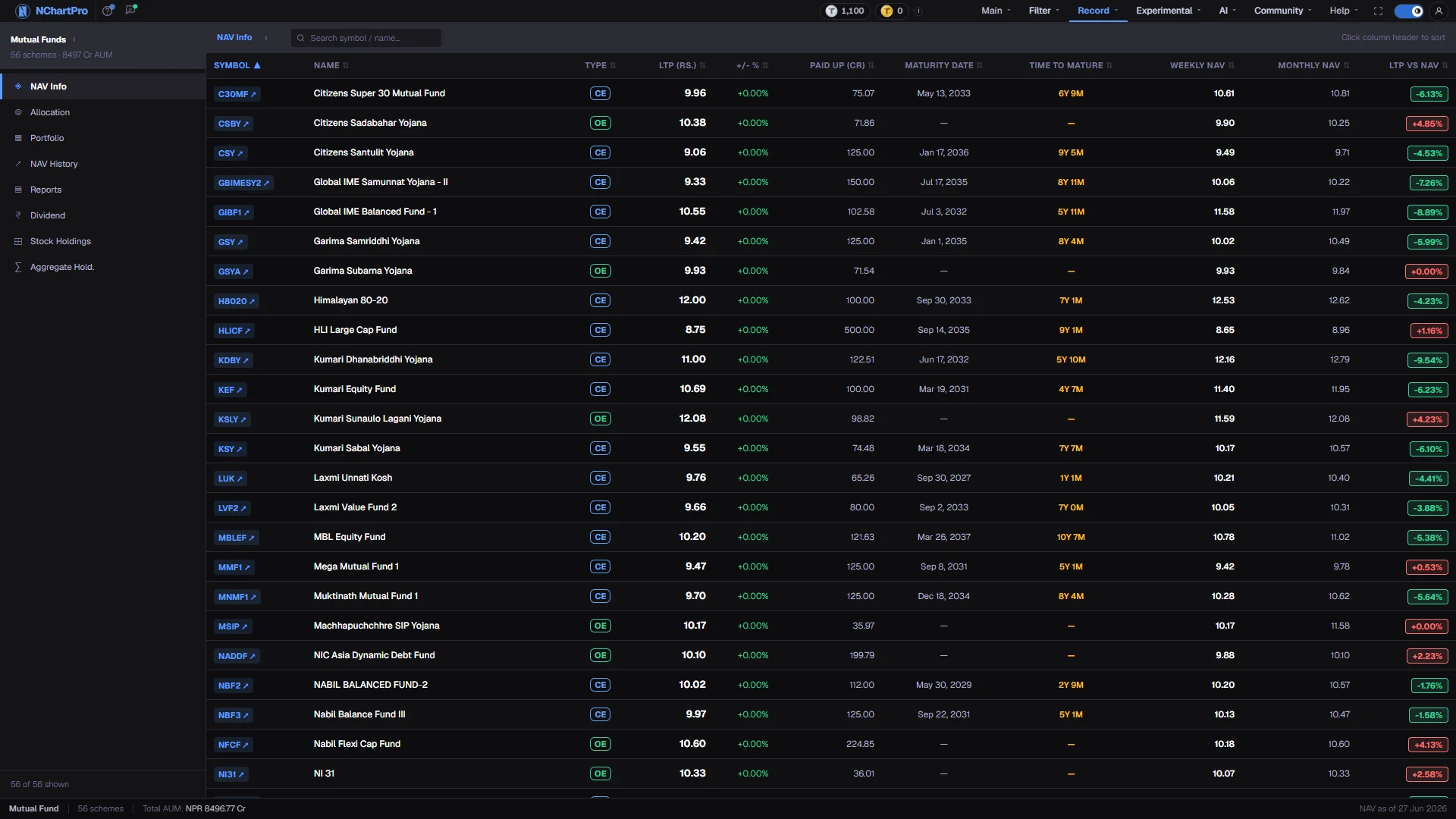
What this page is
A mutual fund pools money from many small investors and lets a professional manager put it into shares, fixed deposits and debentures. You buy units of the scheme rather than choosing companies.
The list on the left never changes which schemes are shown. It changes which set of columns you see: what a unit is worth, where the money sits, what risk was taken, what was paid out, and which shares the fund owns.
The scheme tables in the database have no rows loaded yet, so the views currently render column headings above an empty table. The headings still tell you exactly what each view will hold.
Why it helps you
- Close-ended units are listed and trade like any other symbol, so the discount to NAV is a tradeable spread rather than an accounting note. It usually narrows as maturity approaches.
- Aggregate Hold. is the interesting view for a stock picker: it sums every scheme by symbol, which shows where professional money has concentrated.
- Units are thin. Treat position size, not the signal, as the limiting factor.
- This is the stronger case. One unit at Rs 10 buys a spread across dozens of companies that would take a large account to assemble yourself.
- Judge a scheme on Portfolio and NAV History rather than on last month's return. Beta below 1 means it swings less than NEPSE; Sharpe is return earned per unit of risk taken.
- Payout percentages are quoted against the Rs 10 face value, so compare them against what you actually paid before deciding a fund pays well.
When to use it, and where to find it
- When you want market exposure without choosing individual companies.
- After NAV publication — fund houses publish weekly and monthly, so the figures step rather than tick.
- Before an IPO of a new scheme, to see what the existing schemes from the same sponsor have done.
Try it — a short walkthrough
- 1Start on NAV InfoIt is the default view and the one that answers the first question: what a unit is worth against what it trades at.See this part in detail →
- 2Read the LTP vs NAV columnA negative figure means the unit trades below the value of what the fund owns. Nepali close-ended schemes usually do.See this part in detail →
- 3Switch to PortfolioCompare Beta and Sharpe across schemes. This is the view that separates a fund that took risk from one that was simply in a rising market.See this part in detail →
- 4Sort by any columnClick a heading to sort, click again to reverse. An arrow marks the sorted column; the sort resets to Symbol when you change view.See this part in detail →
- 5Check what the funds ownOpen Aggregate Hold. to see every scheme summed by symbol, or Stock Holdings with one fund selected to see a single portfolio.See this part in detail →
Every part of the page
In the order you meet them on screen, each with a close-up of the real thing. The numbers match the dots on the figure above.
The left panel
The whole left column: a heading with how many schemes are loaded, the eight view buttons, and a count of how many rows your search is showing.
How — This panel never changes which funds are listed — only which columns of them you look at.
Schemes and total AUM
The line under the heading: how many schemes are loaded and their combined AUM — Assets Under Management, the total money all those schemes manage, in Rs crore.
- It currently reads 0 schemes and 0 Cr, because no fund rows have been loaded into the database yet. That is the honest state of the data, not a display bug.
- Crore = 1 Cr = Rs 1,00,00,000.
The eight views
NAV Info (what a unit is worth against its market price), Allocation (where the money is parked), Portfolio (risk and return), NAV History (movement and 52-week range), Reports, Dividend, Stock Holdings (what one fund owns) and Aggregate Hold. (what all funds own together).
How — Click a view; the table on the right swaps its columns and the sort resets to Symbol.
- NAV (Net Asset Value) is what ONE unit is really worth — everything the fund owns minus what it owes, divided by the number of units. The fund house publishes it weekly and monthly, so it is not a live price.
- Stock Holdings needs a fund selected; Aggregate Hold. adds every scheme up on the backend with a GROUP BY on symbol.
Search and the view tooltip
The bar above the table: the name of the active view, an information icon that explains that view and its abbreviated columns, and a search box.
How — Search matches the symbol, the scheme name and the sponsor (the bank or institution behind the scheme). The reminder on the right — "Click column header to sort" — is exactly how you sort.
The table
The rows for the active view. Every column heading is clickable and every row opens that scheme's own detail page.
How — Click a heading to sort, click it again to reverse. ▲ means ascending, ▼ descending, ⇅ means that column is not the one being sorted. Click any row, or the symbol chip, to open the scheme.
- On NAV Info, "LTP vs NAV" is worked out in your browser as (LTP − weekly NAV) ÷ weekly NAV. A negative figure — shown green — means the unit trades at a DISCOUNT to what its assets are worth; Nepali close-ended funds usually do.
- On Portfolio, Beta below 1 means the fund swings less than NEPSE. Sharpe is return per unit of risk: above 0.5 is shown green, above 0 amber, below 0 red.
- On Dividend, Payout % is a percentage of the Rs 10 FACE value of a unit — 12% is Rs 1.20 per unit, not 12% of what you paid.
Why the table is empty
The scheme tables in the backend database were created without any seed data and no real NEPSE fund data has been inserted yet, so the download endpoint honestly returns an empty list.
How — The column headings still tell you what will appear: switch views to see which figures each one will hold once fund data is loaded.
- Invented sample funds were deliberately removed from this app rather than shipped as if they were real.
- Stock Holdings will say "No holdings data for … yet" for the same reason.
The status bar
The bottom strip repeats how many schemes are shown, their total AUM, and a "NAV as of" date on the right.
- That "NAV as of" date is fixed text on this page — it is not read from the fund data, so do not treat it as the date of the NAV you are looking at.
Reading the numbers
- NAV is what one unit is really worth: everything the fund owns minus what it owes, divided by the number of units. It is published weekly and monthly, so it is never a live price.
- AUM is Assets Under Management — the total money a scheme runs, shown here in Rs crore. One crore is Rs 1,00,00,000.
- Payout percentages on the Dividend view are a percentage of the Rs 10 face value of a unit, not of what you paid. Twelve per cent is Rs 1.20 per unit.
- Sharpe is colour-coded: above 0.5 green, above 0 amber, below 0 red.
- Search matches the symbol, the scheme name and the sponsor behind it.
What it does not do
- This page is a finished screen waiting on data. The mutual fund, holdings, NAV history, dividend and report tables were created empty with no seed, so schemes count reads 0 and total AUM reads 0 Cr.
- Invented sample funds were deliberately removed rather than shipped as though they were real schemes.
- Stock Holdings shows "No holdings data for … yet" for the same reason.
- The "NAV as of" date in the status bar is fixed text. It is not read from the fund data, so do not treat it as the date of the NAV shown.
Questions people ask
No real NEPSE fund data has been loaded into the backend yet. The endpoint returns an empty list honestly rather than filling the page with invented schemes.
Not on its own. Nepali close-ended schemes normally trade at a discount for their whole life. What matters is whether the discount is wider than that scheme's own usual level.