

Knowledge Base
The part of the market that never appears on a chart: what a company paid out, what it is issuing, who it merged with, and who exists on the exchange.
What this page is
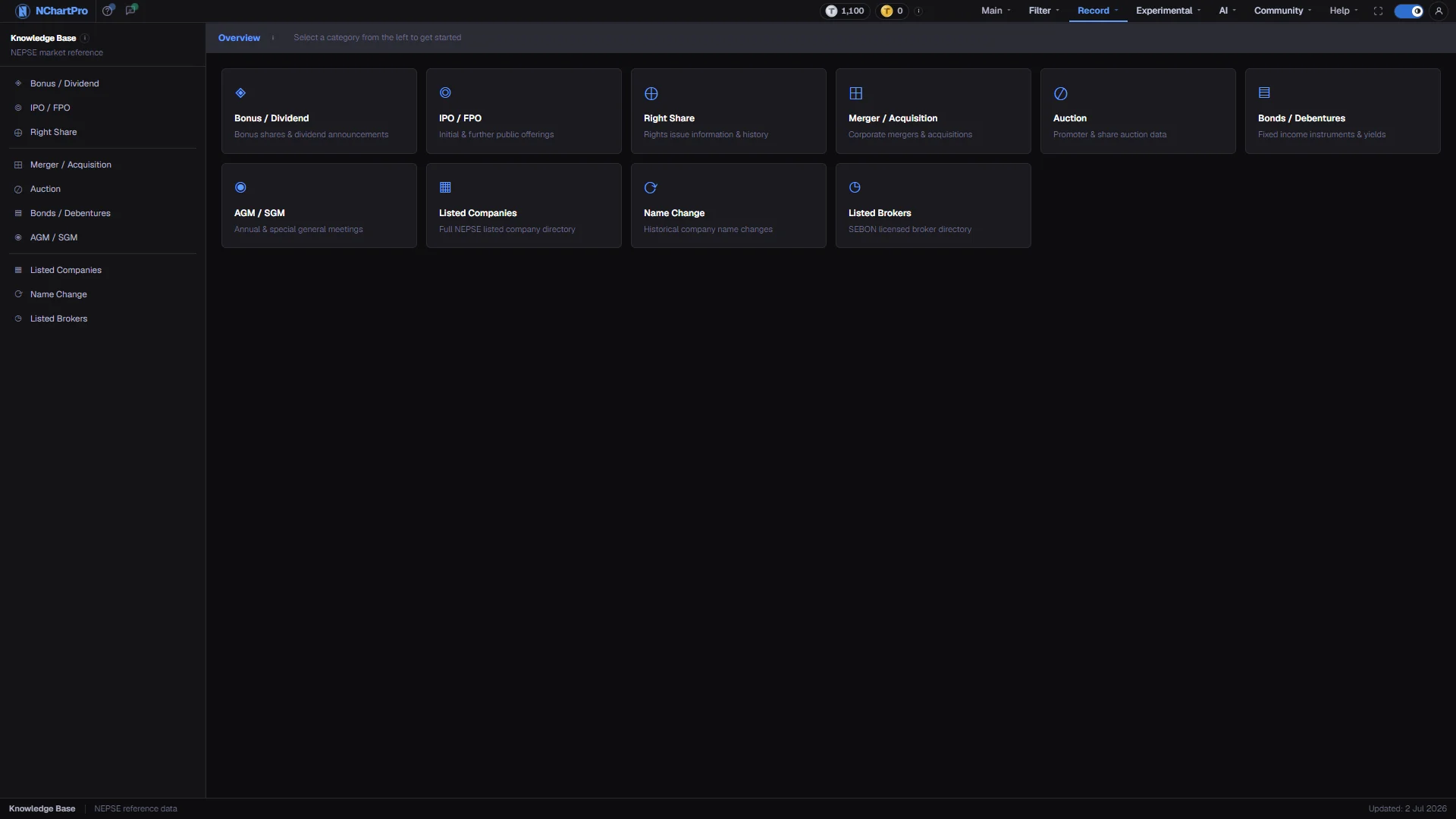
A reference library of NEPSE company events and directories, split into ten categories. Nothing here is a price, an indicator or a signal — it is the record of things done to a shareholding.
The left menu is grouped in threes. Corporate actions are what a company can do to shares you already own: Bonus / Dividend, IPO / FPO, Right Share. Events are what happens around the company: Merger / Acquisition, Auction, Bonds / Debentures, AGM / SGM. Directories are lists of who exists: Listed Companies, Name Change, Listed Brokers.
The cards in the middle are the same ten categories with a line of description each. Either route opens the same page.
Why it helps you
- Corporate actions create mechanical price changes. A bonus or a rights issue adjusts the quoted price down on the book-closure day, and a chart that has not been adjusted will show a gap that was never a real fall.
- Merger and Name Change explain a symbol that vanished from your watchlist or a history that stops abruptly.
- Book Close dates are the calendar worth watching, because the run-up into one and the drop out of it are both predictable in shape if not in size.
- This is the section that matters most to a long holding. Payouts, dilution and mergers change what you own; the daily price only changes what it is quoted at.
- A right share you ignore dilutes you. A bonus you do not understand looks like a loss. Both are recorded here with the dates that decide eligibility.
- AGM records tell you when a proposed dividend actually became binding, which is often months after it was announced.
When to use it, and where to find it
- When a company you follow announces anything other than a result.
- Before a book-closure date, to check whether you need to hold, apply, or pay.
- When a symbol, a price history, or a company name does not match what you expected.
Try it — a short walkthrough
- 1Decide which of the three groups you needThe thin lines in the left menu separate corporate actions, events and directories. Knowing the group is usually enough to find the category.See this part in detail →
- 2Open the categoryClick a card in the middle or the matching item in the left menu. They lead to the same place, and the menu stays on screen so you can move between categories without coming back.See this part in detail →
- 3Use the information icon when unsureThe Overview bar carries an icon that summarises all ten categories in one place. Hover it when you are not sure where a record belongs.See this part in detail →
- 4Read each category on its own termsEvery category reads its own dataset from the backend. One category having rows tells you nothing about whether another does.See this part in detail →
Every part of the page
In the order you meet them on screen, each with a close-up of the real thing. The numbers match the dots on the figure above.
The left menu
The permanent Knowledge Base menu. It stays on screen on every one of these pages, so you can jump between categories without going back.
How — The category you are on is highlighted with a coloured bar on its left edge.
Three groups of pages
The menu is split by thin lines into three groups: corporate actions (Bonus / Dividend, IPO / FPO, Right Share), events (Merger / Acquisition, Auction, Bonds / Debentures, AGM / SGM), and directories (Listed Companies, Name Change, Listed Brokers).
- Corporate actions are the three things a company can do to a shareholding you already own.
- Events are things that happen around the company. Directories are simply lists of who exists.
The Overview bar
The title strip of this front page, with an information icon that summarises all ten categories in one place.
How — Hover the icon whenever you are unsure which category a record belongs in.
The ten cards
The same ten categories as the left menu, each with a one-line description of what it holds.
How — Click a card to open that category. It is the same destination as the matching menu item.
- Each category reads its own kb-… dataset from the backend, so one category having data says nothing about the others.
Corporate actions
This card and the two beside it cover the three things that change what you own: Bonus / Dividend (a share of the profit), IPO / FPO (new shares sold to the public) and Right Share (new shares offered to existing holders).
How — All three open the same screen with three tabs, so you can move between them without coming back here.
- A cash dividend pays you rupees per share; a bonus gives you extra shares instead of cash, and NEPSE adjusts the price down so your total value does not jump.
- Book Close is the cut-off date on all three: you must already hold the share on that day to be eligible.
Events
Merger / Acquisition, Auction and AGM / SGM record what happens around the company: two companies joining into one, leftover shares sold by bidding, and the meetings where shareholders vote.
- In a merger your old shares become shares of the surviving company at a fixed swap ratio — the old symbol stops trading.
- A bonus or cash dividend is only final once the AGM approves it; before that it is a board proposal.
Bonds and debentures
Fixed-income instruments: a loan you make to the issuer, paying a fixed interest coupon and returning your money on a set maturity date.
How — Open it if you want a known return instead of a share's ups and downs. This is the only Knowledge Base page with its own filter bar and summary figures.
- Nepali issues have a Rs 1,000 face value per unit and are listed on NEPSE, so you can sell before maturity at the market price.
The directories
Listed Companies is every traded symbol with its sector and instrument type; Name Change traces which old symbol became which new one; Listed Brokers lists every SEBON-licensed firm you can open a trading account with.
- Listed Companies is the only one with any rows today, and they arrive as a side effect of uploading company fundamentals — so the list is partial and several columns show table defaults rather than published values.
- The broker table has nothing written to it by the backend yet, so Listed Brokers is empty.
The status bar
The bottom strip on every Knowledge Base page: the section name and an "Updated" date on the right.
- That date is fixed text in the layout, not the date the reference data was last refreshed.
Reading the numbers
- Book Close is the single date that runs through this whole section. You must already hold the share on that day to be eligible for whatever was announced.
- A cash dividend pays rupees per share. A bonus gives you extra shares instead, and NEPSE adjusts the price down so your total value does not jump.
- A board announcement is a proposal. It becomes final when the AGM approves it.
What it does not do
- Most of these categories are waiting on their NEPSE data. The kb_ tables were created empty on purpose, with no seed, so nine of the ten pages currently show an empty state rather than invented rows.
- Listed Companies is the only directory with any rows, and they appear as a side effect of uploading company fundamentals — so it is partial, and several of its columns show table defaults rather than published values.
- Nothing in the backend writes to the broker table yet, so Listed Brokers is empty.
- The "Updated" date in the status bar is fixed text in the section layout, not the date any reference data was refreshed.