

Right Share
A company raising money from the people who already own it. You are offered new shares at Rs 100, and if you decline, your share of the company quietly shrinks.
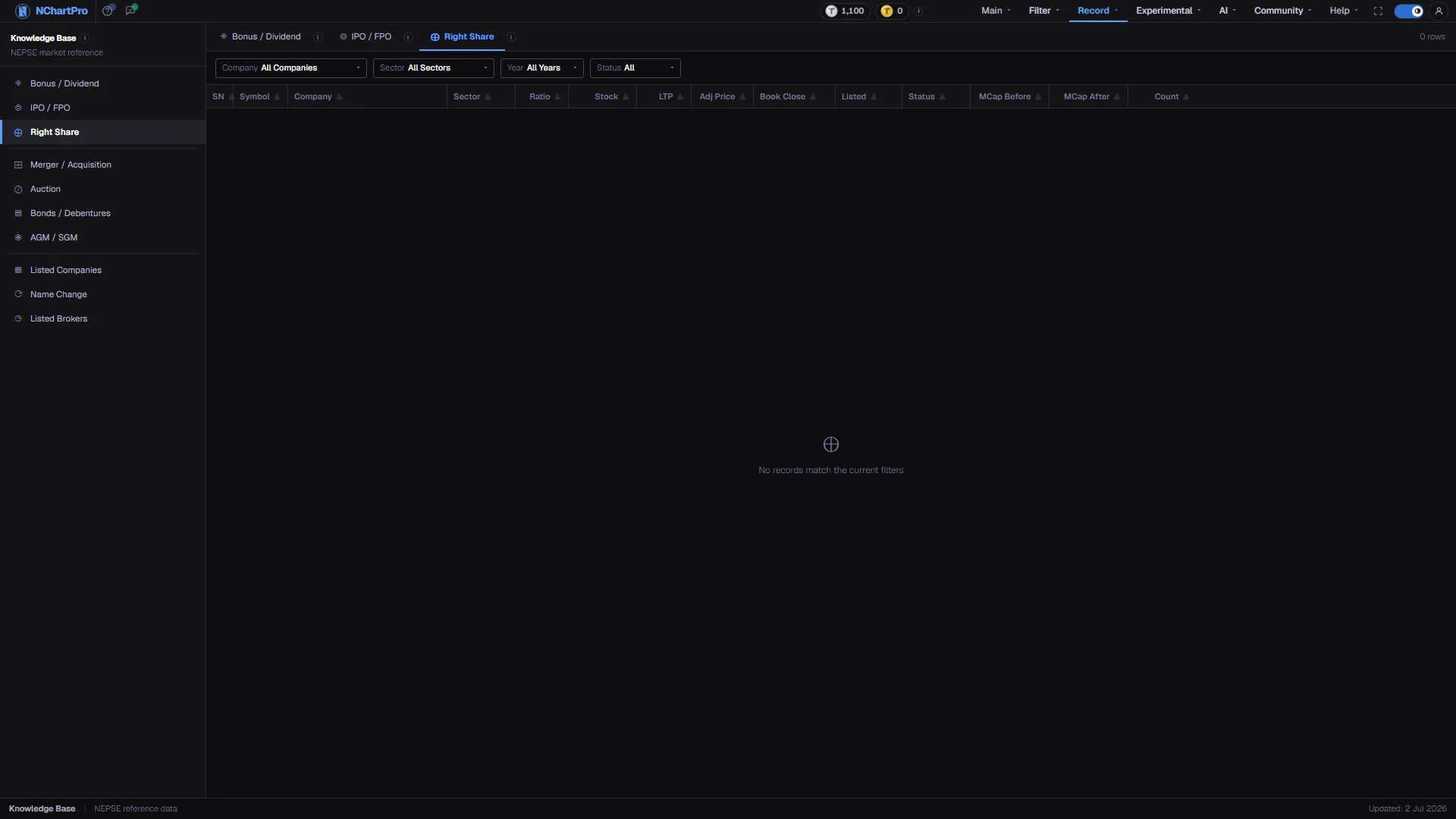
What this page is
A right share lets existing holders buy new shares at the Rs 100 face value, in proportion to what they already hold. The Ratio column is the number to read first: 1:1 offers one new share for every one you own, 1:0.5 offers one for every two.
Because the new shares are cheap, the market price falls when they are issued. NEPSE adjusts the quoted price down on the book-closure day, and the Adj Price column is that theoretical adjusted level, shown beside the current LTP so you can compare.
Why it helps you
- The price adjustment on the book-closure date is mechanical, not a fall. A chart that has not been adjusted will show a gap down that no seller caused.
- Rights are often announced after a run-up and pressure the price afterwards, because holders who need cash for the call sell part of their existing position to fund it.
- This is the page that matters more to a holder than to a trader. Ignoring a rights issue is a decision, not an absence of one — your ownership share is diluted and the rights you did not take up are later sold at auction.
- A ratio below 1 is not automatically bad. What matters is your share count multiplied by the price after the adjustment, compared with what you paid in.
When to use it, and where to find it
- As soon as a company you hold announces a rights issue, so you can plan the cash.
- Before a book-closure date, because eligibility is decided on that day and nothing afterwards.
Try it — a short walkthrough
- 1Read the ratio firstIt sets how many new shares you are entitled to. You pay Rs 100 for each one you take up.See this part in detail →
- 2Compare Adj Price with LTPAdj Price is where the quoted price is expected to land after the issue. LTP sits beside it so the size of the adjustment is visible.See this part in detail →
- 3Check Book Close against ListedBook Close is the last day you must hold to be eligible. Listed is the day the new shares reach your Demat account, which is often much later.See this part in detail →
Every part of the page
In the order you meet them on screen, each with a close-up of the real thing. The numbers match the dots on the figure above.
The Knowledge Base menu
The permanent left menu. Right Share is the third of the corporate actions, next to Bonus / Dividend and IPO / FPO.
How — Click any item to switch category without leaving the section.
The three tabs
Right Share is the third tab of one shared screen; each tab has its own information icon explaining that corporate action.
How — Click a tab to switch — the filter bar and the table both follow.
The row count
How many rights issues match your current filters on this tab.
- It reads 0 rows while the rights table is empty — that is the data, not your filters.
The filter bar
Company, Sector, Year and Status. Status is Upcoming (announced but not yet distributed) or Complete.
How — On this tab the Company dropdown matches the symbol, so pick the entry rather than typing a company's full name.
- The option lists are built from the rows actually returned, so while the table is empty each dropdown offers only its "All …" entry.
The columns
SN, Symbol, Company, Sector, Ratio, Right %, Stock, Issue Price, LTP, Adj Price, Open, Close, Book Close, Listed, Status, market value before and after, and Count.
How — Ratio is the number to read first: 1:1 means one new share offered for every one you own, 1:0.5 means one for every two. You pay Rs 100 per new share you take up.
- Adj Price is the theoretical price after the issue. Because the new shares are cheap, the market price falls, and NEPSE adjusts it on the book-close day — LTP is shown beside it so you can compare.
- Stock is the total number of new right shares (kitta) being issued; Count is the company's total share count after the issue.
The records
One row per rights issue. Book Close is the last day you must hold the share to be eligible; Listed is the day the new shares reach your Demat account.
How — A ratio below 1 is not automatically bad — what matters is your share count multiplied by the price after the adjustment.
- Taking up a right needs cash on the day, so check the Book Close date against your own timing.
- Right now this area shows "No records match the current filters", because the kb_right_share table has no rows loaded yet.
The status bar
The bottom strip of every Knowledge Base page, with an "Updated" date on the right.
- That date is fixed text in the section layout, not the date this table was last refreshed.
Reading the numbers
- Right % is the ratio written as a percentage of what you already hold: 1:0.5 is 50 per cent. Read it rather than the right-hand number of the ratio — many issues are not written as 1:something, so 2:1 is 50 per cent and not 100.
- Issue Price is what you pay for each new share, normally the Rs 100 face value. Open and Close are the window in which you apply and pay.
- Stock is the total number of new right shares being issued, in kitta. Count is the company's total share count after the issue.
- On this tab the Company dropdown matches the symbol, so pick from the list rather than typing a full company name.
- Status is Upcoming when announced but not yet distributed, and Complete once it is done.
What it does not do
- This page is an empty scaffold. The kb_right_share table has no rows loaded, so the row count reads 0 and the table shows "No records match the current filters".
- While the table is empty each filter dropdown offers only its "All …" entry.
- Adj Price is a theoretical figure. The price NEPSE actually opens at on the adjustment day can differ, and the column is blank unless the source itself published one — this app does not guess a figure for it.
- The upstream right-share data carries no fiscal year and no book-closure date, so on an imported row Book Close shows a dash and Open / Close are the only dates you get.