

IPO / FPO
The cheapest way into a Nepali company is usually its first sale of shares to the public — if the lottery goes your way. This page records those issues.
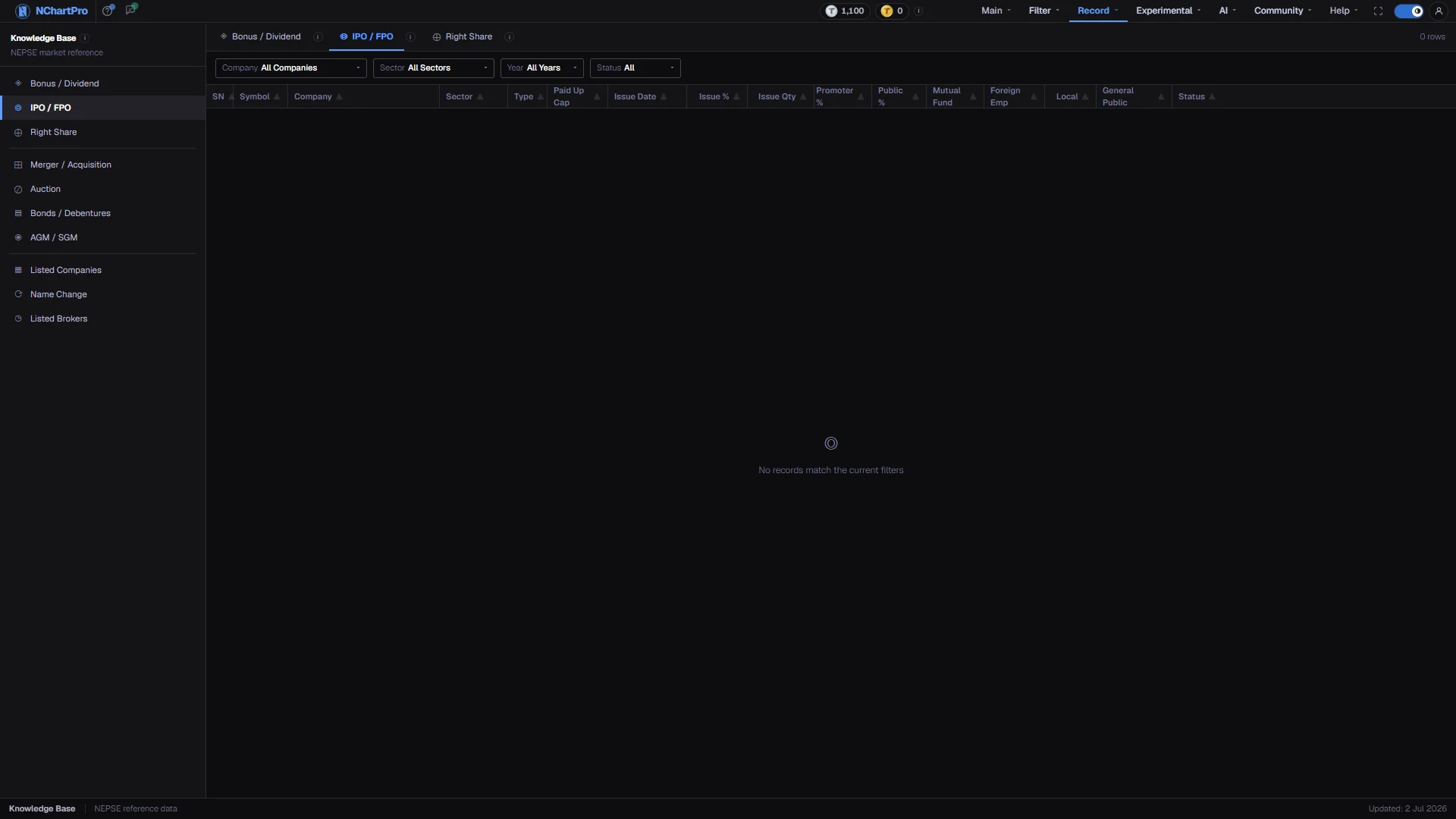
What this page is
An IPO is the first time a company sells shares to the public. An FPO is a later sale of further shares by a company that is already listed. Both are recorded here with the size of the issue, how it is divided between quotas, and whether the window is still open.
An IPO share costs Rs 100 and the minimum application is 10 kitta. If more people apply than there are shares, the issue manager allots by lottery — usually 10 kitta each to as many applicants as possible — and unallotted money is refunded.
Why it helps you
- A listing-day debut is the one predictable event here. An issue sold at Rs 100 often opens far above it, and the Issue Qty column tells you how much stock is about to arrive on the market.
- An FPO is priced by the issue manager and can be well above Rs 100. Do not assume the IPO price when reading an FPO row.
- This is the stronger angle. Applying costs you nothing but the application, and an allotment at face value is a lower entry price than the market will ever offer you again.
- Read Promoter % against Public %. A company where founders keep a large majority has a small floating supply, which affects both liquidity and how the price behaves for years.
When to use it, and where to find it
- While an issue window is open, since you apply through your bank or broker on Mero Share and the window is short.
- Before a newly listed symbol starts trading, to see how much stock was issued and to whom.
Try it — a short walkthrough
- 1Filter Status to UpcomingThat is the set you can still apply for. Complete means the issue has already been made.See this part in detail →
- 2Read Issue % with Issue QtyTogether they tell you how much of the company is on offer and how many kitta that comes to.See this part in detail →
- 3Find the General Public sliceMutual Fund, Foreign Emp and Local are reserved quotas carved out of the public portion. General Public is the part an ordinary applicant competes for.See this part in detail →
Every part of the page
In the order you meet them on screen, each with a close-up of the real thing. The numbers match the dots on the figure above.
The Knowledge Base menu
The permanent left menu. IPO / FPO sits with Bonus / Dividend and Right Share in the corporate-actions group.
How — Click any item to switch category without leaving the section.
The three tabs
IPO / FPO is the middle tab of one shared screen; each tab has its own information icon explaining that corporate action.
How — Click a tab to switch — the filter bar and the table both follow.
- The Type badge inside the table separates the two: IPO in purple, FPO in blue.
The row count
How many issues match your current filters on this tab.
- It reads 0 rows while the issue table is empty — that is the data, not your filters.
The filter bar
Company, Sector, Year and Status. Status is Upcoming (not yet issued or allotted) or Complete (issued).
How — Filter Status to Upcoming when you want to know what you can still apply for. Each dropdown accepts typing to narrow its list, and Reset clears everything.
- The dropdown options are built from the rows that were actually returned, so they never offer a value the data does not have.
The columns
SN, Symbol, Company, Sector, Type, Group, Paid Up Cap, Issue Date, Issue %, Issue Qty, then the quota split — Promoter %, Public %, Mutual Fund, Foreign Emp, Local, General Public — and Status.
How — Issue % and Issue Qty together tell you how much of the company is on offer and how many kitta that is.
- Paid Up Cap is the company's paid-up capital in Rs crore. Promoter % and Public % are the split between founders and public shareholders once the issue is done.
- Mutual Fund, Foreign Emp, Local and General Public are reserved quotas carved out of the public portion — the General Public slice is what an ordinary applicant competes for.
The records
One row per issue. If more people apply than there are shares, the issue manager allots by lottery — usually 10 kitta each to as many applicants as possible, and unallotted money is refunded.
How — Check Issue Date against Status to see whether the window is still open.
- An FPO is priced by the issue manager and can be above Rs 100 — do not assume the Rs 100 IPO price.
- Right now this area shows "No records match the current filters", because the kb_ipo_fpo table has no rows loaded yet.
The status bar
The bottom strip of every Knowledge Base page, with an "Updated" date on the right.
- That date is fixed text in the section layout, not the date this table was last refreshed.
Reading the numbers
- Paid Up Cap is the company's paid-up capital in Rs crore.
- The Type badge separates the two kinds of issue: IPO in purple, FPO in blue.
- Group is the share series the issue belongs to — Ordinary, Promoter or Public. A promoter tranche of the same company is a separate issue, not a duplicate row.
- The dropdown options are built from the rows actually returned, so they never offer a value the data does not contain.
What it does not do
- This page is an empty scaffold. The kb_ipo_fpo table has no rows loaded, so the row count reads 0 and the table area shows "No records match the current filters".
- While the table is empty each filter dropdown offers only its "All …" entry, because the options are derived from the returned rows.
- The "Updated" date in the status bar is fixed text in the section layout.