

Bonus / Dividend
How a company hands its yearly profit back to the people who own it — some as rupees, some as extra shares, and both decided on a single cut-off date.
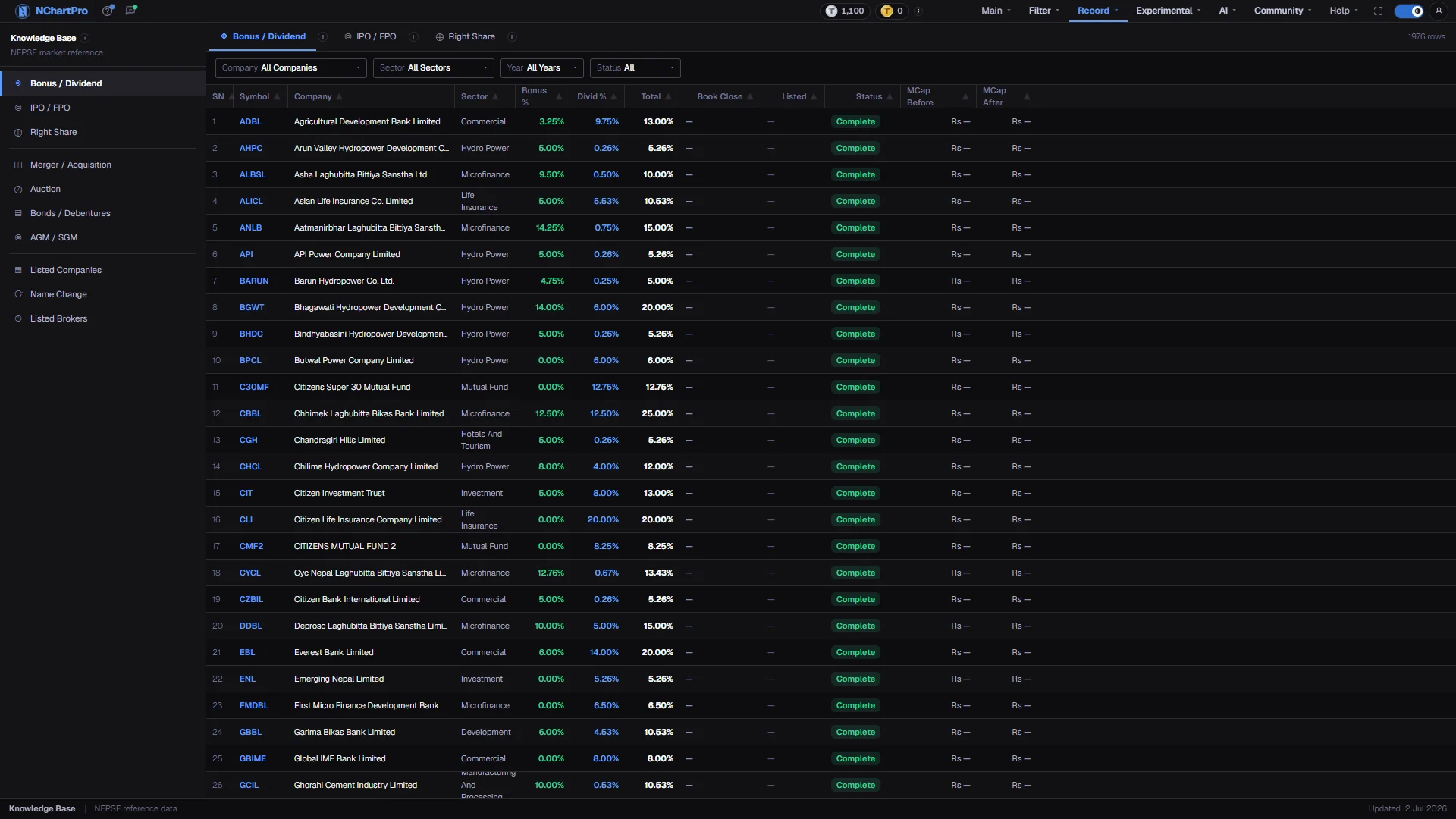
What this page is
A cash dividend pays you rupees per share. A bonus share gives you extra shares instead of cash: your quantity rises, your cost per share falls, and NEPSE adjusts the quoted price down proportionally so your total value does not jump. A bonus is not free money.
Nepali companies usually announce the two together as a combined percentage, which is why the table shows Bonus %, Divid % and a Total that is simply the two added. Both percentages are of the Rs 100 face value of a share, never of the price you paid.
Why it helps you
- The price adjustment on the book-closure day is arithmetic, not selling. A 20 per cent bonus drops the quoted price by about a sixth overnight and no one lost anything.
- The run-up into book closure and the drift afterwards are the tradeable part. Buying after book closure gets you the price adjustment without the payout.
- This is where a holding earns its keep. A company paying consistent cash across several years is telling you something about its earnings that a single quarter cannot.
- Watch for the opposite pattern too. Heavy bonus with little cash grows the share count year after year, and earnings per share has to grow with it or the stock simply gets cheaper-looking without getting better.
When to use it, and where to find it
- After results season, when boards announce what they intend to pay.
- Before a book-closure date on a stock you hold or want to hold.
Try it — a short walkthrough
- 1Filter to a company or a yearEach dropdown is also a search box — start typing to narrow the list. A Reset button appears as soon as any filter is off its default.See this part in detail →
- 2Read Bonus % and Divid % togetherTotal is the two added, which is how payouts are usually compared here. Ten per cent bonus on 100 shares is 10 extra shares; ten per cent dividend is Rs 10 per share.See this part in detail →
- 3Compare Book Close with ListedBook Close is the day you must already own the share. Listed is the day bonus shares actually appear in your Demat account, often months later.See this part in detail →
Every part of the page
In the order you meet them on screen, each with a close-up of the real thing. The numbers match the dots on the figure above.
The Knowledge Base menu
The permanent left menu of this section. Bonus / Dividend sits in the first group with IPO / FPO and Right Share — the three corporate actions.
How — Click any item to switch category without leaving the section.
The three tabs
Bonus / Dividend, IPO / FPO and Right Share are three tabs of one screen, each with its own information icon explaining that action in plain language.
How — Click a tab to switch; the filter bar and table below both follow it.
- Each tab reads its own dataset, so one being empty does not mean the others are.
The row count
How many records match the filters you have set right now, for the active tab.
How — Watch it while you change a filter — if it drops to 0, your filters are too narrow.
- It reads 0 rows while the payout table is empty. That is the data, not a filter problem.
The filter bar
Four dropdowns: Company, Sector, Year and Status. A Reset button appears as soon as any of them is off its default.
How — Each dropdown is also a search box — start typing to narrow the list. Status is Upcoming (announced, not yet distributed) or Complete (done).
- The Company, Sector and Year lists are built from the rows actually returned, so they only offer values that exist in the data.
- While the table is empty each dropdown offers only its "All …" option.
The columns
SN, Symbol, Company, Sector, then Bonus %, Divid % and Total, then Book Close, Listed, Status, the market value before and after, and finally Payout %, Div Growth and Count.
How — Read Bonus % and Divid % together: Total is simply the two added, which is how Nepali investors usually compare payouts.
- Bonus % is extra shares as a % of what you already hold — 10% on 100 shares is 10 free shares. NEPSE adjusts the price down on the book-close day, so your total value does not jump.
- Divid % is cash as a % of the Rs 100 face value, before the 5% dividend tax deducted at source.
The records
One row per announced payout. Book Close is the cut-off date: you must already own the share on that day to receive the payout — buying after it gives you nothing.
How — Compare Book Close with Listed: Listed is the day the bonus shares actually appear in your Demat account, and that is often months later.
- Right now this area shows "No records match the current filters", because the kb_bonus_dividend table has no rows loaded yet.
- Fabricated sample payouts were deliberately deleted from this app rather than shown against real company names.
The status bar
The bottom strip of every Knowledge Base page, with an "Updated" date on the right.
- That date is fixed text in the section layout, not the date this table was last refreshed.
Reading the numbers
- Cash dividend is quoted before the 5 per cent dividend tax deducted at source, so what reaches you is slightly less than the headline figure.
- Status is Upcoming when announced but not yet distributed, Complete once it is done.
- A payout is only final once the AGM approves it. Until then it is a board proposal.
- Payout % is how much of the year's profit the company handed out; Div Growth is how this year's Total compares with the same company's previous year, in percentage points. Both come from the imported dividend book and are blank on hand-entered rows.
What it does not do
- This page is an empty scaffold. The kb_bonus_dividend table has no rows loaded, so the row count reads 0 and the table shows "No records match the current filters".
- Fabricated sample payouts were deliberately deleted rather than displayed against real company names.
- While the table is empty each filter dropdown offers only its "All …" entry.