

Merger / Acquisition
Two companies become one, and the shares you held in the old company turn into shares in the new one at a rate somebody else decided. This is the record of that rate.
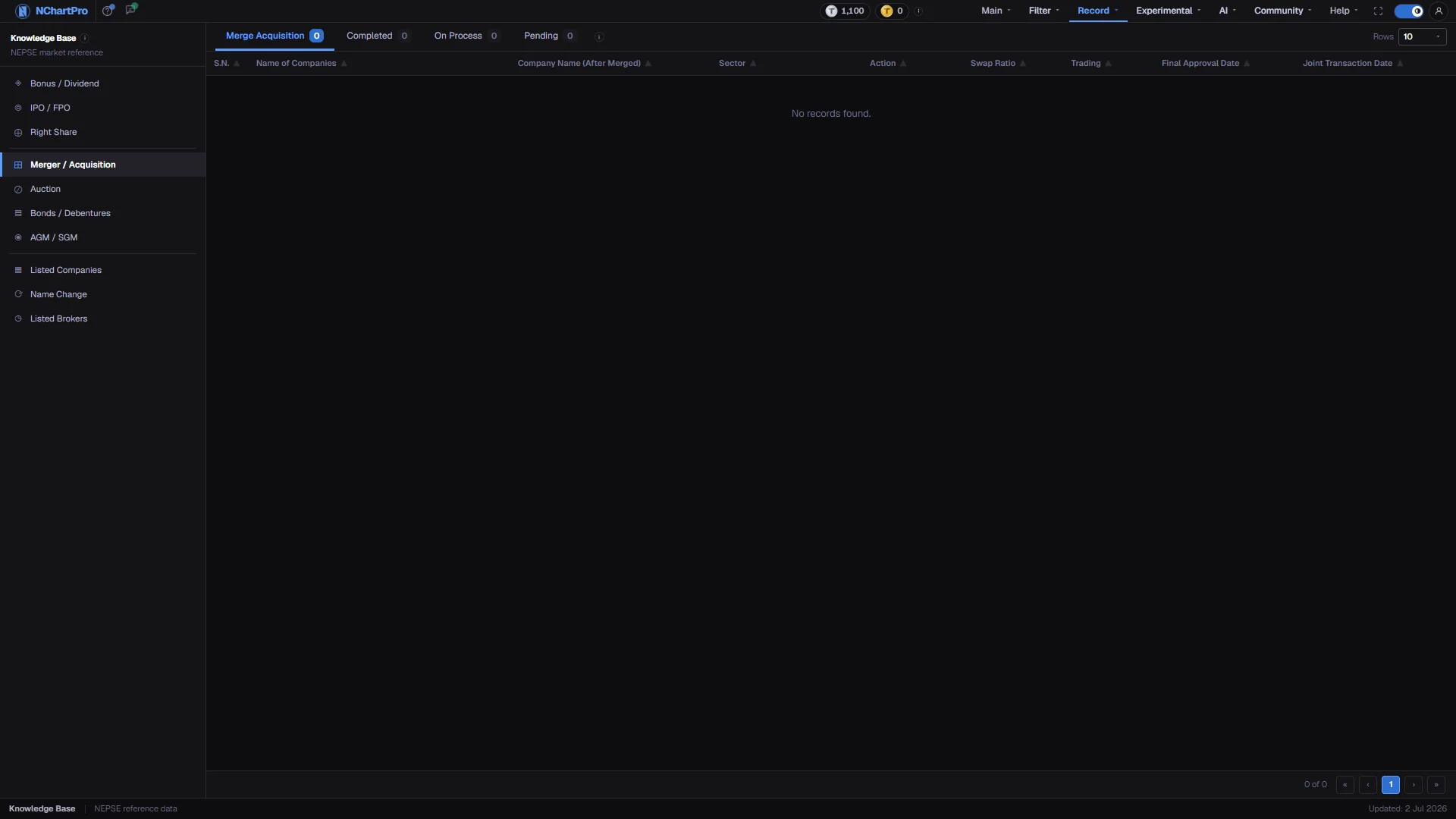
What this page is
When two NEPSE companies join, your holding in the old company is exchanged for shares in the merged company at a fixed swap ratio. The old symbols stop trading; only the surviving symbol remains. This page tracks each deal from announcement through to the first day the merged company trades.
The four tabs are stages — everything, Completed, On Process and Pending — with a count on each. The number of deals at each stage comes from the data, not from a fixed list.
Why it helps you
- This is the page that explains a chart that stops dead. Price history before the joint transaction date sits under the old symbols, so a merged company's history is split across two or three names.
- The stretch between final approval and the first joint trading day is often volatile, because holders of the smaller company are pricing the swap rather than the business.
- A swap ratio below 1 is not automatically a loss. 1:0.90 turns 100 old shares into 90 new ones, but the merged company's share is usually worth more each. Judge it by share count multiplied by price after the swap.
- Read Name of Companies against Company Name (After Merged) to see which entity disappeared and which name survived. That tells you whose management and whose balance sheet you now own.
When to use it, and where to find it
- When a symbol you follow disappears or its history stops without explanation.
- After an SGM is called, since a merger normally needs one to approve it.
Try it — a short walkthrough
- 1Filter by stageClick a tab to see only Completed, On Process or Pending deals. The page resets to the first page each time.See this part in detail →
- 2Read the swap ratioIt is how many merged-company shares you receive for each old share. 1:1 means no change; above 1 means you end up with more shares.See this part in detail →
- 3Note the joint transaction dateThat is the first day the merged company trades as a single symbol, and the point where the old symbols' price history ends.See this part in detail →
Every part of the page
In the order you meet them on screen, each with a close-up of the real thing. The numbers match the dots on the figure above.
The Knowledge Base menu
The permanent left menu of this section. Merger / Acquisition heads the middle group, with Auction, Bonds / Debentures and AGM / SGM.
How — Click any item to switch category without leaving the section.
The four stage tabs
Merge Acquisition (everything), Completed, On Process and Pending. The number on each tab is how many deals are at that stage.
How — Click a tab to filter; the page resets to page 1. The information icon beside the tabs explains the whole process.
- All four counts read 0 while the deal table is empty — the counts come from the data, not from a fixed list.
Rows per page
How many deals to show at once: 10, 20, 50 or 100.
How — Raise it when you want to scan a long history in one scroll instead of paging.
The columns
S.N., Name of Companies, Company Name (After Merged), Sector, Action, Swap Ratio, Trading, MoU Date, Final Approval Date and Joint Transaction Date — the last one also carrying the stage chip.
How — Read Name of Companies against Company Name (After Merged) to see which entities disappeared and which name survived.
- Action is a chip: Merger in purple, Acquisition in blue.
- Trading says whether the merged symbol has started trading yet.
The swap ratio
Swap Ratio is how many merged-company shares you get for each old share. 1:0.90 means 100 old shares become 90 new ones; 1:1 means no change; above 1 means you end up with more shares.
How — Judge it by share count multiplied by price after the swap, not by the ratio on its own.
- A ratio below 1 is not automatically a loss — the merged company's share is usually worth more per share.
The two dates
Final Approval Date is the day the regulator cleared the deal — NRB for banks, the insurance regulator for insurers, SEBON for the listing. Joint Transaction Date is the first day the merged company trades on NEPSE as a single symbol.
How — Use the Joint Transaction Date when you are tracing an old chart: price history before it sits under the old symbols.
- While the table is empty this area shows a single "No records found." row instead of data.
The pager
On the left it says which rows you are looking at out of the filtered total; on the right are first, previous, numbered, next and last buttons.
How — The page numbers collapse to "…" when there are many pages, always keeping the first, the last and the ones next to you.
Reading the numbers
- Action is a chip: Merger in purple, Acquisition in blue. Trading says whether the merged symbol has started trading yet.
- MoU Date is the day the two boards signed the memorandum of understanding — the first public step, often years before the deal completes, and on many older deals the only date on record.
- Final Approval Date is the day the regulator cleared the deal — NRB for banks, the insurance regulator for insurers, SEBON for the listing.
- Rows per page can be set to 10, 20, 50 or 100. Raise it when you want to scan a long history in one scroll.
What it does not do
- This page is an empty scaffold. The kb_merger_acquisition table has no rows loaded, so all four stage counts read 0 and the table shows a single "No records found." row.
- The page always renders the table element, so an empty result looks like an empty table rather than a separate empty-state panel.