

Bonds / Debentures
The other half of the exchange. Instead of owning a slice of a company and hoping, you lend it money at an agreed rate and get the money back on a known date.
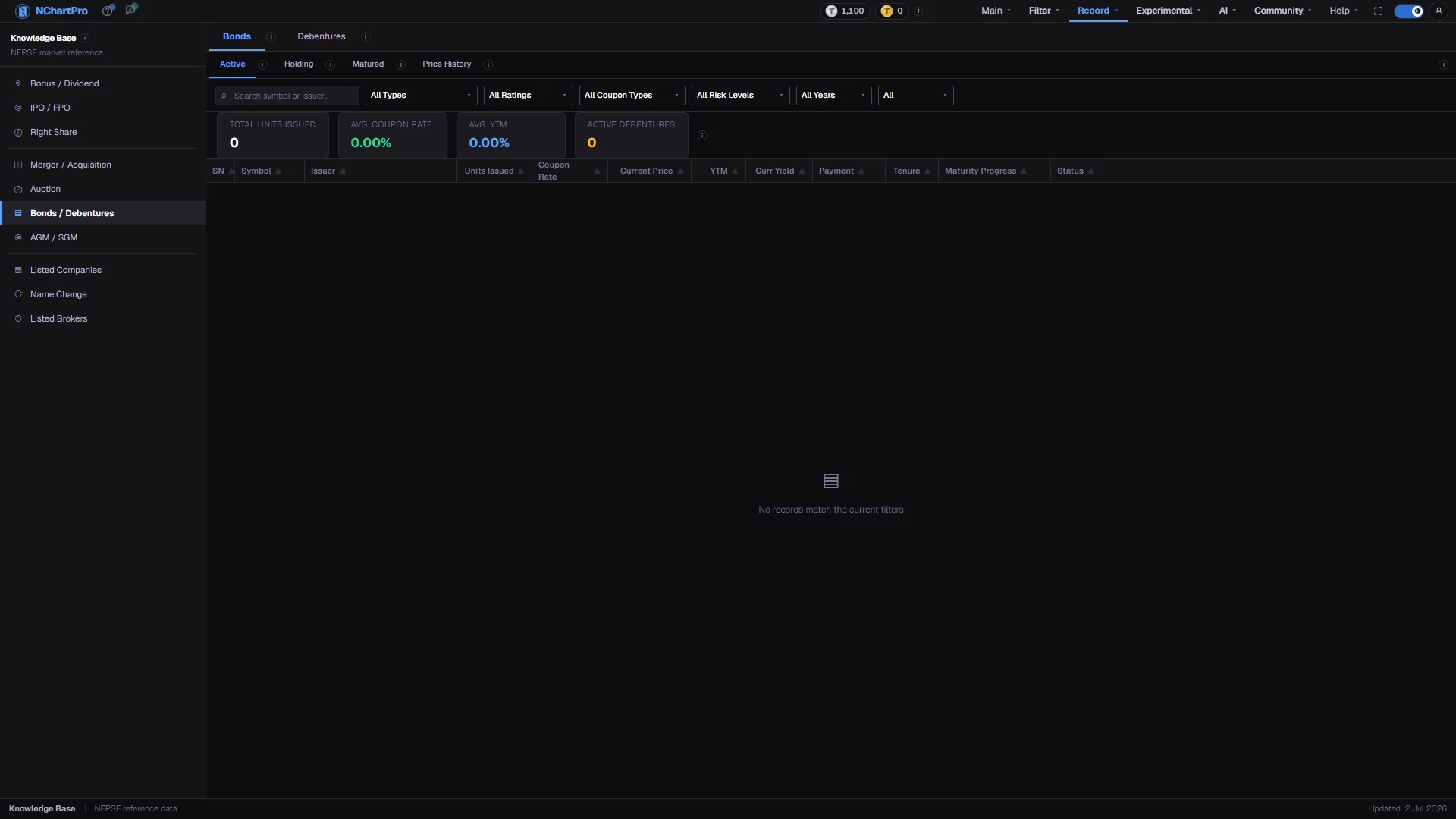
What this page is
A bond is a loan you make to the issuer. You pay the face value of a unit — Rs 1,000 for Nepali issues — collect a fixed interest payment called the coupon each period, and get your money back on the maturity date. A debenture is a bond issued by a listed company, in Nepal mostly banks raising long-term money, backed by the issuer's creditworthiness rather than any specific asset.
Unlike a share, the return is fixed and known in advance. You do not share in the profit, and the price moves far less. Interest is paid whether the company makes a profit or not, and if the issuer is wound up, debenture holders are paid before shareholders.
This is the only Knowledge Base page with its own filter bar and summary figures, and the only one split into main tabs and sub-tabs.
Why it helps you
- There is little to trade. Prices move on interest rates rather than on company news, and a bond that swings is usually a bond in trouble.
- The one exception is the gap between coupon and yield. When the summary strip shows average YTM above average coupon rate, the issues on screen are trading below face value, and rate expectations are the reason.
- This is where a portfolio gets its floor. A bank debenture paying 8 to 12 per cent a year on Rs 1,000, usually in two half-yearly instalments, is a return that does not depend on the market being kind.
- Because Nepali issues are listed on NEPSE, you are not locked in until maturity. You can sell at the market price, at whatever premium or discount the market is offering.
When to use it, and where to find it
- When you want a known return rather than a share's ups and downs.
- When bank deposit rates change, since that is what re-prices every existing issue.
Try it — a short walkthrough
- 1Pick the classBonds or Debentures at the top. Each has its own information icon, and switching reloads the list for that class.See this part in detail →
- 2Stay on Active to compare what you can buyActive shows issues still paying their coupon. Matured is kept for reference, and Holding and Price History show cards instead of the table.See this part in detail →
- 3Compare by YTM, not by couponA high coupon bought at a high price can still be a poor return. YTM is the figure that accounts for what you actually pay.See this part in detail →
- 4Check the registrar and the coupon countRegistrar is the firm that keeps the holder register and actually pays your coupon, so it is who you chase if a payment does not arrive. Coupons reads as paid / remaining.See this part in detail →
- 5Watch the summary strip as you filterThe four figures are recalculated in your browser for the rows currently shown, so they always describe the filtered list rather than the whole market.See this part in detail →
Every part of the page
In the order you meet them on screen, each with a close-up of the real thing. The numbers match the dots on the figure above.
The Knowledge Base menu
The permanent left menu of this section. Bonds / Debentures sits in the middle group with Merger / Acquisition, Auction and AGM / SGM.
How — Click any item to switch category without leaving the section.
Bonds or Debentures
Two tabs. A debenture is a bond issued by a NEPSE-listed company — in Nepal, mostly banks raising long-term money — backed only by the issuer's creditworthiness, not by any specific asset.
How — Click a tab to reload the list for that class; each has its own information icon.
- Bank debentures typically pay 8–12% a year, usually in two half-yearly instalments, on a Rs 1,000 face value.
- Interest is paid whether the company makes a profit or not — a dividend is not. If the issuer is wound up, debenture holders are paid before shareholders.
Active, Holding, Matured, Price History
Four sub-tabs. Active shows issues still paying their coupon — the ones you can buy. Holding shows individual investor positions as cards. Matured shows issues already repaid, kept for reference. Price History shows past price records.
How — The link on the right of this row, "How to read the bond table", explains every column in one tooltip.
- Active and Matured show the table; Holding and Price History show cards instead, and both currently read "No holdings found".
The filter bar
A search box for symbol or issuer, then six dropdowns: issuer type, credit rating, coupon type, risk level, year and status.
How — A Reset button appears as soon as any filter is off its default; it clears the search box too.
- Coupon type is Fixed, Floating or Zero Coupon. Ratings run from AAA down to BBB+ in this list.
- These filter lists are fixed option lists on the page, so a value can be offered even when no issue in the data carries it.
The summary strip
Four figures for the rows CURRENTLY SHOWN: Total Units Issued, Avg. Coupon Rate, Avg. YTM and Active Debentures.
How — They are recalculated in your browser every time you change a filter, so they always describe the filtered list — not the whole market.
- If Avg. YTM sits above Avg. Coupon Rate, the shown issues are generally trading below face value.
- With no rows loaded these read 0 and 0.00%.
The columns
SN, Symbol, Issuer, Units Issued, Coupon Rate, Current Price, YTM, Curr Yield, Prem/Disc, Payment, Coupons, Registrar, Tenure, Maturity Progress, Maturity (BS), Last Traded and Status.
How — Compare issues by YTM, not by coupon — a high coupon bought at a high price can still be a poor return.
- Coupon Rate is the fixed yearly interest on FACE value: 10% on Rs 1,000 is Rs 100 a year whatever the market price does.
- YTM (Yield to Maturity) is your true annual return if you buy at today's price and hold to the end; it counts both the coupons and the gain or loss against face value.
- Current Price above Rs 1,000 means the unit trades at a premium, below means at a discount. Prem/Disc is that gap in rupees.
- Maturity (BS) is the maturity date in Bikram Sambat exactly as the issuer published it — it is never converted, so do not read it as an AD date.
- Credit Rating and Risk Level are FILTERS on the bar above, not columns. This feed publishes neither, so those two match nothing until a rated feed arrives.
The list itself
One row per issue, with a maturity bar showing how much of the issue's life has already passed and its maturity date underneath.
How — Registrar is who actually pays your coupon, and Coupons reads as paid / remaining — the two things to check before you buy a thinly traded issue.
- The maturity bar turns amber past 50% of the issue's life and red past 80%.
- The page opens on Debentures, which is where the loaded rows are. The Bonds tab is genuinely empty and says so — no sample issues were invented to fill it.
The status bar
The bottom strip of every Knowledge Base page, with an "Updated" date on the right.
- That date is fixed text in the section layout, not the date this table was last refreshed.
Reading the numbers
- Coupon Rate is the fixed yearly interest on face value. Ten per cent on Rs 1,000 is Rs 100 a year whatever the market price does.
- YTM is your true annual return if you buy at today's price and hold to the end, counting both the coupons and the gain or loss against face value.
- Current Price above Rs 1,000 means the unit trades at a premium; below means at a discount.
- The maturity bar shows how much of the issue's life has passed. It turns amber past 50 per cent and red past 80 per cent.
- Coupon type is Fixed, Floating or Zero Coupon.
- Prem/Disc is face value minus the current price, in rupees. A positive figure means the unit trades below face, which is why its YTM sits above its coupon.
- Last Traded is the most recent day the issue changed hands. Debentures trade thinly, so a stale date means the Current Price beside it is stale too.
- Maturity (BS) is the maturity date in Bikram Sambat exactly as the issuer published it. It is shown verbatim and never converted, so do not read it as an AD date.
What it does not do
- The page opens on Debentures because that is where every loaded row is. The Bonds tab is genuinely empty and says so: nothing in this deployment writes a row classed as a bond, and no sample issues were invented to fill it.
- Credit Rating and Risk Level are filters on the bar, not columns. The debenture feed publishes neither, so setting either one empties the list until a rated feed arrives.
- Issue size in rupees is not published by that feed either. The summary strip counts UNITS issued instead, because deriving a rupee total would mean assuming a face value.
- Holding and Price History read "No holdings found" — kb_bond_holdings has no rows loaded, and none were invented.
- The filter dropdowns are fixed option lists on the page rather than being built from the data, so a rating or coupon type can be offered even when no issue in the data carries it.