

Reports & Tax
When you sell shares in Nepal your broker withholds capital-gains tax at source. This page rebuilds that year by year, so you can declare it instead of guessing.
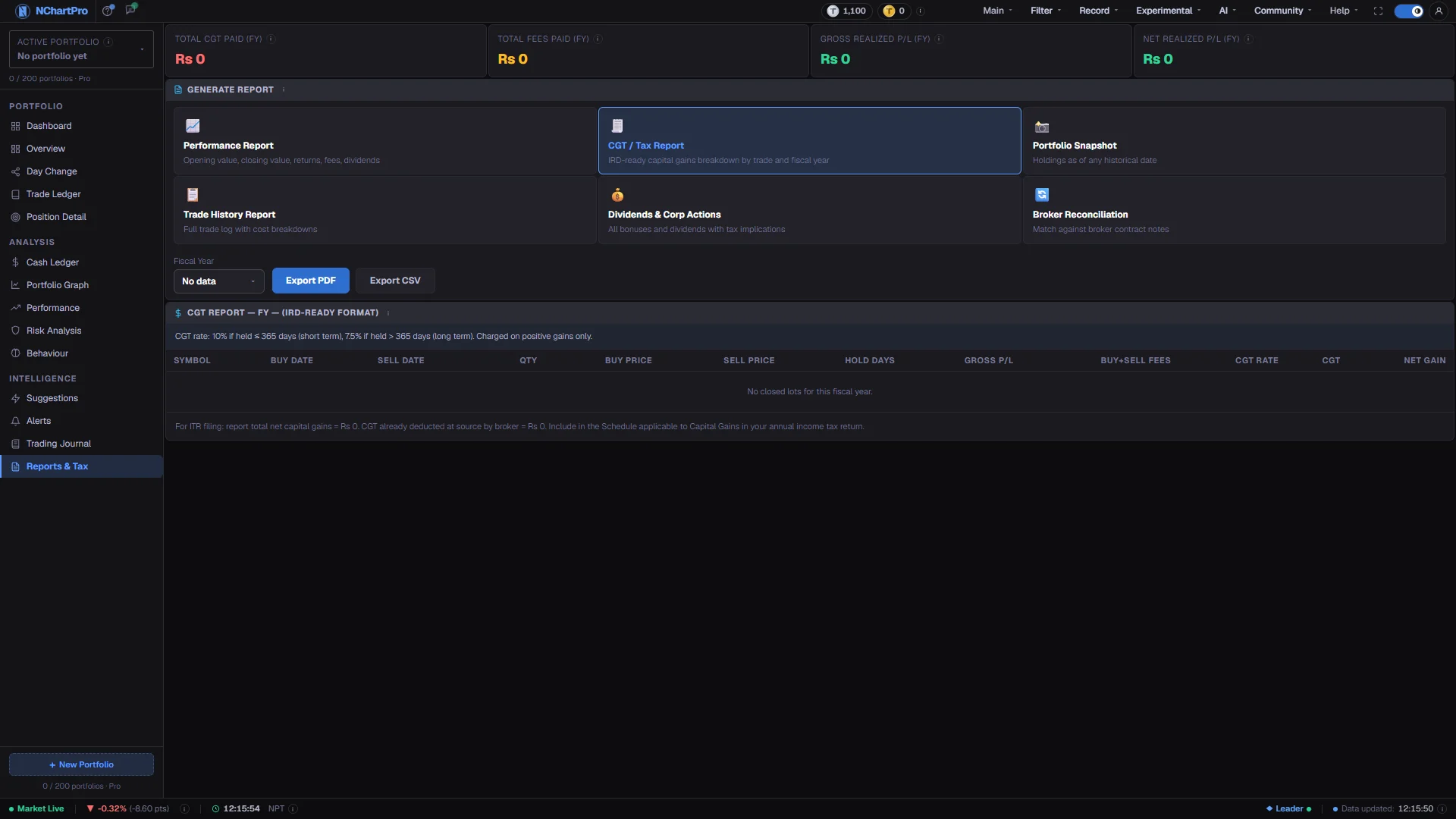
What this page is
Reports & Tax turns the sales you have completed into a capital-gains statement for one Nepali fiscal year, laid out the way the Inland Revenue Department expects it. Four totals sit at the top, the trade-by-trade table sits below, and an annual summary compares every year you have traded.
The tax has already been deducted by your broker at the moment of each sale. This report exists so you can declare the correct figure, not so you can pay again.
A Nepali fiscal year runs Shrawan 1 to Ashad end, roughly mid-July to mid-July, which is why a year is written like 2081/82. Only fiscal years in which you actually closed a trade appear in the picker.
Why it helps you
- The Hold Days column is where the cost of trading fast becomes explicit. Everything at 365 days or less is taxed at 10 percent; past that it drops to 7.5 percent, and the table shows which side of the line each sale fell on.
- Read Total Fees Paid next to Gross Realized P/L. Fees are charged on both the buy and the sell, so a year of many small round trips can show a healthy gross and a thin net.
- A row labelled Loss pays no tax, but losses do not reduce the tax owed on your winning trades here — each profitable lot is taxed on its own.
- Net Realized P/L is the only number worth judging a year by. Gross always flatters, because it is taken before every charge and before the tax.
- The Annual Summary is the long view: one line per fiscal year showing closed lots, gross, tax and net. What you want to see improving over the years is the net column, not the gross.
- At filing time the line under the table gives you exactly what to declare — total net capital gains, and the CGT already withheld at source by your broker.
When to use it, and where to find it
- After Ashad end, when the fiscal year has closed and you are preparing your return.
- Before meeting an accountant, so you arrive with the trade-by-trade breakdown rather than a broker statement to reconcile.
- Whenever you want to know what a year of trading actually netted, once tax and charges are counted.
- Right after correcting a mistake in the Trade Ledger, to confirm the report rebuilt itself.
Try it — a short walkthrough
- 1Keep the CGT report selectedClick CGT / Tax Report among the six cards. It is the one that produces a table — the other five show only the date boxes.See this part in detail →
- 2Pick the fiscal yearUse the Fiscal Year picker. The totals above and the table below both reload for the year you choose, and the picker lists only years in which you closed at least one trade.See this part in detail →
- 3Read gross against netCompare Gross Realized P/L with Net Realized P/L in the tiles at the top. The gap between them is exactly what fees and tax took out of your year.See this part in detail →
- 4Work one row acrossIn the CGT table, follow a single sale left to right: Gross P/L is the amount taxed, then Buy+Sell Fees and CGT are subtracted to give Net Gain. The TOTALS row at the bottom sums the year.See this part in detail →
- 5Check the Hold Days columnAny row at 365 days or less was taxed at 10 percent. Note how many of them sat close to the line — that is where a few more weeks would have saved 2.5 points of tax.See this part in detail →
- 6Compare the yearsScroll to Annual Summary and read the net column down the years. It answers whether your results are improving once fees and tax are counted.See this part in detail →
Every part of the page
In the order you meet them on screen, each with a close-up of the real thing. The numbers match the dots on the figure above.
The four fiscal-year totals
Total CGT Paid, Total Fees Paid, Gross Realized P/L and Net Realized P/L — all for the fiscal year selected below, computed by summing the closed lots of that year.
How — Read Gross next to Net: the gap between them is exactly what fees and tax took out of your year.
- Gross Realized P/L = Σ over closed lots of qty × (sell price − average buy price). This is the figure the tax is calculated on; fees are not deducted from it.
- Total Fees Paid counts BOTH legs: the broker commission (0.36% down to 0.24% by trade size, minimum Rs 10), the SEBON fee (0.015%) and the DP charge (Rs 25 per stock per settlement) on the buy AND the sell.
- Net = Gross − round-trip fees − capital-gains tax. That is the honest number to judge a year by.
Report types — only CGT is built
Six cards are offered, but be aware: only "CGT / Tax Report" actually produces a report. Selecting Performance Report, Portfolio Snapshot, Trade History Report, Dividends & Corp Actions or Broker Reconciliation shows the date boxes and nothing else — those five are not implemented yet.
How — Click "CGT / Tax Report" to keep the working report on screen. The tour tells you this plainly instead of leaving you hunting for a table that never appears.
- Much of what those five cards promise already exists on other pages: Performance, Cash Ledger (dividends and fees), and Trade Ledger (full trade log with cost breakdown).
Choosing the year
With the CGT report selected you get a Fiscal Year picker. With any other type selected you get From (BS) and To (BS) date boxes instead.
How — Pick a fiscal year and the totals above and the table below both reload for that year.
- The picker lists only years in which you closed at least one trade; it reads "No data" when there are none.
- The From/To BS boxes belong to the report types that are not built yet, so typing in them currently changes nothing.
Export PDF / Export CSV — not built yet
Both buttons are placeholders. Clicking them does nothing at the moment: there is no PDF or CSV download from this page.
How — For now, read the CGT table on screen, or take a screenshot / print the page from your browser if you need a copy for your accountant.
- The numbers themselves are real — only the file download is missing.
CGT Report (IRD-Ready Format)
Every share sale you completed in the selected fiscal year, with the capital-gains tax on each one, laid out the way the Inland Revenue Department expects it.
How — Read a row across: Gross P/L is the amount taxed, then Buy+Sell Fees and CGT are subtracted to give Net Gain. The bottom TOTALS row sums the whole year.
- Buy Price is your weighted average cost for that stock at the time of the sale — the average-cost method, not first-in-first-out. Hold Days runs from your first buy of that stock.
- CGT Rate reads 10% at 365 days or less, 7.5% beyond that, or "Loss" when the trade lost money — a loss is never taxed.
- The tax was already withheld by your broker at the time of sale, so this report is for DECLARING it, not for paying again.
- It reads "No closed lots for this fiscal year" when you sold nothing in the selected year.
Annual Summary — All Fiscal Years
One line per Nepali fiscal year, so you can see your trading results and tax bill year by year rather than only for the year selected above.
How — Use it to spot the pattern: whether your net result is improving once fees and tax are counted, not just your gross.
- Closed Lots is how many sales you completed that year. Gross P/L is profit before fees and tax; CGT is the tax paid; Net P/L is what you actually kept.
- Each row sums every closed lot stamped with that fiscal year.
- This card only appears once at least one fiscal year has closed lots.
Reading the numbers
- Gross Realized P/L is the sum over closed lots of quantity multiplied by (sell price − average buy price). This is the figure the tax is calculated on, and fees are not deducted from it.
- Total Fees Paid counts both legs: broker commission (0.36 percent scaling down to 0.24 percent by trade size, minimum Rs 10), the SEBON fee (0.015 percent) and the DP charge (Rs 25 per stock per settlement) on the buy and on the sell.
- Net Realized P/L = Gross − round-trip fees − capital-gains tax. That is the honest number.
- CGT is 10 percent when the shares were held 365 days or less and 7.5 percent when held longer, charged on the gain only. The CGT Rate column reads Loss when the sale lost money, and no tax is due on it.
- Buy Price in the table is your weighted average cost for that stock at the time of the sale — the average-cost method, not first-in-first-out. Hold Days runs from your first buy of that stock.
- The four totals tiles are all scoped to the fiscal year named in each label, computed by summing the closed lots of that year.
- In Annual Summary, Closed Lots is how many sales you completed that year; each row sums every closed lot stamped with that fiscal year.
- The line under the CGT table restates the two figures for filing: total net capital gains to report, and CGT already deducted at source by your broker.
What it does not do
- Only CGT / Tax Report is built. Selecting Performance Report, Portfolio Snapshot, Trade History Report, Dividends & Corp Actions or Broker Reconciliation shows the From and To date boxes and no report body — those five are not implemented yet.
- The Export PDF and Export CSV buttons are placeholders with no handler. Nothing downloads. For now, read the table on screen or print the page from your browser if you need a copy.
- The From (BS) and To (BS) boxes belong to the report types that are not built, so typing in them changes nothing.
- Buy price uses the average-cost method. If your broker calculated a particular sale on a different basis, the per-row figures can differ from the contract note even though the yearly totals are close.
- Everything is computed from the trades you entered. A missing buy makes the gain look larger and the tax with it, so reconcile the Trade Ledger before trusting a filing figure.
- The Annual Summary card only appears once at least one fiscal year has closed lots, and the CGT table reads "No closed lots for this fiscal year" when you sold nothing in the year selected.
- This is a working document, not tax advice. Check the final figures with your accountant before filing.
Questions people ask
No. Your broker withheld it at the time of each sale. The report is for declaring the gain and the tax already deducted at source in your annual return.
The picker lists only years in which you closed at least one trade. A year where you bought but never sold produces no capital gain and therefore no row.
It depends on how long you held. 365 days or less is taxed at 10 percent, longer than that at 7.5 percent. The Hold Days column on each row shows which applied.
Not from the page yet — both export buttons are placeholders. Print the page from your browser or take a screenshot; the numbers themselves are real, only the file download is missing.