

Order Flow
A candle tells you where the price opened, how high and low it went, and where it closed. It does not tell you what happened in between. This page shows that part: how many shares changed hands at each price, which side was pushing, and which prices the market was happy to stay at.
What this page is
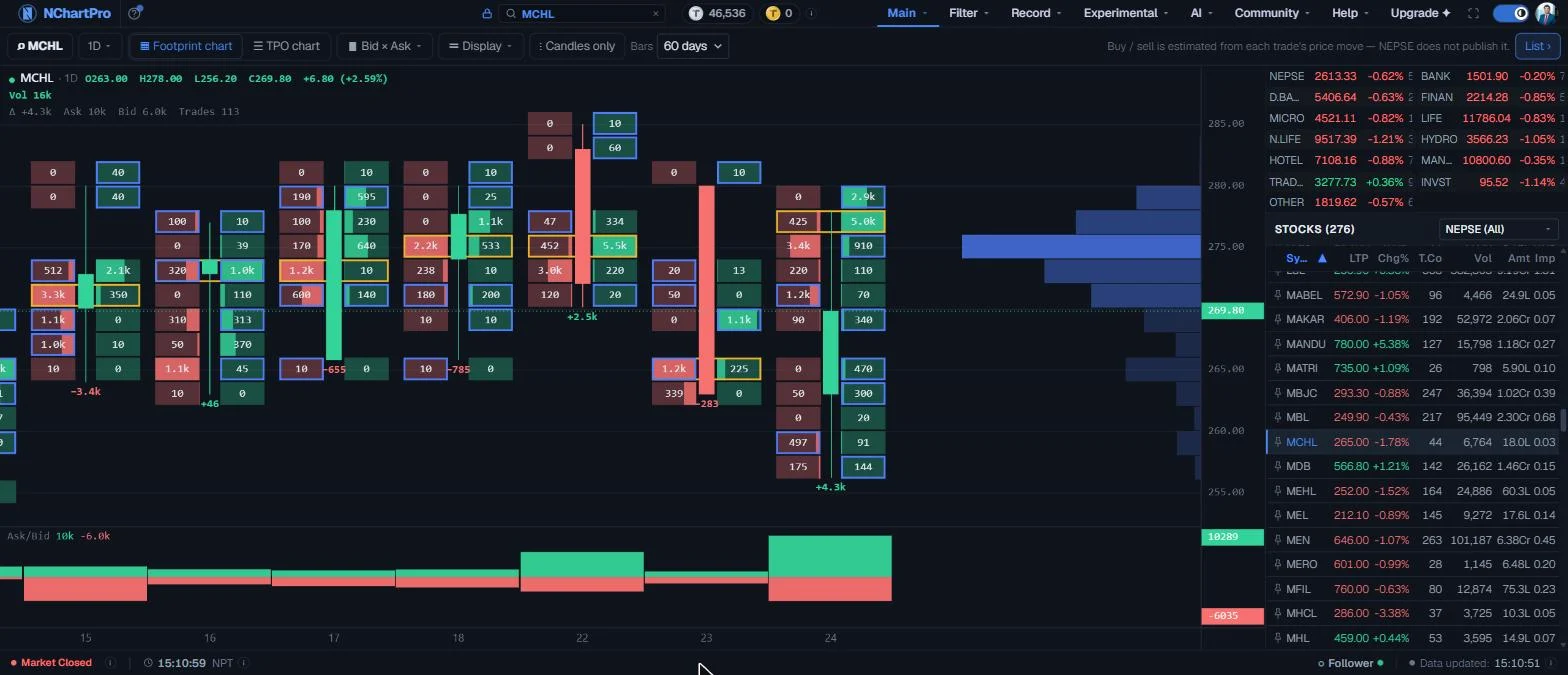
The page has two charts, and a switch at the top picks one. Footprint splits each candle into price rows. Every row shows the shares sold at that price on the left and the shares bought on the right, with the candle drawn between them.
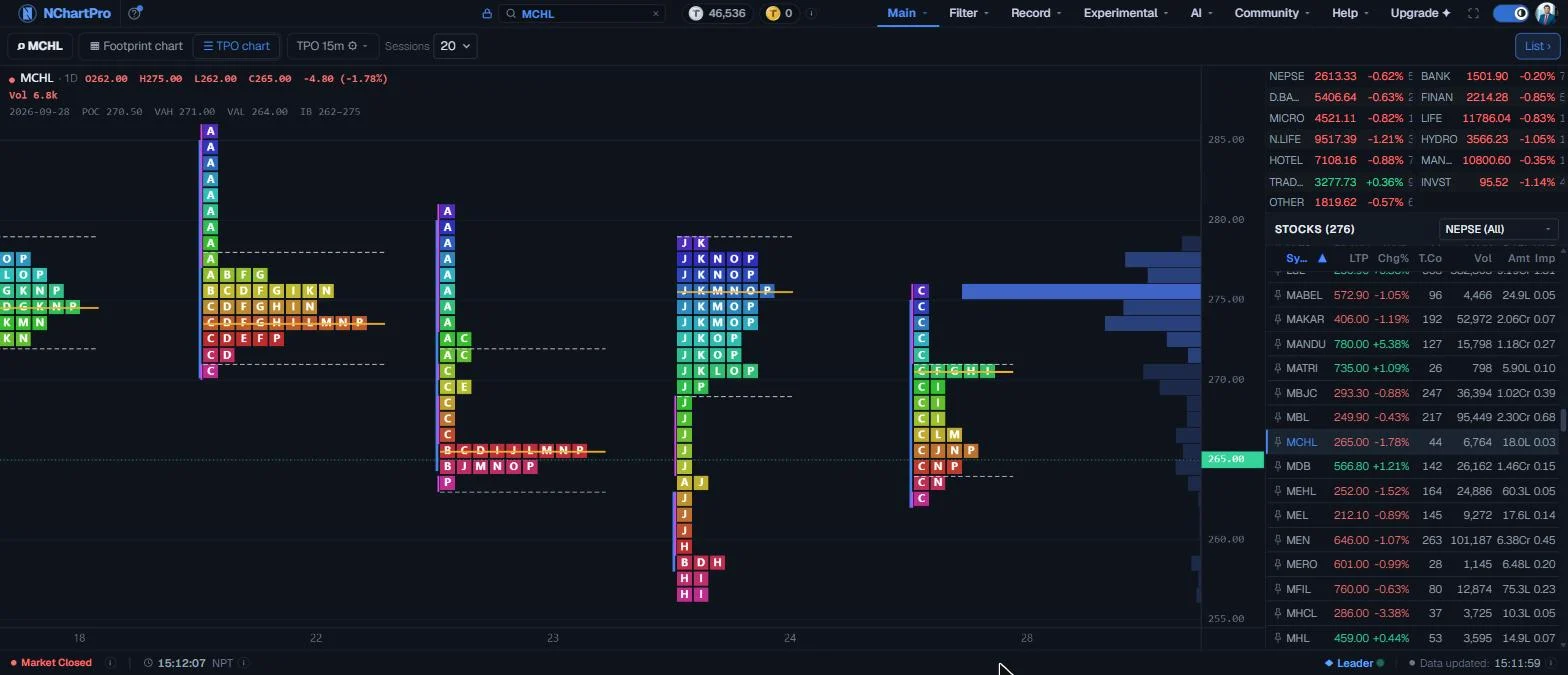
TPO (Time Price Opportunity) draws one column of letters per day. Each letter is a block of time — A is the first 15 minutes after 11:00, B the next, and so on. A letter is placed at every price traded in its block, so a wide row of letters is a price where the market spent a lot of time.
The right side has the same index and stock lists as the Chart page. Click any row to load it. This page is for looking only: there are no drawing tools and no bottom tabs.
During market hours both charts show today as it happens. Today's footprint candle is built from today's trades every few seconds and carries a red LIVE tag. Rest the mouse on any letter or number to read it, and click it to see what it means.
Why it helps you
- A breakout on a normal chart looks the same whether it had real buying behind it or not. On the footprint you can see it: several rows with a blue border on the buy side, one after another, means buyers were really pushing.
- Heavy buying with no rise in price is a warning. It often means a large seller is quietly taking all the buying. The footprint shows this; the candle does not.
- The previous day's value area (from TPO) gives you clear levels to watch the next morning. If the price leaves it and comes straight back, the move out was not accepted.
- Use a small timeframe (15m or 5m) on liquid stocks. On thinly traded stocks a small timeframe has too few trades per row to mean much.
- Switch TPO's input period to Week or Month. The widest part of a monthly profile is the price the market has agreed on for that month — a useful reference when you plan to add to a holding.
- The daily footprint over 60 or 120 days shows whether buying or selling has been stronger for a long stretch. Turn on the CVD line in Display to see it as one running line.
- Nothing here measures the value of a company. It shows how people traded the share, not whether the business is good.
When to use it, and where to find it
- After the close, to review the day: where did value build, and did the big moves have real buying or selling behind them?
- Before the open, to mark the previous day's point of control (POC), value area high (VAH) and value area low (VAL) as levels to watch.
- During a sharp move, with 15m or 5m candles from the previous days, to compare today's move with the same levels.
- When a stock suddenly appears at the top of the heat map or the gainers list, to check whether the move was broad or came from a few trades.
Try it — a short walkthrough
- 1Pick a stockClick a stock in the list on the right, or search for it at the top of the site. For this first try, pick a busy stock such as NABIL.See this part in detail →
- 2Read one footprint candleWith Footprint chart and 1D selected, rest the mouse on the newest candle. The top left shows its open, high, low, close and volume. The number under the candle is Delta — bought minus sold.See this part in detail →
- 3Find the imbalancesLook for boxes with a blue border. Three or more in a row on the buy side at a new high is buying that pushed the price up. Change the ratio in Display to make the test stricter or looser.See this part in detail →
- 4Zoom into the dayOpen the timeframe menu and pick 15m. Each candle is now 15 minutes of one session. Drag the price scale up to stretch the prices so the numbers in the boxes fit.See this part in detail →
- 5Switch to TPOClick TPO chart. Each day becomes a column of letters. Open the TPO settings and turn on POC line and Value area lines to see the three levels most traders mark.See this part in detail →
- 6Put the two togetherFind where yesterday's value area ended on TPO, then go back to Footprint and look at what buyers and sellers did when the price reached that level today.See this part in detail →
- 7Watch today build liveDuring market hours the newest candle has a red LIVE tag and a red LIVE chip in the toolbar. It fills in as trades arrive, every few seconds, on every timeframe. The chip shows the time of the last update and how much of today's turnover the trade list holds so far.See this part in detail →

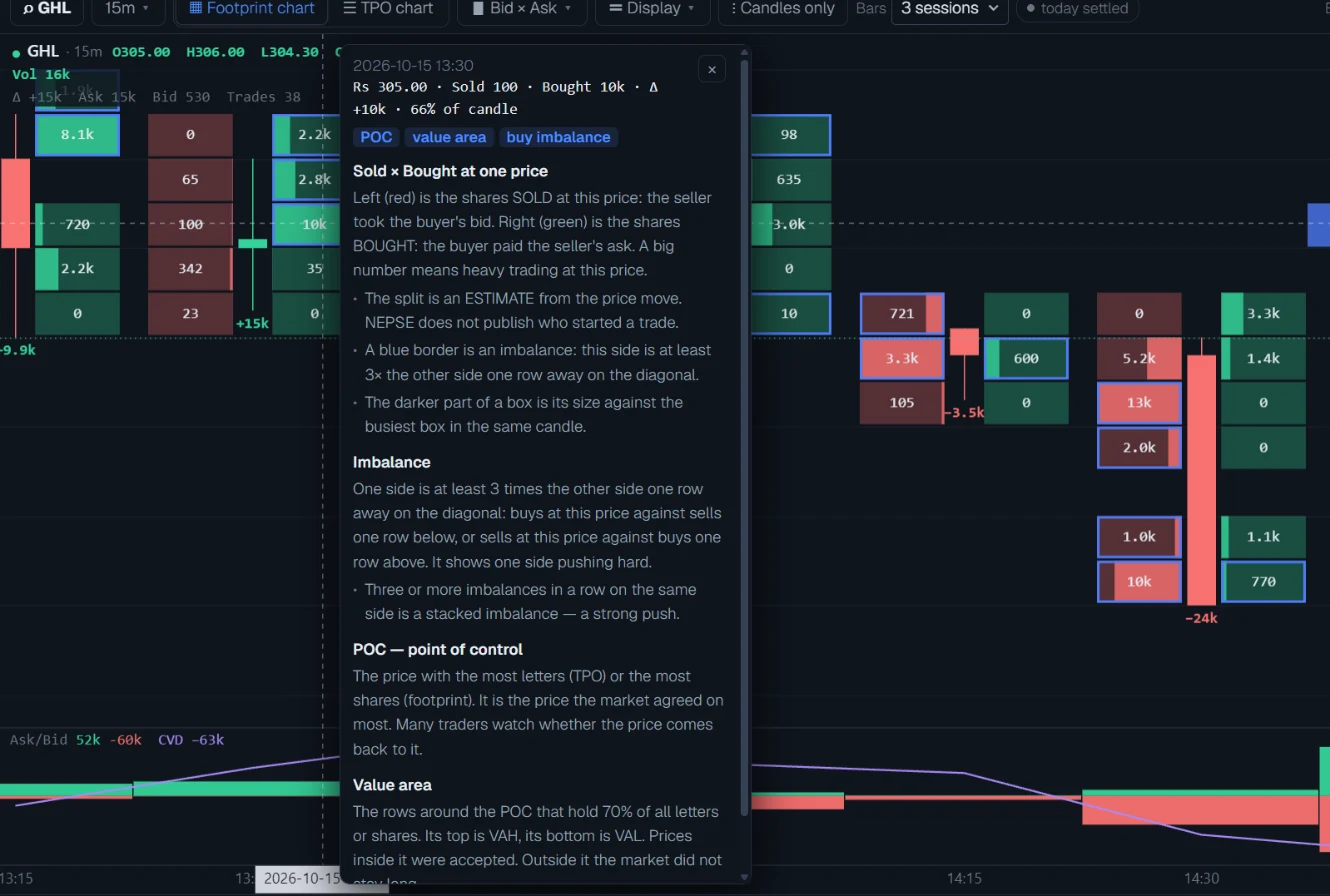
- 8Click a letter or a number to learn what it meansRest the mouse on any box in a footprint candle, or any letter in a TPO column. A small line shows its price, the shares sold and bought, and marks such as POC or imbalance. Click it and a card opens that explains each of those in plain words. Press Esc or click somewhere else to close it.See this part in detail →
Every part of the page
In the order you meet them on screen, each with a close-up of the real thing. The numbers match the dots on the figure above.
The symbol you are looking at
The stock or index shown on the chart.
How — Pick another one from the lists on the right, or type it in the search box at the top of the site.
- Stocks work in both charts. An index or sub-index works in TPO only — an index does not trade, so it has no footprint.
Footprint chart or TPO chart
Switch between the two charts. Each one keeps its own settings.
How — Click Footprint chart or TPO chart. The rest of the toolbar changes to fit the chart you picked.
- A simple way to use both: TPO tells you WHERE to look. Footprint tells you WHAT happened there.
Timeframe
How much time one footprint candle covers: 1 minute, 5, 15 or 30 minutes, 1 hour, or 1 day.
How — Click it and pick a timeframe.
- 1D goes back to 2022.
- Minute and hour candles start from 16 July 2026 — that is when the site began saving the timing it needs.
- Today's trades show after the market closes and the day's floor sheet is loaded.
Reading the chart
Each footprint candle is split into price rows. The LEFT box in a row is Bid — shares SOLD at that price. The RIGHT box is Ask — shares BOUGHT. The candle sits between them.
How — Drag to move left and right. Scroll the wheel to make the candles wider or narrower. Drag the price scale on the right up to stretch prices, down to squeeze them. Double-click to reset.
- The darker part of a box shows how big it is compared with the busiest box in that candle.
- A blue border is an imbalance: one side is 3 times (or more) bigger than the other side one row away.
- The number under the candle is Delta = Ask − Bid. Green: more buying. Red: more selling.
- Top left shows open, high, low, close, change and volume for the candle under your mouse.
What each row shows
Choose how each price row is drawn.
How — Click it and pick one.
- Bid × Ask: two boxes per row — sold on the left, bought on the right. The full picture.
- Delta: one box per row with bought minus sold. Green means buyers won that price, red means sellers did.
- Volume: one box per row with all shares traded at that price.
Display settings
All the footprint settings, in three groups: Rows, Imbalance and Panels. Changes show at once and are remembered in this browser.
How — Click Display. Use Reset at the bottom to go back to the starting settings.
- Row size: how much price one row covers. Auto picks a size that keeps the candles easy to read.
- Numbers, Δ label, POC and Value area turn those marks on or off.
- Imbalance ratio: 3 means one side must be 3 times the other to get a blue border.
- VPVR, Ask/Bid pane and CVD line turn the side profile and the lower pane on or off.
Candles only
Hides the rows and shows plain candles, so you can see the price shape first.
How — Click once to hide the rows, click again to bring them back.
How much history
How many days (for 1D) or trading sessions (for minute and hour candles) to load.
How — Pick a number. A longer history takes a moment longer to load the first time.
Buy and sell are estimated
NEPSE does not say whether the buyer or the seller started a trade. We estimate it from the price: a trade higher than the one before counts as a buy, a lower one as a sell, and a trade at the same price keeps the side of the one before.
- The price and the number of shares are exact. Only the split between buy and sell is an estimate.
TPO settings
Each letter is one block of time — with 15m, A is 11:00–11:15, B is 11:15–11:30, and so on. A letter is placed at every price traded in its block, so more letters at a price means more time spent there.
How — Click TPO to open the settings. Use Reset at the bottom to go back to the start.
- Input period: one profile per Day, Week or Month.
- Block size: how much time one letter covers — 15m, 30m or 1h.
- Value area %: the share of letters counted as accepted value. 70 is common.
- Split by blocks, Value area lines, POC line, Poor high/low, Initial balance, Single prints and Show candles each add one mark.
How many sessions
How many trading days of TPO to load, up to 120.
How — Pick a number. With Input period set to Week or Month, more sessions give you more whole weeks or months.
Indices and stocks
The same lists as on the Chart page. The top part shows NEPSE and the sector sub-indices. The bottom part lists every stock with its live price.
How — Click a row to show it on the chart. Click an index to also narrow the stock list to that sector. Click List at the top right to hide or show this column.
Reading the numbers
- Bid (left box, red) = shares SOLD at that price. Ask (right box, green) = shares BOUGHT at that price. Delta = Ask − Bid. A positive Delta means more buying than selling.
- The darker part of a box is its size compared with the busiest box in the same candle. A box that is nearly all dark is one of the busiest prices of that candle.
- Imbalance (blue border) compares on a diagonal, the way most footprint charts do: the buying at one price against the selling one row lower, and the selling at one price against the buying one row higher. With a ratio of 3, one side must be at least 3 times the other.
- POC (point of control) = the price row with the most shares (footprint) or the most letters (TPO). Value area = the rows around the POC that hold 70% of the total — its top edge is VAH, its bottom edge is VAL.
- Initial balance (IB) = the price range of the first hour of the session, 11:00 to 12:00. A poor high or poor low is a top or bottom row with two or more letters — a flat edge, which often means the price will come back to test it.
- A single print is a row only one letter reached. A run of single prints is a price the market moved through quickly and did not accept.
- VPVR on the right edge adds up the volume at each price for everything on the screen. It changes as you move the chart.
- CVD (cumulative volume delta) adds each candle's Delta to a running total. A rising CVD means buying has been stronger over the whole period on screen.
- All prices are the prices that actually traded. They are not adjusted for bonus shares, so an old candle may sit far from today's price after a bonus.
- Hover = read, click = learn. Resting the mouse on a box or a letter shows its numbers in one line. Clicking it pins a card with the meaning of each word on that line. The same works on the Δ labels, the top-left candle line, the Ask/Bid pane and the volume profile on the right.
- LIVE (red tag on today's candle, red chip in the toolbar) means the candle is built from today's trades as they arrive. Its buy and sell numbers may change a little as new prices come in. After the close the final floor sheet replaces it and the chip reads "today settled".
Every setting, explained
The toolbar
The row across the top of the chart. What it shows depends on which chart is selected: the Footprint controls in Footprint mode, the TPO controls in TPO mode.

| Symbol | The stock or index on the chart. Change it from the lists on the right or the search box at the top of the site. |
| Timeframe (1m … 1D) | Footprint only. How much time one candle covers: 1 minute, 5, 15 or 30 minutes, 1 hour or 1 day. Tip: 1D reaches back to 2022. Minute and hour candles start on 16 July 2026. |
| Footprint chart / TPO chart | Switches between the two charts. Each keeps its own settings. |
| Bid × Ask | Footprint only. Chooses what each price row shows — see the next panel. |
| Display | Footprint only. Opens the footprint settings — see below. |
| Candles only | Footprint only. Hides the rows and shows plain candles. Click again to bring the rows back. |
| Bars | Footprint only. How many days (1D) or sessions (minute and hour candles) to load. 1D goes up to 250 days; 1m up to 5 sessions. |
| LIVE chip | During market hours, on both charts. Shows that today's candle is being built from today's trades, the time of the last update, and "tape %" — how much of today's turnover the trade list holds so far. After the close it reads "today settled". Tip: Early in the session the tape % is low and the numbers are a floor. They grow as the trade list catches up. |
| TPO 15m ⚙ | TPO only. Opens the TPO settings — see below. The label shows the current block size. |
| Sessions | TPO only. How many trading days to load, up to 120. |
| List | Hides or shows the index and stock lists on the right, to give the chart more room. |
Bid × Ask — what each row shows
Opens from the Bid × Ask button. It changes how every price row in a footprint candle is drawn. The data does not change, only the way it is shown.
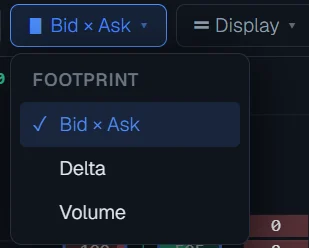
| Bid × Ask | Two boxes per row: shares sold on the left (red), shares bought on the right (green), with the candle between them. The full picture, and the default. |
| Delta | One box per row, right of the candle, showing bought minus sold. Green means buyers took more at that price, red means sellers did. Tip: Good for spotting quickly where one side won. |
| Volume | One box per row showing all shares traded at that price, whichever side. It is a small volume profile for each candle. |
Display — footprint settings
Opens from the Display button. Every change shows at once and is remembered in this browser. Reset at the bottom puts everything back to the starting settings.
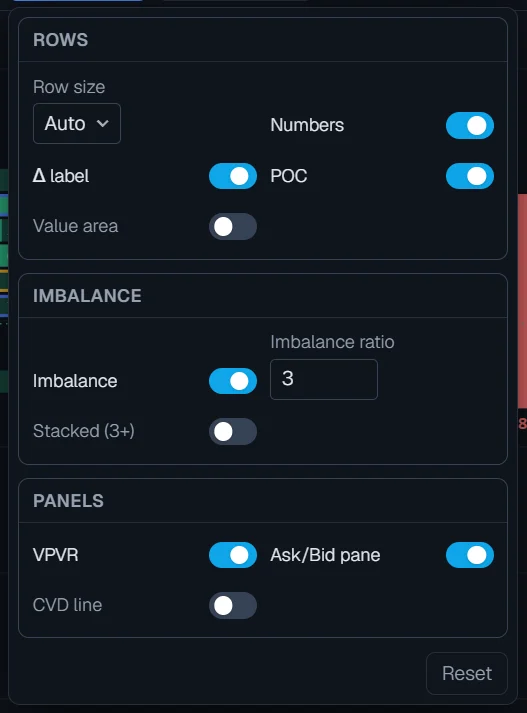
| Row size | How much price one row covers, in rupees. Auto picks a size that keeps about 40 rows across the price range on screen. Pick a fixed size (Rs 0.1 up to Rs 100) to compare stocks the same way. Tip: A thinly traded stock reads better with bigger rows; a busy one with smaller rows. |
| Numbers | Prints the share count inside each box. Numbers only appear when the boxes are big enough to hold them — widen the candles or stretch the price scale to see them. |
| Δ label | Prints the candle's Delta (bought minus sold) under each candle, green when positive and red when negative. |
| POC | Draws a yellow outline round the busiest row of each candle — its point of control. |
| Value area | Draws a thin blue line down the left edge of the rows that hold 70% of the candle's volume. |
| Imbalance | Draws a blue border round a box when that side is much bigger than the other side one row away (see Reading the numbers). |
| Imbalance ratio | How much bigger one side must be to count as an imbalance. 3 means three times. Raise it to see only the strongest imbalances, lower it to see more. |
| Stacked (3+) | Draws a thick line beside three or more imbalances in a row on the same side — the pattern the reference guide calls a stacked imbalance. |
| VPVR | The blue volume profile on the right edge of the chart, for everything on screen. The darkest bar is its POC, the medium bars its value area. |
| Ask/Bid pane | The lower pane: shares bought (green, up) and sold (red, down) for every candle. The tags on the right show the largest values on screen. |
| CVD line | Adds the running total of Delta to the lower pane as a purple line. Needs the Ask/Bid pane to be on. |
TPO settings
Opens from the TPO button in TPO mode. Like the footprint settings, every change shows at once, is remembered in this browser, and Reset puts it back.
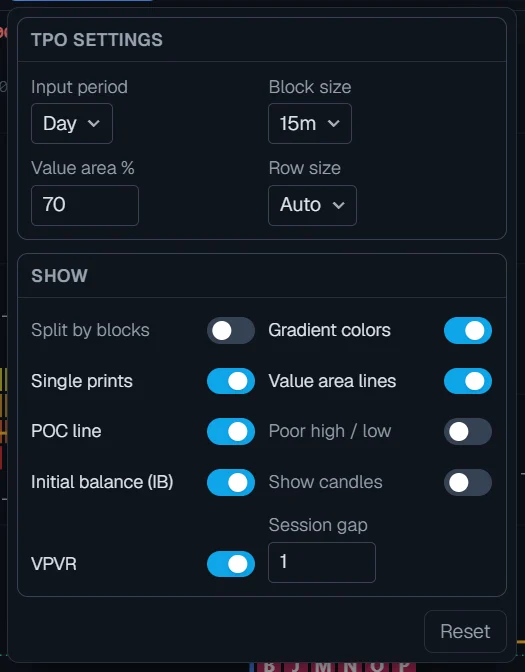
| Input period | What one profile covers: a Day, a Week or a Month. Week and Month add up the letters of every day inside them. |
| Block size | How much time one letter covers: 15 minutes, 30 minutes or 1 hour, counted from the 11:00 open. With 15m the day runs A to P. |
| Value area % | The share of all letters counted as the value area around the POC. 70 is the usual choice. A higher number gives a wider area. |
| Row size | How much price one row covers. Auto gives about 15 rows per day, which keeps the letters readable. |
| Split by blocks | Puts each block in its own column instead of packing the letters to the left, so you can see the order the profile was built in. |
| Gradient colors | Colours each row by its price, from violet at the top of the profile to magenta at the bottom. Switch it off for one plain colour, where the value area is brighter. |
| Single prints | A pink mark beside rows only one letter reached — prices the market moved through quickly. |
| Value area lines | Dashed lines at VAH (top of the value area) and VAL (bottom). |
| POC line | A yellow line at the row with the most letters. |
| Poor high / low | A red line on a top or bottom row that has two or more letters — a flat edge the price may come back to. |
| Initial balance (IB) | A blue bar on the left of each profile covering the first hour's range, 11:00 to 12:00. |
| Show candles | Draws the day's candle on the left of each profile. |
| VPVR | The volume profile on the right edge, for the profiles on screen. |
| Session gap | Empty space between profiles, counted in letters. 0 puts them side by side. |
What it does not do
- Buy and sell are estimates. NEPSE does not say which side started a trade, so each trade is judged by its price: higher than the one before counts as a buy, lower as a sell, and the same price keeps the side of the one before. Prices and share counts are exact; only the split is estimated.
- An index has no footprint. It does not trade, so there are no buys or sells to count. TPO works for indices.
- Minute and hour footprint candles start on 16 July 2026. The time of each trade comes from matching the trade list against the market snapshots saved every few seconds, and those snapshots only go back to that date.
- Today's footprint is live during market hours, but it is a floor: early in the session the trade list is still catching up (the LIVE chip shows the share it holds), and the newest minute can move a trade by one candle until the next market snapshot lands. Prices are exact; only the timing and the buy/sell split are estimated. After the close the stored floor sheet replaces it.
- A very old daily candle on a busy stock can take a second or two to load the first time.
Questions people ask
An index is a number worked out from many stocks. Nobody buys or sells the index itself, so there is nothing to put in the rows. Switch to TPO chart for indices.
Minute and hour footprint candles only go back to 16 July 2026. Use 1D for older history.
They only appear when the boxes are big enough. Scroll the mouse wheel to widen the candles, or drag the price scale on the right upward to stretch the prices.
Each site estimates buy and sell in its own way, because NEPSE does not publish it. The total shares at each price should match; the split between buy and sell may not.
Today's candle is live. The trade list arrives in pieces, and each trade is placed in time by matching it to the market snapshots. A late trade can move into an earlier minute, and the buy/sell guess for a price can shift when the trade before it arrives. The numbers settle once the day's floor sheet is stored after the close.
Each letter is one block of time, counted from the 11:00 open. With 15-minute blocks, A is 11:00, B is 11:15, and K is 13:30 to 13:45. Click any letter on the chart and a card tells you its exact time and price.