

Heat Map
A list of three hundred symbols tells you very little at a glance. The same day drawn as sized, coloured boxes tells you immediately where the money actually went.
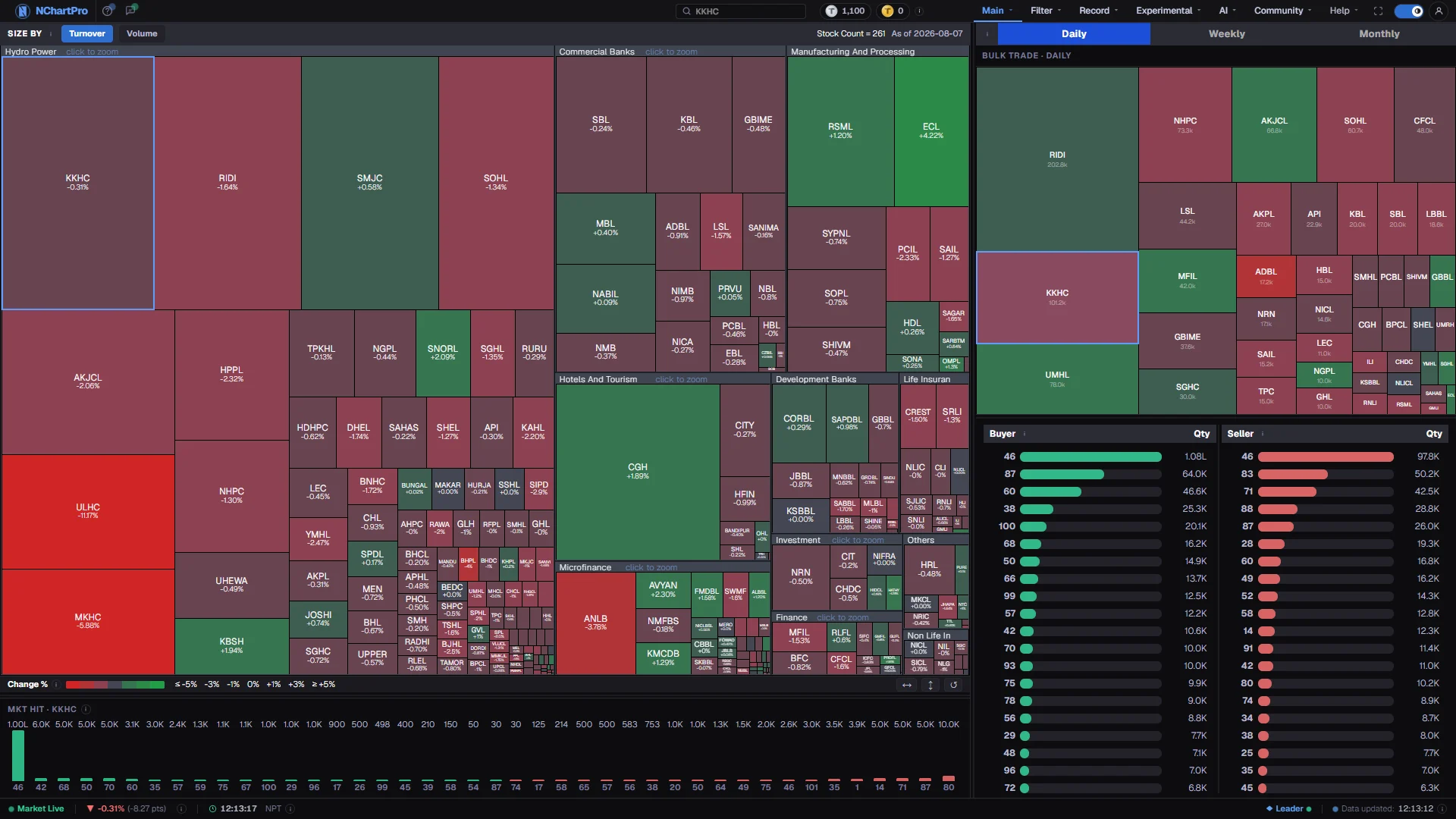
What this page is
The left half is today's market. Each box is one stock: its area is how much was traded in it, its colour is how far the price moved. Boxes are grouped by sector, so a sector that ran hot appears as a block of green rather than as numbers you have to add up.
The right half is a second map of bulk trades only — single unusually large deals reported on the floor sheet — over the period you choose in the tabs.
Clicking joins the two halves to the broker cards. Every tile is really a question with two parts: how much was traded here, and which broker houses were on each side of it.
Why it helps you
- Size answers the liquidity question before you place an order. A tile that is barely visible is a stock where a modest order moves the price.
- Switching Size by between Turnover and Volume separates an expensive share moved by a few large deals from a cheap one changing hands constantly. In a plain gainers list those two look identical.
- Click the biggest green or red tile, then read MKT Hit. Knowing which brokers were on each side of the day's largest move is something a price table cannot give you.
- The bulk map is where large single tickets appear, usually before any of it is visible in the shape of a daily chart.
- Read it by sector rather than by stock. Whether money has been flowing into banking, hydropower or insurance over a month is a better question for a long holder than what one tile did today.
- Widen the period tabs to Monthly. One day of broker activity is noise; the same broker accumulating across a month is at least a fact worth noting.
- A stock you own appearing large on the bulk map means large holders are transacting in it. That is worth understanding before you add to your position.
- Nothing here measures value. A dark green tile is a price that moved, not a business that improved.
When to use it, and where to find it
- Just after the close, when the session is complete and tile sizes describe a whole day rather than a partial one.
- On a day the index moved sharply, to see in one glance whether the move was broad or came from one or two sectors.
- Once a week or once a month with the period tabs widened, as a review of where sustained activity has been.
- Before placing a large order, as a quick check on how much the stock genuinely trades.
Try it — a short walkthrough
- 1Decide what size meansStart on Turnover to see where rupees went, then switch to Volume. A tile that changes size a lot between the two is telling you about its price level.See this part in detail →
- 2Find the outliersLook for the biggest tiles and the darkest colours. Rest the cursor on one for about two seconds and a detail card opens with the day's high, low, trades, volume and turnover.See this part in detail →
- 3Click into a stockClick the tile. The MKT Hit card below fills with the broker houses that traded it — buyers in green on the left, sellers in red on the right.See this part in detail →
- 4Widen the windowSwitch Daily to Weekly or Monthly. The right half and the MKT Hit bars all follow these tabs, so you can see whether a broker was busy once or all month.See this part in detail →
- 5Check the large single dealsRead the Bulk Trade map on the right. A stock that is large here but small on the left map was moved by a few very large tickets rather than by steady trading.See this part in detail →
Every part of the page
In the order you meet them on screen, each with a close-up of the real thing. The numbers match the dots on the figure above.
Size by — Turnover or Volume
This picks what makes a tile big. The two answers give a different picture of the same day, so it is worth switching between them.
How — Click Turnover or Volume. The row also tells you how many symbols are on the map, and the "As of" date once you click a tile.
- Turnover = tile area is the RUPEE value traded today (price × shares). Expensive shares look big.
- Volume = tile area is the NUMBER of shares (kitta) traded today. Cheap, heavily-traded shares look big.
- A stock that is large under Volume but small under Turnover is a low-priced share changing many hands.
The market map
One tile per traded stock, grouped under a grey strip carrying its sector name (Banking, Hydropower, Life Insurance and the other sectors). Tile colour is today's price change against yesterday's close — green up, red down, grey flat.
How — Click a tile to load that stock's broker details in the cards below and to the right. Click a sector's grey header strip to zoom into just that sector (bigger tiles); the "← All Sectors" button that appears in the bar above zooms back out.
- Rest the cursor on one tile for about 2 seconds and a detail card opens with LTP, high, low, trades, volume and turnover. Drag that card to pin it in place.
- In that card, "Net B/S" is the change % rescaled to −100%…+100% (a ±8% move is full scale) — it is the number that picks the tile colour, NOT a buy-minus-sell figure.
- Sizes refresh every 30 seconds; while the market is open (Mon–Fri) each tile also recolours live from the price feed.
The colour key and layout buttons
The key to the tile colours, and three small buttons that change how much room each panel gets.
How — ↔ hides the right panel so the map fills the width. ↕ hides the MKT Hit card so the map fills the height. ↺ puts every panel back to its default size.
- Deep green = up 5% or more; deep red = down 5% or more; grey in the middle = little or no change.
- The scale is stepped, so a 6% and a 9% gainer share the same darkest green.
- For context, NEPSE's daily limit is ±10% for most stocks.
MKT Hit — who traded the stock you clicked
For the stock you clicked on the map, this shows which broker houses hit the market — that is, traded it — and how many shares each one bought or sold. Each bar is one broker, and the number under the bar is that broker's licence number.
How — Click a tile above to fill it; until then it says "Click a tile to see broker hits". The card scrolls sideways when there are more brokers than fit, and you can drag its top edge to make it taller.
- Green bars on the left = brokers who BOUGHT, biggest buyer at the far left. Red bars on the right = brokers who SOLD, biggest seller at the far right.
- Bar height is share quantity on one shared scale, so buy and sell bars are directly comparable.
- It follows the period tabs on the right: daily = the latest trading day, weekly = Monday to date, monthly = the 1st of the month to date.
- The same broker can appear on both sides — brokers trade for many different clients.
Daily / Weekly / Monthly
These tabs set the time window for everything on the right side of the page — the Bulk Trade map and the Buyer / Seller lists — and for the MKT Hit bars on the left.
How — Click a tab to widen or narrow the window. Start on Daily, then switch to Monthly to see whether a broker has been at it all month or only today.
- Daily = the latest day that has bulk-trade data. Weekly = from Monday of that week up to that day, so early in the week it is a partial week (NEPSE trades Mon–Fri).
- Monthly = from the 1st of that month up to that day.
Bulk Trade map
A second map, but of bulk trades only. A bulk trade is a single unusually large deal reported on the floor sheet, so this shows where the big single tickets were placed in the chosen window.
How — Click any tile here to load that stock's broker buyers and sellers underneath. Hovering works the same way as on the left map.
- Tile SIZE = total bulk-traded share quantity for that stock in the window.
- Tile COLOUR = that stock's latest day price change %, using the same green/red scale as the left map.
- A stock can be big here while being small on the left map — that means few, very large deals rather than steady trading.
Buyer and Seller lists
For the stock you last clicked, the broker houses that BOUGHT it (left, green) and that SOLD it (right, red), each ranked by share quantity. The small number on each row is the broker's licence number; the figure on the right is the quantity.
How — Drag the divider between the two lists to give one side more room, and scroll a list when it has more brokers than fit. Until you click a tile both sides say "Click a tile".
- Bar length is relative to the biggest broker on ITS OWN side, so a long green bar and a long red bar are not the same quantity — read the numbers.
- Quantities are summed per broker from the daily floor-sheet filter over the period picked in the tabs above.
- k = thousand, L = lakh (1,00,000), Cr = crore (1,00,00,000) shares.
- This is activity, not advice: heavy buying by one broker can mean one large player is accumulating, but a broker acts for many clients.
Reading the numbers
- Green is up, red is down, grey is little or no change. The scale is stepped, so a six percent and a nine percent gainer share the same darkest green.
- Turnover is rupees traded, price multiplied by shares. Volume is the share count. They rank the market differently and both are correct.
- Net B/S on the hover card is the change percent rescaled to a −100 to +100 range, where a move of about eight percent is full scale. It is the number that picks the tile colour, not a buy-minus-sell figure.
- Bar lengths in the Buyer and Seller lists are relative to the largest broker on their own side, so a long green bar and a long red bar are not the same quantity. Read the numbers.
- The small number under or beside a broker bar is that broker's licence number.
What it does not do
- Only ordinary stocks appear. Mutual funds, debentures and promoter shares are on neither map.
- A broker acts for many clients. Heavy buying under one licence number could be one large buyer or fifty small ones, and the floor sheet does not say which.
- Broker and bulk figures come from the floor sheet, which is a completed-day record. During a session the right half describes the last day that has bulk-trade data, not the one in progress.
- The map has no memory. A tile shows one window only; it cannot tell you whether the same stock was equally busy the week before.
Questions people ask
The map draws stocks that traded. A symbol with no trades in the window has nothing to size a tile by.
No. Weekly runs from the Monday of that week up to the day shown, so early in the week it is a partial week by design.
That is normal. A broker house executes for many different clients, and their orders can sit on opposite sides of the same stock on the same day.