

Dr Live
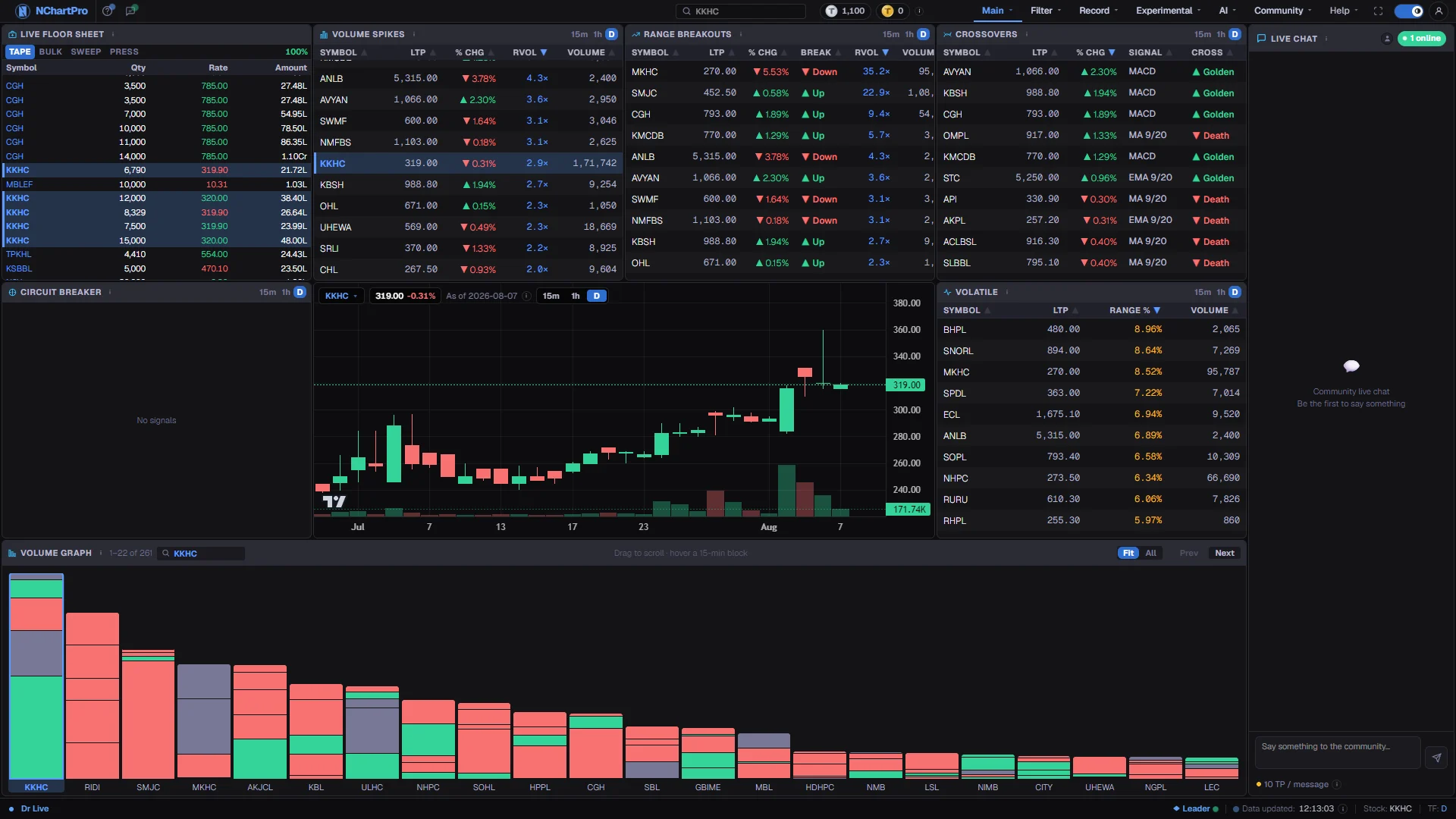
Nobody can watch three hundred symbols at once. Six cards watch them for you and list only the ones behaving abnormally, with a chart in the middle to check each name.
What this page is
The page is arranged around one idea: the cards find candidates, the chart in the middle judges them. Clicking a symbol anywhere sends it to that chart, so you never lose the list you were reading.
Each card asks a different question of the same session. Volume Spikes asks who is trading far above their normal pace. Range Breakouts asks whose price has left its recent range on real volume. Crossovers asks whose daily trend lines have just changed sides. Circuit Breaker asks who is moving hard — up or down — with genuine participation behind it. Volatile asks who is swinging widest. The Live Floor Sheet card is the only one built from individual trades rather than per-symbol totals.
Everything follows the live feed, so the page fills during a session and holds the last session's result outside trading hours.
Why it helps you
- This is the page a short-term trader sits on during the session. A name appearing here is a shortlist entry, and it usually arrives before the move is obvious on a chart you were already watching.
- Volume answers whether you can get out again. A wide-ranging stock on thin volume can fill your order well away from the price you saw.
- The Live Floor Sheet card is the closest thing here to watching individual deals, so you can separate a stock being moved by a few large hands from one changing hands broadly.
- Cross-checking is the discipline. A breakout that also appears on Volume Spikes is a different quality of event from one that appears on its own.
- A long-term holder does not need this page daily. Its value is occasional: when a stock you own turns up here, something changed today, and you can decide whether it concerns the business or only the tape.
- Crossovers works on daily candles, so it is the one card whose timescale is close to an investor's.
- Treat it as a warning bell, not an instruction. Unusual volume in a company you hold is worth reading the news for; it is rarely worth selling on.
- Most of what this page finds resolves within a day or two and never touches a multi-year view.
When to use it, and where to find it
- During the session, 11:00 to 15:00 Nepal time, which is the only window in which the cards fill from the live feed.
- In the first half hour, when opening imbalances push the day's unusual names onto Volume Spikes and Volatile early.
- On a sharply red or green day, to see whether the move is broad or is coming from a handful of heavily traded names.
- After the close, as a review — the cards keep showing the last completed session rather than going blank.
Try it — a short walkthrough
- 1Start with volumeRead Volume Spikes first, highest relative volume at the top. Trading far above normal pace is what makes every other signal on the page worth trusting.See this part in detail →
- 2Send a name to the chartClick any row. The chart in the middle loads that symbol, and the chip at its top-left shows which stock you are looking at with its last price.See this part in detail →
- 3Ask for a second opinionCheck whether the same symbol also appears on Range Breakouts or Circuit Breaker. One card is a hint; two cards pointing at one name is a reason to look properly.See this part in detail →
- 4Judge the risk, not the directionOpen Volatile and find your name's range percent. A wide range means the price is moving hard both ways, so an order can fill far from where you expected.See this part in detail →
- 5See when the trading happenedDrag the volume strip along the bottom to your symbol. The stacked blocks show whether today's volume arrived at the open, near the close, or steadily.See this part in detail →
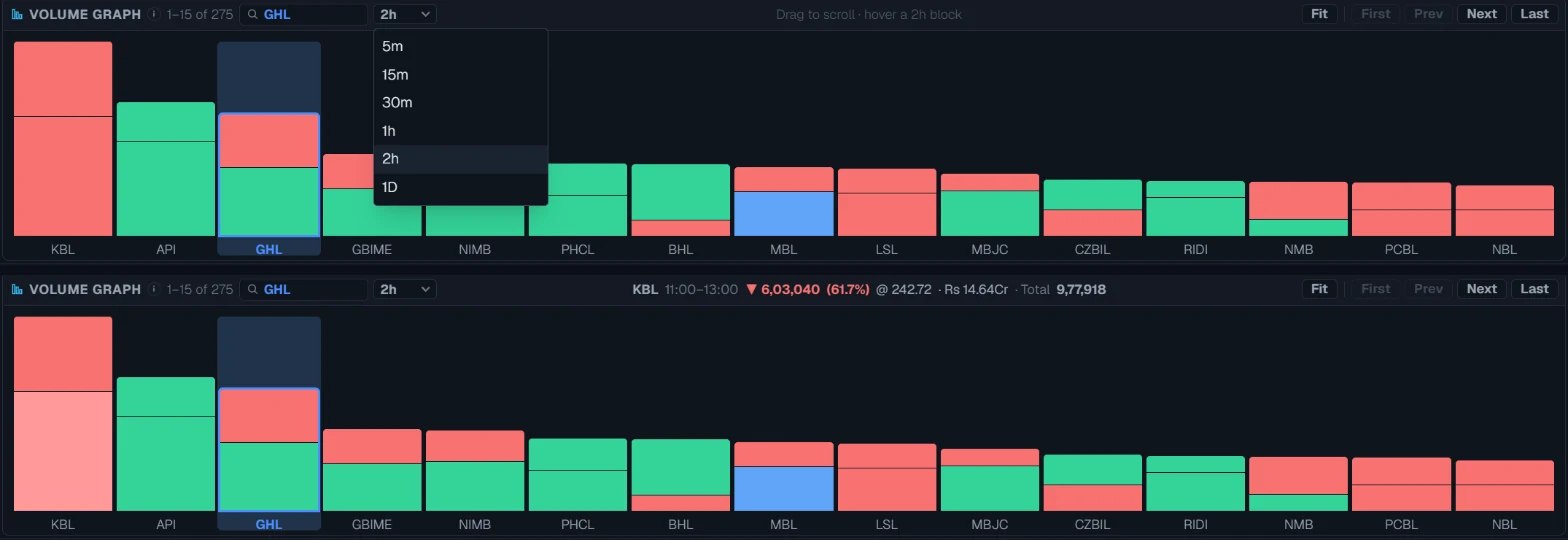
- 6Change the block sizeOpen the dropdown next to "Find stock" on the Volume Graph and pick 5m, 15m, 30m, 1h, 2h or 1D. The bars redraw at once. Hover a block to read its clock time, volume and share of the day in the title bar.See this part in detail →
Every part of the page
In the order you meet them on screen, each with a close-up of the real thing. The numbers match the dots on the figure above.
Live Floor Sheet
The only card here built from INDIVIDUAL trades rather than per-symbol totals. The live floor sheet is read through the session, held in memory, and re-analysed on every update.
How — The four buttons in the title bar switch the view. BULK lists single big trades as they print, newest first. B.TOTAL adds those trades up per stock. MKT HIT (market hit) finds runs that executed back-to-back on one stock. PRESS reads buy/sell pressure.
- A trade counts as big at Rs 20 lakh in value or 10,000 shares — the same threshold Filter → Bulk Trade uses.
- In B.TOTAL, "Share" is how much of a stock's whole floor-sheet turnover came from big trades: 80% means a few large hands are moving it, 5% means ordinary trading.
- PRESS runs from +1 (all buying) to −1 (all selling) and is INFERRED from whether each trade printed above or below the one before it — the floor sheet never says who was the aggressor. Treat it as sentiment, not fact.
- The chip on the right is how much of today's floor sheet has arrived. Pressure stays hidden until that is high enough to mean anything.
- Every instrument is included, not just ordinary shares — a large block on a debenture is still a large block.
Volume Spikes
Stocks trading far more shares than their normal pace right now. It compares the shares traded in the chosen window against what that stock would normally trade in a window of the same length.
How — The small 15m / 1h / D buttons in the card's title bar pick the measuring window — D is the whole session so far. Click any column heading to re-sort, and click a row to load that stock into the chart in the middle.
- RVOL (relative volume) = volume in the window ÷ (its 20-day average daily volume × the window's share of a session). RVOL 3 means three times its usual pace.
- A stock appears only when RVOL is 2 or more — at least double normal. Highest RVOL first, up to 50 names.
- Volume here is a share count (kitta), not rupees.
Range Breakouts
Stocks whose price has pushed outside the high–low range of the previous window, backed by above-average volume. A breakout on thin volume is ignored on purpose, because it is easy to fake.
How — Switch 15m / 1h / D to change which range is used as the reference, and read the Break column for the direction.
- On D the reference is the PREVIOUS trading day's high and low; on 15m / 1h it is the previous completed 15-minute or hourly block.
- Volume confirmation: relative volume must be 1.5 or more — 50% above the stock's normal pace for that window.
- Break +1 / green = broke upward, −1 / red = broke downward. Ranked by how far past the broken level the price has gone, as a % of that level.
Crossovers
Stocks where a fast trend line has just crossed a slow one on the DAILY chart — the classic momentum-change signal. Today's live price is used as the forming daily close, so a cross can appear during the session.
How — Leave this card on D. The 15m and 1h buttons return nothing for it by design, so it is not a bug when they are empty.
- Three signals are checked on the last 60 daily closes: SMA 9 vs 20, EMA 9 vs 20, and MACD (12, 26, 9) against its signal line. The Signal column says which one fired.
- Cross +1 (golden) = the fast line moved above the slow one, read as bullish. −1 (death) = below, read as bearish.
- A stock is listed only on the day the cross actually happens, not for as long as the lines stay apart.
- An empty card simply means no stock crossed today.
Circuit Breaker
Despite the name, this is a MOMENTUM SCREEN — not an exchange halt. It lists stocks running hard today on real participation: a big gain that is being backed by heavy turnover rather than a few thin trades.
How — Read it with the chart: click a row to see whether the run started today or has been building.
- Listed when the stock is up at least 5% today AND the shares traded so far have already reached 80% of its whole previous trading day's volume.
- Both tests use the live feed and are always measured on the FULL day; the 15m / 1h / D buttons only change the volume column.
- Ranked by % gain, up to 50 names. It does not mean NEPSE has halted the stock.
The chart in the middle
The price chart of the stock named in the chip at the top-left of the card. The cards around it and this chart stay in sync: clicking a symbol anywhere — a signal card, a bar in the volume graph, or the dropdown — loads it here.
How — Click the symbol chip to search and pick a stock. The 15m / 1h / D buttons beside it change the candle size of THIS chart only; each signal card has its own separate timeframe buttons.
- The two numbers next to the symbol are the last traded price and today's % change, refreshed every 30 seconds.
- Only ordinary shares can be selected here.
- For the full workspace with indicators, overlays and drawing tools, go to Main → Chart.
Volatile
The stocks swinging the most inside the chosen window — widest travel from low to high, whether they finished up or down.
How — Use it to judge risk, not direction: a wide range means the price is moving a lot both ways, so an order can fill far from where you expected.
- Range % = (high − low) ÷ low × 100. A stock that traded from 95 up to 105 reads about 10.5%.
- On D it uses the true day high and day low; on 15m / 1h it uses the current clock block (resetting at :00 / :15 / :30 / :45 and on the hour).
- Only the top 10 widest movers are shown, biggest range first.
Volume Graph
One bar per stock showing how many shares it has traded so far today, busiest on the left. Each bar is sliced into time blocks stacked oldest at the bottom and newest on top, so you can see WHEN the trading happened, not just how much. The dropdown beside "Find stock" sets how much time one block covers: 5m, 15m, 30m, 1h, 2h or the whole day (1D).
How — Drag the strip sideways to reach the quieter stocks, or use Prev / Next. Type in "Find stock" to jump to one, and click a bar to load that stock into the chart. Pick a block size from the dropdown, then hover a block to read its clock time and volume in the title bar.
- A block is GREEN if the price rose during that time and RED if it fell, so the colours read as advance/decline through the day. Smaller blocks show the minute-by-minute rhythm; 1h or 2h shows which part of the session carried the volume.
- "Fit" rescales the bars to the tallest one currently in view; "All" keeps one scale across the whole list so heights stay comparable.
- Volume is a share count (kitta): Cr = crore (1,00,00,000), L = lakh (1,00,000), K = thousand.
- This card is live-only — it builds up as today's session runs, refreshing about every 20 seconds while the market is open.
Live chat
One open room where everyone using Dr Live talks in real time. When you join you are shown the recent backlog, then everything new as it is written. The green pill is how many people are in the room right now.
How — You must be signed in to read and post — signed out, the panel shows "sign in to chat". Type in the box and press Enter to send (Shift+Enter for a new line).
- On joining you get roughly the last 5 minutes of chat, and never fewer than the 30 most recent messages.
- It is moderated automatically. Abusive language, buy/sell stock tips, repeating the same line, or sending faster than about 6 messages in 8 seconds each earn a warning; 3 warnings block you from sending for 10 minutes. The amber bar is a warning, the red bar is a block with its countdown.
- Each message costs the TPoints shown under the box. If your balance is short the message still sends, and your balance never goes below zero.
- Your own messages sit on the right in accent colour; everyone else's on the left with their name.
Reading the numbers
- RVOL is relative volume — how many times its own normal pace a stock is trading at. RVOL 3 means three times normal.
- Volume on this page is a share count (kitta), not rupees. Cr is crore, L is lakh, K is thousand.
- The 15m / 1h / D buttons belong to the card they sit on. Changing the chart's timeframe does not change any card, and changing a card does not change the chart.
- The Volume Graph has its own block-size dropdown (5m to 1D). It only changes how finely each bar is sliced — the bar's height, which is the day's total, stays the same. Blocks start on the 11:00 open, so 2h reads 11:00–13:00 and 13:00–15:00.
- Circuit Breaker is a momentum screen despite the name. It has nothing to do with NEPSE halting a stock.
- Circuit Breaker is two-sided. A green row moved up at least five percent, a red row moved down at least five percent, and both had to trade heavily to be listed. The list is ordered by the size of the move whichever way it went — click % Chg to bring the gainers or the fallers together.
- An empty card is usually a true result: nothing met that card's test today.
- Updated at the bottom right is when this page last received data. Every card also re-checks on its own at least once a minute, and the Refresh button next to the stamp re-fetches all of them at once.
The Volume Graph title bar, explained
Volume Graph — block size and navigation
The row across the top of the Volume Graph card. Every control here works on the strip of bars below it; none of them changes the chart or the other cards.
| Find stock | Type part of a symbol and pick it. The strip scrolls to that bar and highlights it, and the chart in the middle loads the stock. |
| Block size (5m … 1D) | How much time one block of a bar covers. 5m, 15m and 30m show the rhythm inside the session; 1h and 2h show which part of the day carried the volume; 1D makes each bar one block coloured by the whole day's direction. Tip: Your choice is remembered in this browser. 15m is the starting size. |
| Middle readout | Appears while you hover a block: the stock, the block's clock time, its volume with an up or down arrow, its share of the day, the average rate and rupee amount, and the day total. Tip: Rate and amount are estimates built from the minute candles, not from individual trades. |
| Fit / All | One button that shows the scale in force and switches on click. Fit stretches the bars to the tallest one in view; All keeps one scale across the whole list. |
| First / Prev / Next / Last | Jump one screen of bars at a time, or straight to either end. Dragging the strip or turning the mouse wheel over it does the same. |
What it does not do
- The signal cards scan ordinary shares only — no indices, mutual funds, debentures or promoter shares. The Live Floor Sheet card is the exception and includes every instrument.
- Crossovers is computed on daily candles only. Its 15m and 1h buttons return nothing by design, so an empty result there is not a fault.
- Buy and sell pressure on the Live Floor Sheet card is inferred from whether each trade printed above or below the one before it. The floor sheet does not record who was the aggressor, so read it as sentiment, not fact.
- The cards only fill from the live feed. Outside 11:00 to 15:00 you are reading the last completed session, not the present one.
- A signal is a reason to look. Nothing here knows what you own, what you paid, or what the company announced this morning.
Questions people ask
Usually because no stock met its test today. Crossovers in particular lists a stock only on the day the lines actually cross, so most days it is short or empty.
Both. Every signal card has its own 15m / 1h / D buttons and so does the chart. They are independent on purpose, so you can scan on one timescale and inspect on another.
No. It lists stocks that have moved at least five percent today, up or down, on heavy volume. Exchange halts are not shown on this page.
Yes. A bar's height is the stock's whole-day volume, which is the same whatever block size you pick. Only the slices inside the bar change — fewer and taller for 2h, many and thin for 5m.
Yes. Reading and posting both need you to be signed in, and each message costs the TPoints shown under the box.