

Kundali
Researching one company usually means opening six different pages and losing your place between them. This screen puts all six answers next to each other instead.
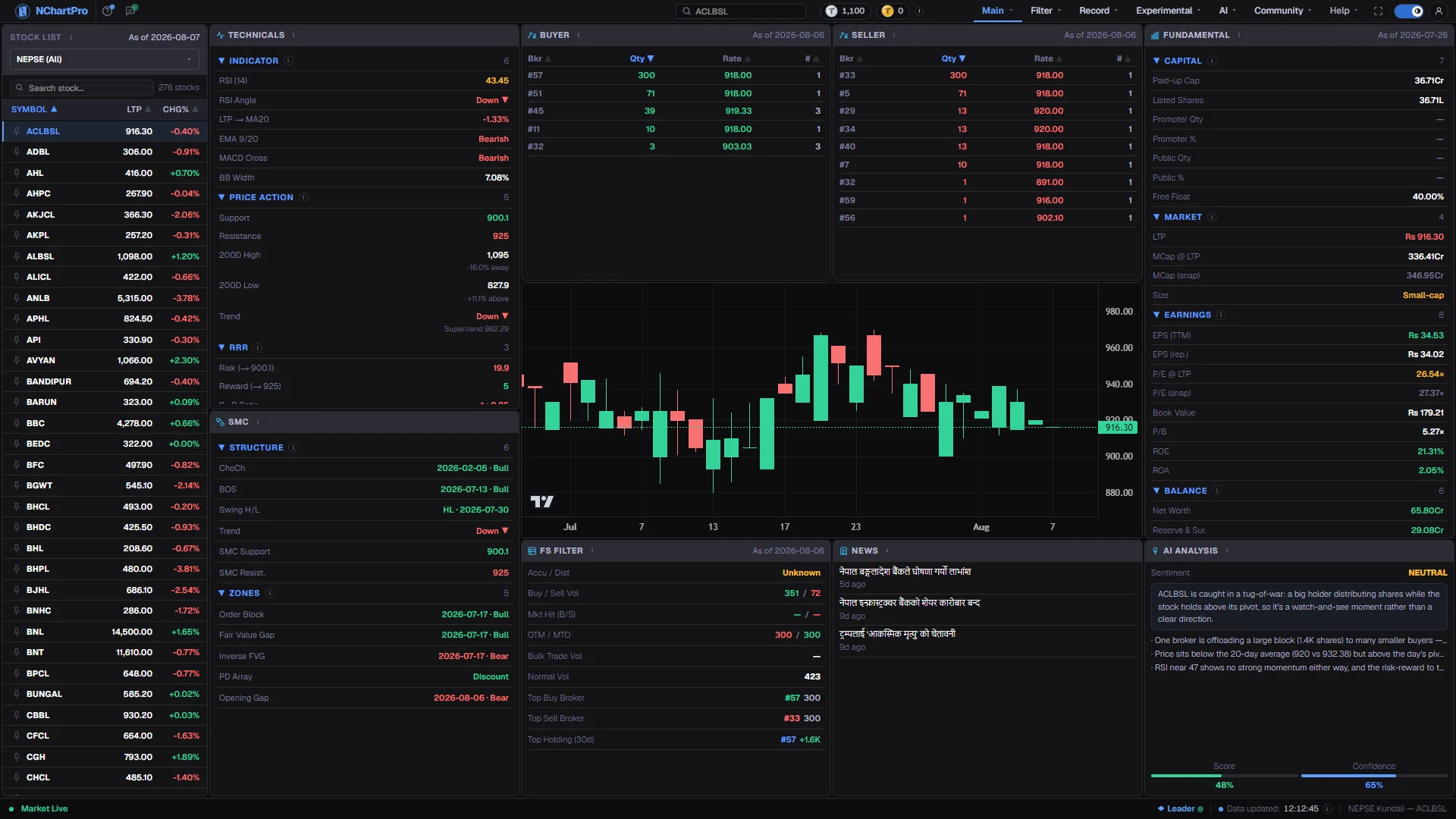
What this page is
The page is built around one selection. You pick a symbol in the left list and every card to the right refills for that company — nothing on the screen belongs to a different stock.
The cards are deliberately different in kind. Technicals and the chart come from daily candles. Buyer, Seller and FS Filter come from the completed floor sheet. Fundamental comes from the company's own published results. Reading them together is the point: when three unrelated sources agree, that is a stronger case than any one of them alone.
It is an orientation screen, not a workbench. Each card is a compact version of a fuller tool elsewhere in the app, and is there to tell you whether opening that fuller tool is worth your time. When it is, the small ↗ in the card's title bar opens that tool on the same stock.
Why it helps you
- The Buyer and Seller cards show whether one broker house took an unusual share of one side of the day. A rise on concentrated buying is a different setup from the same rise on scattered trading.
- Technicals are computed from daily candles, so they answer whether the daily trend is with you before you take a position you intend to hold for a week or two.
- FS Filter compresses the day's floor sheet into one read, which is faster than opening the floor-sheet tools when you are only checking a single name.
- The page is quick to cycle through. Click down a shortlist in the left list and drop the names whose cards contradict each other.
- Fundamental is where a long holder starts. Earnings per share, book value and the return ratios describe the business, and they move only when the company publishes.
- Set those figures next to the price on the chart. A company whose numbers have improved while its price has not is the situation worth writing down and watching.
- The broker cards matter far less here. One day of buying and selling says almost nothing about a holding you intend to keep for two years.
- Use it as a review habit: open each stock you own once a quarter, read Fundamental first, and only then look at the chart.
When to use it, and where to find it
- After the close, once the day's floor sheet has arrived, so the Buyer, Seller and FS Filter cards describe a complete session.
- As the last check on a name that reached your shortlist from a filter, the heat map or a scanner.
- In the days after a company publishes results, to see whether the price has moved to meet the new numbers.
- Not in the first busy minutes of a session — most cards here describe a finished day rather than the one in progress.
Try it — a short walkthrough
- 1Choose a companyNarrow the list with the sector box or the search field, then click a row. Everything to the right reloads for that symbol.See this part in detail →
- 2Read the daily trend firstOpen the Indicator and Price Action sections. They tell you which way the daily candles have been going before any other card can colour your view.See this part in detail →
- 3See who was on each sideCompare the Buyer card with the Seller card beside it, and note the As of date on both. A broker that is large on one side only is the reading worth having.See this part in detail →
- 4Put the business next to the priceRead the earnings and valuation rows, then glance back at the chart. That pairing is the whole reason both cards sit on one screen.See this part in detail →
- 5Finish with the written readScroll to the AI Analysis card at the bottom. Read it last, once you already have your own view, so it cannot become your view. If it says there is no AI text yet, nobody has asked for it today.See this part in detail →
- 6Go deeper with the ↗Click the small ↗ in a card's title bar. Buyer and Seller open Daily Filter, Fundamental opens the Fundamental filter, FS Filter opens Floor Sheet, and AI Analysis opens the full AI page — each already on the stock you picked.See this part in detail →
Every part of the page
In the order you meet them on screen, each with a close-up of the real thing. The numbers match the dots on the figure above.
Pick the stock
Every ordinary stock with its LTP (last traded price) and today's change against yesterday's close. Whatever you click here becomes the subject of the whole page.
How — Narrow the list with the sector box or the search field, then click a row. Click SYMBOL, LTP or CHG% to sort; the pin icon keeps a stock at the top across the whole app.
- "All Sectors (NEPSE)" shows every ordinary stock — mutual funds and debentures are not included.
- While the market is open (Mon–Fri) both columns update live from the shared price feed. A dash means no quote has arrived yet.
Technicals
Everything the chart tools say about the selected stock, grouped into four sections you can open and close. All of it is computed by the backend from the DAILY candles.
How — Click a section heading to expand or collapse it.
- Because it is built from daily candles, these readings describe the daily trend — not what is happening minute by minute.
Buyer brokers
Every broker house that BOUGHT this stock on the latest trading day, and how much. It comes from the floor sheet, so it is a completed-day record.
How — Read the "As of" date on the card to see which trading day it covers, and compare it with the Seller card beside it. The ↗ in the title bar opens Daily Filter on this stock.
- One broker taking a large share of the buying can hint at concentrated interest — it is a hint, not a conclusion.
Seller brokers
The other side of the same day: every broker house that SOLD this stock, and how much.
How — Look for a broker that appears large on one side only — that is more telling than one busy on both.
The price chart
A compact candle chart of the selected stock so you can see the price picture without leaving the page.
How — For the full chart with indicators, overlays and drawing tools, go to Main → Chart.
Fundamental
How the COMPANY is doing — not its share price. These figures come from its last published yearly results.
How — Read this next to the price: a strong business trading cheaply, or a weak one trading dearly, is exactly what fundamentals reveal. The ↗ in the title bar opens the Fundamental filter on this stock.
- Because it is annual reporting, it changes only when the company publishes — it will not move during the day.
SMC
Smart Money Concepts — the footprints large institutional traders leave on the chart: broken structure, price zones they left behind, and where stop-loss orders are resting. Read from the daily candles.
How — Click any row to draw that overlay straight onto the chart above; click it again to remove it. Each row shows only the newest event of its kind, the chart draws them all.
- Ticking a row also widens the chart to about 180 days, because most of these marks are older than the 30 days it normally shows.
- These are pattern detections, not predictions. Read them alongside Technicals rather than instead of it.
FS Filter
A summary of the day's official trade record (the floor sheet) for this stock, hinting whether big players were buying or selling.
How — The full floor-sheet tools live under Filter → FloorSheet if you want to dig deeper — the ↗ in the title bar takes you there on this stock.
News
The three latest GENERAL market headlines. Note: they are not filtered to the stock you picked.
How — For the full archive with category filters, open Record → News.
AI Analysis
The AI's short written read of this stock — a headline and a summary — for the last trading day. It is the same text as the AI Analysis page: the AI writes only words about our own numbers.
How — Treat it as a study aid — read the cards above and make your own judgement. "No AI text yet" means nobody has asked for it today.
- This is for study only. It is not investment advice, and a model can be wrong.
Open the full page
The small ↗ in a card's title bar opens the full page that card is a short version of — on the same stock. AI Analysis has it, and so do Buyer and Seller (Daily Filter), Fundamental, and FS Filter (Floor Sheet).
How — Click the ↗. The page opens with this stock already chosen. Hold Ctrl while clicking to open it in a new tab and keep Kundali where it is.
- On the AI Analysis card it is also the way to WRITE today's text: the card only reads what has been written, and the AI Analysis page is where the first visitor asks for it.
Reading the numbers
- Technicals has four sections: Indicator, Price Action, RRR and Tools. Everything in them is computed from daily candles, so they describe the daily trend and not the last few minutes.
- SMC has its own card on the bottom row, with four sections: Structure, Zones, Liquidity and Candles. Like Technicals it is computed from daily candles. Every row in it is clickable: clicking one draws that overlay onto the chart in the middle of the page, and widens the chart to about 180 days so the older marks are actually inside the view.
- An SMC row shows only the NEWEST event of its kind. The chart draws every one of them, which is why a single click can fill the candles with marks.
- LTP means last traded price — the price of the most recent completed deal, not a bid or an offer.
- The As of date on the Buyer, Seller and FS Filter cards is the trading day being described. It is normally the last completed session, not today.
- Fundamental figures are annual. A number that has not changed in months is normal, not stale data.
- The AI Analysis card shows the headline and summary of the AI text for the last trading day — the same text as the AI Analysis page. It is written once a day, when the first visitor asks for it on that page; the card only reads it, and says so when nothing has been written yet.
- The ↗ in a title bar also appears inside the enlarged view of a card, so you can read the card in full and then go straight to its page.
What it does not do
- The News card carries general market headlines. They are not filtered to the stock you selected. Record → News has the full archive with category filters.
- Regression Trend inside Technicals → Tools reads "Coming soon". It is not computed yet.
- The AI Analysis card is machine-written. It describes what the data did on the last trading day; it is not advice and it can be wrong or incomplete. The card cannot write the text itself — open the AI Analysis page for that.
- Only ordinary shares are listed. Mutual funds and debentures do not appear on this page.
- The chart here is a compact one. Indicators, overlays and drawing tools live on Main → Chart.
Questions people ask
Broker names come from the floor sheet, which is published after a session ends. Prices are live; the floor sheet is a completed-day record.
No. Those figures come from the company's last published yearly results, so they move only when the company reports.
A broker house trades for many clients, so a large figure could be one buyer or fifty. Treat it as a reason to look closer, never as a signal.
No. The AI text is written once per trading day, after the market settles, and only when someone asks for it on the AI Analysis page. Click the ↗ on the card, then use the button on that page. Everyone who opens that stock afterwards reads the same text.