

Gann Wheel
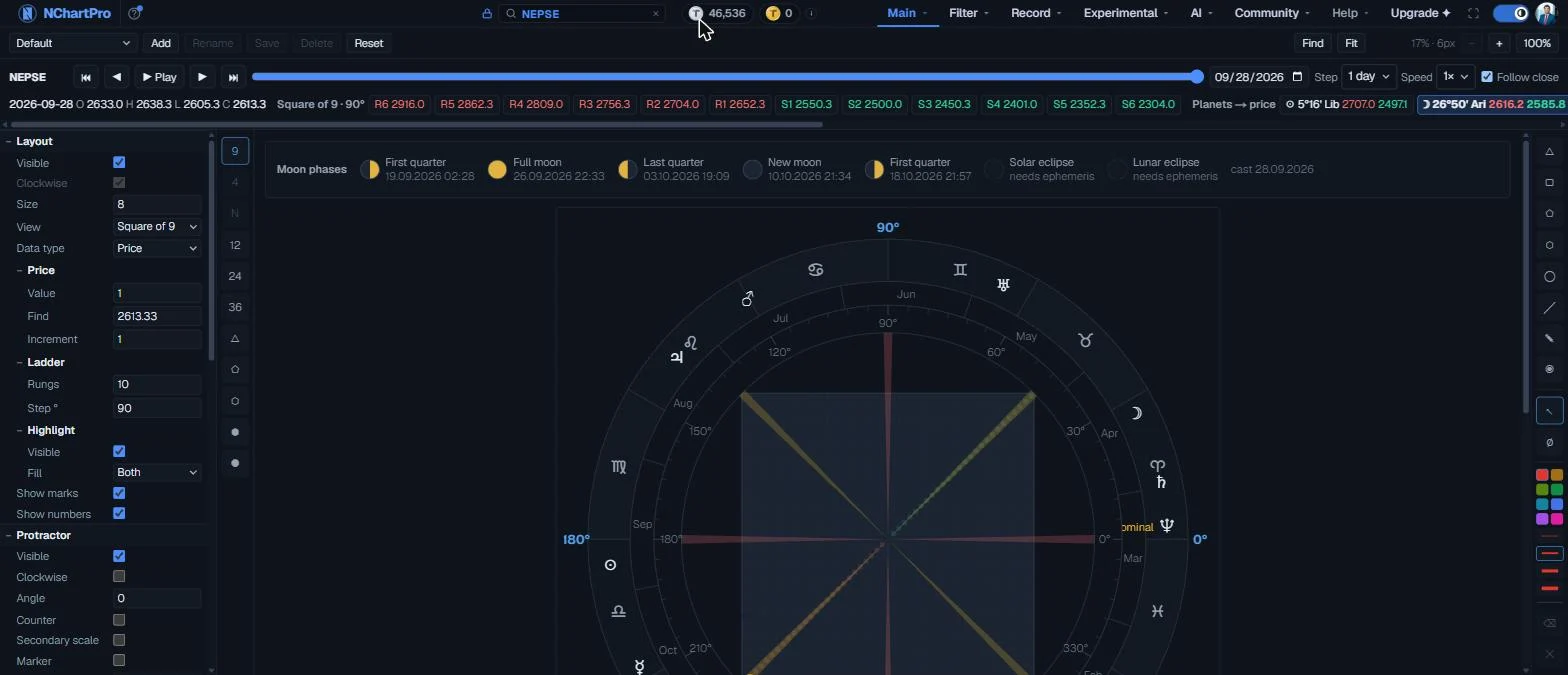
W.D. Gann wound the numbers into a spiral and read prices off the angles between them. This page draws that spiral with rings for degrees, the calendar and the zodiac around it, and adds a time bar: pick a stock, press Play, and the planets, the moon and the support and resistance levels move day by day.
What this page is
The centre is the Square of Nine: the numbers 1, 2, 3 … wound outwards in a square spiral. Numbers on the same line from the centre are a whole number of turns apart, and Gann treated those as prices that relate to each other.
Around it sit three rings: the protractor (degrees), the chronometer (the calendar) and the cosmogram (the zodiac, with the Sun, Moon and planets placed at their positions for the date).
The time bar across the top ties the wheel to a real stock or index. For each trading day it puts the close on the wheel and lists the levels above and below it: from the Square of Nine itself, and from each planet's position turned into a price.
Why it helps you
- The Square of 9 levels (R1–R6, S1–S6) are prices a quarter turn apart round the wheel. Many traders mark the first two each way as the day's likely turning areas.
- Play a past period and watch which levels the price actually touched — they light up with a blue border. It is a quick way to see whether a stock respects these levels before you trust them.
- Change Ladder ▸ Step ° to 45 for levels an eighth of a turn apart, when the quarter-turn levels are too far away for day trading.
- Step by 1 month at a high speed to see several years in a minute. Levels the price keeps coming back to over years matter more than any one day's.
- The planet levels change slowly for the outer planets (Jupiter to Pluto). A price that keeps meeting the same slow planet level is worth writing down.
- Gann methods are a way of marking levels, not a measure of a company's value. Use them beside your other reading, not instead of it.
When to use it, and where to find it
- Before the open, to mark the next day's levels from yesterday's close.
- On a weekend, playing back the last few months of a stock you follow, to see which levels held.
- Around a new moon or full moon, or when a planet changes sign — the moon strip and the zodiac ring show both.
Try it — a short walkthrough
- 1Pick a stockType a stock or NEPSE in the search box at the top of the site. The time bar loads its history and jumps to the newest day.See this part in detail →
- 2Read today's levelsUnder the bar you see the day's close, then R1–R6 above and S1–S6 below from the Square of Nine, then each planet with its sign, degree and a price above and below.See this part in detail →
- 3Play it backDrag the slider back a few months, set Step to 1 day and Speed to 2×, and press Play. The planets turn on the zodiac ring and the levels change each day.See this part in detail →
- 4Look for touchesPause on a day where a level has a blue border — the day's high and low reached it. Step forward a few days and see what the price did next.See this part in detail →
- 5Change the ladderOpen Layout ▸ Ladder on the left and set Step ° to 45. The Square of 9 levels come closer together.See this part in detail →
- 6Save itWhen the wheel looks the way you like, click Add in the preset bar and give it a name. It will be in the list next time.See this part in detail →
Every part of the page
In the order you meet them on screen, each with a close-up of the real thing. The numbers match the dots on the figure above.
The time bar
One trading day at a time, for the stock or index named on the left. Each step moves the wheel's date, puts that day's close on the wheel, and lists the levels for that day.
How — Pick the stock or index in the search box at the top of the site. The bar loads its daily history — about ten years.
- Prices are the prices that actually traded, not adjusted for bonus shares.
Play, pause and step
Play moves forward one step at a time on its own. The arrows beside it step once back or forward; ⏮ and ⏭ jump to the first and the newest session.
How — Click Play. Watch the planets turn round the zodiac ring and the levels change under the bar. Click Pause to stop on a day.
- At the newest session Play stops by itself. Press it again to start over from the beginning.
The date slider
The whole history on one line — left is the oldest session, right is the newest.
How — Drag the handle to any day. The wheel follows as you drag.
Go to a date
A calendar to jump straight to one day.
How — Click it and pick a day. A weekend or a holiday lands on the session just before it.
Step and speed
Step is how far one move goes: 1 day, 1 week (5 sessions) or 1 month (21 sessions). Speed is how many steps Play makes each second.
How — Use 1 day at 1× to study each session. Use 1 month at 4× or 8× to watch a whole year go by in a few seconds.
Follow close
When this is on, each day's close is written into Price ▸ Find on the left, so the wheel highlights it and moves its base square with the date.
How — Turn it off to keep your own Find price fixed while the date and the planets move.
Support and resistance for the day
The day's open, high, low and close, then two sets of levels worked out from the close.
How — Rest the mouse on any level to read how it was made. A level with a blue border is one the day's price range touched.
- Square of 9: R1–R6 above and S1–S6 below, one rung every Step ° (90° by default) round the wheel.
- Planets → price: each planet's sign and degree, then the price that far round the wheel above (red) and below (green) the close.
- Planet positions are for 15:00 NPT on the day, from public formulas (Meeus, JPL), within about 0.1°.
Presets
Save the whole settings panel under a name and bring it back later.
How — Change the settings, click Add and type a name. Pick it from this list to load it again. Reset goes back to the starting settings.
- Presets are kept in this browser only — they do not follow you to another computer.
The settings panel
Every part of the wheel, in groups: Layout (with Price, Time, Ladder and Highlight), Protractor, Chronometer, Cosmogram, Location, Moon phases and Cycles.
How — Click a group name to open or close it. Rest the mouse on any setting for a longer explanation.
- Price ▸ Find is the price the ladder is built from — the time bar fills it in when Follow close is on.
- Ladder ▸ Step ° is the turn between rungs. 90° is a quarter turn; 45° gives twice as many levels.
- Dates are picked from a calendar.
The views
How the numbers are laid out: the Square of 9 spiral, the Circles of 12, 24 and 36, and the polygon views.
How — Click a button to switch. Some views are greyed out and say why when you rest the mouse on them.
The wheel
The numbered spiral in the middle, the degree ring, the calendar ring and the zodiac ring with the planets on it. The highlighted cell is Find; the outlined cell is the ladder's base square.
How — Drag to move around, scroll to zoom. Find (top right) scrolls back to the highlighted cell and Fit shows the whole wheel. Drag a ring to turn it.
- The moon strip above the wheel shows the five phases around the date, with their times in your time zone.
Drawing on the wheel
Shapes, lines, colours and widths to mark the wheel. Drawings are kept per view and are not changed by presets.
How — Pick a tool, then draw on the wheel. Click a drawing to select it; Delete removes it.
Reading the numbers
- Square of 9 level: take the square root of the close, round it to a whole number (the base square), then add or take away half a step per rung for every Step ° of turn, and square it again. With Step ° 90 each rung is a quarter turn round the wheel.
- Planet level: the planet's longitude (0° = the start of Aries) used as the turn. The close's square root is moved by longitude ÷ 180 and squared again, giving one price above (red) and one below (green).
- A level with a blue border was inside that day's high–low range: the price touched it.
- Planet positions are for 15:00 NPT on the date — the close. They come from published formulas: Meeus for the Sun, Moon and lunar node, JPL (Standish) for Mercury to Pluto. Checked against Meeus's worked examples and known oppositions, they are within about 0.1°. ℞ marks a planet that is retrograde (moving backwards against the zodiac).
- Signs are written short: Ari Tau Gem Can Leo Vir Lib Sco Sag Cap Aqu Pis. 7°32' Lib means 7 degrees 32 minutes into Libra.
- Prices on the time bar are the ones that actually traded. They are not adjusted for bonus shares, so a level from years ago may sit far from today's price after a bonus.
Every setting, explained
The time bar
The two rows across the top of the wheel. The first row moves the date; the second shows that day and its levels.

| Symbol | The stock or index on the bar. Change it from the search box at the top of the site. |
| ⏮ ◀ ▶ ⏭ | Jump to the first session, step back one step, step forward one step, and jump to the newest session. |
| Play / Pause | Moves forward one step at a time on its own, at the chosen speed. Stops by itself at the newest session; pressing Play there starts again from the beginning. |
| Slider | The whole history on one line. Drag it to any day. |
| Date | A calendar to go straight to one day. A weekend or holiday lands on the session just before it. |
| Step | How far one step moves: 1 day, 1 week (5 sessions) or 1 month (21 sessions). |
| Speed | Steps per second while playing: 0.5× (one every two seconds) up to 8×. |
| Follow close | On: each day's close is written into Price ▸ Find, so the wheel highlights it and its base square moves. Off: your own Find stays put while the date moves. |
| Level strip | The day's open, high, low and close; the Square of 9 levels R1–R6 and S1–S6; then each planet as sign and degree with its price above and below. Rest the mouse on any level for how it was made. |
Layout — the wheel, its numbers and the ladder
The first group in the left panel. It decides what is drawn in the centre and what its numbers mean.
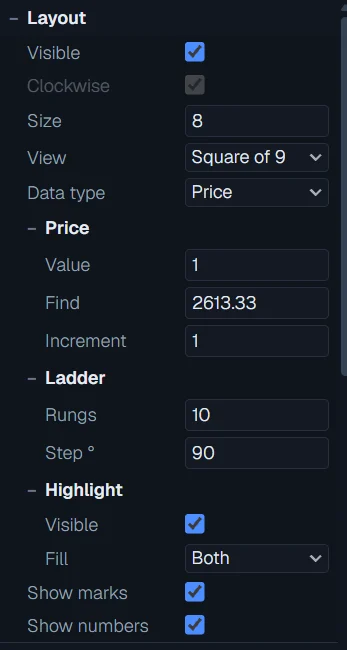
| Visible | Draws the numbered cells. Show numbers (under Highlight) decides whether the numbers are printed. |
| Clockwise | Direction of the ring views. The Square of 9 spiral has one fixed direction, so this is greyed on it. |
| Size | How many rings the spiral has. More rings reach higher prices but make each cell smaller. |
| View | Square of 9, the Circles of 12, 24 and 36, or a polygon. The same as the buttons on the thin rail beside the panel. |
| Data type | What the numbers mean: Price, or Time (calendar days). The spiral is the same; only the labels change. |
| Price ▸ Value | The number in the centre cell. |
| Price ▸ Find | The price to highlight — and the price the ladder is built from. The time bar fills this in when Follow close is on. |
| Price ▸ Increment | The step between two neighbouring cells. Must be above zero. |
| Time ▸ Start date / Find date | With Data type Time: the date in the centre cell, and the date to highlight. Both are picked from a calendar. |
| Time ▸ Increment | Calendar days between two neighbouring cells. |
| Ladder ▸ Rungs | How many support and resistance rungs each way. |
| Ladder ▸ Step ° | The turn between rungs. 90 is a quarter turn; 45 gives levels twice as close. Any value from 1 to 360 is allowed. |
| Highlight ▸ Visible / Fill | Draws the highlight over the found cell, and whether it fills the cross, the star or both. |
| Highlight ▸ Show marks | Outlines the ladder's base square — the whole-number square nearest to Find. |
| Highlight ▸ Show numbers | Prints the number in every cell that is big enough to hold it. |
Protractor and Chronometer — degrees and the calendar
The two rings round the spiral that measure turn and time.
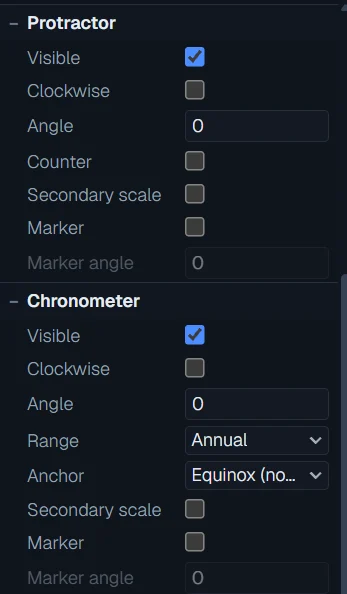
| Protractor ▸ Visible | The degree ring: a tick every 5°, a label every 30°. 0° is on the right and it counts anticlockwise. |
| Clockwise / Angle | Turn the ring the other way, or rotate it. You can also drag the ring on the wheel to rotate it. |
| Counter | Shows the marker's angle as a number beside the ring. |
| Secondary scale | A second, finer tick ring inside the first. |
| Marker / Marker angle | A pointer you can drag round the ring; its angle is shown and can be typed. |
| Chronometer ▸ Visible | The calendar ring — months (or other bands) laid round the same 360°. |
| Range | What one full turn of the calendar ring covers — for example a year of months. |
| Anchor | Where the ring's 0° sits in the calendar. |
| Secondary scale / Marker | Ticks at each band edge, and a draggable pointer. The pointer only reads; it does not change the date. |
Cosmogram, Moon phases and Cycles — the sky
The zodiac ring with the planets on it, the moon strip above the wheel, and the cycle cards below it. All of them follow the date — the time bar's day, or the date set here.
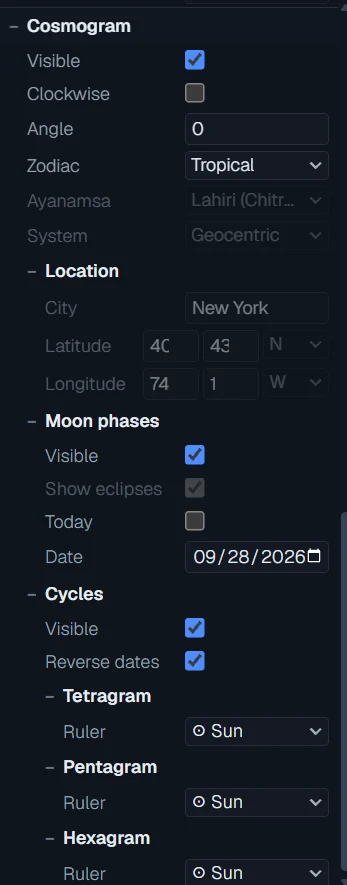
| Cosmogram ▸ Visible | The zodiac ring: the twelve signs, with the Sun, Moon, planets and the lunar node placed at their positions for the date. |
| Clockwise / Angle | Turn or rotate the zodiac ring. Dragging it on the wheel rotates it too; the planets turn with it. |
| Zodiac | Tropical (the usual Western zodiac) or Sidereal. Sidereal still draws the tropical signs for now and says so. |
| Ayanamsa / System | Settings for the sidereal zodiac and the frame; shown so the choice is visible, not in use yet. |
| Location | City, latitude and longitude. Kept for later — the positions here do not need it, as a zodiac longitude is the same from anywhere on Earth to well under a degree. |
| Moon phases ▸ Visible | The strip of five moon phases (new, first quarter, full, last quarter) around the date, with their times in your time zone. |
| Today / Date | Cast the page for today, or for the date picked in the calendar. Using the time bar switches Today off and sets this date for you. |
| Cycles ▸ Visible / Reverse dates / Ruler | The three cycle cards (4-, 5- and 6-point stars) under the wheel, which way they walk, and the planet that rules each. |
What it does not do
- Planet positions come from published formulas, not from Swiss Ephemeris. They are within about 0.1°, valid from 1800 to 2050. Chiron is not shown — the formulas used here have no data for it.
- Sidereal zodiac still draws the tropical signs: the ayanamsa (the offset between the two) is not computed yet.
- Eclipses are not computed. Their cells in the moon strip stay empty and say so.
- Presets and drawings are kept in this browser only.
- This page was built in SAT3 first. The time bar, planets and calendar pickers were added here in 006 on 2026-09-28, so SAT3's copy does not have them yet.
Questions people ask
The time bar sets it. Every step writes the day into the page's one date, so the planets, moon strip and calendar ring all show the same day. Tick Today to go back to today.
Follow close is on in the time bar, so each day's close is written into Find. Turn Follow close off to keep your own price.
A planet's longitude can be up to 360°, a full turn or more round the wheel, so its level can be well above or below the close. Slow planets move their level slowly; the Moon's changes every day.