

Watch List
A trading plan is worth most when it is written down before the day gets loud, and this is where it goes: your names, and for each of them the three prices that matter.
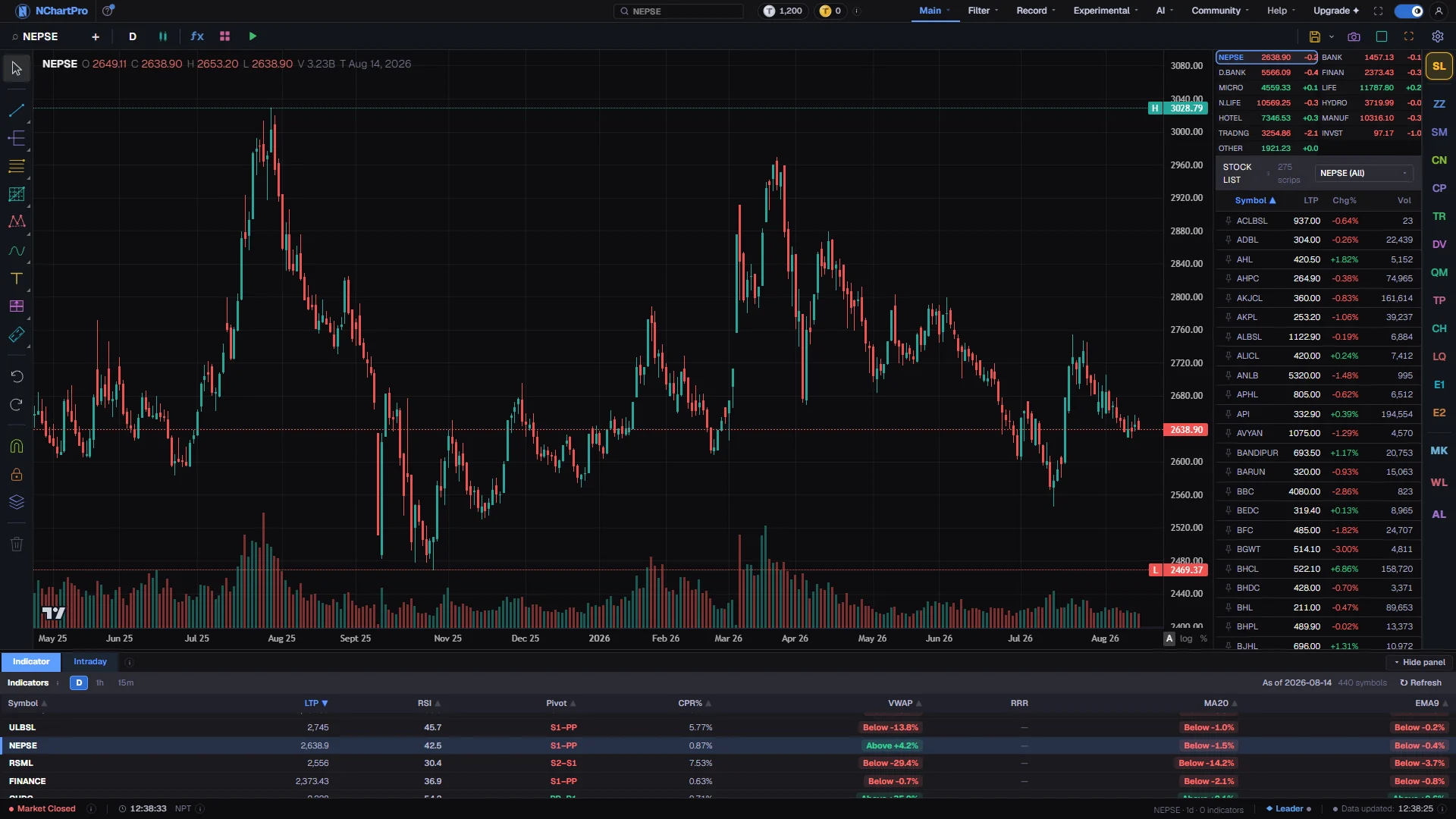
What this page is
Watch List is the WL button in the column down the right edge of the Chart page. It holds symbols you chose, in a table of five columns — a serial number, the symbol, and your Buy, Sell and Stop prices. Clicking a row charts that symbol, so the list doubles as a shortcut back to the names you care about.
Adding is done from the chart. Chart the company you want, then press the Add button in the panel header. The button changes to Added once the symbol is in, so the same name cannot go in twice.
The three prices are yours to set, and the gear at the end of a row opens the box that sets them. Buy is the price you would be willing to pay. Sell is the profit target you would take. Stop is the price at which you would accept you were wrong and cut the loss.
That box does more than take three numbers. It reads the recent daily candles, offers a starting plan built from the weekly low, and shows the risk and the reward of the plan you are typing — per share, as a percentage, and in rupees once you tell it a quantity.
The list itself belongs to your account, so it follows you to another browser and another machine. The pins that float a row to the top do not: those are stored in the browser you are sitting at.
Why it helps you
- The value is in writing the stop down before the position exists. A stop chosen calmly on Sunday and a stop chosen while a stock is falling on Wednesday are rarely the same number, and only one of them is a plan.
- The risk and reward panel is the honest part. If a setup only reaches one to one, you can see it before committing rather than after, and the ratio turns green from two to one upward.
- Keep it short. A watch list of thirty names is a list nobody reads; a list of six is a morning routine.
- The pin holds today names at the top while the rest of the list stays in place, which is a lighter way to work than deleting and re-adding.
- Buy is the more useful of the three for a long holder. A good company at the wrong price is still the wrong purchase, and the box is where you record what the right price would be.
- The default plan starts from the weekly low, which is a deliberately unexciting anchor — it asks what the stock has actually traded at recently rather than what you hope it will do.
- A stop is optional for a long hold, and leaving it blank is a legitimate answer. The row simply shows a dash, and nothing in the app treats a blank as zero.
- Revisit the numbers when results or a corporate action change the company. A watch list that has not been touched in a year is recording a plan you no longer hold.
When to use it, and where to find it
- Before the session, to set or review the three prices while nothing is moving.
- The moment you notice a company worth following — chart it and press Add, so the name is not lost by tomorrow.
- When you are working out position size, because the box turns your buy and stop into a rupee loss for a given quantity, which is the number a position calculation actually needs.
- After a trade closes, to remove the name or to reset the plan rather than leaving a stale one on screen.
- The WL button is in the button column on the right edge of /main/chart. Pressing it again closes the panel.
- Nothing here is a portfolio entry. Actual holdings and trades live under Main then Portfolio, which is a separate record.
Try it — a short walkthrough
- 1Add the symbol you are chartingOpen the panel with WL, then press Add in its header. The button turns into Added and the symbol appears at the top of the list. If you are signed out, the sign-in box opens first.
- 2Open the plan boxClick the gear at the end of the row. The title bar shows the symbol and its weekly low — the lowest low of roughly the last five trading days — and the box can be dragged by that bar if it covers the chart.
- 3Take the suggested plan, or type your ownFor a brand-new symbol the three prices are already filled in from the weekly low. Press the apply-default-plan button to put them back at any time, or type over any of the three.
- 4Tune the two knobsStop below is how far under the buy the stop sits, as a percentage. Reward is how many times the risk the target is worth. Changing either recomputes Stop and Sell immediately, so you can see what a wider stop costs.
- 5Read the trade planThe panel on the right shows the risk and reward ratio, the gain and loss per share and as a percentage, and — once you put a quantity in — the rupee gain and loss. Press Save when the numbers say what you meant.
- 6Keep the list shortThe bin icon removes a symbol, and the pin at the left of a row floats it to the top for as long as you are working on it.
Every part, up close
The Chart page — WL is one of the buttons in the right-hand column. Each part with a close-up of the real screen; the numbers match the dots on the picture.
The WL button
Watch List is one of the panel buttons in this column, and pressing it again closes the panel.
The panel slot
It opens into the same slot the Stock List uses, so your shortlist and the whole market are never on screen at once.
Add what you charted
The Add button in the panel header saves whichever symbol is loaded here, so chart the company first and then add it.
Reading the numbers
- Buy is shown in green, Sell in blue and Stop in red. A dash means that price has not been set, which is different from zero — nothing treats an unset price as a target.
- The default plan is Buy at the weekly low, Stop two percent below the buy, and Sell at three times the risk above it. Those two defaults are starting points and both are editable.
- Sell and Stop must land within fifteen percent of Buy. The box states the allowed range under the three fields, turns a field red while it is outside, and snaps it back into range when you leave the field. Saving from a field you never left is caught as well.
- Because the range is enforced, the two knobs are capped too — a two percent stop with a twenty times reward would be a forty percent target, and that is the back door the cap closes.
- Risk and reward are arithmetic on your own three numbers. Gain per share is Sell minus Buy, loss per share is Buy minus Stop, and the ratio is one divided into the other. Nothing here is a forecast.
- SN is just the row number in the current order. It is not an identifier and it changes when you pin something.
What it does not do
- The list needs an account. Signed out, the panel is empty and Add opens the sign-in box instead of saving; the pins are the only part stored in the browser.
- Nothing here places an order, watches a price for you, or notifies you. These are your own notes. Standing rules that actually fire live on the Alerts page under Portfolio.
- The weekly low is read from recent daily candles, so a symbol with a very short history may not have one. The title bar then shows n/a and the default plan button is unavailable.
- Prices in the row do not update live. They are the numbers you wrote down, not the market — the market is on the chart beside them.
- Pins are per browser. The same account on another machine keeps the list and loses the pinning, which is intended: pinning is about what you are doing today.
Questions people ask
Because a plan that far out stops being a plan for this trade. The band is stated under the fields and a number outside it snaps back when you leave the box, rather than being silently refused.
No. The watch list stores your numbers and nothing more. If you want to be told when a price is reached, set a rule on the Alerts page under Portfolio.
No. It records intent, not ownership, and nothing in the portfolio pages reads it. Buying is recorded separately in the trade ledger.
Press the apply-default-plan button in the box. It recomputes all three prices from the weekly low using the current stop and reward knobs.