

Auction Market Theory
Every trading day is an auction. Buyers and sellers move the price up and down until they find a price where both are happy to trade. Auction Market Theory (AMT) reads that auction: where most trading happened, where price was refused, and whether today is calm or moving to a new level. The Auction panel draws this on your chart and tells you, in a few words, what the auction is doing today.
What this page is
The market is an auction. When price goes up, it is looking for sellers. When price goes down, it is looking for buyers. When both sides are happy, price stays in one area and trades there a lot. That area is called value.
The market is in one of two states. Balance: price moves sideways inside a range, and both sides agree on value. Imbalance: one side is stronger, price leaves the old range and looks for a new value. Most of the time the market is in balance. The big moves happen when balance breaks.
The Auction panel builds a profile for each day: how much was traded at each price. From the profile it finds the key prices (POC, VAH, VAL), the first hour range (IB), and reads the day: how it opened, what kind of day it is, and whether value is moving up or down.
It uses the minute candles of the session, 11:00 to 15:00. All profile prices are the real traded prices.
Why it helps you
- Yesterday's value area is a map for today. If price opens above it and stays there, buyers are in control. If it opens above and falls back inside, the move was refused.
- The POC of an old day that price has not touched again (a naked POC) often pulls price back to it. It is a useful target.
- The first hour range (IB) tells you how the day may go. A narrow IB often leads to a bigger move later. A wide IB often means a quiet rest of the day.
- The 80% rule gives a clear plan: when price opens outside yesterday's value and comes back inside, it often travels to the other side of value.
- Value migration shows if fair value is rising, falling or flat over many days. Value rising day after day is healthy buying. Value falling day after day is steady selling.
- A balance box shows days when the stock went sideways. A break out of a long balance, which then holds, is often the start of a new trend.
- The composite profile joins many days into one. Its POC is the price where the stock traded most over that time — a strong support or resistance.
When to use it, and where to find it
- Before the market opens: look at yesterday's POC, VAH and VAL, and the naked POCs. These are the prices to watch today.
- In the first hour: watch how the day opens and where the IB forms. The panel says "forming" until the rule has enough time.
- After the close: read the day type, the profile shape and value migration, and plan for tomorrow.
- Chart page → right-hand column → the Auction button. If you do not see the button, it is not on your plan yet.
- To see these readings for every stock at once, open Filter → Misc → Auction (AMT). It shows each stock's last day and lets you pick stocks by open type, day type, acceptance or balance.
- To be told when the price reaches one of these levels, open the Alert panel (AL), pick the category Auction and pick a level — for example "Price crosses above yesterday's value area high".
Try it — a short walkthrough
- 1Open a stock on an intraday chartLoad any stock and pick a 1m, 5m, 15m or 1h chart. On a daily chart the panel draws only the levels (yesterday's value, naked POCs, composite), not the per-day profiles.
- 2Open the Auction panelClick the Auction button in the right-hand column. Each day now shows a sideways profile, its POC line and its value area.
- 3Read the context cardThe card at the top says where price is against yesterday's value, how the day opened, if the move is accepted, the day type and the value migration.
- 4Turn parts on and offUse the switches for Session profile, Yesterday's levels, Naked POC and Initial Balance. Change the value area %, the IB length or how many days back to draw.
- 5Hover a labelEvery label shows the rule behind it when you hover it. For example: "Open Drive: opened outside value and never came back to the open in the first 30 minutes."
- 6Turn on the broker profile (if your plan includes it)Open a stock and turn on "Broker profile" in the Show card. Next to each day's profile, every price row gets a green bar for the brokers who bought there and a red bar for the brokers who sold. The darker parts are the top 3 brokers. Zoom in to read their broker numbers. A card in the panel lists the top 5 buying and selling brokers in the value area and at the POC.
- 7Close the panelClick Auction again. Every Auction drawing disappears.
The panel and the chart, part by part
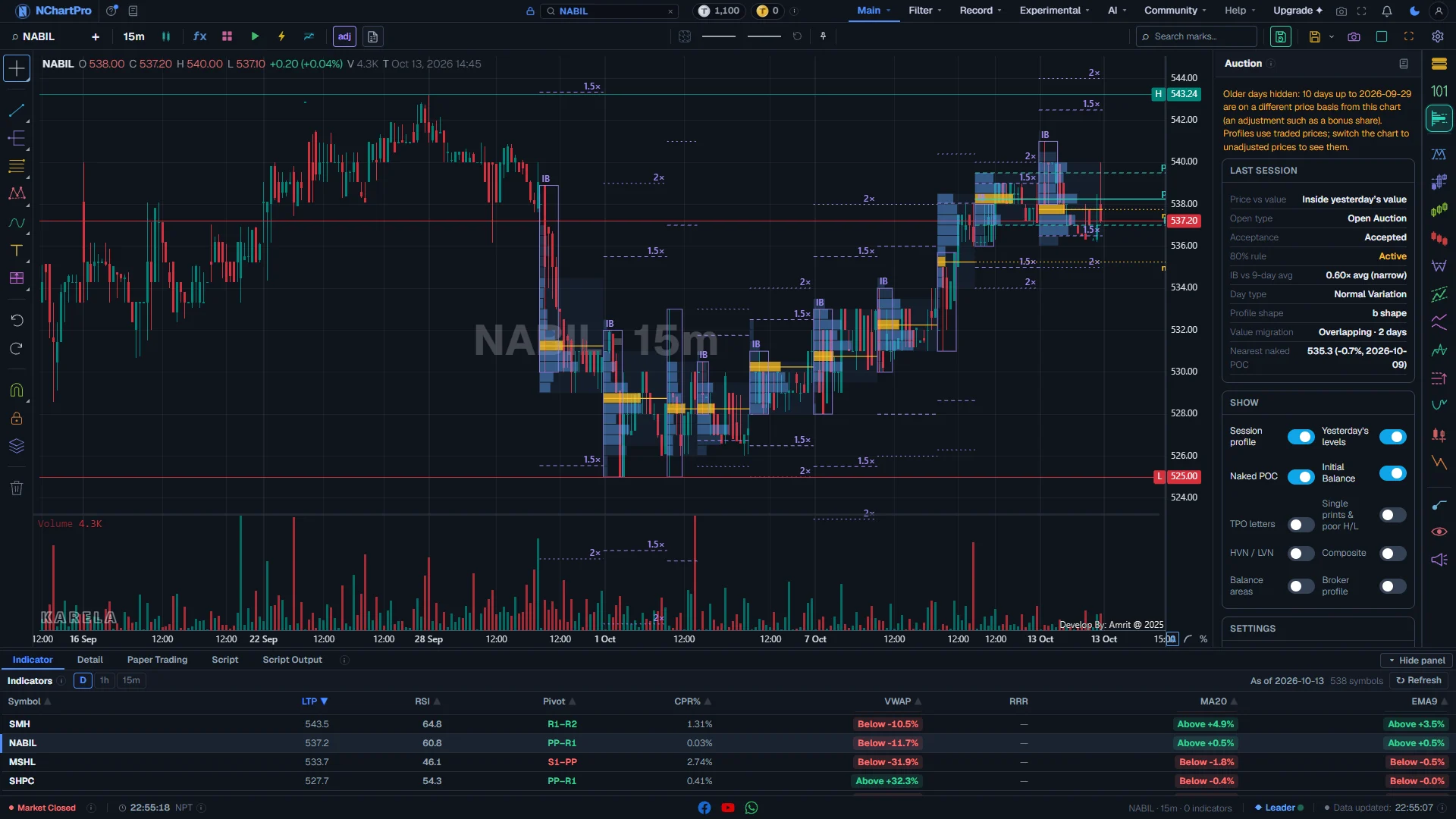
The Auction panel open on a 15-minute chart. Each part with a close-up of the real screen; the numbers match the dots on the picture.
Today so far / Last session
The reading of the newest day, in nine lines. While the market is open it is called "Today so far"; after the close, "Last session".
How — Read it from top to bottom. Hover any line to see the rule behind it. A grey "Forming" means the day is still open and that rule needs more time.
- Price vs value: is the price now above, inside or below yesterday's value area (the prices that held 70 % of yesterday's volume)?
- Open type — Open Drive: opened and moved hard one way, and never came back to the open in the first 30 minutes. Open Test Drive: tested one way first, found no business, then drove the other way. Open Rejection Reverse: moved one way at the open, was refused, and turned back through the open. Open Auction: moved up and down around the open with no clear side. Decided at 11:30.
- Acceptance — Accepted: the price opened outside yesterday's value and stayed out for at least two time blocks, so the market agrees with the new price. Rejected: it came back inside. A dash means it opened inside, so there is nothing to accept or reject.
- 80% rule — Active (amber): the price opened outside yesterday's value and has now spent two blocks back inside it. It often travels on to the other edge of value. No: the rule is not in play.
- IB vs average: today's first-hour range against its average over the last 20 days, for example "1.40× avg (wide)". Wide (1.3× or more) is an active open. Narrow (0.7× or less) leaves room for a bigger move later.
- Day type — Normal: the first hour held almost all day. Normal Variation: the day stretched the first-hour range one way, up to about double. Trend: kept going one way all day and closed near the end. Double Distribution: two separate areas of trade with thin trade between them. Neutral: stretched both sides, then closed in the middle. Non-Trend: a small, quiet day. Circuit: the stock hit its ±10 % limit. Decided after the close (15:00).
- Profile shape — P: most volume near the top, often buyers in control. b: most volume near the bottom, often sellers in control. D: a bulge in the middle, a balanced day. Thin: a fast, one-way day.
- Value migration — Higher: today's value area sits above yesterday's. Lower: it sits below. Overlapping: the market is balancing. "· 3 days" means three days in a row.
- Nearest naked POC: the closest old POC that no later day has traded through — its price, how far it is from now in %, and its date. The price often returns to these.
Show
Switches for what is drawn on the chart. Nothing is drawn while the panel is closed.
How — Click a switch to turn it on or off. A switch whose name is bright is on. Hover one to read what it draws.
- Session profile: the volume at each price for every day, drawn inside that day, with its POC and value area. Intraday charts only.
- Yesterday's levels: yesterday's POC, value area high and value area low, carried across today.
- Naked POC: old POCs that no later day has traded through, carried to the right edge.
- Initial Balance: the first hour's range as a box, with 1.5× and 2× lines. Intraday charts only.
- TPO letters: a letter for each time block that traded at each price. Shown when the rows are tall enough to read.
- Single prints & poor H/L: prices only one block reached, and weak or strong (tail) highs and lows.
- HVN / LVN: busy prices and thin gaps inside each day.
- Composite: one profile for all the loaded days, at the right edge.
- Balance areas: runs of days whose value areas overlap, with the breakout or the rejection marked.
- Broker profile (if your plan includes it): which brokers bought and sold at each price. On an index it says "stocks only", because an index does not trade.
What is drawn on the chart
Each day gets a sideways bar chart of where trading happened, with its fair-value lines. The levels run across to the right edge.
How — Use an intraday chart (1m to 1h) to see the profiles. On a daily chart only the levels are drawn. Zoom in to read the letters and the broker numbers.
- Profile bars (blue): the longer the bar, the more volume traded at that price. Bars inside the value area are darker. The POC row is amber, with an amber line across the day.
- pVAH, pPOC, pVAL (in the accent colour): yesterday's value area high, POC and value area low. The POC line is solid and thicker; the value lines are dashed.
- nPOC (amber, dotted): a naked POC, with its price.
- IB (purple): the first-hour box, with dashed 1.5× and 2× lines above and below it.
- Single prints: short amber marks at the left edge of the day. "poor high" and "poor low" are amber; "tail" is red at the top and green at the bottom.
- HVN: green ticks. LVN: red ticks.
- Balance boxes (dashed): green "Breakout ↑" or "Accepted ↑", red "Breakout ↓" or "Accepted ↓", amber "Rejected", grey "Balance" while it lasts.
- Composite (purple, at the right edge), with its POC marked cPOC.
The lower half of the panel, part by part
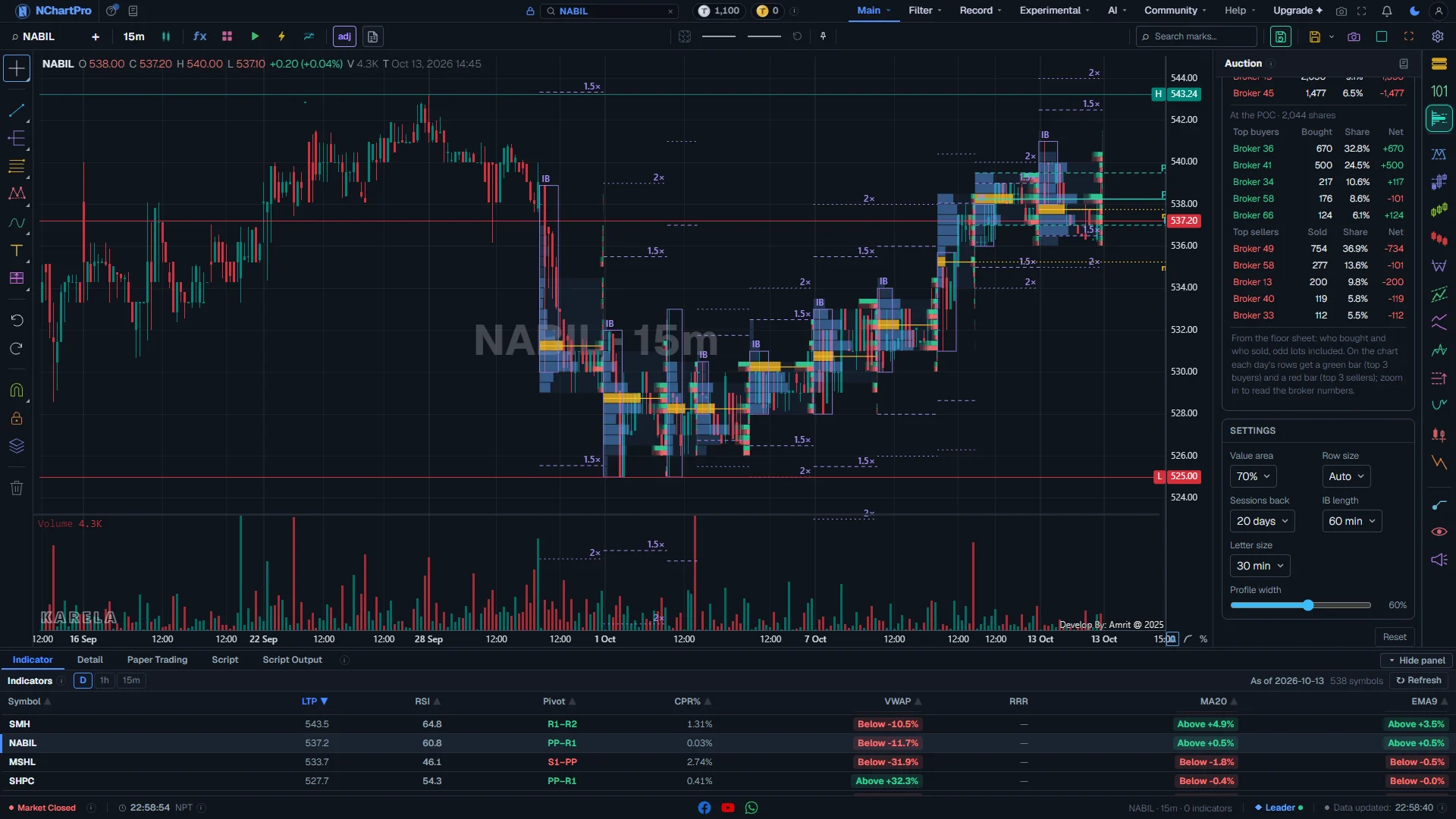
The Auction panel scrolled down: Broker profile on, then Settings and Reset. Each part with a close-up of the real screen; the numbers match the dots on the picture.
Brokers (floor sheet)
Shown when Broker profile is on (if your plan includes it): who bought and who sold on the newest finished day.
How — Read the top line, then the two tables: inside the value area, and at the POC. On the chart, zoom in to read the broker numbers on each price row.
- Top line: the day, the shares traded, and how many brokers bought and sold. During the session it says that today's brokers appear after the close.
- Top buyers / Top sellers: the 5 brokers who bought or sold the most there. Bought / Sold is in shares. Share is their part of the total, in %.
- Net: what the broker bought minus what it sold there. Green is a net buyer, red is a net seller.
- On the chart, each price row gets a green bar (bought) above a red bar (sold). The darker parts are the top 3 brokers. Both bars are the same length, because every share bought was sold by someone — what differs is WHO.
- "Not recorded" is a trade with no broker number in the floor sheet.
Settings
How the profiles are built and drawn.
How — Pick a value in each box. The chart redraws at once.
- Value area: the share of the day's volume treated as fair value — 60 % to 80 %, normally 70 %.
- Row size: how much price one row covers. Auto picks a size that keeps each day readable.
- Sessions back: how many days of minute data to read, up to 120.
- IB length: how long the first range lasts — 60 minutes (normal) or 30 minutes.
- Letter size: how much time one TPO letter covers — 15, 30 or 60 minutes.
- Profile width: how much of each day's width the profile bars may fill.
Reset
Puts every switch and setting back to its starting value.
How — Click it when the chart looks wrong and you do not know which setting caused it.
Reading the numbers
- POC (Point of Control): the price where the most volume traded that day. The fairest price of the day.
- Value area: the prices around the POC that hold 70 % of the day's volume. VAH is its top, VAL is its bottom. You can change 70 % in Settings.
- TPO letters: each letter is one time block of the session (30 minutes unless you change Letter size). A is 11:00, B is 11:30, and so on. Many letters at a price means the price spent a long time there.
- IB (Initial Balance): the high and low of the first 60 minutes. The 1.5× and 2× lines show how far the day stretched beyond it.
- Single prints: prices touched by only one time block. The price moved fast through them. They often act as support or resistance later.
- Poor high / poor low: the day's top or bottom was touched many times but not pushed through. The auction there is not finished, so the price may come back.
- Excess (a tail): a sharp end at the top or bottom — the price was firmly refused there. It is a strong end to a move.
- HVN and LVN: high-volume and low-volume prices inside a profile. The price slows down at an HVN and moves fast through an LVN.
- Naked POC: an old POC that no later day has traded through. It stays drawn to the right until the price touches it.
- Balance and imbalance: in balance the price moves sideways and value overlaps day after day. In imbalance one side is stronger, the price leaves the old range and value moves. The big moves start when balance breaks.
- Broker profile: from the floor sheet, who bought and who sold at each price. One broker taking most of the green bar at a price is a big buyer there.
- "Forming": the day is still open and the rule needs more time. Open type is final after 30 minutes, IB after the IB length, day type after the close. Today's labels use only the minutes that have already traded.
What it does not do
- Minute history: profiles go back up to 120 trading days. Older days get no profile.
- NEPSE's session is about 4 hours, not 6.5 hours like the US market. The rules here are set for NEPSE, but they come from a US idea. Treat them as a guide.
- The ±10% circuit limit stops a move. A day that hit the limit is marked Circuit, not Trend, because the auction was stopped, not finished.
- Profiles use the real traded prices. On the adjusted chart, days before the last bonus or right share are hidden, and the panel says why.
- NEPSE does not say which side started a trade. Any buy / sell split (delta) is an estimate and is marked as one.
- An index has no trades of its own, so it has no broker profile. On an index the switch says so.
- The broker profile, if your plan includes it, is built after the market closes and covers the last 60 trading days. Today's brokers appear after the close.
- The broker profile counts every trade in the floor sheet, small odd-lot trades too, so its totals match the floor sheet.
- A broker buying is not the same as an eager buyer. NEPSE does not say which side started a trade.
- 2026-08-28 has no minute data, so that day shows a gap.
- This is a reading of the auction, not investment advice. You make the decision.
Questions people ask
Per-day profiles need minute candles, so they draw only on 1m to 1h charts. On a daily chart you still get yesterday's levels, naked POCs and the composite.
The market is still open and the rule has not had enough time. The panel never guesses the end of the day from the minutes it has not seen.
Profiles use the prices that really traded. After a bonus or right share those prices do not match the adjusted candles, so the older days are hidden instead of drawn in the wrong place.
Every share that was bought was also sold. The bars show the same amount from both sides. Look at the darker parts: they show which brokers did most of the buying or selling at that price.
Yes. Both use the same minute data, the same session and the same value area rule.