

101 Analysis
101 Analysis reads the daily chart of the stock you have open and checks it from up to 101 angles: trend, momentum, volume, brokers, price levels, timing and risk. Each angle is one card. At the top you get one signal, the key prices, and a plan in plain words. It is an automatic reading of the chart, not investment advice.
What this page is
101 Analysis is a panel on the Chart page. It reads the DAILY chart of the stock you have open, even when the chart itself is on another timeframe. It looks at the stock from up to 101 angles. Each angle is one card, and each card gives a score from −2 (bad) to +2 (good). The scores are then put together into one signal: BUY, WAIT or EXIT.
Open it with the button marked 101 in the right-hand column of the chart, second from the top, just under Stock List. Pick any stock and the panel reads it in a moment. Pick another stock and it reads that one.
All 101 checks are built. 100 of them can read a stock, and one more (news vs price) appears when news is available on your account. A few checks are not switched on yet (see the limits below). A check that has no data says "Not enough data" and is not counted. The full list is at the bottom of this page.
The panel can show its words in English or in Nepali. Use the EN / नेपाली switch in the panel. This page is in English.
Every view ends with the same line: this is an automatic reading of the chart, not investment advice. The panel reads numbers. It does not know your money, your plans or news it has not seen. You make the decision.
Why it helps you
- The Signal card answers the first question in one word, and Key levels gives you the prices to act on: the best buy point, the stop, the targets and tomorrow’s likely range.
- Best buy point compares three ways to buy — now, at a better price, or on a breakout — with a stop, targets and risk : reward for each. The best one is marked.
- Every plan carries a trailing stop: where to move the stop as the price rises, so a winning trade does not turn into a loss.
- The Matters filter shows only the cards that stand out today, strongest first. You can read a stock in under a minute.
- Use it as a second opinion before you add to a holding. The line "If you already hold it" tells you to hold, add, move the stop up, sell a part, or exit.
- The broker cards (Top buyers / sellers, Broker accumulation, Broker average cost, Concentration) show what the big holders have done over the last 60 trading days.
- Earnings vs price, Event clock and Event reaction history show whether earnings back the price, and how this stock moved around its past book closes.
- Sector comparison and the Rotation box show whether this stock is a leader or a laggard among its own sector.
When to use it, and where to find it
- After the market closes, or before it opens, to plan the next day. The broker and floor-sheet cards use the last finished session.
- When you find a stock in a filter or the Stock List and want a quick, full reading before you look closer.
- When you already hold a stock and want to know where your stop should be today.
- Chart page → right-hand column → the button marked 101, second from the top, under Stock List. If you do not see the button, it is not on your plan yet.
- It also works with Bar Replay: the reading uses only the candles up to the replay point. The broker and floor-sheet cards are skipped in replay.
Try it — a short walkthrough
- 1Open a stock on a daily chartLoad any stock and set the chart to 1D candles. The panel reads the daily chart on any timeframe, but the drawings show only on a 1D candle chart.
- 2Open the 101 panelClick the 101 button in the right-hand column. After a moment the Signal card shows BUY, WAIT or EXIT, with the score and today in 3 lines.
- 3Read the key pricesUnder the signal, Key levels gives the last close, the likely range tomorrow, the best point to buy, the stop and the targets.
- 4Step through the cardsUse ‹ and › at the top, or the ← and → keys. The chart zooms to about 30 candles around each card and draws what the card is about.
- 5Open Best buy pointGo to card 2 in the Matters filter. Click Plan A, B or C. The chart draws that plan: entry, stop, targets and the trailing stop steps.
- 6Close the panelClick 101 again. Every 101 drawing, the HUD box and the extra pane disappear, and your own chart view comes back.
The panel, part by part
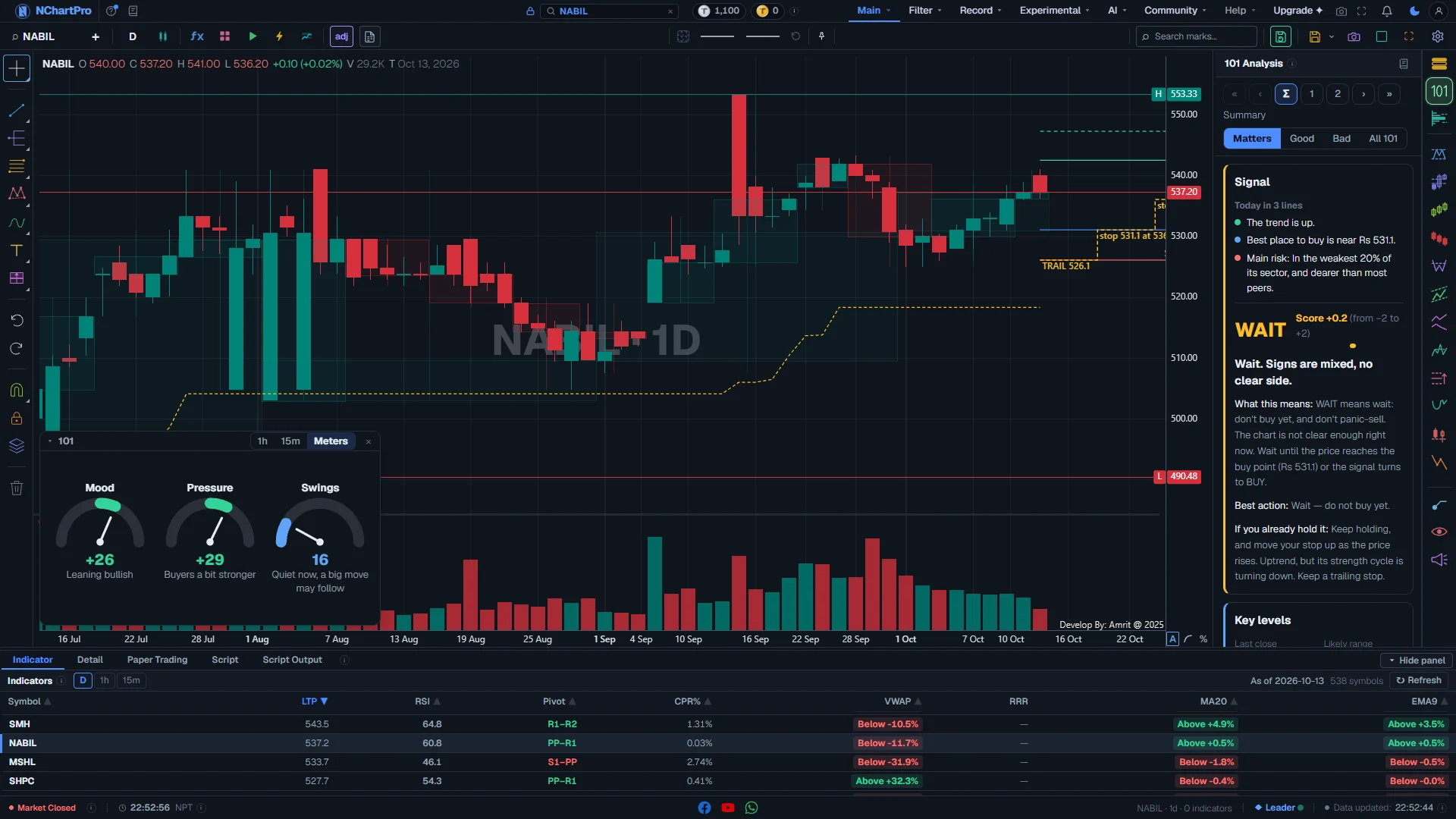
The 101 panel open on the chart, on the summary (Σ). Each part with a close-up of the real screen; the numbers match the dots on the picture.
Card pager
Moves between the cards. Σ is the summary. 1, 2, 3 … are the cards in the filter you picked, in order.
How — Click a number to open that card. ‹ and › move one card. « and » go to the first and the last card. The ← and → keys do the same.
- The line under the buttons names the open card, for example "2 / 14: Best buy point" — card 2 of 14.
- When you change the card yourself, the chart zooms to about 30 candles around what that card is about.
Filter
Chooses which cards are in the pager.
How — Click one of the four words. Matters is the one to use most days.
- Matters: Summary, Next day and Best buy point, then only the cards that are clearly good or bad, strongest first. Usually 10 to 15 cards.
- Good: only the GOOD cards. Bad: only the BAD cards.
- All 101: every card in number order, also the ones that are not built yet.
Signal
The answer in one word — BUY, WAIT or EXIT — with the overall score and what to do next.
How — Read it from the top: "Today" in 3 lines, the big word and the score, one short reason, then "What this means", "Best action" and "If you already hold it".
- BUY (green): conditions look good to buy. It names a price and a stop. It is not a promise, so always keep the stop.
- WAIT (amber): the chart is not clear. Do not buy yet, and do not panic-sell. Wait for the buy point, or for the signal to turn BUY.
- EXIT (red): sell or stay out. If you hold it, protect your money. If you do not, do not start a new buy. NEPSE has no short selling, so EXIT never means "sell first and buy back later".
- Score: from −2 (very bad) to +2 (very good). The bar grows to the right of the middle line for a plus score and to the left for a minus score.
- The dots beside "Today": green is good for the price, red is bad, amber is mixed, blue is information, grey has nothing to say.
- Best action is for someone with no shares: buy now, wait for a price, wait, or stay out.
- "If you already hold it" is for a holder: hold, add more, hold and move the stop up, sell a part, or exit.
Key levels
The prices to act on, in one box.
How — Use these numbers for your order and your stop. The last line names the best plan; open Best buy point to see it in full.
- Last close: the price the last session ended at.
- Likely range tomorrow (blue): where the price ends about 2 days in 3.
- Best point (green): the best price to buy at. A dash (—) means there is no good buy point now.
- Stop (red): if the price closes below this, the idea is wrong. Sell or stay out.
- Targets (green): target 1 / target 2 — where to take profit.
- Circuit limits: the most the price can move in one day, about ±10 % from the last close.
The 101 box on the chart
One small box in the lower left of the chart, with three tabs: 1h, 15m and Meters.
How — Click a tab. Drag the title bar to move the box, click the title to fold it, double-click it to put it back. × closes it; the HUD chip opens it again.
- 1h and 15m: the same stock's 1-hour and 15-minute candles. They are for looking, not part of the score.
- Mood, from −100 to +100: below zero leans down (bearish), above zero leans up (bullish). It comes from the trend, momentum and price-level cards.
- Pressure, from −100 to +100: plus means buyers are stronger, minus means sellers are. It comes from volume and from broker and floor-sheet buying and selling.
- Swings, from 0 (calm) to 100 (wild): how big the price moves are, for a stock of this size. "Quiet now, a big move may follow" means the price is coiled.
- Colours: Mood and Pressure are green past +15, red past −15, amber in between. Swings is blue when calm, amber when normal, red when wild.
- Click a meter to open the cards behind it in the panel.
- The box shows on a computer screen, not on a phone.
Reading one card
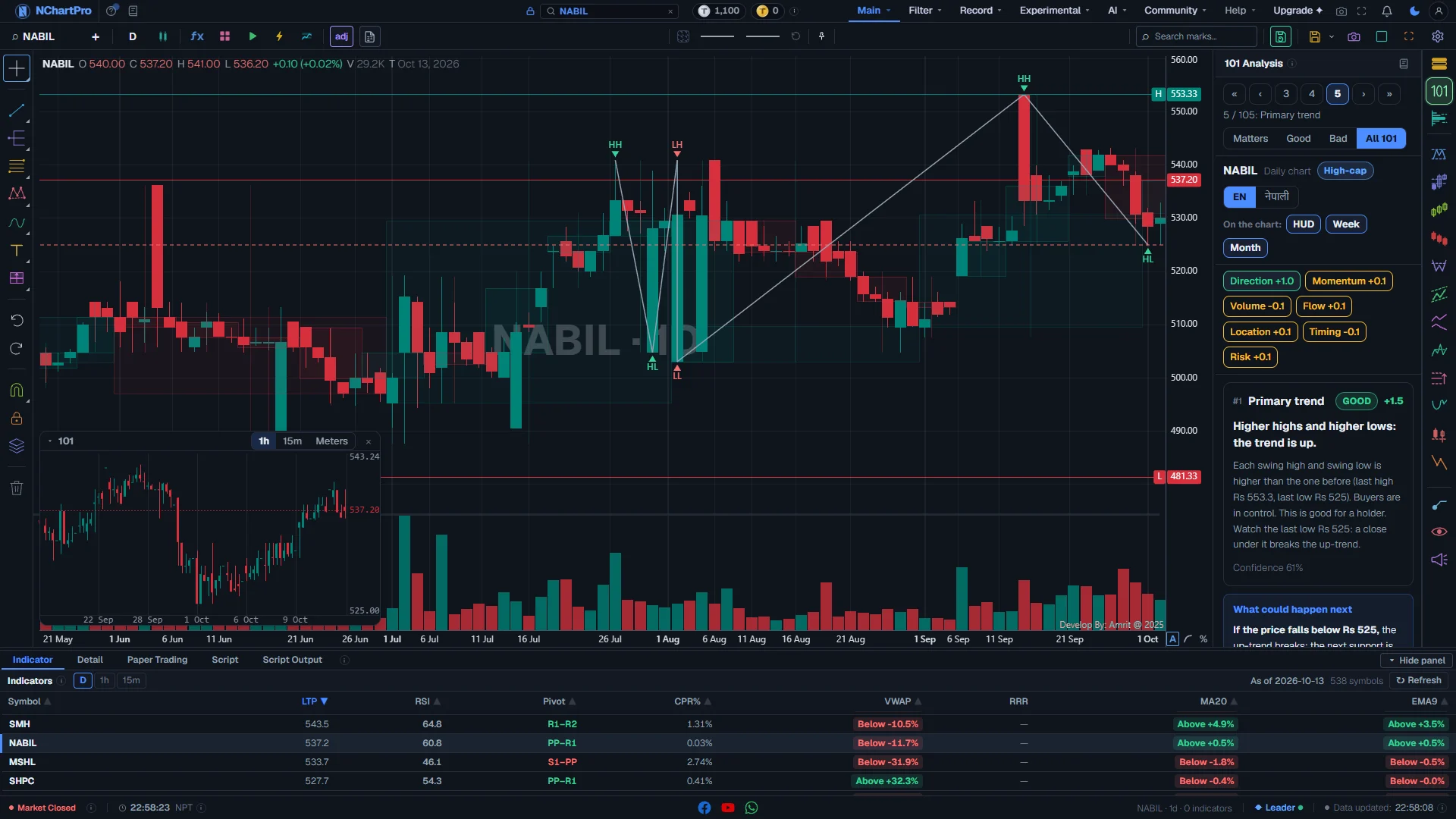
One card open (card 1, Primary trend). Each part with a close-up of the real screen; the numbers match the dots on the picture.
Stock row and language
The stock being read, its size, and the EN / नेपाली switch.
How — Pick a stock on the chart and this row follows it. Click EN or नेपाली to change the language of every card, the signal and the plans.
- "Daily chart": 101 always reads the daily candles, whatever timeframe the chart shows.
- High-cap, Mid-cap or Low-cap: the company size. Moves and swings are judged against stocks of the same size.
On the chart: HUD · Week · Month
Three on/off chips for what 101 draws on the chart.
How — Click a chip to turn it on or off. A chip with a coloured outline is on.
- HUD: the small 101 box on the chart, with the 1h, 15m and Meters tabs.
- Week and Month: faint, wide candles behind the daily ones — one per week or per month — so you see the bigger trend without leaving the daily chart.
- All three draw only on a 1D candle chart. On another timeframe the panel says: switch to a 1D candle chart to see the drawing.
Family scores
One chip per family of cards, with that family's score.
How — Click a chip to jump to the first card of that family. The chip of the open card's family is shaded.
- Direction: is the price going up, down or sideways?
- Momentum: is the push getting stronger or tired?
- Volume: is the move backed by trading?
- Flow: what the brokers and the floor sheet show.
- Location: is the price near a floor, a ceiling or a target?
- Timing: is a move about to start?
- Risk: how far can it go against you?
- Colour: green is good (+0.25 or more), red is bad (−0.25 or less), amber is in between.
A card
One angle on the stock: its number, its title, a GOOD / BAD / NEUTRAL badge and a score.
How — Read the bold headline first — it says what is happening. Then the explanation in simple words.
- Score from −2 to +2. About +0.25 or more shows a green GOOD badge. About −0.25 or less shows a red BAD badge. In between is NEUTRAL.
- Confidence (%): how sure the card is. It is lower when some data is missing or the signs disagree.
- "Not enough data": the card was skipped and is not counted. It never counts as zero.
- "Coming in a later phase.": this check is not built yet and is not counted.
- A momentum card (RSI, MACD, Stochastic …) adds one line — rising, falling or flat over the last 5 days — and draws its line in a pane under the price.
What could happen next
Plain "If … then … else …" lines under every card.
How — Read them as a plan for the next days: what to do if the price goes above a level, and what to do if it falls below one.
- For example: "If price goes above 520, then the next stop is 526. Else if price falls below 509, sell or stay out."
- Risk : reward is explained in words the first time it appears: how much you may gain for each rupee you risk.
The card on the chart
The open card draws its own lines, zones and labels, and the chart zooms to about 30 candles around them.
How — Change the card to change the drawing. Close the panel and every 101 drawing goes away; your own chart view comes back.
- The candles sit on the right side, so the 101 box does not cover them.
- Only changing the card yourself moves the chart. A new reading or a filter change leaves your view where it is.
- Broker cards add labels: BIG at a very large trade, NEW at a new broker, COST at the big holders' average cost, ADJ at the price after a bonus or right share.
- A momentum or volume card shows its indicator in a pane under the price. It goes away when you change the card. Your own panes are never touched.
- Drawings show on a 1D candle chart only.
Best buy point and the plans
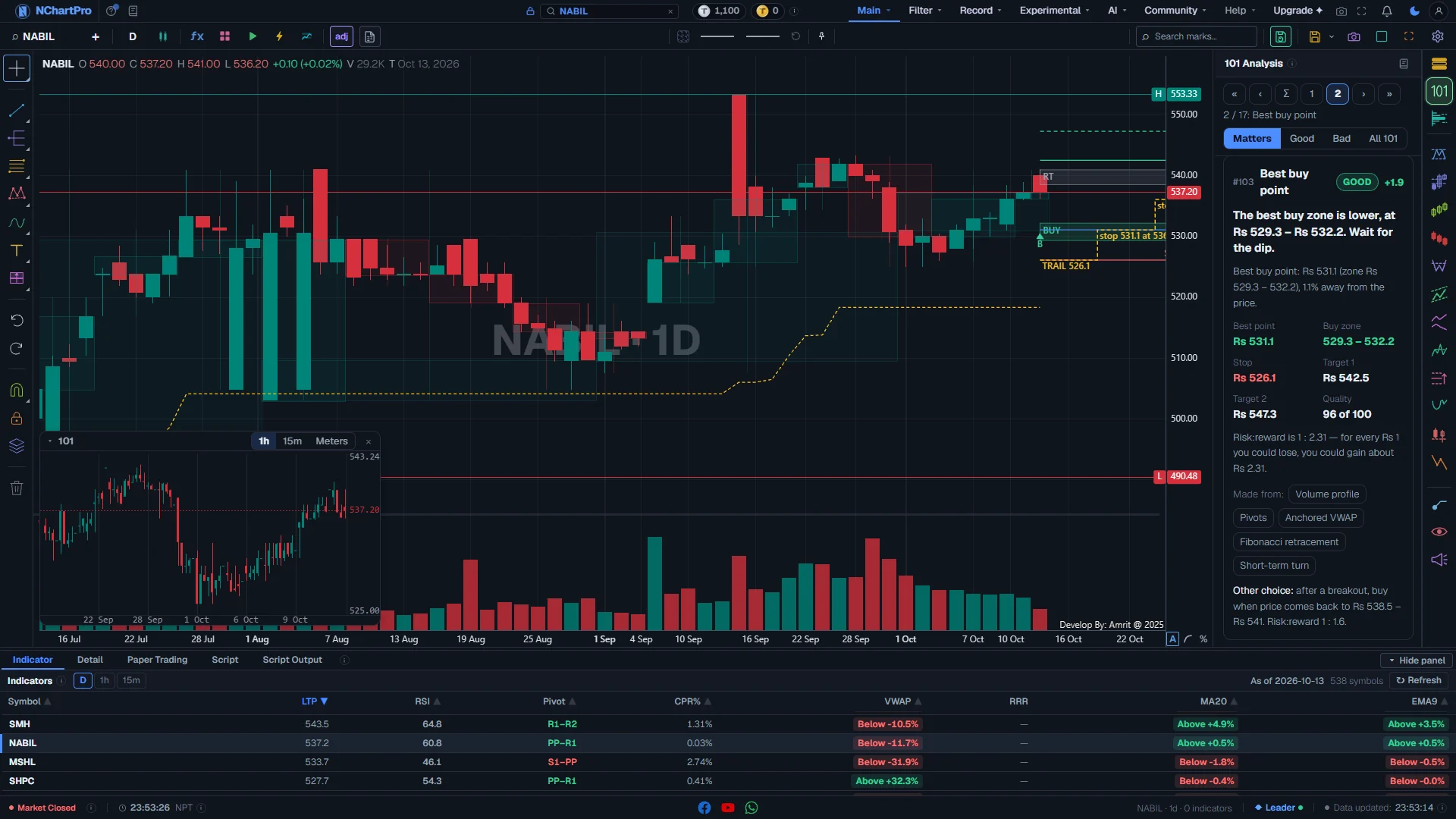
Best buy point (card 2 in Matters). Each part with a close-up of the real screen; the numbers match the dots on the picture.
Best buy point
The strongest group of support prices the other cards found, made into one buy zone and one best point.
How — Compare the best point with the price now. The "Made from" chips name the cards behind it; click one to open that card.
- Best point (green): the price to buy at. Buy zone: the range around it.
- Stop (red): the price that proves the idea wrong. Target 1 and Target 2: where to take profit.
- Quality, out of 100: how strong the zone is. Higher is better.
- Risk : reward, for example 1 : 2.5: for each rupee you risk down to the stop, you may gain 2.5 rupees up to the target.
- "Price is in the zone now." means you are already at a buy price.
- "No good buy point now." means no support area is good enough, and it says why.
- Other choice: a second, deeper zone.
The plan on the chart
The picked plan is drawn on the chart: the entry, the stop, the targets and the trailing stop steps.
How — Click another plan in Ways to buy to draw that one instead.
Ways to buy and the open plan
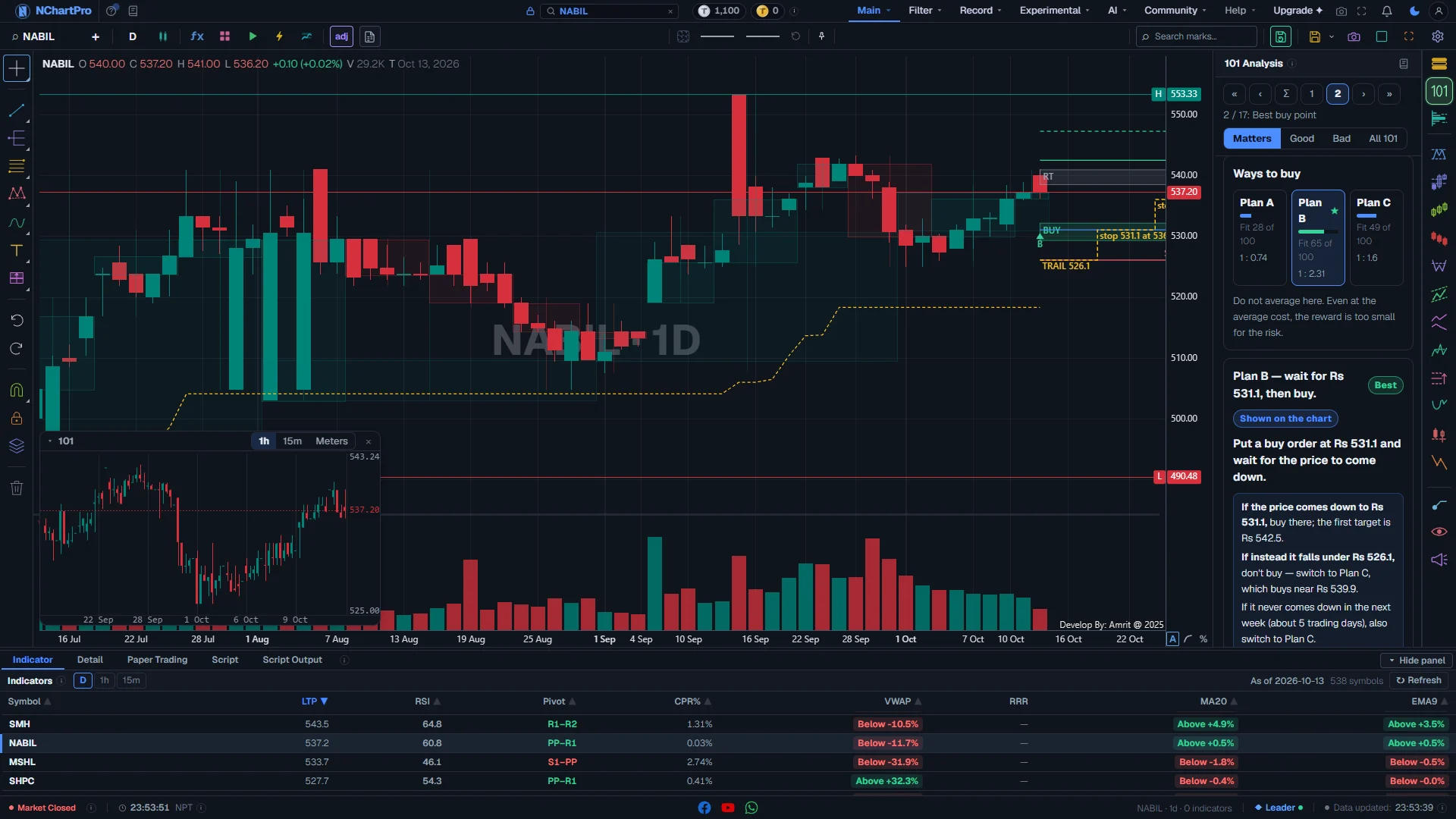
Ways to buy and the open plan, further down the Best buy point card. Each part with a close-up of the real screen; the numbers match the dots on the picture.
Ways to buy
The ways to buy, side by side, each with a fit score.
How — Click a plan. Its details open below and the chart draws it: entry, stop, targets and the trailing stop steps.
- Plan A: buy now. Plan B: wait for the best point. Plan C: if Plan B is missed — buy the breakout retest, or the next deeper support.
- Buy in parts: shown only when it is safe — the trend is not broken and there are at least two support areas below. It splits one buy into 2 or 3 parts. When it is not safe, the card says "Do not average here." and why.
- Fit, out of 100 (the bar): how well the plan suits the chart now. ★ and a green border mark the best plan.
- 1 : 2.0 under a plan is its risk : reward.
- "No plan is good now." means wait or stay out. You can still tap a plan to see it on the chart.
The open plan
The plan you picked, in full. "Shown on the chart" means this is the plan being drawn.
How — Follow the steps in the tinted box, in order. Use the numbers for your order and your stop.
- Buy near, Stop, Target 1, Target 2: the prices.
- Risk to stop: how much you lose, in %, if the stop is hit.
- Chance to reach: the chance, in %, that the price reaches the target.
- Buy in parts adds Parts (how much to buy at each price), the average cost after each part, and "Most loss if all parts fill".
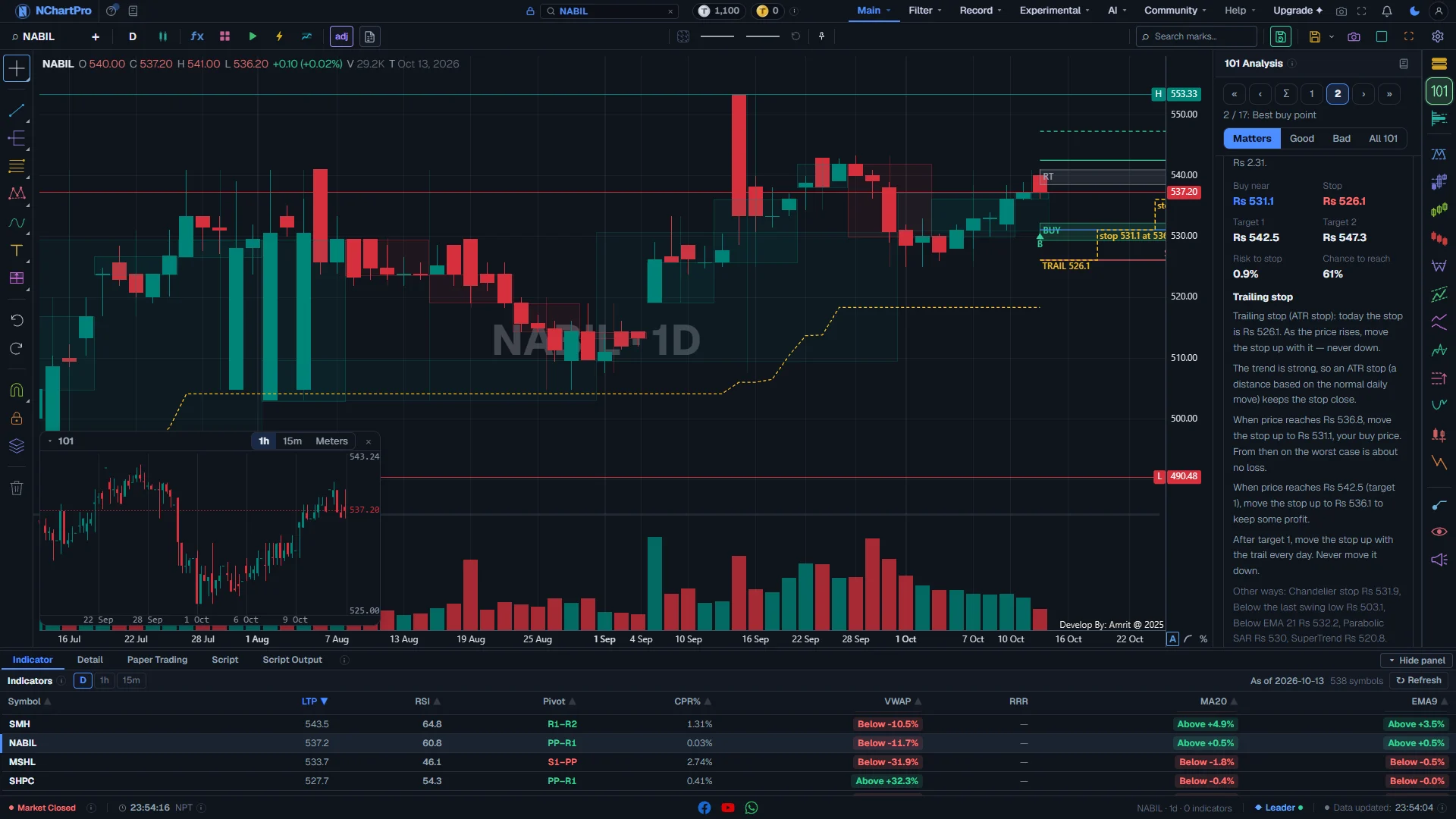
Every part, up close
The trailing stop, at the end of the open plan. Each part with a close-up of the real screen; the numbers match the dots on the picture.
Trailing stop
A stop that moves up as the price rises, so a winning trade does not turn into a loss.
How — Move your stop when the steps say so. Never move it down.
- It picks the method that suits this stock — ATR stop, Chandelier stop, Below the last swing low, Below EMA 21, Parabolic SAR or SuperTrend — and shows the stop for today.
- The usual steps: when the price is halfway to target 1, move the stop to your buy price. At target 1, move it up to lock in profit. After that, follow the trail every day.
- Other ways: the stop by the other methods, to compare.
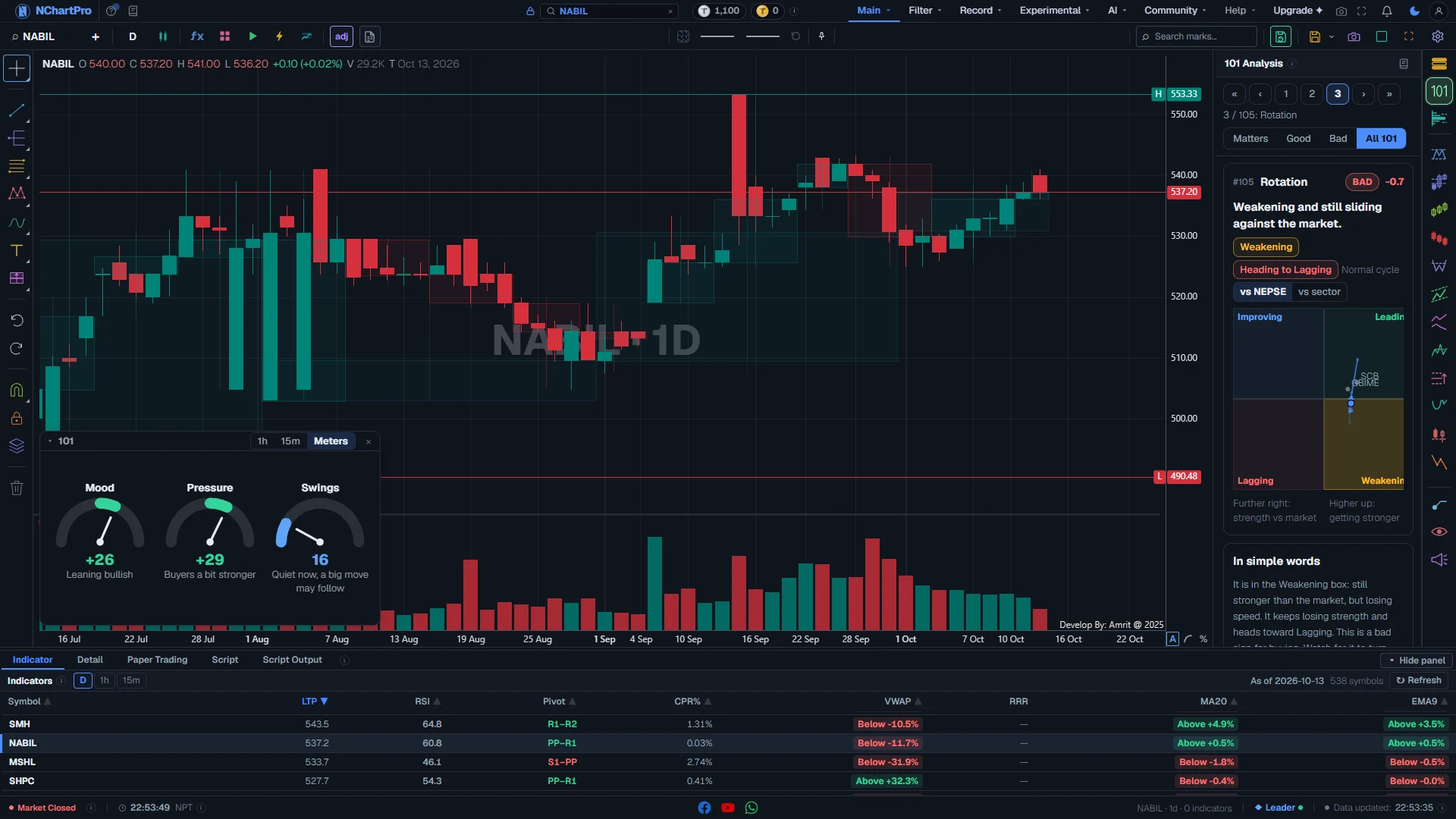
The Rotation card
The Rotation card (105): the stock on four boxes. Each part with a close-up of the real screen; the numbers match the dots on the picture.
Rotation box
Where the stock stands against the whole market, or against its own sector, on four boxes.
How — Find the big dot. The line behind it is where it came from over the last 8 weeks — older points are fainter, and an arrow shows the newest move. Use "vs NEPSE" or "vs sector" to change what it is compared with.
- Further right: stronger than the market, compared with its usual level (RS-Ratio). Higher up: getting stronger (RS-Momentum).
- Leading (top right, green): stronger, and still getting stronger.
- Weakening (bottom right, amber): still stronger, but slowing down.
- Lagging (bottom left, red): weaker, and still getting weaker.
- Improving (top left, blue): still weaker, but getting better.
- The box the stock is in now is shaded darker. "Heading to …" names the box it is moving towards.
- Normal cycle: it is turning the usual way (clockwise: Improving → Leading → Weakening → Lagging). Turning back: it is going the other way. Hardly moving: it stays where it is.
- The small grey dots are the other stocks of the same sector (in the vs NEPSE view).
- These are the same numbers as on Filter → Rotation, which shows every sector and stock at once.
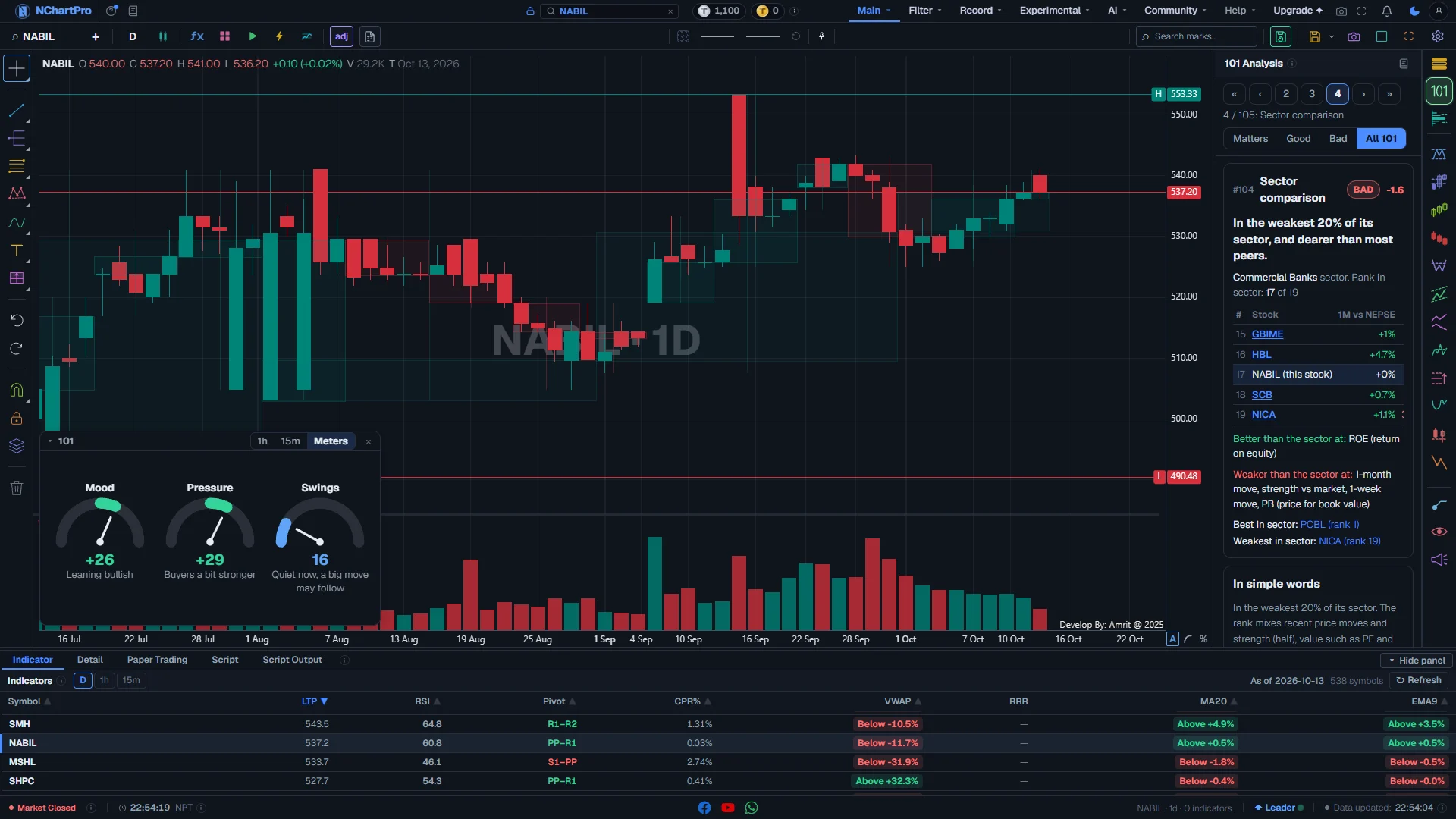
The Sector comparison card
The Sector comparison card (104). Each part with a close-up of the real screen; the numbers match the dots on the picture.
Sector comparison
The stock against the other stocks of its own sector.
How — Read the rank first, then where it is better and where it is weaker. Click a stock in the table to open its chart.
- Rank in sector: "3 of 27" means only 2 stocks in the sector score higher overall.
- Better than the sector at / Weaker than the sector at: the measures where it wins or loses — the move over 1 day, 1 week, 1 month and 3 months, strength vs market, PE, PB, ROE, earnings growth, dividend yield, company size, trading activity, and closeness to the 52-week high.
- The table shows the 2 stocks ranked just above it and the 2 just below it, plus the best and the weakest in the sector.
- In the table, a green number means that stock is better than yours on that measure; red means it is worse.
Reading the numbers
- The overall signal is not a simple average. Each family is capped, so the eleven momentum cards cannot outvote the broker cards. Market, events and earnings can hold a signal back: then the signal says WAIT and tells you why.
- Cards that say "Not enough data" or "Coming in a later phase." are not counted at all — never as zero.
- NEPSE has no short selling. So a bad reading never tells you to sell first and buy back later. It says: sell or stay out.
The cards without a picture, and all 101 checks
The special cards
Five cards come before card 1. In the pager they are Σ, then the first four numbers, and the Matters filter always shows the first three. Best buy point, Rotation and Sector comparison have their own pictures above; these two do not.
| Σ · Summary | The short version: Good signs (the strongest cards for the stock), Bad signs (the strongest against it), and the best risk : reward. Click a line to open that card. On the chart it draws the best plan only. |
| Next day | A likely range for the next trading day: a narrow band (this happens about 2 days in 3) and a wide band (about 9 days in 10). It is a likely range, not a promise. It never goes past the circuit limits (about ±10 % from the last close). Tip: It also shows the lean (leans up, leans down, or no clear lean), how active the stock is (Active, Normal, Quiet, or Coiled — a big move may come), "Wider than usual" when an event is close, and the event itself (book close, general meeting, results, bonus / right shares, dividend). On the chart: the two bands right of the last candle, and the circuit limits as dashed lines. |
A. Direction — which way is it going? (1–10)
Is the price going up, down or sideways, and how strong is that?
| 1 · Primary trend | Is the price making higher highs and higher lows (up), or lower highs and lower lows (down)? |
| 2 · Market structure | Did the price break its last important high or low, and did the trend change? |
| 3 · Trend strength | How strong the trend is, from ADX (a number that measures strength, not direction). |
| 4 · MA stack | The order of the 20, 50 and 200-day moving averages (average closing price over that many days). Stacked in order means a healthy trend. |
| 5 · Golden / death cross | Did the 50-day average cross above the 200-day (golden, good) or below it (death, bad)? |
| 6 · Short-term turn | Did the fast 9-day average cross the 21-day average? An early sign of a short turn. |
| 7 · Regression channel | Where the price sits in its best-fit channel: near the top, the middle or the bottom. |
| 8 · Trend lines & channels | The nearest trend line, and whether it is holding or broken. |
| 9 · Ichimoku | Is the price above or below the Ichimoku cloud, and is the cloud about to change? |
| 10 · Supertrend / SAR | Which side of the trailing line the price is on, and the price where it would flip. |
B. Momentum — how strong is the push? (11–21)
Is the move speeding up or getting tired?
| 11 · RSI level | RSI (a 0–100 strength gauge): too high, too low or healthy, compared with this stock’s own past. |
| 12 · RSI angle | How fast RSI is turning, and which way. |
| 13 · Regular divergence | The price made a new high or low but momentum did not agree — an early warning of a turn. |
| 14 · Hidden divergence | A divergence that says the trend is likely to continue after a pause. |
| 15 · Divergence grade | One score from divergence on many indicators together. |
| 16 · MACD cross | Did the MACD line cross its signal line, and is it above or below zero? |
| 17 · MACD histogram | Is the push growing or fading? (the MACD bars getting taller or shorter) |
| 18 · Stochastic / Stoch RSI | Is the price turning up from a low area, or down from a high area? |
| 19 · CCI / Williams %R | Has the price stretched too far from normal, and is it getting tired? |
| 20 · Rate of change | Is the price speeding up or slowing down? |
| 21 · Relative strength | Is the stock stronger or weaker than NEPSE and than its own sector? |
C. Volume — is the move real? (22–33)
Volume is the number of shares traded. A move with strong volume is more real than one without.
| 22 · Volume vs average | Was the last day’s volume much higher or lower than usual for this stock? |
| 23 · Volume trend over the swing | Did volume rise with the price during this move? Rising together is healthy. |
| 24 · Up vs down volume | Is there more volume on up days (buyers) or on down days (sellers)? |
| 25 · OBV vs price | Does On-Balance Volume (a running total of up-day minus down-day volume) agree with the price? |
| 26 · Accumulation / Distribution | Is money quietly coming in (accumulation) or going out (distribution)? |
| 27 · Chaikin money flow | Buying or selling pressure over the last 20 days. |
| 28 · Money flow index | Like RSI, but it also counts volume. |
| 29 · Volume profile | The price where the most shares changed hands — a busy price often acts as a floor or ceiling. |
| 30 · Anchored VWAP | The average price buyers paid since the last swing low. Above it, most of them are in profit. |
| 31 · Breakout volume | Did the last breakout come with real volume, or was it weak? |
| 32 · Climax bar | A very large volume day at the end of a move — often a sign the move is tired. |
| 33 · Dry-up on pullback | Low volume on a dip, which is usually healthy for an uptrend. |
D. Trades & flow — who is behind it? (34–47)
The Flow chip in the panel. These cards read the floor sheet and broker records of the last 60 trading days, up to the last finished session. Trades under 10 shares are not counted.
| 34 · Trade count | How many trades happened, compared with a normal day. |
| 35 · Average trade size | Are trades bigger (big money) or smaller (small investors) than usual? |
| 36 · Big / block trades | Very large trades for this stock, marked BIG on the candle at their average price. |
| 37 · Retail share | How much of the trading is small trades (under Rs 1 lakh). A rising share near a high can mean late buyers. |
| 38 · Top buyers / sellers | Which brokers bought and sold the most during the current swing. |
| 39 · Broker accumulation | Are the top holding brokers adding shares or reducing them, compared with the price trend? |
| 40 · Concentration | How much of the shares the top brokers hold. Very high can mean a few players control the price. |
| 41 · New broker entry | Brokers who bought this stock for the first time in the last 20 sessions, marked NEW on the chart. |
| 42 · Broker average cost | The average buying price of the big holding brokers, drawn as a COST line. Near support, it makes the support stronger. |
| 43 · Wash / crossing | How much trading had the same broker on both sides. Such trades are not real demand. |
| 44 · Buy / sell pressure | The balance of buy orders against sell orders. |
| 45 · Intraday flow shape | Did most of the trading happen near the open or near the close? |
| 46 · Sector flow / rotation | Is money moving into this stock’s sector or out of it? |
| 47 · Market flow & breadth | Total NEPSE turnover, and how many stocks rose against how many fell. |
E. Location — where is the price, cheap or expensive? (48–66)
Price levels that many traders watch: floors (support), ceilings (resistance) and targets.
| 48 · Nearest support & resistance | The nearest floor below and ceiling above. |
| 49 · Level strength | How many times a level held, and how old it is. |
| 50 · Supply & demand | Fresh zones where buyers or sellers stepped in strongly before. |
| 51 · Bull / bear boxes | A price range box, and which side it broke out of. |
| 52 · Pivots | Where the price is against this month’s pivot levels (levels made from last month’s high, low and close). |
| 53 · Reference levels | Is the price above or below last week’s and last month’s high and low? |
| 54 · 52-week position | Is the price near its 1-year high or its 1-year low? |
| 55 · Fibonacci retracement | How far the price has pulled back in the last swing (38.2 %, 50 %, 61.8 % …). |
| 56 · Fibonacci extension | Targets past the last swing (127 %, 161.8 % …). |
| 57 · Golden pocket | Is the price in the 61.8–65 % pullback zone, a common place where buyers return? |
| 58 · Gann fan / 1×1 | Is the price above or below Gann’s 1×1 angle line? |
| 59 · Gann Square of 9 | The next price levels from Gann’s Square of 9. |
| 60 · Gann box | A box of price and time from the last swing. |
| 61 · Order blocks | The last candle before a strong move, where big orders may still wait. |
| 62 · FVG / inverse FVG | Gaps between candles that the price often comes back to fill. |
| 63 · Premium / discount | Is the price in the cheap half or the expensive half of its range? |
| 64 · Liquidity pools | Equal highs or lows, where many stop orders sit. |
| 65 · Quasimodo level (QML) | The Quasimodo line the price often returns to. |
| 66 · Fair value zone | A fair price band from the company’s earnings and book value, drawn on the chart. |
F. Timing — is now the moment? (67–82)
Patterns and dates that say whether a move may start soon.
| 67 · Candle pattern | The pattern of the last 1 to 3 candles (hammer, engulfing and others). |
| 68 · Candle at a key level | The same, but on an important price level — a stronger sign. |
| 69 · Inside bar / NR7 | A very small day inside the day before: the price is resting before a move. |
| 70 · Squeeze | The price bands are very tight: a big move may come soon. |
| 71 · Head & shoulders | A head and shoulders pattern, its neckline and its target. |
| 72 · Double / triple top-bottom | Two or three tops or bottoms at about the same price, and the target. |
| 73 · Triangles, wedges, flags | Price shapes that narrow before a breakout. |
| 74 · Cup & handle | A rounded base with a small dip, then a break above the rim. |
| 75 · QM reversal | A complete Quasimodo turn setup. |
| 76 · QM continuation (QMC) | A Quasimodo setup in the direction of the trend. |
| 77 · Liquidity sweep | The price dipped under a low to hit stop orders, then quickly came back. |
| 78 · Wyckoff events | Wyckoff signs such as a spring or an upthrust. |
| 79 · Power of Three (PO3) | Build-up, a false move, then the real move — inside one bigger candle. |
| 80 · Time cycles | Dates when a turn is more likely, from time counts. |
| 81 · Event clock | Days left to the next book close, general meeting, results, bonus or dividend. Past events are marked on their candle. |
| 82 · Event reaction history | How this stock moved before and after its past book closes, over the last 3 years. |
G. Risk — what can go wrong? (83–94)
How far it may move against you, and the price that proves the idea wrong.
| 83 · ATR & stop size | How much the stock normally moves in a day, and a sensible distance for a stop. |
| 84 · Stretch | Has the price run too far from its average? A stretched price often comes back. |
| 85 · Volatility percentile | Is the stock calm or wild compared with its own past? |
| 86 · Unfilled gaps | Price gaps that may pull the price back. |
| 87 · Circuit room | How far the price is from the circuit limits, the most it may move in one day. |
| 88 · Invalidation | The price that proves the idea wrong. A close below it means sell or stay out. |
| 89 · Risk : Reward + trade levels | Every buy idea the cards found, with entry, stop, target and risk : reward, best first. |
| 90 · Exit risk | Is there enough trading to get out easily when you need to? |
| 91 · Adjustment risk | A bonus or right share will cut the price after book close. The ADJ line shows the price after the cut. |
| 92 · Fundamental red flags | Falling profit, bad loans and other warnings in the company accounts. |
| 93 · Manipulation risk | Signs that a few players may be controlling the price. |
| 94 · Beta to NEPSE | How much the stock usually moves when NEPSE moves. A high beta falls more when the market falls. |
H. Story — the big picture (95–100)
The long view: the stage of the cycle, the waves, news, earnings and the market. Its chip in the panel takes you to these cards but shows no score. These cards do not add to the overall score, but they can appear among the good or bad signs.
| 95 · Wyckoff phase | Is the stock being collected, rising, being sold off, or falling? |
| 96 · Elliott count | The likely Elliott wave now, and the price that cancels the count. |
| 97 · Elliott target | Where the current Elliott wave may end. |
| 98 · News vs price Needs news | Did the price react to recent news? Good news with no rise is weak; bad news and the price holds is strong. Tip: Shown only when news is available on your account. Otherwise it shows "Coming in a later phase." |
| 99 · Earnings vs price | Are earnings backing the price? Earnings up and price down may be good value; price up and earnings down is a rise on hope. |
| 100 · Market regime & sector story | The state of NEPSE and of the stock’s sector. |
I. Verdict (101)
The last card puts everything together.
| 101 · Overall verdict | The signal (BUY, WAIT or EXIT), the overall score, the good signs and the bad signs, and the best risk : reward. It is the same reading as the Signal card at the top. |
Good to know
Short notes that answer most questions.
| Daily chart | 101 always reads the daily chart. The 1-hour and 15-minute candles in the HUD box are for looking, not for the score. |
| Last finished session | The floor-sheet and broker cards use data up to the last finished trading session. They do not change during the day. |
| News | The news card appears only when news is available on your account. When it is not, no card talks about news. |
| Not advice | This is an automatic reading of the chart, not investment advice. Always keep a stop, and decide for yourself. |
What it does not do
- Some checks need data that not every stock has: chart patterns, Elliott waves, Wyckoff, intraday trading, or company accounts. When it is missing, the card says "Not enough data" and is not counted in the signal. The news card needs news on your account.
- A few checks are not switched on yet: divergence (13–15) and buy / sell pressure (44). For now they say "Not enough data" on every stock. Wyckoff (78, 95) works only for stocks where its data has been built.
- Elliott waves (96, 97) are read on adjusted prices only. With the chart on unadjusted prices, those two cards say "Not enough data".
- It reads numbers only. It does not know about news it has not seen, about a company announcement made today, or about your own money and plans.
- The Next day range is a likely range, not a promise. About 1 day in 3 the price ends outside the narrow band.
- A stock with fewer than 30 daily candles cannot be read — the panel says there are not enough daily candles yet.
- The HUD box with the 1-hour and 15-minute candles shows on a computer screen only, not on a phone.
Questions people ask
A good score is not enough to buy. The price may be far from a good buy point, the market may be weak, or an event may be close. The reason is written under the signal. Wait for the buy point, or for the signal to turn BUY.
No. NEPSE has no short selling. EXIT means sell or stay out: if you hold it, protect your money; if you do not, do not start a new buy.
They need the floor-sheet and broker history of this stock. It may not be there yet, or the chart may be in Bar Replay. The card is skipped and not counted.
The drawings show only on a 1D candle chart, and only while the panel is open. Switch to 1D candles, or open the 101 panel again.
Yes. Use the EN / नेपाली switch in the stock row of the panel. Every card, the signal and the plans change language.