

Trend & Channels
A trend line is two points and a ruler, and every trader draws it a little differently. The TR chip draws them by rule: it finds the swing points, joins the ones that line up, and stops the line where a close breaks it. The same rule runs on every stock, so the line lands in the same place for you as for anyone else.
What this page is
The TR chip opens one panel with three groups. Rails are single sloping lines of support and resistance. Channels are two parallel rails. Regression is a statistical band.
Each group shows its own dials first, then the rows those dials move. Rows that answer to no dial sit under the line "Answers to no dial — fixed in the engine", so you always know which dial changes which row.
Every line is found on the candles in front of you, on any timeframe. Nothing is drawn until you turn a row on, and the rail chip shows a small dot while any row is on.
Why it helps you
- Current Channel on its own is the best start. It shows the two rails price is moving between, without old lines.
- A close through a Trendline S & R support, stamped "TL✗", is a reason to exit or tighten your stop. In NEPSE you cannot sell short, so a break down means stay out, not "sell to open".
- Raise Channel min points to 6 or 7 when the chart looks over-drawn. A channel touched seven times is real; one touched four times may be chance.
- Use Regression Trend as a stretch gauge. Price at the top rail is far from its own average path, which is a poor place to start buying.
- Use the weekly chart, raise Depth, and use Trendline S & R alone. One line under the major lows of the last few years is the most useful thing here for a long holder.
- Regression Trend on a weekly chart shows if today's price is unusual by the company's own standards.
- Ignore short channels on small timeframes. They describe weeks, not years.
When to use it, and where to find it
- When you want to know if a move is still inside its channel or has left it.
- Before drawing a trend line by hand, as a check on the line the swings really support.
- After a long rise, to see how far price sits above its own regression line.
Try it — a short walkthrough
- 1Open TR on a daily chartPick the 1 day timeframe, then click the TR chip on the right rail.
- 2Turn on Current ChannelClick Current Channel. An amber pair of rails appears if price is inside a channel today.
- 3Add one support or resistance lineClick Trendline S & R. Pale cyan lines appear, labelled "TL×" with their touch count. Raise Depth for fewer, longer lines.
- 4Compare with the regression bandClick Regression Trend. A grey three-line band appears. Raise Trend back count to start the fit from an older swing.
- 5Clean upClick each lit row again to turn it off before you move on. A chart with every row on is hard to read.
The panel and the chart, part by part
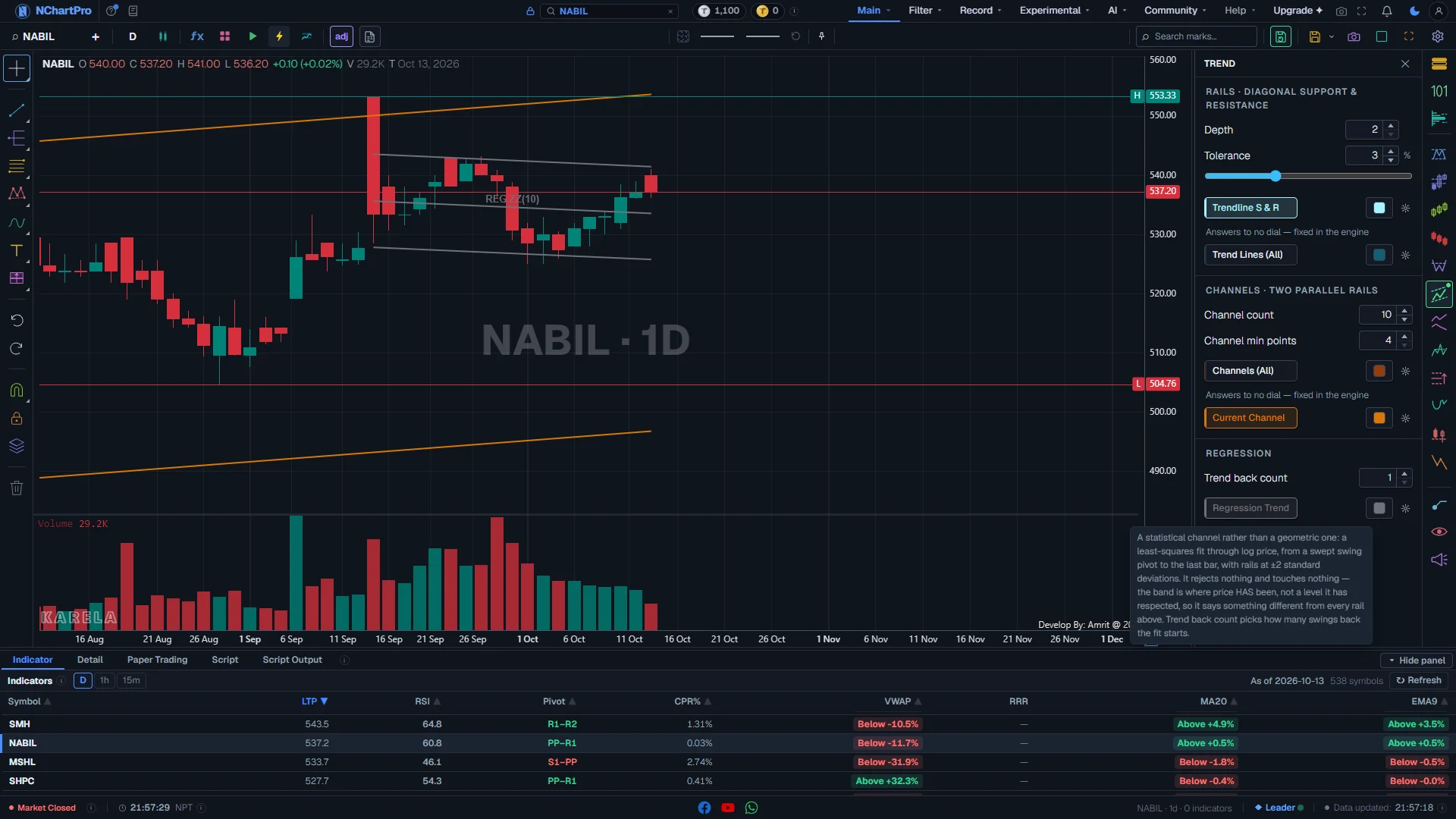
The Trend (TR) panel on NABIL, daily chart, with Trendline S & R, Current Channel and Regression Trend on. Each part with a close-up of the real screen; the numbers match the dots on the picture.
Depth
How big a swing must be to count as a turning point. The badge shows how many turning points this depth finds on your chart.
How — Type a number or use the arrows (2 to 30, start 2). Raise it for fewer, bigger swings.
- Low depth: many small swings, many short lines.
- High depth: few large swings, long lines that matter more.
- This dial is shared with other mark panels, so moving it here also moves them.
- It only moves Trendline S & R in this panel.
Tolerance
How much a wick may poke through a rail before the rail is refused.
How — Drag the slider (0.5 % to 8 %, start 3 %). Raise it on a noisy stock with long wicks.
- Higher tolerance: more lines survive, but some are looser.
- Lower tolerance: only very clean lines are drawn.
Trendline S & R
A sloping support or resistance line through two swing points that price never closed clearly through.
How — Click to turn on. Use the colour box to change its colour; the gear can switch off its labels or extend the line to the right edge.
- Colour: pale cyan #a5f3fc.
- Label "TL×4" = the line has been touched 4 times. More touches = a line the market has respected more often.
- A broken line ends where a close went through it by a margin, and is stamped "TL✗" at that candle.
- A rising line under price is support; a falling line over price is resistance.
- Answers to Depth and Tolerance.
Trend Lines (All)
Every clean line on the chart at once, scanned at four fixed swing sizes.
How — Turn it on to see the wide view, then compare it with the one tuned Trendline S & R line.
- Colour: dark cyan #155e75.
- A small arrowhead marks the candle where a line was broken.
- It answers to no dial — the four swing sizes are fixed. That is why it sits under "Answers to no dial — fixed in the engine".
Channels
Two parallel rails that price has been moving between. The two dials here decide how many are drawn and how strict they are.
How — Turn on Channels (All). If the chart is busy, lower Channel count; if the channels look weak, raise Channel min points.
- Channel count (1 to 40, start 10): how many channels are DRAWN. It only hides; it does not change what is found.
- Channel min points (4 to 12, start 4): how many touches a channel needs to qualify at all. Raise it for stronger channels.
- Channels (All) colour: brown #92400e. An arrowhead marks the side price broke out of.
- A break up through the top rail is the bullish side; a break down through the bottom rail is a reason to exit or stay out.
Current Channel
Only the one channel price is trading inside right now.
How — Turn this on alone for a clean chart. It is usually the most useful row on the panel.
- Colour: amber #d97706, drawn thicker than older channels.
- It comes from the same scan as Channels (All), so the two never disagree.
- It is never hidden by Channel count. If none is drawn, price is not inside any channel today.
Regression Trend
A statistical band: a best-fit line through price with a rail two standard deviations above and below.
How — Turn it on. Change Trend back count (1 to 10, start 1) to start the fit further back — it counts swings, not candles.
- Colour: grey #71717a, on purpose — it is a statistic, not a level the market has respected.
- The middle line is labelled "REG ZZ(n)". The outer two lines are the ±2 standard deviation band.
- Price near the top rail is stretched compared with its own recent path; near the bottom rail it is weak compared with it.
- A volatile stock gets a wide band, a quiet stock a narrow one.
What is drawn on the chart
Every row draws in its own colour, the same colour its button shows.
How — Turn on one or two rows at a time, so you can tell the lines apart.
- Solid lines are rails and channels; the grey three-line band is the regression.
- Labels: "TL×n" touch count, "TL✗" broken line, "REG ZZ(n)" regression.
- Arrowheads mark the candle where a line or channel was broken.
- A line that is still unbroken ends at its last touch; turn on "Extend right" in the row gear to carry it to the right edge.
Reading the numbers
- Rail: one sloping line of support (under price) or resistance (over price).
- Channel: two parallel rails, with price touching both sides.
- Touch: a candle that reached a rail and turned.
- Break: a close through a rail by a clear margin. The line stops there.
- Regression band: a best-fit line with rails two standard deviations away. It is where price has been, not a level it promised to respect.
What it does not do
- A drawn line describes where price has been. Price leaves channels often, and the tool simply draws a new one.
- Only the loaded candles are read. A line that starts before the loaded history is found only after you scroll back.
- The last candle is not final while the market is open, so a break on it can disappear by the close.
- The regression band is the same width above and below, so it says nothing about direction by itself.
- These lines are readings, not advice to buy or sell.
Questions people ask
No. Trend Lines (All) always scans four fixed swing sizes and answers to no dial. Depth and Tolerance move only Trendline S & R.
Channels (All) draws every channel it finds, up to Channel count. Current Channel draws only the one price is inside now, and is never hidden by the count.
Price is not inside any channel today — it has broken out of the last one. Turn on Channels (All) to see the older channels and where they broke.
It is measured from the price itself. A stock that swings a lot gets a wide band; a steady one gets a narrow band.