

Quasimodo (QM)
A Quasimodo (QM) is one particular way a trend fails. Price makes a swing (the left shoulder), a bounce (the neckline), a new extreme (the head) — and then breaks hard the other way. The price of the left shoulder becomes the QM level. Traders often watch for price to come back to that level. The QM chip finds these shapes and draws them.
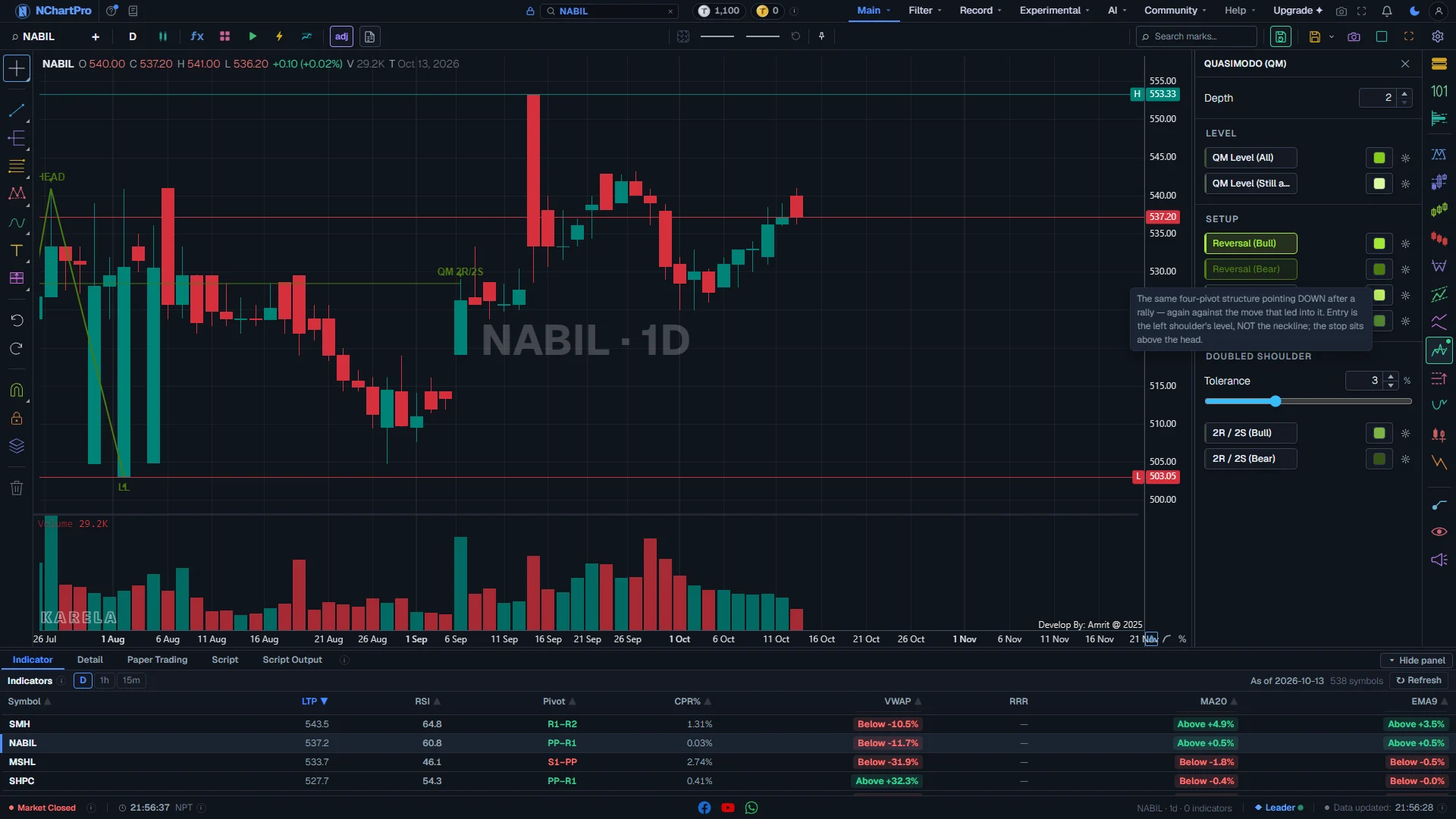
What this page is
The panel has three blocks. Level draws only the QM level lines. Setup draws the whole shape, in four rows: Reversal and Continuation, each for Bull and Bear. Doubled shoulder draws only the setups whose left shoulder was made twice.
The four Setup rows draw the same shape. What tells them apart is the side (Bull or Bear) and the trend that led into the shape.
Everything is computed in your browser on the candles you are looking at, on any timeframe.
Why it helps you
- The level to watch is the left shoulder, not the neckline. That is what makes a Quasimodo different from a head and shoulders.
- For a Bull setup, the shape fails if price goes back below the head. Plan your stop there.
- QM Level (Still armed) is the most useful row to leave on: a short list of prices that have not been tested yet.
- This is mostly a trading tool. A long holder can look only at QM Level (Still armed) on a weekly chart.
- A Bear QM on a weekly chart is a warning to review the holding, not a reason to sell what you do not own.
When to use it, and where to find it
- After a sharp turn, to see whether it made a Quasimodo and where its level sits.
- When price is moving back toward an old failed swing, to see whether a QM level is waiting there.
Try it — a short walkthrough
- 1Open QM and set DepthClick the QM chip. On a daily chart set Depth to 4 or 5 so only clear turns are used.
- 2Start with the levelsClick QM Level (Still armed). You see only the levels that have not been tested yet.
- 3See one full shapeClick Reversal (Bull). Find LS, NL, HEAD and HH on the chart. The level line starts at LS.
- 4Check the doubled shouldersSwitch the Setup rows off and turn on 2R / 2S (Bull). Raise Tolerance if none appear.
The panel and the chart, part by part
The Quasimodo panel open on a daily chart, with both Reversal rows on. Each part with a close-up of the real screen; the numbers match the dots on the picture.
Quasimodo (QM)
The QM chip on the right rail opens this panel: one setting at the top and eight rows in three blocks.
How — Click the QM chip to open it; click it again, press Escape or click the cross to close it.
- A small dot on the QM chip means at least one row is switched on.
- Each row is a button in the colour it draws — all shades of lime and olive. Click to draw, click again to remove.
Depth
How big a swing must be to count. It changes every row on this panel.
How — At 2 the panel finds many small shapes. Raise it to 5 or 6 to keep only shapes built from real turns.
- Range 2 to 30, starts at 2: how many bars on each side a high or low must beat to count as a swing.
Level
Only the QM level line, with no shape drawn around it.
How — Use Still armed on its own for a short list of levels that have not been tested yet.
- QM Level (All) — lime line: every QM level found, from the left shoulder to where it stopped mattering.
- QM Level (Still armed) — pale lime: only the levels price has not come back to or broken through.
- Still armed is part of All, not the other half. With both on, the armed levels are drawn twice, one line on top of the other.
Setup
The whole shape: three lines joining the four turns, the QM level line, and the labels.
How — Turn on one side at a time. Find the left shoulder (LS) — that is the level to watch, not the neckline.
- Reversal (Bull) — light lime: the shape points UP after a fall, against the move that came before it.
- Reversal (Bear) — dark olive: the shape points DOWN after a rise. In NEPSE this means protect profit or stay out.
- Continuation (Bull) / (Bear) — pale lime / dark green: the SAME shape, but it runs WITH the move that came before it.
- Reversal and Continuation are told apart only by the trend before the shape.
Doubled shoulder (2R / 2S)
Setups whose left shoulder was made twice — two nearly equal lows (S S) or highs (R R).
How — Turn these on alone. With the Setup rows also on, the same shape is drawn twice.
- Tolerance (0.5 % to 8 %, starts at 3 %): how equal the two shoulders must be. It only changes these two rows.
- 2R / 2S (Bull) — mid green; 2R / 2S (Bear) — very dark olive.
What is drawn on the chart
Each setup is three straight lines through its four turns, a level line, and short labels.
How — Zoom in. Read the labels in order: LS, NL, HEAD, then the break.
- LS: the left shoulder. Its price is the QM level.
- NL: the neckline — the bounce between the shoulder and the head.
- HEAD: the new extreme that failed.
- HH (bull) or LL (bear): the break that confirmed the shape.
- Level line (label QML on the Level rows): thick while price has not come back to it; thinner once it has been retested or broken.
- Arrow labelled "QM" (or "QM 2R/2S"): the bar where price came back to the level. No arrow means price has not come back yet.
Reading the numbers
- Left shoulder (LS): the first swing of the shape. Its price is the QM level.
- Neckline (NL): the bounce between the left shoulder and the head.
- Head: the new high or low that failed.
- Armed: the level has not been retested or broken yet.
- 2R / 2S: two resistances (highs) or two supports (lows) at about the same price, making a doubled left shoulder.
What it does not do
- Reversal and Continuation are separated only by the trend before the shape. Where that trend is unclear, the name can be unclear too.
- Turning on Level and Setup rows together, or Setup and Doubled shoulder rows together, draws the same lines twice. This is expected.
- Armed only means not yet tested. It says nothing about whether price will respect the level.
- These are readings of past candles, not advice to buy or sell.
Questions people ask
QML means Quasimodo level — the price of the left shoulder. The Level rows draw only that line; the Setup rows draw the whole shape around it.
The "QM" arrow is drawn only on the bar where price came back to the level. If price has not come back yet, there is no arrow.
Raise Depth. It is the one setting that reduces how many swings the panel uses, so going from 2 to 5 removes most of the small shapes.