

Liquidity Setups
After price breaks out of an area, it often comes back to test it. How it comes back tells a story: did it first run past an obvious low to take the stop orders sitting there, drift back in a neat channel, pause, or simply return? The LQ chip finds every break and retest on your chart and names each one by what the pullback did.
What this page is
A setup has three parts: a zone, a break away from it, and a retest — price coming back to touch the zone. The panel finds every one in the loaded candles and names it by what happened during the pullback.
The twelve zone rows are six names, each for the Bull side and the Bear side. They never overlap: one retest gets exactly one name. The two Gap Reversal rows come from a separate search and can overlap any of them.
Everything is computed in your browser on the candles you are looking at, on any timeframe.
Why it helps you
- Liquidity Retest and Gap Reversal are the two to learn first. Both describe a stop hunt: price runs past an obvious low, takes the stop orders there, and turns up.
- A Demand box near today's price is an area to watch for buying interest. Wait for price to react at the box rather than buying the touch.
- A Supply box above price is where a rally may stall. Use it to plan where to take profit.
- These are short- to medium-term readings. A long holder can mostly ignore them.
- On a weekly chart, a Demand box that held more than once is a sensible area to add to a holding.
When to use it, and where to find it
- After a breakout, while you wait for price to come back and test the area it broke from.
- When price has just spiked past an obvious low or high and come straight back, to see whether it is marked as a Gap Reversal or a Liquidity Retest.
- On the daily chart after the close, when the last bar is final.
Try it — a short walkthrough
- 1Open LQ and start cleanClick the LQ chip. Switch off any lit row so only what you choose is drawn.
- 2Turn on the busiest pairClick Plain Retest (Bull) and Plain Retest (Bear). Find a "Demand" box and the arrow on its retest bar.
- 3Try a stop-hunt setupSwitch those off and turn on Liquidity Retest (Bull). Each box should have two lows at about the same price just before it.
- 4Adjust if neededIf there are too many boxes, raise Depth. If there are none, raise Tolerance a little.
The panel and the chart, part by part
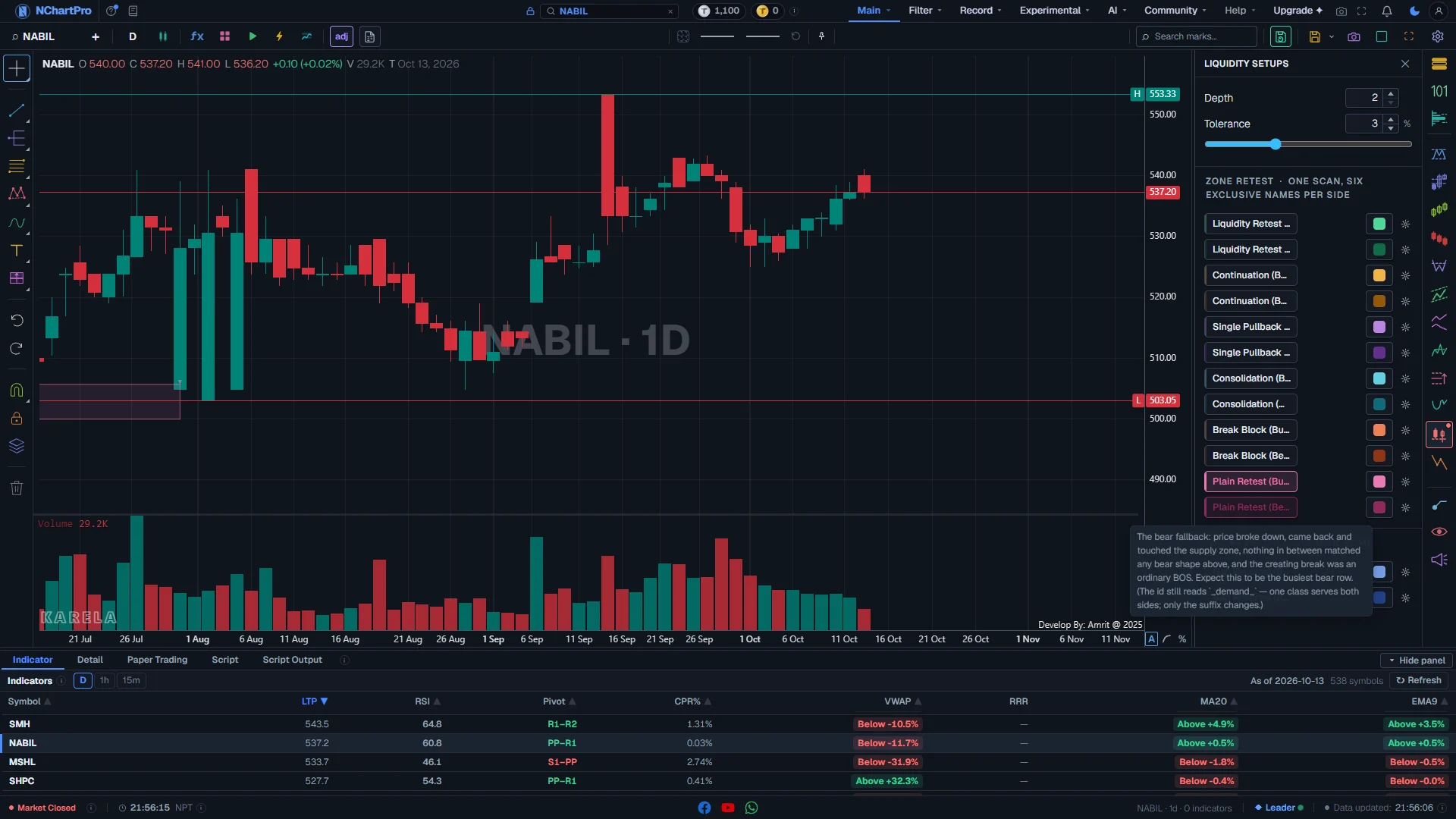
The Liquidity Setups panel open on a daily chart, with the two Plain Retest rows on. Each part with a close-up of the real screen; the numbers match the dots on the picture.
Liquidity Setups
The LQ chip on the right rail opens this panel: two settings and fourteen rows.
How — Click the LQ chip to open it; click it again, press Escape or click the cross to close it.
- A small dot on the LQ chip means at least one row is switched on.
- The boxes stay on the chart after you close the panel. Switch rows off here to remove them.
Depth and Tolerance
Two settings that reach all fourteen rows.
How — Start with the defaults. Raise Depth on a daily chart if every small wiggle becomes a setup.
- Depth (2 to 30, starts at 2): how many bars on each side a high or low must beat to count as a swing.
- Tolerance (0.5 % to 8 %, starts at 3 %): how close two lows (or highs) must be to count as equal, and how loose a pause may be.
- Moving Tolerance can move a setup from one row to another, not only add or remove boxes.
- There is no Back count here. Every setup in the loaded history is drawn.
Zone retest — one scan, six names
One search finds every break and retest, then gives each one exactly ONE name, testing the names from top to bottom.
How — Hover this heading to read the rule. Switching a row off hides its setups; it does not pass them to the row below.
- The order is: Liquidity Retest, Continuation, Single Pullback, Consolidation, Break Block, Plain Retest. The first name that fits wins.
- Bull and Bear are separate searches. Each setup's two rows sit next to each other.
- Bull rows are the light shade of a colour, Bear rows the deep shade of the same colour.
The six setups
Each row is a button in the colour it draws. Click to draw, click again to remove.
How — Switch on one setup's Bull and Bear rows together, then look for its boxes on the chart.
- Liquidity Retest (green): two lows (or highs) stopped at the same price — a shelf of stop orders — and price took that shelf on the way back to the zone. Tested first.
- Continuation (gold): the pullback came back as a neat channel of at least two legs.
- Single Pullback (lavender): exactly one small pullback leg, then straight back to the zone.
- Consolidation (cyan): price paused for 5 to 20 bars, clear of the zone, just before the touch.
- Break Block (coral): no shape in the pullback, but the break that made the zone went against the old trend (a CHoCH).
- Plain Retest (pink): the fallback — none of the above fitted. Usually the busiest row.
Colour box and gear
The box to the right of each row is the mark's colour; the gear holds its style and its own inputs.
How — Click the colour box to change the colour, line or fill. Click the gear to change the label size or the setup's own inputs.
Gap reversal — its own scan
A separate search, not one of the six names. It can sit on the same bars as any zone row.
How — Turn it on when you are looking for a turn after a stop hunt.
- Gap Reversal (Bull) — light blue: a swing low in a pool of lows is wicked and rejected on the same bar, a gap opens within ten bars, and price later closes back above the gap.
- Gap Reversal (Bear) — navy: the mirror at a swing high.
What is drawn on the chart
Each setup is a light box over the zone, a small arrow on the retest bar, and for Gap Reversal a short line.
How — Zoom in to read the box labels. Look at what price did after the arrow before you trust a setup.
- Box labelled "Demand": a Bull setup — a zone price broke up from and came back to.
- Box labelled "Supply": a Bear setup — a zone price broke down from and came back to. In NEPSE this is a place to take profit or stay out, never a reason to sell what you do not own.
- Small arrow: the bar where price came back to the zone — below the bar for Demand, above it for Supply.
- Line labelled "sweep" (Gap Reversal only): the swing level that was taken just before the turn.
Reading the numbers
- Zone: the price area a break started from. Demand is below price (buyers), Supply is above price (sellers).
- Retest: price coming back to touch the zone after the break.
- Liquidity: stop orders resting just beyond an obvious high or low.
- Sweep / stop hunt: price runs past that high or low, takes the stops, and comes straight back.
- BOS / CHoCH: a break in the same direction as the trend, or the first break against it.
What it does not do
- Nobody can see where stop orders really sit. Every setup is a guess from the candles.
- Every row draws every setup in the loaded history, so a long daily chart can be busy. Switch on one pair at a time.
- A box does not score how good a setup is. A textbook one and a weak one look the same.
- These are readings of past candles, not advice to buy or sell.
Questions people ask
Each retest gets exactly one name, the first one that fits. Switching a row off only hides its setups; they are not handed to the next row.
They are the same colour on purpose: the light shade is Bull and the deep shade is Bear. The box label also says "Demand" or "Supply".
They come from the same idea. Liquidity Pools on the SM chip marks the level where stops are resting. This chip names the whole setup around a zone, including how price reached for those stops.