

Elliott Wave v2 (E2)
E2 is the fast Elliott Wave engine on the chart. More than 300 conditions in its code check every count. It turns the price into swings, tries every possible 3-wave and 5-wave pattern over them, keeps only the ones that pass 17 hard rules, and ranks those with 8 guidelines and 26 Fibonacci targets. This page shows exactly what it checks, how it was built, and what every part of its panel does.
The engine’s code tests over 300 conditions (318, counted 2026-09-28): 83 in the pattern rules, 160 in the wave parser and 75 in the swing finder. Of them, 25 are the named Elliott rules — 17 hard rules and 8 guidelines: Impulse 7 (4 hard + 3 guidelines) · Diagonal 7 (5 + 2) · Zigzag 4 (4 hard) · Flat 4 (2 + 2) · Triangle 3 (2 + 1) — and 26 are Fibonacci targets that add to the score.
A pattern that breaks any hard rule is thrown away before it is drawn. Guidelines and Fibonacci fits decide the score of what is left. Every rule is listed below, with the exact test it applies.
What this page is
E2 answers one question: "if this price is an Elliott Wave structure, which count fits it best?" It does not guess the answer from a picture. It measures every swing, tests each possible pattern against fixed rules, scores what survives, and picks the combination with the highest total.
How it was built. E2 is a C++ engine (about 1,600 lines) written for this app from scratch. It started as a separate test engine and was moved into the app on 2026-09-13. The rules are the classic Elliott rules (wave 2 never retraces all of wave 1, wave 3 is never the shortest, wave 4 never enters wave 1's territory, and so on) written as exact numeric tests. The thresholds were then tuned by running it on NEPSE and six other stocks and checking where the counts went wrong. There is no formal accuracy study, and the page does not claim one.
How many rules. 25 checks are shown to you: 17 hard rules and 8 guidelines, across 5 pattern types — Impulse (4 hard + 3 guidelines), Diagonal (5 + 2), Zigzag (4 + 0), Flat (2 + 2) and Triangle (2 + 1). A 6th kind, Combination (W-X-Y), has no rules of its own: it is accepted only when it is built from named patterns, and its score is the average of its parts. On top of the 25, 26 Fibonacci targets add to the score without being listed. Counting every condition the engine tests — in the rules, the wave parser and the swing finder — gives more than 300 (318 on 2026-09-28).
Where it runs. On the server, not in your browser. The first time you open a stock and timeframe it is usually computed on the spot (in under half a second, or it joins a short queue); the answer is saved for 20 hours. NEPSE and the 80 most-traded stocks are pre-computed every night on the daily and hourly charts.
What it reads. Bonus-adjusted daily or intraday candles — at least 120 of them — and at most 2,000 daily or 1,500 intraday bars. Candles with zero prices or a broken high/low are dropped first.
The panel has two kinds of control. The Engine block (Sensitivity and Subdivision depth) chooses WHICH count the server makes. Everything below it — Display, Degrees, the lists — only changes what is drawn from that count, instantly, with no new request.
Why it helps you
- Use the invalidation price, not the target. Every forecast row comes with the price that would prove the count wrong. That is a stop level the structure itself gives you.
- Raise "Hide patterns scoring below" to 50–60%. Low scores are patterns that only just passed the hard rules; hiding them leaves the readings the engine is actually confident about.
- Use Sensitivity 4 or 5 on hourly charts for trade-sized swings, and 2 or 3 on daily charts for the bigger picture. Each step changes which swings count as waves, so the count itself changes.
- Change Sensitivity one step up and one step down. If the top-level count stays the same, the reading is stable; if it flips, the price is honestly unclear.
- A count that says a falling wave is under way is a reason to sell what you hold or to wait. NEPSE has no short selling, so it is never a trade on its own.
- Open a daily or weekly chart, set Sensitivity to 1 or 2 and tick only the first one or two degrees. That shows the largest waves — the scale a long-term holder cares about.
- Read the Alternate count as well as the preferred one. The alternate is what the engine thinks is the next-best explanation; if it points the other way, the big picture is not settled.
- Nothing here measures the value of a company. It describes how the price has moved, not whether the business is good.
When to use it, and where to find it
- After the close. The last swing is always marked "live" because it can still change, so a count read during the session is the least stable one.
- On a stock that has made a clear, large move. Elliott Wave needs trending structure; on a flat, sideways stock E2 will find only small patterns or nothing convincing.
- Before placing a trade near a round level, to see whether a forecast target or an invalidation price sits there.
Try it — a short walkthrough
- 1Open E2On the Chart page, pick 1 day and click the E2 chip in the marks column. The panel opens with "Zigzag engine · SYMBOL · timeframe" at the top. The chart stays bare at first — every pattern kind starts switched off.
- 2Turn on the patternsUnder Display, tick Impulse, Zigzag and Flat. Blue, amber and pink wave lines with numbers and letters appear on the candles.
- 3Choose the size of the wavesUnder Engine, move Sensitivity. Step 1 keeps only the biggest swings; step 5 reads the smallest. Each change asks the server for a new count — wait a moment.
- 4Hide the weak readingsDrag "Hide patterns scoring below" to about 50%. Patterns the engine is unsure of disappear and the chart becomes easier to read.
- 5Read the forecastTick Forecast rays and Target levels, then click a row in Forecast by degree. Only that degree's forecast is drawn, with its targets and its invalidation price.
- 6Check why a wave was chosenIn the Preferred count at the bottom, click any wave. It is highlighted on the chart, and the row opens to show every rule it was tested against.
The top of the panel, part by part
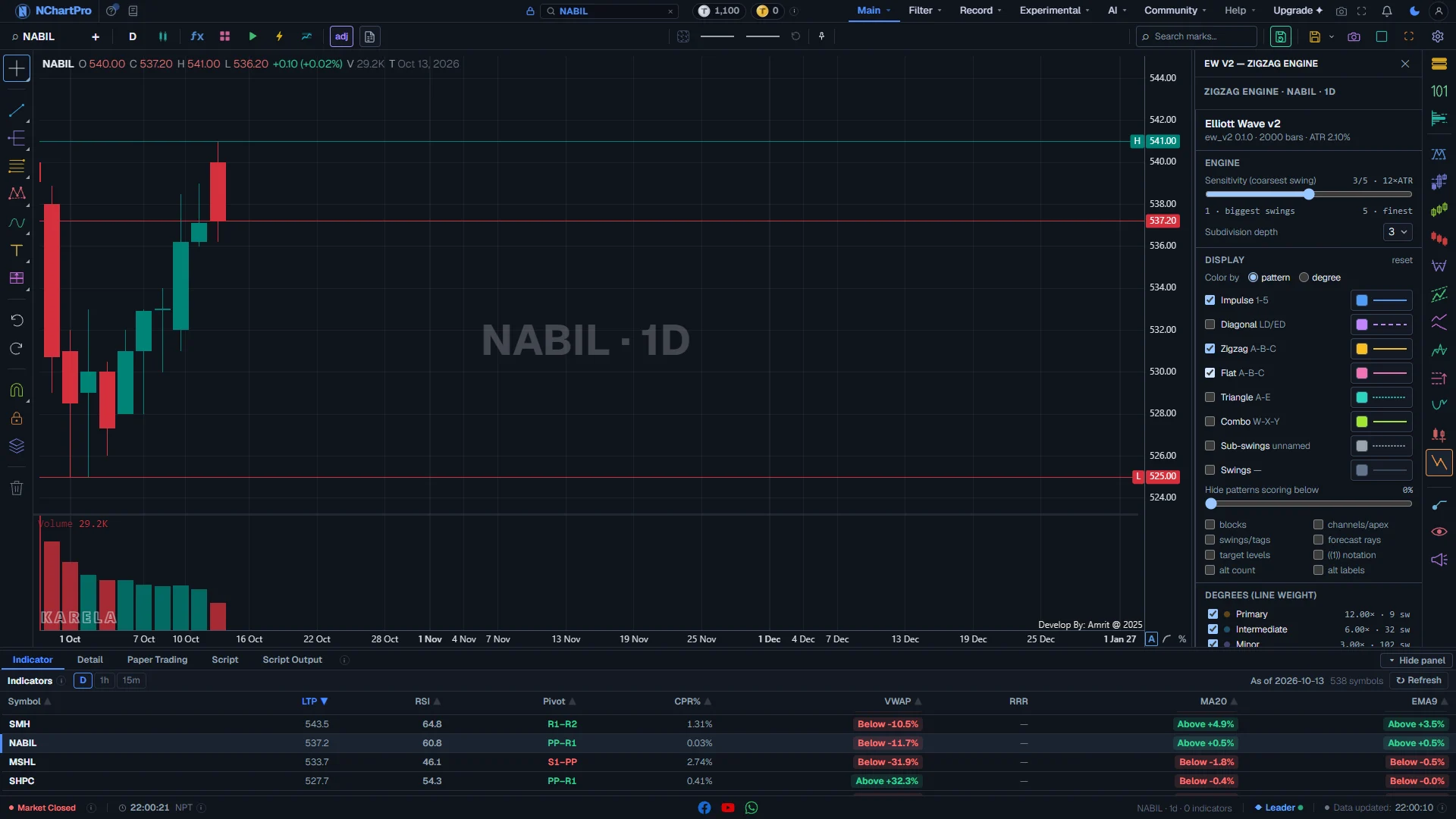
NABIL, 1 day: the E2 panel open, with Impulse, Zigzag and Flat ticked. Each part with a close-up of the real screen; the numbers match the dots on the picture.
Opening E2
Click the E2 chip (EW V2 — zigzag engine) in the marks column on the right of the chart.
How — Click the chip again, the cross, or press Escape to close the panel. The count stays drawn while you use other panels.
Engine · stock · timeframe
Which engine ran, on which stock, on which timeframe. For example "Zigzag engine · NABIL · 1D".
How — E2 reads 1m, 5m, 15m, 1h and 1D candles. Another chart timeframe is mapped to the nearest one, and this line shows the one it really read.
- Loading…: the stored count is being fetched.
- Computing…: the count is being made now. It says how many jobs are ahead, retries by itself, and has a "Retry now" button.
- Queue is busy (grey): too many counts are being made. Press "Try again" in a minute.
- Could not load the analysis (red): something failed. Press "Retry".
- Sign in to view…: the count is made on the server, so it needs an account.
Version line
The panel title "Elliott Wave v2", and under it the engine version, how many candles it read, and the ATR it measured.
- Example: "ew_v2 0.1.0 · 1500 bars · ATR 2.10%".
- ATR: the average size of one candle, as a percent of the price, over the last 14 candles. Every swing size is measured in ATRs.
- "no analysis" means the server sent nothing for this stock yet.
Sensitivity (1–5)
How big a price turn must be to start a new swing at the largest degree.
How — Drag the slider. Each step asks the server for a NEW count, so the chart redraws a moment later. Your choice is remembered in this browser.
- The readout shows the step and its multiple, for example "3/5 · 12×ATR".
- 1 = 20 × ATR: only the biggest swings. A short, broad count.
- 2 = 16 ×, 3 = 12 × (default), 4 = 8 ×.
- 5 = 4 × ATR: the finest swings. A long, detailed count.
- Hover the row to see the multiple actually used on this timeframe and the degree the count started at. On an intraday chart it is rescaled, so one step means the same size of price move as on the daily chart.
Subdivision depth (1–4)
How many levels of smaller waves are worked out inside each wave. Default 3.
How — Pick 1 to see only the main waves. Pick 3 or 4 to see each wave broken into its own smaller waves. This also asks for a new count.
- It also sets how many degrees exist: depth + 4, up to 8.
Color by
Paint the count by pattern kind (default) or by degree.
How — Use "pattern" to tell an impulse from a correction. Use "degree" to see which waves belong together.
- In degree mode the largest degree shown is amber, then sky blue, violet, green, pink, yellow, orange and slate for the smallest.
- In degree mode the pattern colours below are kept, but not used, until you switch back.
Pattern kinds
One row per kind of pattern: a tick box to draw it, its name, its waves, and a style button. All start OFF.
How — Tick a box to draw that kind. Click the style button at the right to change its colour, transparency, thickness (0.1 to 4 px), line type and label size (11 to 14).
- Impulse 1-5 — blue, solid. Block tag IMP; IMP* when wave 5 is short (truncated); IMP³ when wave 3 is extended.
- Diagonal LD/ED — purple, dashed. A five-wave wedge: LD (leading) at the start of a move, ED (ending) at the end.
- Zigzag A-B-C — amber, solid. A sharp correction. ZZ+ when C is extended.
- Flat A-B-C — pink, solid. A sideways correction. FL+ expanded, FL→ running.
- Triangle A-E — teal, dotted. Five sideways waves. TRI+ when widening.
- Combo W-X-Y — lime. A longer correction made of smaller ones.
- Sub-swings — grey, dotted. Swings inside one wave that form no named pattern. No wave labels.
- Swings — slate, thin. The raw swings the engine started from.
The count on your candles
Each pattern is a line through its swing points, with its wave labels at the turns.
- Numbers 1-5 and letters A-B-C (or A-E, W-X-Y) sit at the end of each wave, above a high and below a low.
- A dashed line on a wave that is normally solid: its last swing is still "live" and can move with the next candle.
- Where waves of several degrees end on the same candle, their labels are stacked, smallest degree nearest the candle.
- A rising count says the trend is up. A falling count says it is down — for you that means EXIT or stay out, never a short trade.
Display switches, degrees and forecasts
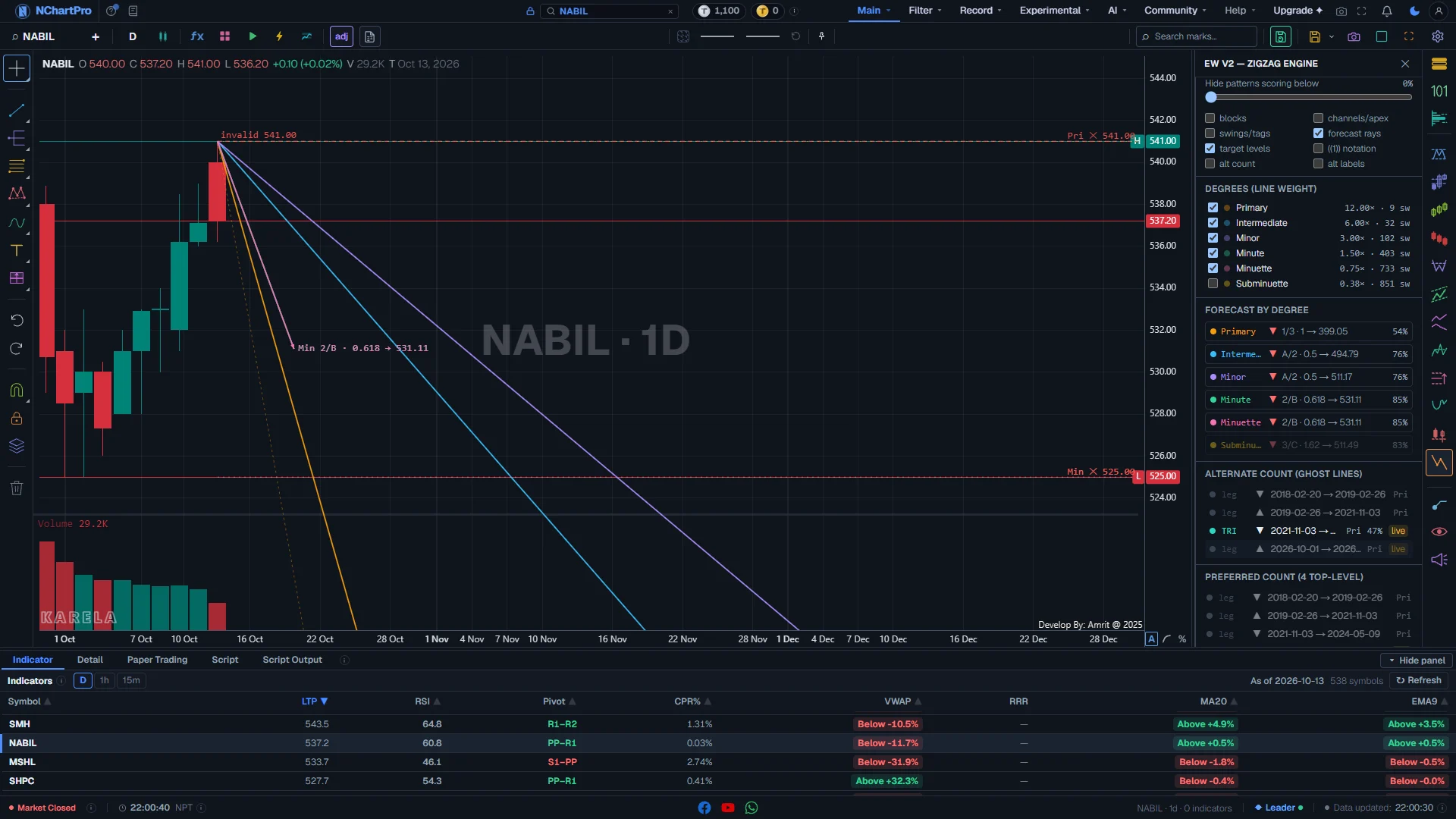
Further down the E2 panel: the score filter, the drawing switches, the degrees and the forecasts (Forecast rays and Target levels ticked). Each part with a close-up of the real screen; the numbers match the dots on the picture.
Hide patterns scoring below
Hides every pattern whose score is under this value. 0 to 90%, in steps of 5. Default 0 (show all).
How — Drag to about 50% to keep only the confident readings. The smaller waves inside a hidden pattern are still drawn.
Drawing switches
Eight extra things to draw. All start off. The "reset" link above puts the whole Display block back to its defaults.
- blocks: a faint box over the time and price each pattern covers, in its colour, with its tag (IMP, ZZ, FL…) in the top-left corner. A "?" after the tag means the pattern is still live.
- channels/apex: thin dashed helper lines — the impulse channel through waves 2-4, the zigzag channel, the two flat levels, and the edges of triangles and diagonals.
- swings/tags: a small dot at every swing, and HH, LH, HL or LL (higher high, lower high, higher low, lower low) at the swings of the largest ticked degree.
- forecast rays: from the end of the count, a ray to each target of every ticked degree, in the degree colour. The preferred target is solid with an arrow; the others are faint and dashed. Each is labelled like "Pri 3 → 512.30".
- target levels: green dotted lines across the chart at the largest degree's target prices, labelled "1.618 → price", and a red dashed "invalid price" line.
- ((1)) notation: write the degree into the wave labels — ((1)), (1), 1, (i), i.
- alt count: the second-best count as faint, thin dashed "ghost" lines with small labels.
- alt labels: add each wave's second-best reading after its label, for example "3·C".
Degrees
One tick box per degree the count produced, largest first. The first five are ticked until you change them.
How — Untick a degree to hide its waves. Tick only the top one or two for the big picture.
- The coloured dot is the degree's colour. It is bright only when Color by is set to degree.
- The numbers at the right, like "12.00× · 18 sw", are the swing size used (in ATRs) and how many swings that degree holds.
- A higher degree draws its lines thicker, so the big waves stand out over the small ones.
Forecast by degree
One row per degree: where the count is now, and where it points next.
How — Click a row to draw only that forecast on the chart, even if its degree is unticked. The row opens with the details. Click it again to go back.
- Dot and name: the degree, in its colour.
- ▲ green: the next move is expected up. ▼ red: expected down — for a holder that is a warning, not a short trade.
- Text like "3 → 512.30": the preferred target. If there is none, the phase is shown instead.
- The percent at the right is how strong the forecast is.
- Opened: the phase in words, the invalidation price in red, every target with what it was measured from (the preferred one bright), and roughly how many bars out it is drawn.
- A faded row belongs to a degree you have unticked.
Forecast lines on the chart
With Forecast rays and Target levels on, the space right of the last candle shows where each degree points.
- Coloured rays with an arrow: each degree's preferred target. Faint dashed rays: its other targets.
- A dotted line in the degree colour with a red "✕ price" label at the right edge: that degree's invalidation price.
- Green dotted levels: the largest degree's Fibonacci targets.
- Red dashed level "invalid …": the price that would prove the largest count wrong.
The wave tree
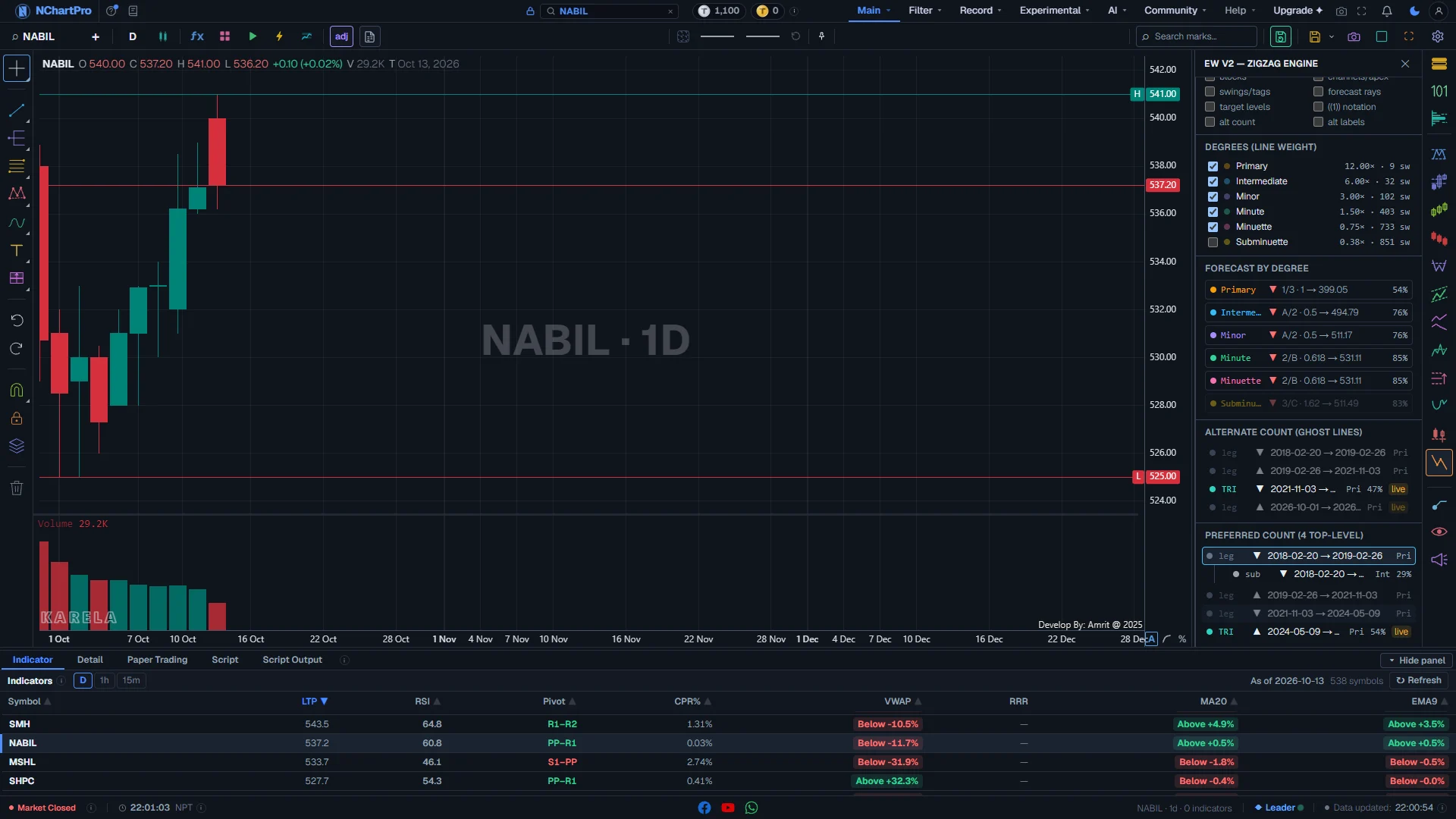
The bottom of the E2 panel: the Preferred count, with its first wave clicked open. Each part with a close-up of the real screen; the numbers match the dots on the picture.
Preferred count
Every wave of the chosen count, as a tree. Bigger waves hold the smaller waves inside them. The heading says how many top-level waves there are.
How — Click a row to open it and see its smaller waves. Above this list, "Alternate count (ghost lines)" lists the next-best count in the same way.
- Dot and tag: the pattern kind, in its colour (IMP, ZZ, FL, TRI, WXY, sub, leg). Hover the tag for its full name.
- ▲ / ▼: the wave goes up or down.
- Dates: from the first candle to the last candle of the wave.
- Three letters: the degree (Pri, Int, Min…).
- Percent: the pattern's score. A plain swing (leg) has none and is shown faded.
- "live" chip: the wave's last swing can still change.
A clicked wave
Clicking a wave singles it out on the chart. Everything else fades, and the wave is drawn with a soft glow and hollow dots on its turning points.
How — Click the same row again, or "clear" at the top of the panel, to bring the whole count back.
Why this wave was chosen
Inside an opened wave: its second-best reading, and every rule it was tested against.
- "alternate reading: ZZ 41%": what the engine would call this wave if not the chosen pattern, with that pattern's score.
- ✓ (green): the test was passed. ✗ (grey): it was not.
- The rule name, then its measured value (for example 0.618).
- "· rule": a hard rule. A drawn wave always passes all of these — one that failed was thrown away.
- "· guide": a guideline. A cross here only lowered the score.
The selected wave
The clicked wave stands out on the candles with its labels a little larger; the rest of the count is faded.
Reading the numbers
- Score: a percent. It is prior × (floor + (1 − floor) × guideline blend). An impulse that passes every hard rule but no guideline scores 30%; one that matches every guideline and Fibonacci ratio scores 100%.
- Hard rule ("rule"): breaking it throws the pattern away. Guideline ("guide"): breaking it only lowers the score.
- "live": the last swing of that wave is still provisional — the most recent high or low, and up to two small swings after it, can still move as new candles arrive.
- Degree: the size of a wave. E2 names its degrees Primary, Intermediate, Minor, Minute, Minuette, Subminuette, Micro and Nano, largest first. Each degree uses half the swing size of the one above. The largest degree shown is the first one with at least 8 swings, so a short intraday chart may start at Minor.
- ((1)) notation: the bracket style of printed Elliott charts — ((1)) for the largest degree shown, then (1), 1, (i), i, and ·i· for the smaller ones.
- Swing size: a new swing starts when the price turns by more than Sensitivity × ATR(14). Steps 1 to 5 mean 20, 16, 12, 8 and 4 × ATR on the daily chart.
- A forecast is measured from waves that already finished. How far right a ray is drawn is only a sketch, not a date.
Every rule, in plain words
Impulse
11Five waves in the direction of the trend: 1-2-3-4-5.
- Wave 2 never goes back past the start of wave 1. hard rule
- Wave 3 is never the shortest of waves 1, 3 and 5. hard rule
- Wave 3 ends beyond the end of wave 1. hard rule
- Wave 4 never enters the price range of wave 1. hard rule
- Waves 2 and 4 look different — one deep, one shallow. guideline
- Wave 5 ends near the channel line drawn through wave 3. guideline
- Wave 5 goes past the end of wave 3. If it does not, the impulse is marked "truncated". guideline
- Wave 2 goes back about 50% or 61.8% of wave 1. Fibonacci
- Wave 3 is about 1.618, 2.618 or 1 times wave 1. Fibonacci
- Wave 4 goes back about 38.2% or 50% of wave 3. Fibonacci
- Wave 5 is about 1, 0.618 or 1.618 times wave 1. Fibonacci
Diagonal
10A five-wave wedge, at the start (leading) or the end (ending) of a move.
- Wave 2 never goes back past the start of wave 1. hard rule
- Wave 3 is never the shortest of waves 1, 3 and 5. hard rule
- Wave 3 ends beyond the end of wave 1. hard rule
- Wave 4 ends beyond the end of wave 2, so both edges of the wedge move forward. hard rule
- The two edges of the wedge do not cross, and they clearly narrow or widen. hard rule
- Wave 4 dips into the price range of wave 1 — normal for a diagonal. guideline
- Wave 5 ends beyond wave 3. guideline
- Wave 2 goes back about 75% of wave 1. Fibonacci
- Wave 4 is about 70% of wave 3. Fibonacci
- The wedge narrows to about half its width (or widens to about 1.8 times). Fibonacci
Zigzag
6A sharp three-wave correction: A-B-C.
- Wave B goes back more than 5% but less than 88.6% of wave A. hard rule
- Wave C ends beyond the end of wave A. hard rule
- Wave C is at least 38.2% of wave A. hard rule
- Not a very long C after a very short B — that shape is the start of a new trend instead. hard rule
- Wave B goes back about 50%, 61.8% or 38.2% of wave A. Fibonacci
- Wave C is about 1, 0.618 or 1.618 times wave A. Fibonacci
Flat
6A sideways three-wave correction: regular, expanded or running.
- Wave B goes back between 61.8% and 161.8% of wave A. hard rule
- Wave C is between half and 2.618 times wave A. hard rule
- The shape is closer to an expanded flat than a regular one. guideline
- Wave C goes past the end of wave A. If it does not, the flat is "running". guideline
- Regular flat: B about 95% of A, and C about the same as A. Fibonacci
- Expanded flat: B about 123.6% of A, and C about 155% of A. Fibonacci
Triangle
4A five-wave sideways pattern: A-B-C-D-E, narrowing or widening.
- The two edges do not cross, and they clearly narrow (or widen). hard rule
- No wave goes more than 10% past the wave two before it on the same side — the price moves sideways, not in a trend. hard rule
- Each wave shrinks (or grows) by a similar amount. guideline
- Each wave is about 75% of the one before (135% when widening). Fibonacci
Combination
3A longer correction made of smaller ones: W-X-Y or W-X-Y-X-Z.
- Accepted only when the move splits into exactly 3 or 5 parts. step
- Every main part (W, Y, Z) must itself be a named pattern. step
- Its score is the average score of its parts. step
Swings and degrees
8How the price is turned into waves before any pattern is tested.
- The average daily range is measured over 14 candles (ATR). step
- A new swing starts when the price turns by more than Sensitivity × ATR: 20, 16, 12, 8 or 4 × ATR for steps 1 to 5. step
- On other timeframes that number is rescaled, so one step means the same size of move as on the daily chart. step
- Swings always go high, low, high, low — two highs in a row cannot happen. step
- The latest swing, and up to two after it, are marked "live" because they can still change. step
- Each smaller degree uses half the swing size of the one above. step
- The largest degree shown is the first one with at least 8 swings. step
- No degree uses swings smaller than 0.35 × ATR. step
Choosing the count
8How the best set of patterns is picked from all the ones that passed.
- Every run of 3 swings is tried as a Zigzag and a Flat; every run of 5 as an Impulse, Diagonal and Triangle. step
- A pattern that breaks any hard rule is thrown away. step
- Patterns scoring under 20% are ignored. step
- Score = how common the pattern is × (a base for passing the hard rules + the guidelines and Fibonacci fits). step
- A pattern that fits its place (a trend where a trend belongs) scores 10% more; one that does not scores 25% less. step
- The count with the highest total wins, with a bonus for trend patterns and for a trend-then-correction rhythm. step
- For each spot, the second-best pattern is kept as that wave's alternate reading. step
- The Alternate count is found by removing the strongest pattern and solving again. step
Sub-waves
4How each wave is broken into smaller waves.
- Each wave is read again on smaller swings, up to three degrees down. step
- First choice: one named pattern covering the whole wave. Then a Combination. Then plain sub-swings. step
- A wave needs at least 4 candles and 4 swings to be broken down. step
- This repeats until the Subdivision depth you chose (1 to 4). step
Forecast and invalidation
7What is projected from the open end of the count, and where it would be wrong.
- After a finished impulse: a pullback to 38.2%, 50% or 61.8%. Wrong below the impulse's start. Fibonacci
- After a finished correction: a move of 1 or 1.618 times it. Wrong beyond the correction's end. Fibonacci
- During wave 1: wave 2 to 50% or 61.8%. Wrong below wave 1's start. Fibonacci
- During wave 2: wave 3 to 1, 1.618 or 2.618 times wave 1. Wrong below wave 1's start. Fibonacci
- During wave 3: wave 4 to 38.2% or 50% of wave 3. Wrong inside wave 1. Fibonacci
- During wave 4: wave 5 to 0.618 or 1 times wave 1. Wrong inside wave 1. Fibonacci
- The time on a drawn ray is a sketch from past wave lengths, not a date. step
What it does not do
- Elliott Wave is an interpretation. E2 applies one exact version of the rules; another analyst can read the same chart differently.
- A count changes as new candles arrive. What is wave 3 today can become part of a bigger wave next week.
- Barrier and running triangles, and the finer NeoWave pattern types, are not separate types in E2.
- The forecast time on a ray is a proportional sketch from past wave lengths, not a date.
- It needs at least 120 candles, and it runs only for signed-in users because it is computed on the server.
- There is no published accuracy figure. The rules were tuned by checking counts on NEPSE and a handful of stocks.
- A count is a reading of past prices, not advice to buy or sell.
Questions people ask
Every pattern kind starts switched off. Tick Impulse, Zigzag and Flat under Display.
That is expected. Sensitivity decides which moves count as swings, and the whole count is built from those swings. Try the next step up and down to see how stable the reading is.
No. Crosses only appear on guidelines, which lower the score but never reject a wave. Any wave that broke a hard rule was thrown away before it could be drawn.
The count is made on the server for each stock, timeframe and setting. It is usually ready in under a second; if the server is busy it joins a queue and the panel retries by itself.
Clicking a row singles that wave out. Click the same row again, or "clear" at the top of the panel, and the whole count comes back.