

Elliott Wave
Elliott Wave says a market moves in a repeating rhythm: five waves with the trend, then three against it, at every size at once. Counting those waves by hand is slow, and two people rarely agree. On the chart, the E2 chip counts them for you, draws the count on your candles, and shows the rules behind every wave.
What this page is
Elliott Wave is a way to read price as waves. A trend moves in five waves (1-2-3-4-5): three go with the trend and two pull back. Then a correction moves in three waves (A-B-C) against it. Each wave is made of smaller waves of the same kind. The sizes are called degrees.
This app has one Elliott Wave engine with a button: E2, the zigzag engine. It turns the price into swings, tries every 3-wave and 5-wave pattern over them, throws away any that break a hard rule, and keeps the best-scoring count. Everything about it — its 25 rules, how it scores, and every option in its panel — is on the next page, Elliott Wave v2 (E2).
A second, larger engine, E1 (the grammar engine), exists in the code but is not built into this app. Its button is hidden on purpose. A button for an engine that is not there would open a panel that never shows a count. If you see E1 mentioned elsewhere, it is not something you can open here.
The count is made on the server, not in your browser. The first time you open a stock and timeframe it usually takes under a second. After that it is stored, so the next visit is instant.
Why it helps you
- A wave count is a map, not a signal. Its most useful number is the invalidation price: the level where the count is proven wrong. Use it as your stop level.
- A count that says the price is in a falling wave is a reason to EXIT or stay out. NEPSE has no short selling, so a falling count is never a trade by itself.
- Change Sensitivity one step up and one step down. If the big waves stay the same, the reading is stable. If they flip, the price is honestly unclear.
- Use the daily or weekly chart and Sensitivity 1 or 2. That keeps only the biggest waves, which is the scale a long-term holder cares about.
- The main question it answers is simple: is this stock late in an old rise (wave 5), or early in a new one (wave 1 or 3)?
- It says nothing about the business. It only describes how the price has moved.
When to use it, and where to find it
- After the close. The last swing is always "live" during the session and can still change.
- On a stock that has made a clear, large move. On a flat, sideways stock the engine finds only small patterns or nothing useful.
- Before buying near a level you like, to see whether a target or an invalidation price sits there.
- The E2 chip is in the marks column on the right of the Chart page, on a computer and in the Android app.
Try it — a short walkthrough
- 1Open E2Pick a stock and the 1 day timeframe, then click the E2 chip on the right. The panel opens. Wait for the line at the top to show the stock name and the Engine block to appear.
- 2Tick three pattern kindsUnder Display, tick Impulse, Zigzag and Flat. Blue, amber and pink wave lines with numbers and letters appear on the candles.
- 3Choose the wave sizeMove Sensitivity. Step 1 keeps only the biggest swings; step 5 reads the smallest. Wait a moment — each change is a new count.
- 4Read the invalidation priceScroll down to Forecast by degree and click the first row. Its invalidation price is where this count is wrong. Read the full guide on the Elliott Wave v2 (E2) page.
The panel at a glance
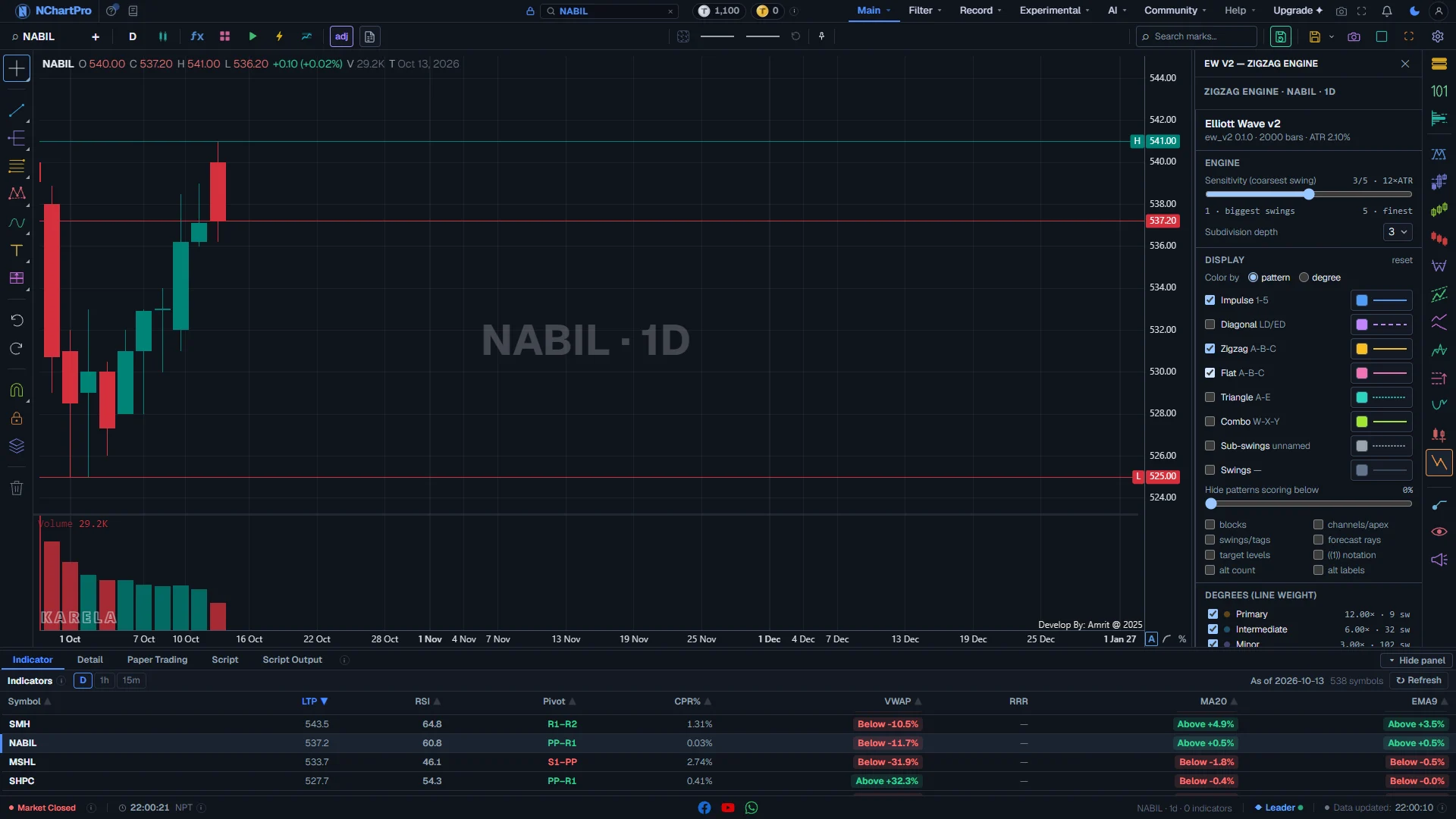
NABIL, 1 day, with the E2 Elliott Wave panel open and three pattern kinds ticked. Each part with a close-up of the real screen; the numbers match the dots on the picture.
The E2 panel
Click the E2 chip (EW V2 — zigzag engine) in the marks column on the right. Its panel opens here.
How — Click the chip again, the cross, or press Escape to close it. Your count stays on the chart while you work in other panels.
What is being counted
One line: the engine, the stock and the timeframe it read, for example "Zigzag engine · NABIL · 1D".
How — Check this line first. The count is for this stock and this timeframe only.
- Loading…: the stored count is being fetched.
- Computing…: the server is making the count now. It retries by itself. "Retry now" asks again at once.
- Queue is busy: many counts are being made. Press "Try again" in a minute.
- Could not load the analysis (red): something failed. Press "Retry".
- Sign in…: the count is made on the server, so it needs an account.
Engine
Two controls that decide WHICH count you get: how big a swing must be, and how many levels of smaller waves to find.
How — Move Sensitivity from 3 (the default) to 2 for bigger waves, or to 4 for smaller ones. Each change asks the server for a new count.
Pattern kinds
Every pattern kind starts switched OFF, so the chart is bare until you tick one.
How — Tick Impulse, Zigzag and Flat to start. The other kinds and all their colours are on the Elliott Wave v2 (E2) page.
The count on your candles
Each pattern is a line through its swing points, with wave numbers at the turns.
- 1-2-3-4-5 (blue line): an impulse, the five waves with the trend.
- A-B-C (amber line): a zigzag, a sharp correction.
- A-B-C (pink line): a flat, a sideways correction.
- A dashed wave line: its last swing is still "live" and can change with the next candle.
Reading the numbers
- Wave: one move from a swing high to a swing low, or back.
- Impulse: five waves with the trend, 1-2-3-4-5.
- Correction: three waves against the trend, A-B-C (zigzag or flat), or five sideways waves, A-B-C-D-E (triangle).
- Degree: the size of a wave. The same move is a small wave at one degree and part of a bigger wave at the next.
- Invalidation price: the price that would prove the count wrong.
- Live: a wave whose last swing can still change as new candles come in.
- Score: how well a pattern fits the rules, as a percent. Higher is a better fit, not a better trade.
What it does not do
- Elliott Wave is an interpretation. The engine applies one exact version of the rules; another person can read the same chart differently.
- A count changes as new candles arrive. What is wave 3 today can become part of a bigger wave next week.
- E1, the larger grammar engine, is not built into this app. Only E2 can be opened.
- The count needs at least 120 candles and a signed-in account, because it is made on the server.
- A count is a reading of past prices. It is not advice to buy or sell.
Questions people ask
Every pattern kind starts switched off. Tick Impulse, Zigzag and Flat under Display.
There is none in this app. The E1 engine is not built in, so its button is hidden rather than left to open an empty panel.
The count is made on the server for each stock, timeframe and setting. It is usually ready in under a second. If the server is busy, the panel waits and retries by itself.