

Detector Marks
Down the right edge of the Chart page runs a column of small coloured buttons. Most of them are detectors. A detector reads the candles on your chart and draws what it found straight onto them: levels, zones, patterns and wave counts. You do not get a table to read. You get marks on the price.
What this page is
The right edge of the chart is one column of buttons with one panel area to its left. At the top sit three side-panel buttons: Stock List, 101 Analysis and Auction. Under them come the detector chips this section is about. Under those come the last few side-panel buttons: the market-wide Candle Pattern scanner (tucked just below the Candle Patterns chip), MK, Watch List and Alert.
Each detector chip opens its own panel, but every panel is built from the same pieces: a few shared number boxes (Depth, Back count, Tolerance) and a list of coloured buttons, one per mark. A button lights up in the mark's own colour when it is on. The colour boxes beside it change how that mark is drawn, and the gear opens the detector's own inputs.
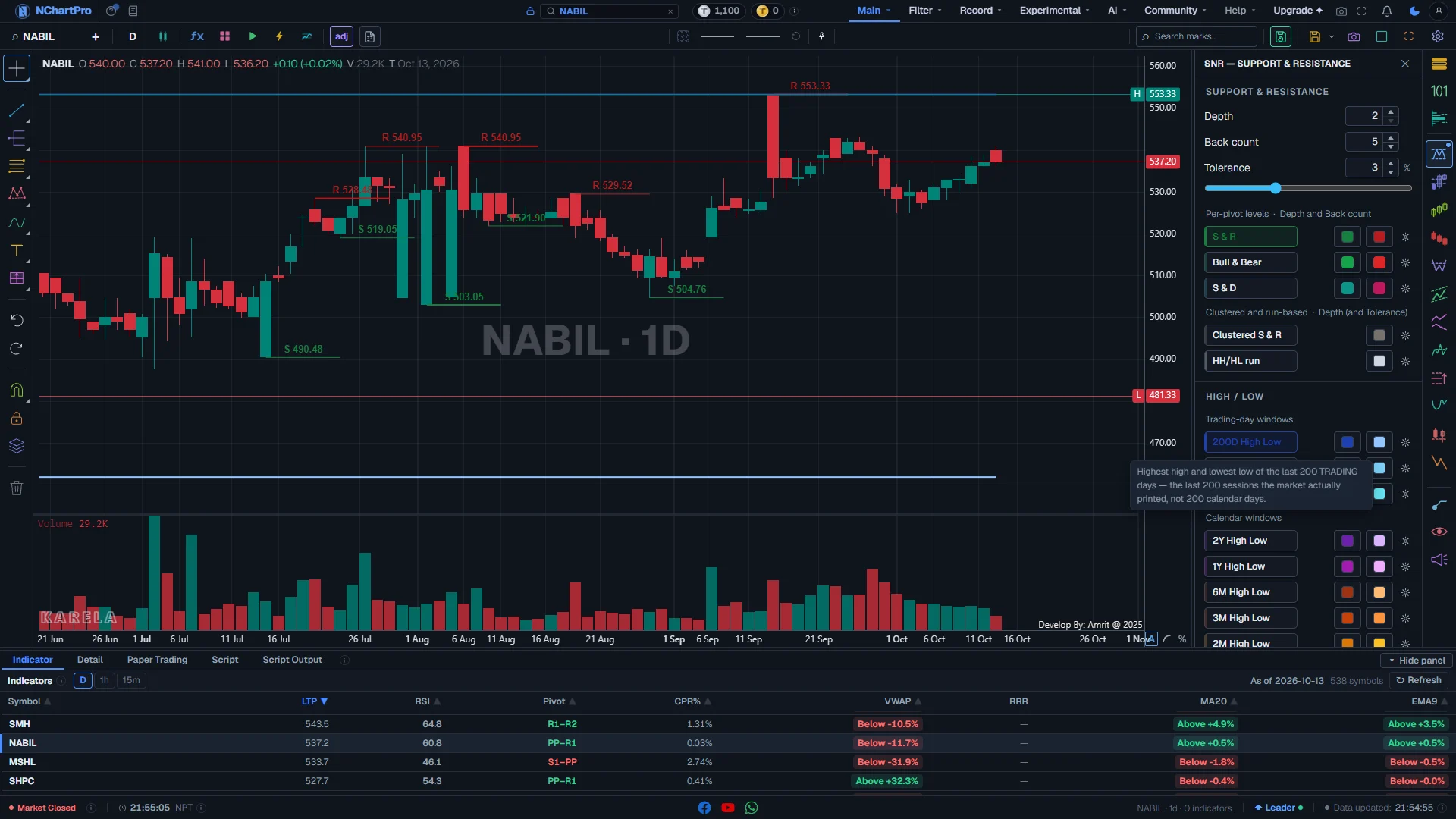
The SnR chip has no page of its own in this section, so it is the panel in the picture above. It holds three groups: support and resistance read from the swings, a list of fixed high/low windows, and two rows (Clustered S & R and HH/HL run) that came over from the chart pattern detector because they are levels, not shapes.
Why it helps you
- The detectors mark a chart in a moment, and they mark every stock the same way. That matters when you are checking twenty stocks before the open.
- Keep one mark on at a time. Every chip can put dozens of shapes on the screen, and a chart with four detectors on is a chart nobody can read.
- Learn Depth and Tolerance first. They decide what most detectors even call a turning point or a level, so changing them changes every chip that uses them.
- Most of these are short-term tools, and you can ignore many of them. The ones that help a long-term holder are the SnR levels and the 1Y / 2Y high/low rails, the Chart Pattern Detector for shapes that take months to form, and Cup and Handle.
- Set the chart to 1 day or 1 week first. The same detector on a 15-minute chart finds ten times as many shapes, and almost none of them will still matter next quarter.
- Nothing here is a forecast. A detector says a shape that matches a rule exists in the price history. Whether it matters is your judgement.
When to use it, and where to find it
- After you have picked a stock and a timeframe, never before. Every detector reads the candles on the chart, so the timeframe you are on is the analysis you get.
- When you want a second opinion. Mark a level by eye, then switch on the matching detector and see whether it agrees.
- After the close or at the weekend, when the last candle is final. During the session the last candle is still moving, and a mark that depends on it can change.
- The column is shown on a computer and in the Android app. It is hidden in a phone's web browser and on a read-only shared chart link.
Try it — a short walkthrough
- 1Hover the chipsHover any chip in the column. A small box names the tool on the first line and says what it does on the second.
- 2Open SnR and switch on S & RClick the SnR chip (the top one) and click the S & R button. Green support lines and red resistance lines appear at the turning points on the chart.
- 3Change Depth and watch the badgeRaise Depth from 2 to 8. The pivot count beside it falls, and the chart keeps only the bigger turning points.
- 4Try one high/low windowSwitch on 1Y High Low. Two purple rails show the highest and lowest price of the last year. Switch S & R off so the two do not mix.
- 5Turn everything off before you move onClick each lit button again to switch it off. The small dot on the chip goes away when nothing in that panel is drawing. Press Escape to close the panel.
The column, the panel and the chart, part by part
NABIL, 1 day, with the SnR chip open and two of its rows switched on. Each part with a close-up of the real screen; the numbers match the dots on the picture.
The detector chips
Eleven coloured buttons, one per detector. Each opens its own panel to the left of the column.
How — Hover a chip to read its name and what it does. Click it to open its panel. Click it again, press Escape or click the cross to close it.
- From the top: SnR (support and resistance), SMC, Candle Patterns, Chart Pattern Detector, Trend, Divergence, Quasimodo, Trade Levels, Cup and Handle, Liquidity Setups and Elliott Wave (E2).
- Each chip keeps its own colour. The open one gets a ring and a filled background in that same colour.
- A small dot in the corner of a chip means something in that panel is switched on and drawing on the chart.
- A chip your plan does not include is not shown, so the column is not the same length for every account.
The panel frame
Every detector panel uses the same frame: the tool name at the top and a close cross.
How — Drag the thin strip on the panel edge next to the chart to make it wider or narrower. The chart gets smaller to make room, so no candle is hidden.
- Only one panel is open at a time. Opening a detector closes the side panel that was open (101, Auction, Alert and so on), and the other way round.
- Clicking on the chart does not close the panel. Only the cross, Escape or the chip does, so you can read the candles while it is open.
Depth
How big a swing must be to count as a turning point (a pivot). 2 to 30, starting at 2.
How — Type a number or use the arrows. The grey badge beside it counts how many pivots that Depth finds on the candles in front of you, so you see the effect before you look at the chart.
- Small Depth: many small swings, many levels. Good for a short view.
- Big Depth: only the large swings, few levels. Good for a long view.
- Depth is shared. Most detector panels use the same number, so changing it here changes them too.
Back count
How many of the newest levels of each kind are drawn. 1 to 40, starting at 5.
How — Raise it to see older levels, lower it to keep the chart clean. It only changes how much is drawn, not how the levels are found.
- It reaches the three rows under "Per-pivot levels" (S & R, Bull & Bear, S & D) and nothing else in this panel.
Tolerance
How close two prices must be to count as the same level. 0.5 % to 8 %, starting at 3 %.
How — Drag the slider or type a number. In this panel only the Clustered S & R row reads it.
- Higher: more touches are joined into one level, so you get fewer, stronger lines.
- Lower: only very close touches join, so you get more, thinner lines.
- Tolerance is shared with the SMC, Liquidity, Quasimodo and Cup and Handle panels.
S & R
Support and resistance: the prices where the market turned before, one short line at each pivot.
How — Click the button to switch it on. It lights up in its own colour. The small colour boxes on the right change the colour and line of each side; the gear opens the detector's own settings.
- Support (dark green line): a low the price turned up from. Buyers stepped in there before.
- Resistance (dark red line): a high the price turned down from. Sellers stepped in there before.
- Bull & Bear (the row below): every swing leg as a shaded box from pivot to pivot, green for a rising leg and red for a falling one, labelled HH, HL, LH or LL.
- S & D (the row below that): demand zones (teal boxes) where a rising leg started and supply zones (pink boxes) where a falling leg started. A zone that price has already come back to is drawn faded, and its label gets an "x" (for example "Demand x").
- Clustered S & R (grey line): one line where many pivots agree, found by how often price traded near it.
- HH/HL run (light grey dashed line): a long run of higher highs and higher lows, or lower highs and lower lows, with the level that would end the run.
High / low
The highest high and lowest low over a fixed window, drawn as two flat rails to the right edge.
How — Switch on one window at a time. Each rail is labelled with its window and H or L, for example "200D H" and "200D L".
- Trading-day windows (blue shades): 200D, 100D and 50D count market sessions, not calendar days. Darker blue is the high, lighter blue the low.
- Calendar windows: 2Y and 1Y (purple shades), 6M, 3M, 2M and 1M (orange to yellow shades). These count back by date from the last candle.
- A label like "200D H · 41d" means the chart only has 41 days of data, so the rail covers less than the full window.
- Price near an old high: a test of resistance. Price breaking a 1Y or 2Y low: the stock is at its weakest in that time. That is a warning sign, not a bargain by itself.
Where the marks land
Everything a detector finds is drawn on these candles, at the exact prices and dates it found it.
How — Switch on one row, look at the chart, then switch it off before trying the next. Several detectors on at once make a chart that is hard to read.
- A mark on the last candle can change while the market is open. It is settled after the close.
- Marks that belong to an indicator (most Divergence marks) are drawn in a small pane under the candles, not on them.
Reading the numbers
- Pivot: a candle whose high (or low) is higher (or lower) than the candles on both sides of it. Depth sets how many candles on each side it must beat.
- Support: a price the market turned up from before. Resistance: a price it turned down from before. A level that breaks often swaps role: old resistance can become new support.
- HH, HL, LH, LL: higher high, higher low, lower high, lower low. HH and HL together are an up-trend; LH and LL together are a down-trend.
- Demand zone: the area a rising move started from. Supply zone: the area a falling move started from. A faded zone with "x" has already been revisited.
- Faded drawing: something that has already been used up (touched, filled or broken). It stays on the chart as history, not as a live level.
What it does not do
- Every chip has its own feature key, so a tool your plan does not include is not shown. No page in this section can promise a given chip is on your screen.
- The Elliott Wave V1 engine (E1) is not built into this app, so it has no chip. Only E2 is on the column.
- MK, below the detectors, is a placeholder for hand-drawn marks that is not built yet. Hand drawing lives on the left drawing rail.
- The S & D Zone tiers (Major, Minor, Strong) are hidden in the SnR panel for now while they are being finished. A tier you had already switched on keeps drawing.
- Detectors describe the past. A shape appearing is not a reason to buy or sell anything.
- On an open market the last candle is not finished, so any mark that depends on it can change or vanish before the close.
Questions people ask
The Candle Patterns chip marks patterns in the history of the one stock on your chart. The Candle Pattern scanner button below it lists which stocks across the whole market just printed one. Different questions, so both stay.
Usually not. Most detectors need enough swings to work with. On a short chart, or with a strict Tolerance, there may truly be nothing to draw. Lower Depth, raise Tolerance a little, or move to a longer timeframe and try again.
Yes. Which marks are on, the shared dials and your colour changes are saved with your chart, and come back the next time you open it.
The zigzag is how the pivots are found, not something to draw. Its dial is Depth, and it lives in the SnR panel and in the other panels that use it.