

The Karela Engine
The Chart page is drawn by Karela, an engine written here, in C++, and compiled to run inside your browser. This page is the story of where it came from and an account of how it works, for readers who want to know what is under the page rather than how to use it.
What this page is
NChartPro did not start as a website. It started as a Windows desktop program written in MFC, Microsoft's C++ framework for desktop applications, and it ran on a trader's own machine rather than in a browser. That program is still in this repository as reference source. You can see it working in recordings on the project's YouTube channel, which is the same market and the same ideas, several rewrites ago.
Two different things came out of that desktop program, and they took different routes. The analysis code — the ZigZag pivot engine, the proprietary KA indicator set, Smart Money Concepts, the pattern detectors, the strategy and simulation engines — was ported, deliberately and file by file, from Windows-bound C++ into portable C++17. That library is what runs on the server today, loaded into the Go backend, holding every symbol's history in memory and answering the detector panels you see on the right of the chart.
The chart itself took the other route. Rather than translate a Windows drawing system that was built around Windows graphics calls, the chart was rebuilt as a new C++ engine aimed at the browser from the start. It carried over the desktop chart's tool set and its layout rules, but none of its Windows code. That engine is Karela, and it is what draws the Chart page.
So the honest summary is: the analysis was ported, the chart was rebuilt, and both descend from the same desktop program. The family resemblance is real and visible — the desktop chart's drawing system defined forty-four kinds of object, and today's tool list still has a counterpart for every one of them, down to the Gann boxes, the XABCD and Cypher patterns and the Elliott impulse.
Why it helps you
- It is fast in a way that matters when you are scrolling through years of intraday bars. The geometry is computed in compiled code and handed straight to your graphics card, so panning and zooming stay smooth on large histories where a page built out of ordinary web code starts to stutter.
- Drawings are handled inside the engine rather than layered on top of the chart. Selecting, dragging a handle, and undo and redo are all part of the same compiled model, which is why a drawing stays exactly on its candles when you pan, zoom or change timeframe.
- You are unlikely to need this page at all, and nothing on it is required reading. The chart shows the same prices from the same feed as every other page in the app.
- What it may be worth knowing is that the analysis behind the detector panels is not a third-party library. It is code written for this market, carried forward from a program that has been in use long enough to have been rewritten several times, which is a different thing from a generic charting widget pointed at Nepali data.
- The chart engine is the project's own work and carries its own copyright, dated 2025. There is no licence fee inside it and no external service it calls.
When to use it, and where to find it
- Read it when you are curious what the name "Karela" means, or what draws the chart you are looking at.
- Read the limits section below if a drawing will not move to the front, or if the chart will not load at all on an old browser.
- The engine draws Main, then Chart. It is the only chart page in the app. The small charts on other pages, such as Dashboard and Comparison, are drawn by a smaller, lighter engine, not by Karela.
- The hollow KARELA wordmark in the bottom-left of the canvas, and the attribution line in the bottom-right, are the engine's own marks.
Try it — a short walkthrough
- 1Open Main, then ChartThe first load fetches the engine — about 1.3 MB of compiled code — and then starts. That download happens once per browser session and is cached for an hour, so moving between pages afterwards is immediate.
- 2Look for the wordmarkA hollow KARELA appears in the bottom-left of the chart area and an attribution line in the bottom-right. If you can see them, the engine started. If the chart is blank and they are missing, the engine did not load.
- 3Draw something and undo itPick a trend line from the left rail, place it, then press Ctrl+Z. The undo is executed inside the engine, not by the page around it. Drag one of its handles and it re-computes the shape as you move.
- 4Try a price-driven chart typeOpen the chart type menu and pick Renko, Kagi, Line Break or Point and Figure. These are price-driven rather than time-driven, so the horizontal axis stops being an even march of dates.
Every part, up close
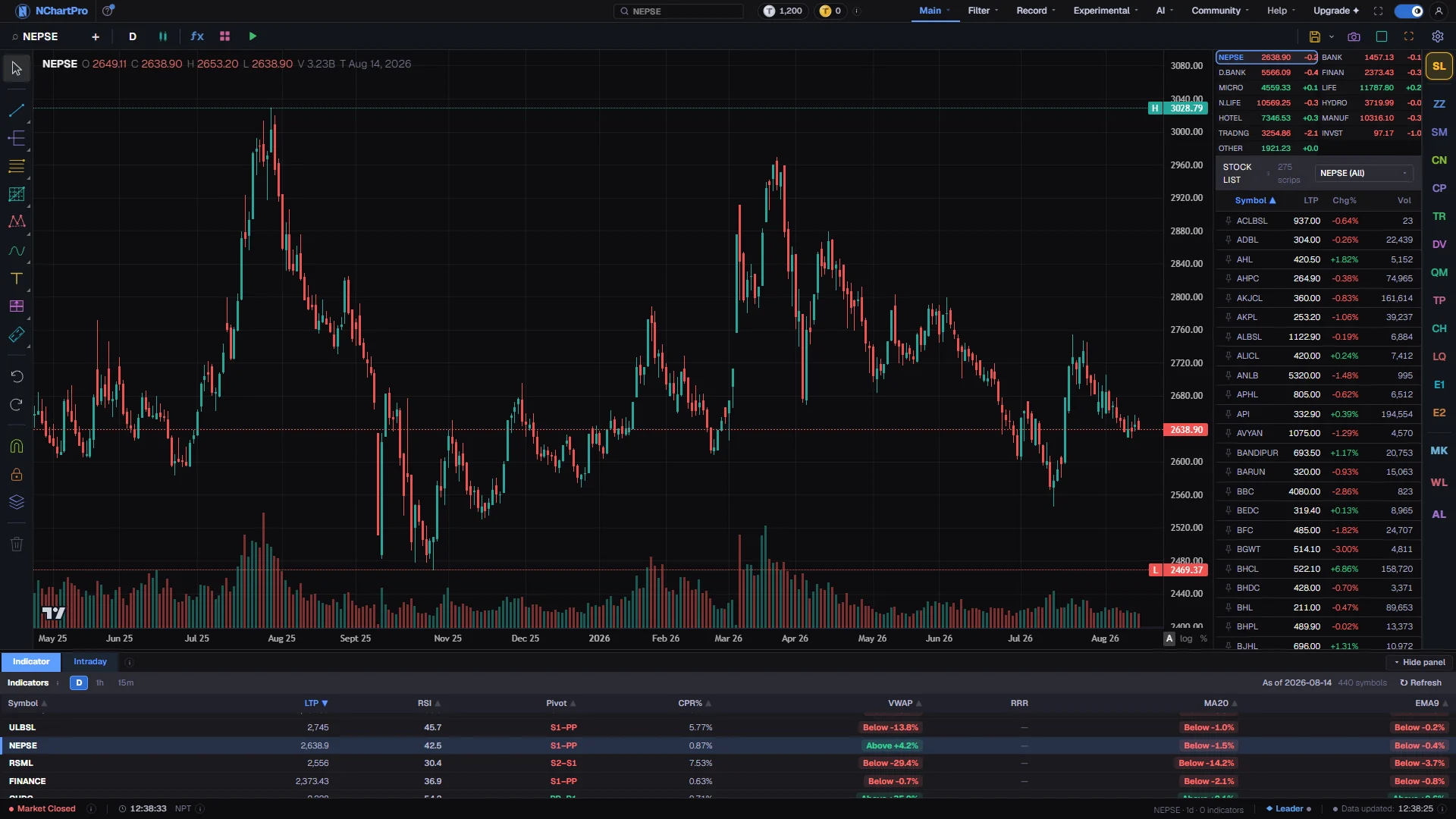
The Chart page — drawn by this engine, signed on its own canvas. Each part with a close-up of the real screen; the numbers match the dots on the picture.
The engine's canvas
Every candle here is placed by the compiled C++ engine, which signs its own work with the hollow KARELA wordmark and the developer credit set behind the price.
The inherited tools
The desktop program defined forty four kinds of drawing object and this rail still has a counterpart for each, held inside the engine rather than layered over the chart.
Geometry on demand
Switching this axis to log or percent reprojects every bar and every drawing at once, which is the kind of arithmetic the engine was compiled to keep instant.
Same feed
The strip shows the same feed the rest of the app uses. The engine only draws the chart; it never fetches data itself.
Reading the numbers
- What the browser actually downloads: karela.js, a 47 KB loader, and karela.wasm, 1,269,595 bytes of compiled WebAssembly. Both are served from a gated route that checks the request came from this site and that you have a session, rather than from the public static folder, because the compiled engine is the product.
- How it draws: the engine computes geometry — the numbers describing where every candle, axis tick and drawing goes — and never touches a pixel itself. A small renderer package takes those numbers and issues the draw calls, using WebGL2 where the browser has it and falling back to a 2D canvas where it does not.
- The engine renders no text at all. Every axis label, price tag and crosshair readout you see is painted by the page on a transparent layer above the chart, because glyphs cannot travel through the geometry buffer the renderer uploads.
- One copy of the engine runs per browser tab, with a fixed 512 MB working area reserved up front. Each chart window inside a multi-window layout is a cheap object inside that one copy, not a second engine.
- It runs on the main thread rather than in a background worker, and it never fetches data. Bars are handed to it by the page, which loads them the same way every other page in the app does.
- The 276 indicators are not Karela's. The engine has 188 indicators of its own and they are deliberately switched off; a separate compiled indicator library computes the values and injects them, so the same indicator code is not shipped twice.
- Version string, if you ever need it in a bug report: chart-engine 0.13.0.
What it does not do
- The engine paints drawings in the order they were created and offers no way to send one to the front or the back. Bring-to-front is therefore not available, and faking it by deleting and re-adding the object would change its identity and break saved layouts, so it is left undone rather than done badly.
- A detector mark drawn into an indicator sub-pane cannot widen that pane's scale to fit itself. On the main price pane it can, but only while auto-scale is switched on — a mark appearing is never allowed to overrule a zoom you performed yourself.
- It needs WebAssembly, and it is much better with WebGL2. Without WebGL2 it falls back to a plain 2D canvas; on a browser too old to run WebAssembly the chart will not load, so use an up-to-date browser.
- The fixed 512 MB working area is reserved whether you need it or not. On a machine with little memory, having many tabs of this page open will be felt.
- Nothing in the compiled file is obfuscated beyond having its debug symbols stripped. The names of its internal functions are readable by anyone who downloads it. It is protected by copyright, not by secrecy.
Questions people ask
Yes. Until 1 September 2026 there were two chart pages: one drawn by a third-party charting library, and one drawn by Karela. The third-party page was retired, and Karela now draws the one Chart page.
On the project's YouTube channel, linked at the bottom of this page and from the front page. It is the same market and the same ideas, several rewrites earlier, and it is there as provenance rather than as something you can still install.
No. It runs entirely inside your browser and makes no network requests of its own — it does not even fetch its own price data. Drawings are saved to your account by the page around it.
About 1.3 MB of compiled code has to arrive and be started before anything can be drawn. It is cached for an hour afterwards, so it is a once-per-session cost, not a once-per-page one.
Watch it
NChartPro on YouTube — the earlier desktop version, and where this came from