

Stocks
The plain arithmetic of the day: how many shares changed hands in each stock, how much money that was, and what the average share actually traded at.
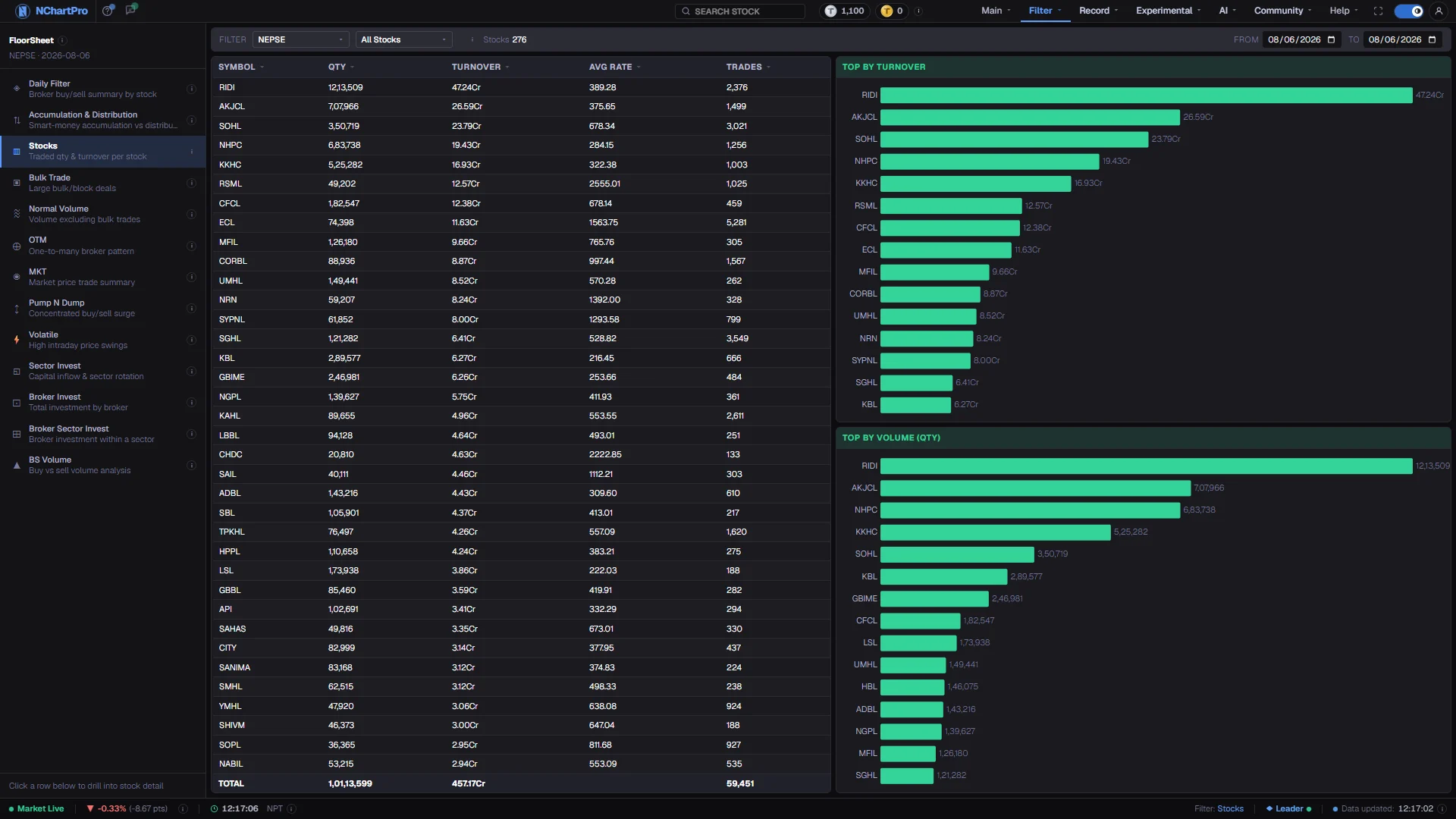
What this page is
Stocks is the baseline the rest of the floor-sheet section is built on. There is no pattern detection here and nothing is filtered out. For each symbol you get the quantity traded, the turnover in rupees, the volume-weighted average rate and the number of separate floor-sheet transactions, over a day or a range.
A sticky TOTAL row sums whatever is currently on screen, so it follows your sector, stock and date choices. Two bar charts beside the table rank the fifteen largest names by turnover and by quantity — usually two different lists.
Why it helps you
- Read it before any pattern filter. A flag on a stock that trades two thousand shares a day means something different from the same flag on one that trades two lakh.
- Average rate against the closing price is a free read on how the day was shaped. A close well above the average rate means most of the session traded lower and the stock finished strong.
- The trade count is your liquidity check. High quantity spread over very few transactions means you will move the price getting in or out.
- Set the sector picker to one industry and read the TOTAL row over a month. That is the honest size of the industry you are buying into.
- It is the right place to check whether a stock you want to hold trades enough for you to leave it later. Beyond that, a day's turnover tells you nothing about a multi-year holding.
When to use it, and where to find it
- Any time you need the real size of a stock's activity, including while the market is open — nothing on this page depends on broker identities.
- Immediately after Pump N Dump, Volatile or OTM flags a name, to put the flag in proportion.
- At month end, with the range opened, to compare industries by the money that actually moved through them.
Try it — a short walkthrough
- 1Choose a day or a periodSame date in both boxes for one session, or open From and To for a range. Over a range every figure is summed per stock across each trading day inside it.See this part in detail →
- 2Sort by Turnover, then by QtyClick each heading in turn and watch the order change. Expensive stocks dominate turnover, cheap ones dominate quantity, and the gap between the two lists is the point.See this part in detail →
- 3Compare Avg Rate with the closePick a stock you follow and read its average rate against the closing price on the chart. The difference tells you where inside the day the volume actually sat.See this part in detail →
- 4Narrow to one sector and read the TOTALSet the sector picker, then read the sticky bottom row. It gives that industry's traded quantity and turnover for the whole period in one line.See this part in detail →
Every part of the page
In the order you meet them on screen, each with a close-up of the real thing. The numbers match the dots on the figure above.
The floor-sheet filter menu
Every floor-sheet filter has its own page, all listed here. Stocks is the one highlighted.
How — Click any name to jump to that filter. Your sector, stock and date choices carry across.
Sector and stock
The two pickers narrow the list to one industry or one stock. The ⓘ repeats the column meanings and "Stocks" counts the rows on screen.
How — Everything else on the page — the TOTAL row and both bar charts — follows these two choices.
- NEPSE in the sector box means all ordinary stocks; Mutual Fund, Debenture and Promoter are separate choices.
From and To
Set both boxes to the same trading day for one day, or open a range.
How — Over a range every figure is added up per stock across each trading day inside it.
Qty and Turnover
Qty = shares traded. Every share bought is a share sold, so at stock level the buy and sell quantity are the same number — one figure is enough. Turnover = the rupee value traded (price × quantity, summed).
How — Click any column heading to sort; click again to flip highest-first / lowest-first.
- Turnover uses Cr = crore, L = lakh, K = thousand.
Avg Rate is not the closing price
Avg Rate = turnover ÷ quantity — the volume-weighted average price, i.e. the price the "average share" actually traded at across the whole day.
How — Compare it with the closing price on the chart: a close well above Avg Rate means most of the day traded lower and the stock finished strong.
- Trades = how many separate floor-sheet transactions took place.
The TOTAL row
The sticky bottom row sums whatever is currently on screen, so it follows your sector, stock and date filters.
How — Set the sector to one industry and read the TOTAL to get that industry's traded quantity and turnover for the period.
Top by Turnover and Top by Volume
"Top by Turnover" ranks the 15 stocks that pulled the most money. "Top by Volume (Qty)" ranks by share count instead.
How — Read them together — the two lists are usually different, and the difference is informative.
- Cheap stocks dominate the volume chart; expensive ones dominate the turnover chart.
Reading the numbers
- Qty is a share count (कित्ता). Every share bought was also sold, so at stock level the buy and sell quantities are the same number and only one figure is needed.
- Turnover is money: price × quantity, summed across the period. Cr is crore, L is lakh, K is thousand.
- Avg Rate is turnover ÷ quantity — the volume-weighted average price. It is not the closing price and not the midpoint of the day's range.
- Trades is the number of separate floor-sheet transactions, not the number of brokers involved.
- The TOTAL row sums the visible rows only, so it changes when you change a picker.
- Every column heading sorts; a dim arrow marks inactive columns and an accent arrow the active one.
What it does not do
- This page counts activity, not direction. A stock can top the turnover list on a day it fell heavily — heavy selling is still heavy turnover.
- For NEPSE and the sub-indices, volume means turnover in rupees rather than a share count. This page deals in ordinary stocks, where volume is a quantity; do not carry the two meanings across pages.
- Row limits apply to very wide ranges. A short-looking total is more often a truncated read than missing data — narrow the sector or the dates and check again.
Questions people ask
It is cheap. A hundred thousand shares of a Rs 90 stock is a large quantity and a modest amount of money. The two charts are shown side by side precisely so that this is visible.
No. At stock level they are identical by definition. If you want the aggressive side separated out, use BS Volume, which tags each trade by the tick rule.