

Bulk Trade
One buyer and one seller matching twenty lakh rupees of stock in a single trade is rarely retail activity, and every such trade of the day is listed here.
What this page is
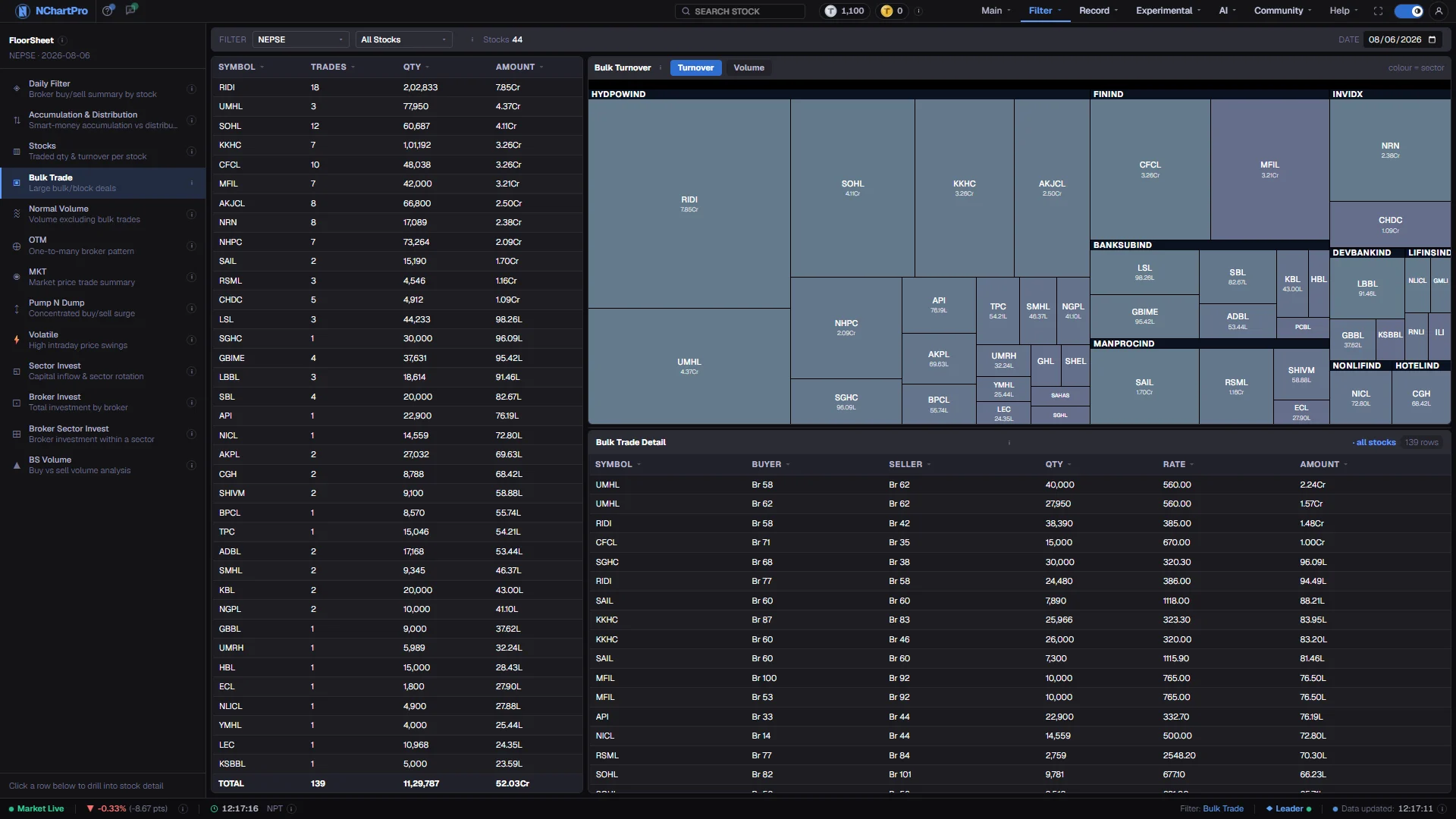
A bulk trade here is one line on the floor sheet worth Rs 20,00,000 or more. The page collects all of them for a single trading day: a per-stock roll-up of how many such deals a symbol had and what they came to, a treemap sized by that activity, and the raw list of every individual deal with the broker numbers on each side.
It is a single-day view by design. Bulk trades are discrete events, so there is one Date box rather than a From and To range, and nothing is added across days.
Why it helps you
- It shows you where large money committed today rather than where price moved. Those are often different stocks, and the difference is the useful part.
- Check the deal rate against the day's range. A large block struck near the low says something different from one struck at the high.
- Switch the map between Turnover and Volume on a cheap, heavily traded name — a tile that is small on one and large on the other tells you the block was quantity rather than money.
- Repeated large deals in a stock you hold, over consecutive days, are worth knowing about. A single one is not.
- It cannot tell you who traded or why. NEPSE publishes the broker, never the client, so a block is an event without a motive attached.
When to use it, and where to find it
- After the close, once the full floor sheet has brought the broker numbers — the buyer and seller columns are empty without it.
- On any day a stock you follow moved sharply on unusual volume, to see whether one or two deals carried it.
- Alongside Normal Volume, which uses the same Rs 20 lakh threshold to show what proportion of a stock's day was block trading.
Try it — a short walkthrough
- 1Pick the trading daySet the single Date box. There is no range here, so choose a completed session — the deals of a day still in progress are only partly recorded.See this part in detail →
- 2Sort the roll-up by AmountClick the Amount heading in the per-stock table to bring the largest block money to the top. Trades tells you whether that money was one deal or twenty.See this part in detail →
- 3Read the map by size, not by colourTile size is bulk activity; tile colour is only the stock's sector, so related industries sit together. Colour carries no up or down meaning on this page.See this part in detail →
- 4Open the deals behind one stockClick a tile or a table row. The detail list below narrows to that symbol and shows each deal's buyer broker, seller broker, quantity, rate and amount.See this part in detail →
Every part of the page
In the order you meet them on screen, each with a close-up of the real thing. The numbers match the dots on the figure above.
The floor-sheet filter menu
Every floor-sheet filter has its own page, all listed here. Bulk Trade is the one highlighted.
How — Click any name to jump to that filter. Your sector, stock and date choices carry across.
One trading day only
This page has a single Date box, not a From/To range. Bulk trades are individual deals, so they are shown for one trading day and never added across a range.
How — Change the date to look at a different day. The sector and stock pickers beside it narrow the list the same way as on the other filter pages.
The per-stock roll-up
One row per stock: Trades = how many bulk deals it had, Qty = the total shares in them, Amount = their total rupee value. The TOTAL row sums the whole visible list.
How — Click a column heading to sort. Click a stock to load its individual deals in the table below the map.
The bulk map
Each rectangle is one stock. Its SIZE is how much bulk activity that stock had today. Its COLOUR is only its sector, so stocks from the same industry sit together — colour carries no up/down meaning here.
How — Click a sector title to zoom into just that sector; "← All Sectors" goes back. Click a rectangle to load that stock's individual deals below.
- You can drag the divider under the map to give the map or the detail table more room.
Turnover or Volume
These two buttons decide what the rectangle size means. Turnover sizes tiles by the rupee value of the bulk deals; Volume sizes them by the number of shares in those deals.
How — Switch between them on a cheap, heavily traded stock — it can be tiny on Turnover and large on Volume.
Every individual deal
The raw record, largest rupee value first. Buyer / Seller are the NEPSE broker numbers on each side of that one deal ("Br 58" = broker 58). Qty is the shares exchanged, Rate the price per share, Amount = Qty × Rate.
How — It shows all stocks until you click one in the table or on the map; then it narrows to that stock.
- When the same broker number appears on both sides, the shares simply changed hands between two clients of that broker.
Reading the numbers
- The threshold is per trade, not per stock and not per broker: one floor-sheet line of Rs 20,00,000 or more.
- In the roll-up, Trades is the count of bulk deals, Qty their total shares and Amount their total rupee value. The TOTAL row sums the visible list.
- In the detail list, Buyer and Seller are NEPSE broker numbers ("Br 58"), Qty is shares, Rate is the price per share, and Amount is Qty × Rate.
- The Turnover and Volume buttons change only what the rectangle size means — money or share count. They do not filter anything out.
- The divider under the map can be dragged to give the map or the detail table more room.
- Every column heading sorts, with a dim arrow on inactive columns and an accent arrow on the active one.
What it does not do
- A large deal is a fact; a reason for it is not. Blocks come from fund rebalancing, promoter transfers, inheritance settlements and ordinary large orders, and the floor sheet distinguishes none of them.
- The same broker number on both sides of a deal usually means two clients of that firm matched each other. It is not evidence of anything unusual.
- Twenty lakh is a fixed line, not a statistical one. On a very expensive stock it is a modest trade; on a cheap one it is a large one. There is no size adjustment.
- Broker numbers come only with the full floor sheet after the close. Some older days were saved without them, and those days show no bulk detail at all.
Questions people ask
Not on this page. It is deliberately one day at a time, because these are individual deals rather than a running total. Step the date to compare days.
Its volume came from many ordinary-sized transactions, none of which reached twenty lakh on its own. Normal Volume shows that split directly.