

Sector Invest
Twelve rectangles, one per sector, each sized by the rupees that actually changed hands in it — the simplest read on where the market's attention sat.
What this page is
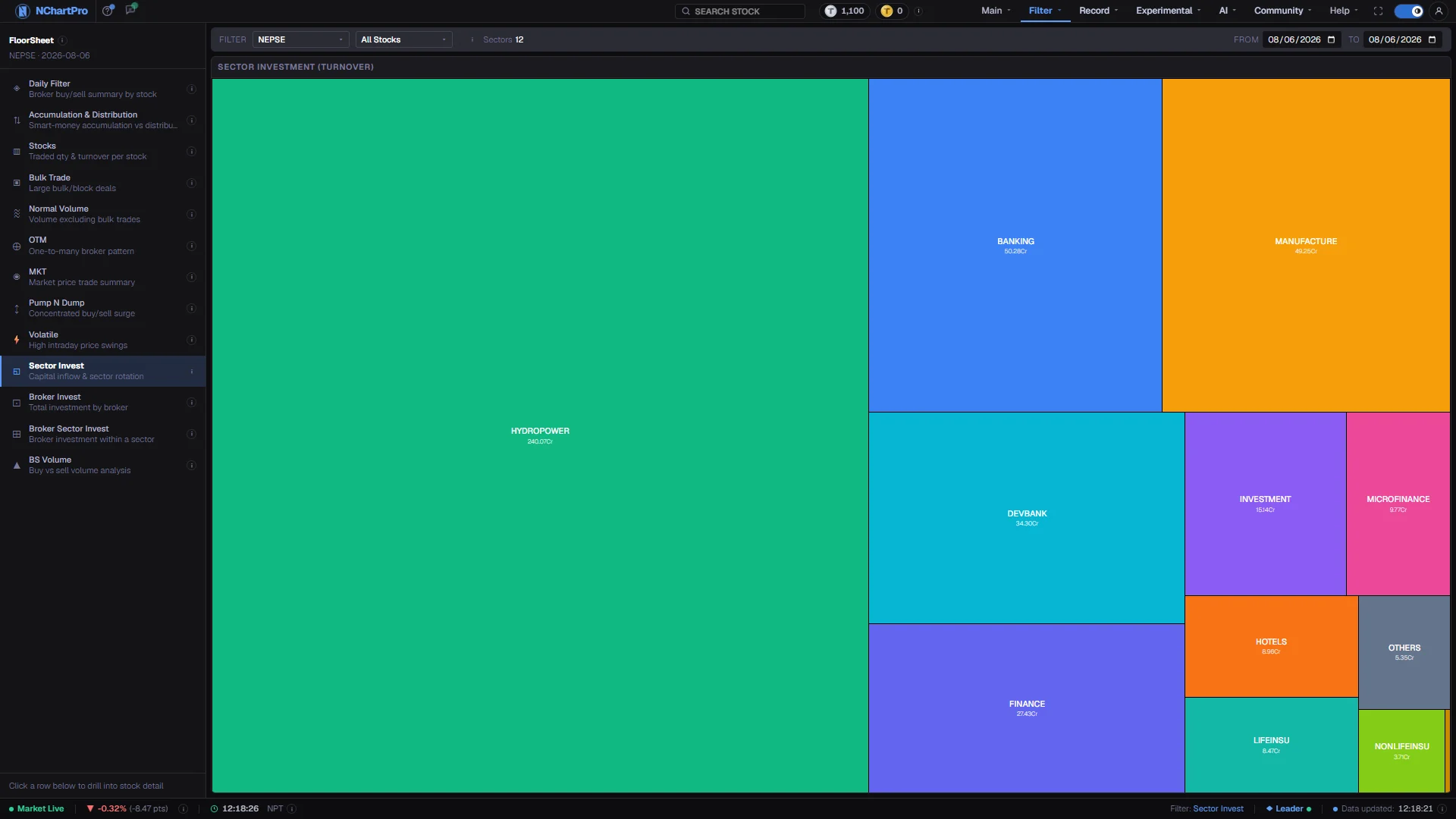
Each of NEPSE's twelve sectors gets one tile: Banking, Development Bank, Finance, Microfinance, Life and Non-Life Insurance, Hydropower, Hotels, Manufacturing, Trading, Investment and Others. The tile is sized by the sector's total rupee turnover across every day in the range you set.
The figure comes from each sub-index's own daily candle. An index has no share count, so for a sub-index the volume field is the turnover amount in rupees — this is the one place in the app where volume means money rather than a quantity.
Why it helps you
- Sector rotation shows up here before it shows up in prices. An industry whose share of turnover has been growing for a week is where the market is putting its money.
- Compare a single day against a month with the same From and To trick. A sector that is large today but small over the month is a one-day story.
- Useful at a slow cadence. If the industry you are steadily buying into has been shrinking as a share of market turnover for months, that is worth knowing before you add again.
- It measures attention, not quality. A sector can dominate turnover for a year and still be a poor place to have owned.
When to use it, and where to find it
- Any time — this page reads sub-index candles, not broker records, so it does not wait for the full floor sheet after the close.
- At the end of a week or a month, with the range opened, to see which industries actually absorbed money.
- Before drilling into a single sector, as the step that decides which sector to drill into.
Try it — a short walkthrough
- 1Set the periodThe two date boxes are the only controls that change this page. Same date in both for one session; open them wider for a week or a month.See this part in detail →
- 2Read size, and ignore colourTile size is that sector's share of turnover. Tile colour is only the sector's own identifying colour and carries no up or down meaning. Expecting green and red here will make you misread the map.See this part in detail →
- 3Click a tile for its exact figureClicking a sector outlines it and puts its name, its rupee turnover and its share of the total in the top bar — the reliable way to read a small tile, whose own label has to shrink with it. Click the same tile again to clear.See this part in detail →
- 4Add direction from somewhere elsePair the map with the sector index change on the chart's index strip or the dashboard. Size tells you how much moved; only the index tells you which way.See this part in detail →
Every part of the page
In the order you meet them on screen, each with a close-up of the real thing. The numbers match the dots on the figure above.
The floor-sheet filter menu
Every floor-sheet filter has its own page, all listed here. Sector Invest is the one highlighted.
How — Click any name to jump to that filter. Your date choice carries across.
Where the number comes from
For a sub-index, the daily candle's "volume" field IS the turnover amount in rupees — an index has no share count. Each sector's tile is the sum of its sub-index turnover across every day in the range.
How — The ⓘ here repeats that, and "Sectors" counts how many tiles are drawn.
- This is the one place where "volume" means money. For an ordinary stock, volume is a share count instead.
From and To
The two date boxes set the period the tiles cover.
How — Set From and To to the same date for a single trading day. Open them wider to see which sector pulled the most money over a week or a month.
Reading the map
Tile size = that sector's share of total turnover. The colour is just the sector's own identifying colour — it does NOT mean up or down.
How — Click a tile to highlight that sector: its name, its rupee figure and its share of the total appear in the top bar. The number on each tile uses Cr = crore (1,00,00,000) and L = lakh (1,00,000) rupees.
- If you expect green/red here, you will misread the map. Direction is not shown.
- Click the same tile again to clear the selection.
This measures activity, not profit
A sector can dominate turnover on a day it fell heavily — heavy selling is still heavy turnover.
How — Pair this page with the sector index change (the index strip on Main → Chart, or the dashboard) to read direction alongside size.
Reading the numbers
- Tile values are rupees, with Cr for crore (1,00,00,000) and L for lakh (1,00,000).
- The number is a sum of daily sub-index turnover across the range, not an average and not a closing figure.
- For a sub-index, the candle's volume field is the turnover amount. For an ordinary stock the same field is a share count — do not carry one reading onto the other.
- The Sectors counter beside the toolbar tells you how many tiles were drawn.
- Clicking a tile highlights that sector and echoes its figure in the top bar. There is no drill-down into stocks from here.
What it does not do
- This measures activity, not profit or direction. A sector can dominate turnover on a day it fell heavily, because heavy selling is heavy turnover too.
- Turnover is where money passed through, not where it stayed. Every rupee bought in a sector was also a rupee sold in it.
- There are no sector or stock pickers on this page — it always draws all twelve sectors, so only the dates change what you see. To look inside one industry, use Stocks with that sector selected.
- Sub-index coverage defines the sectors. Symbols outside those twelve groups, including mutual funds and debentures, are not represented on this map.
Questions people ask
Because they are different questions. This map ranks by money traded; a sector can post the day's biggest index gain on modest turnover, and a heavily sold sector can top the map.
They were removed here because this page always draws all twelve sectors and nothing they set could change the map. Your choice on the other filter pages is untouched.