

Broker Invest
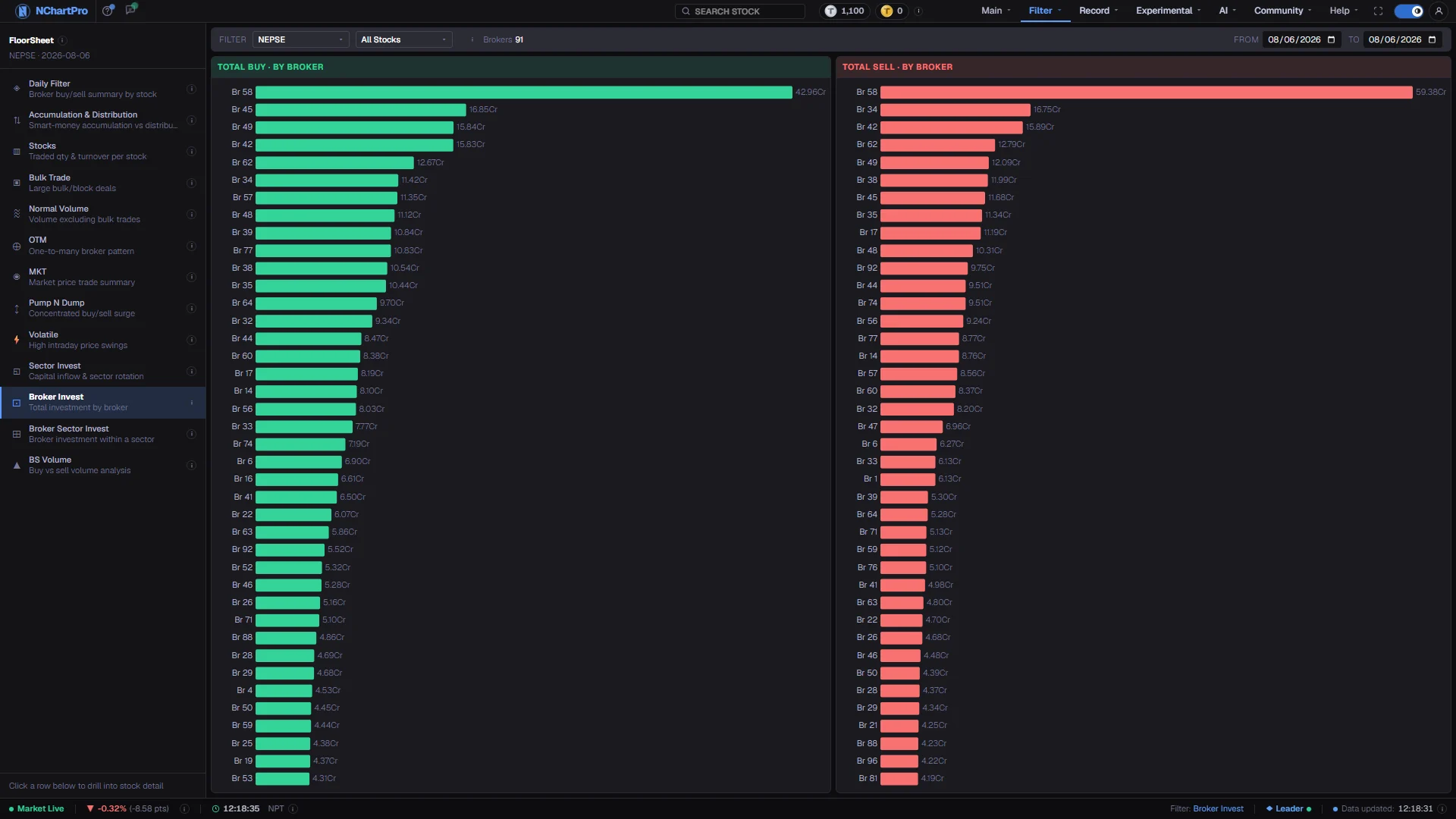
Two ranked charts, buy on one side and sell on the other, showing which broker houses carried the market's money over the period you choose.
What this page is
Every trade in the range is grouped by broker and the rupee amounts summed on each side. The result is two bar charts: the forty brokers that bought the most, and the forty that sold the most. A broker is the licensed firm that places an order — "Br 58" is broker number 58.
These are market-wide totals. The page does not break down by stock or sector, and the sector and stock pickers in the toolbar have no effect on the charts. For one stock, Daily Filter is the page you want.
Why it helps you
- The useful reading is asymmetry. A firm near the top of one chart and absent from the other was moving in one direction, and that is worth a second look in Daily Filter.
- Open the range to a month and the picture changes character: instead of who was busy today, you get which houses have been carrying flow consistently.
- Little direct value. Broker flow is client money passing through an execution venue, and it says nothing about any company you might own.
- The one honest use is context: knowing that a handful of houses carry most of the market's turnover tells you how concentrated NEPSE's execution actually is.
When to use it, and where to find it
- After the close, once the full floor sheet for the day has arrived with the broker numbers. Nothing on this page exists without them.
- At the end of a week or a month, which is the timeframe where broker totals start to mean anything.
- As a starting point before Broker Sector Invest, which splits the same money across industries.
Try it — a short walkthrough
- 1Set a period worth readingSame date in both boxes for a single session, but a week or a month is more informative — daily broker totals are dominated by whichever large orders happened to land.See this part in detail →
- 2Read the buy chart top-downThe forty largest buyers by rupee value, biggest first. Bar labels are broker numbers, and the value beside each bar is money, not shares.See this part in detail →
- 3Put the sell chart beside itSame ranking on the selling side. Look for names that appear high on one chart and not on the other — a broker high on both is simply busy.See this part in detail →
- 4Take one broker to Daily FilterPick a number that stood out, open Daily Filter for the same dates and set the broker picker to it. That shows which stocks the money actually went into.See this part in detail →
Every part of the page
In the order you meet them on screen, each with a close-up of the real thing. The numbers match the dots on the figure above.
The floor-sheet filter menu
Every floor-sheet filter has its own page, all listed here. Broker Invest is the one highlighted.
How — Click any name to jump to that filter. Your date choice carries across.
Where the totals come from
The day's floor sheet, already rolled up per date, stock and broker. Every broker's buy amounts are summed and every broker's sell amounts are summed.
How — The ⓘ here repeats that, and "Brokers" counts how many broker houses appear in the current range.
- This page totals the whole market, so the sector and stock pickers do not change the charts.
From and To
Set both boxes to the same trading day for one day, or open a range.
How — Over a range the daily amounts are added up per broker, so a month view shows which firms carried the most flow all month.
Total Buy · by broker
The 40 brokers that bought the most rupees in the period, biggest first.
How — Read the bar labels as broker numbers. Hover or read the value beside each bar for the amount.
- Bars are in RUPEES, not shares: K = thousand, L = lakh, Cr = crore (1 Cr = 1,00,00,000).
Total Sell · by broker
The same ranking on the selling side — the 40 brokers that sold the most rupees.
How — Compare the two charts side by side. A broker near the top of one chart but absent from the other is worth a closer look.
What this does NOT mean
A broker high on BOTH charts is simply busy — it is executing a lot of client orders, not taking a view of its own.
How — Use it to see where market flow is concentrated, not to guess any single firm's opinion.
- NEPSE never publishes the client behind a trade, only the broker.
Reading the numbers
- Bars are in rupees, not shares: K is thousand, L is lakh, Cr is crore (1 Cr = 1,00,00,000).
- Each chart is capped at forty brokers per side. A firm missing from a chart was outside the top forty for that period, not absent from the market.
- The Brokers counter beside the toolbar tells you how many houses appear at all in the current range.
- Over a range the daily amounts are summed per broker; nothing is averaged.
- The totals cover the whole market, so they will not reconcile against a single stock's figures on any other page.
What it does not do
- A broker high on both charts is executing a lot of client orders, not taking a view of its own. Reading a large buy total as a firm being bullish is the standard mistake on this page.
- NEPSE publishes the broker on a trade and never the client, so nothing here identifies who was actually buying or selling.
- The sector and stock pickers are visible but inert on this page, because it totals the whole market.
- Broker numbers come only with the full floor sheet after the close. Some older days were saved without them, and those days will show nothing.
Questions people ask
That it is a large firm with a lot of clients. Buy and sell totals of similar size are the normal shape for a busy execution business, and no directional conclusion follows.
This page sums the entire market for the period. Daily Filter is per stock and per broker, so its rows will only ever be a slice of these totals.