

Season
Markets keep habits: dividend season falls in the same months each year, so do budget announcements and the quiet weeks, and over enough years that leaves a pattern in the monthly returns.
What this page is
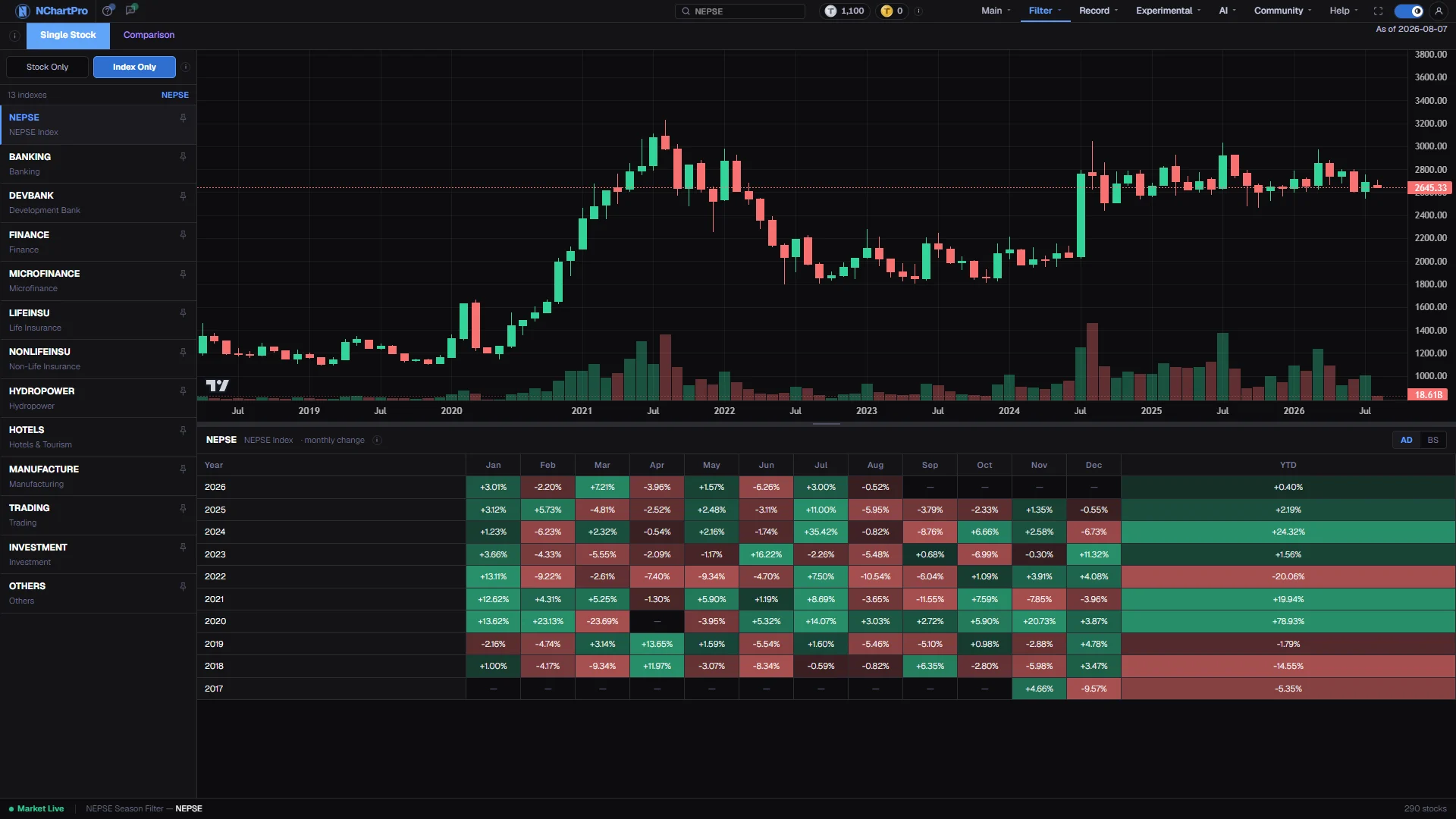
Every cell on this page is one month's gain or loss in percent, worked out from real daily candles: the close of the last trading day of the month against the open of the first. Nothing is estimated and nothing is smoothed.
The Single Stock view stacks those months into a grid, one row per year with the newest at the top, beside a monthly candle chart of the same symbol. Reading down a column tells you how that month has behaved repeatedly. Reading across a row tells you how one year unfolded.
The Comparison view answers the other question. It lays every stock in a sector, or every index, side by side for one chosen year, so you can sort by a single month and see which names actually carry a season rather than assuming the whole market moves together.
Seasonality is a tendency drawn from history. It is not a forecast, and a month that finished green in eight of the last ten years can still fall this year.
Why it helps you
- Position sizing is where this is useful. Going into a month that has been weak for a stock four years running is a reason to start smaller, not to stay out.
- Sorting a Comparison month column is the fastest way to find which stocks drive a seasonal move. Often it is three or four names, not the sector.
- Check the market's own seasonality before a stock's. If NEPSE has been weak in a month, a stock being weak in the same month tells you nothing about the stock.
- A month that breaks its pattern hard is worth investigating. Something changed, and the chart will not tell you that on its own.
- For regular monthly buying, this shows which months you have historically paid up in and which you have not. It is a small edge, applied every month for years.
- Dividend and book-close season concentrates in particular months in Nepal. Seeing that concentration in an index's grid explains a great deal of the yearly pattern.
- Compounded year returns in the Comparison view are the honest measure of what a holding actually returned, because monthly moves multiply rather than add.
- Count the years before you trust a column. Four years of history is an anecdote; a dozen begins to be a tendency.
When to use it, and where to find it
- At the start of a Nepali month, when the coming month's history is the relevant question.
- When planning a quarter of buying or selling and you want to know which months have historically been kind.
- After an unusual month, to see whether it was genuinely unusual or perfectly normal for that time of year.
- Before assuming a seasonal story you have heard is true. Most are testable here in under a minute.
Try it — a short walkthrough
- 1Look at the market before the stockSwitch the mode toggle to Index Only and pick NEPSE. The market's own monthly pattern is the backdrop against which every stock's pattern should be read.See this part in detail →
- 2Read one column down, not one row acrossPick a month and follow it down through the years. Repeated green in the same month is the pattern; a single strong year is not.See this part in detail →
- 3Line the grid up against the chartEach candle above is one calendar month, so it sits over one column of the grid. Use the divider between them to give whichever half you are reading more room.See this part in detail →
- 4Switch the labels to the Nepali calendarPress BS if you think in Baishakh and Jestha. Only the labels change; each percentage still belongs to the English month it was computed for.See this part in detail →
- 5Now compare a whole group for one monthOpen the Comparison tab, choose a sector and a year, then click a month heading to rank every symbol in it. That is the fastest answer to which stocks perform in a given month.See this part in detail →
- 6Take a candidate to the chartPick the symbol from the list on the left to see it here, then open Main → Chart to check whether its current position agrees with its seasonal habit.See this part in detail →
Every part of the page
In the order you meet them on screen, each with a close-up of the real thing. The numbers match the dots on the figure above.
Two views
Single Stock draws ONE symbol's monthly chart plus its month-by-month history. Comparison lays every stock (or every index) in a group side by side for one chosen year.
How — Click a tab to switch. The page opens on Single Stock with NEPSE already selected, so there is a chart on screen straight away.
- In Comparison you pick a group and a year: "Index (NEPSE + sub-indices)" lists the market and its 12 sector indices, any other choice lists that sector's ordinary stocks.
- Comparison's month headings are all sortable, which is the fastest way to answer "which stocks do well in Shrawan?".
- Comparison's YTD is the COMPOUNDED year return — the monthly moves multiplied together, not simply added, so it matches what an investor would actually have made.
Pick the symbol
The list of everything you can chart in the Single Stock view, with a count at the top and the currently selected symbol beside it.
How — Click a row and the chart and the table on the right both rebuild for it. The pin icon keeps a symbol at the top of every list in the app.
- The list is driven by the mode toggle above it — ordinary companies, or the indices.
Stock Only / Index Only
Chooses what the list below contains. Stock Only = ordinary listed companies. Index Only = the NEPSE index plus its 12 sector sub-indices.
How — In Stock Only a SECTOR box appears under the toggle so you can narrow the list to one industry ("All / NEPSE" = every sector). In Index Only there is no sector box — an index IS a sector.
- The 12 sub-indices: Banking, Development Bank, Finance, Microfinance, Life and Non-Life Insurance, Hydropower, Hotels, Manufacturing, Trading, Investment, Others.
- Switching mode clears the current selection, because a stock symbol is not valid in the index list and vice-versa.
- For an index the underlying volume figure is turnover in RUPEES, not a share count — an index has no shares.
The symbol list
In Index Only mode: NEPSE first, then each sector index with its readable name underneath. In Stock Only mode: every ordinary company in the chosen sector.
How — Scroll and click. The selected row is marked with an accent bar down its left edge.
- A company name under a stock symbol only appears when the backend supplies one for that symbol.
The monthly candle chart
The selected symbol on a MONTHLY candle scale — one candle per calendar month — so each candle lines up with one column of the table underneath.
How — Drag sideways to pan through the years and scroll to zoom. Hover a candle to read its open, high, low and close.
- It is built from the same daily candles as the table: the browser downloads the daily history and groups it into months, so the chart and the grid can never disagree.
- The volume bars under the candles are the month's traded volume — a share count for a stock, turnover in rupees for an index.
The drag handle
The grey bar between the chart and the table is a divider you can move.
How — Press and drag it up to give the table more room, or down to make the chart taller. Neither pane can be collapsed below about a sixth of the height.
- It opens at a 50/50 split.
The table header bar
The symbol being shown, its readable name, the words "monthly change" to remind you what the cells mean, and an ⓘ that spells out the formula.
How — Nothing to click except the ⓘ and the AD / BS switch on the right.
- If it says "No candle history for …", the backend has no daily candles stored for that symbol yet, so no seasonality can be computed.
AD / BS calendar labels
Switches the month and year LABELS between the English (Gregorian) calendar and the Nepali Bikram Sambat one — Baishakh, Jestha, Ashadh and so on.
How — Press BS if you think in the Nepali calendar. Press AD to go back.
- Only the labels change. The percentages themselves are unchanged, and each one still belongs to the ENGLISH month it was computed for.
- The BS year shown is an approximation of the AD year, because a Nepali year starts in mid-April and so straddles two English years.
The monthly change grid
One row per calendar year, newest first, one column per month, plus a YTD column. Every year the stored candle history covers gets a row, so the grid grows on its own as history does.
How — Read DOWN a month column to see whether that month has repeatedly been strong or weak for this symbol. Read across a row to see how one year unfolded.
- YTD here is the whole year measured the same way: first trading day's open to last trading day's close.
- "—" means there was no trading data for that month, so nothing could be computed.
- This grid is not sortable — switch to the Comparison tab if you want to rank symbols by a month.
- Three or four green years in the same month is a tendency worth noting, not a rule. Check how many years there actually are before trusting it.
The status bar
Which symbol the Single Stock view is on (or that you are in Comparison mode), and how many symbols the seasonality dataset returned.
How — Nothing to click — use it to confirm you are reading the symbol you meant to.
- "No data yet" here means the seasonality dataset came back empty; the Single Stock grid can still work, because it is computed from the candles instead.
Reading the numbers
- A month's percentage is that month's first open to its last close. Green means the month finished up, red means down, and a deeper shade means a bigger move.
- Sorting differs between the two views, which is the one exception to the usual rule in this menu. The Comparison grid sorts on every month column, in the accent colour with the direction arrow. The Single Stock grid does not sort at all, because its rows are years in order and reordering them would destroy the pattern you are reading.
- The two views also measure the year differently. Single Stock's YTD is the year's first open to its last close. Comparison's YTD compounds the monthly moves together, which is what an investor would actually have made.
- A dash means there was no trading data for that month, so nothing could be computed.
- The volume bars under the candles follow the symbol. For a company they are a share count in kitta; for NEPSE and the sector sub-indices they are turnover in rupees, because an index has no shares.
- Index Only lists NEPSE and its twelve sector sub-indices. Stock Only lists ordinary companies and adds a sector box, since an index is already a sector in itself.
What it does not do
- Seasonality describes what happened, not what will happen. Treat a strong column as a question to investigate, never as a reason on its own.
- The grid only covers the years of daily candles the backend holds. A symbol listed recently has very few rows, and a pattern across three years is not a pattern.
- The Bikram Sambat year label is an approximation of the English year, because a Nepali year begins in mid-April and straddles two of them. The percentages themselves never change with the calendar switch.
- If a symbol says it has no candle history, no seasonality can be computed for it at all.
- The status bar can report that the seasonality dataset came back empty while the Single Stock grid still works, because that grid is computed in the browser from the daily candles instead.
Questions people ask
Count the rows. Under five years, treat it as an observation. Ten or more with a consistent sign is worth factoring into a decision, alongside everything else.
Its rows are consecutive years, and the point is to read a month down through them. Use the Comparison tab when you want to rank symbols by a month.
No. Only the month and year labels change. Each percentage still belongs to the English month it was calculated for.
They measure differently on purpose. Single Stock takes the year's first open to its last close; Comparison multiplies the twelve monthly moves together.