

OTM
Most stocks are traded by many brokers in small pieces; this page lists the ones where a single house sat on a fifth or more of a whole day's quantity.
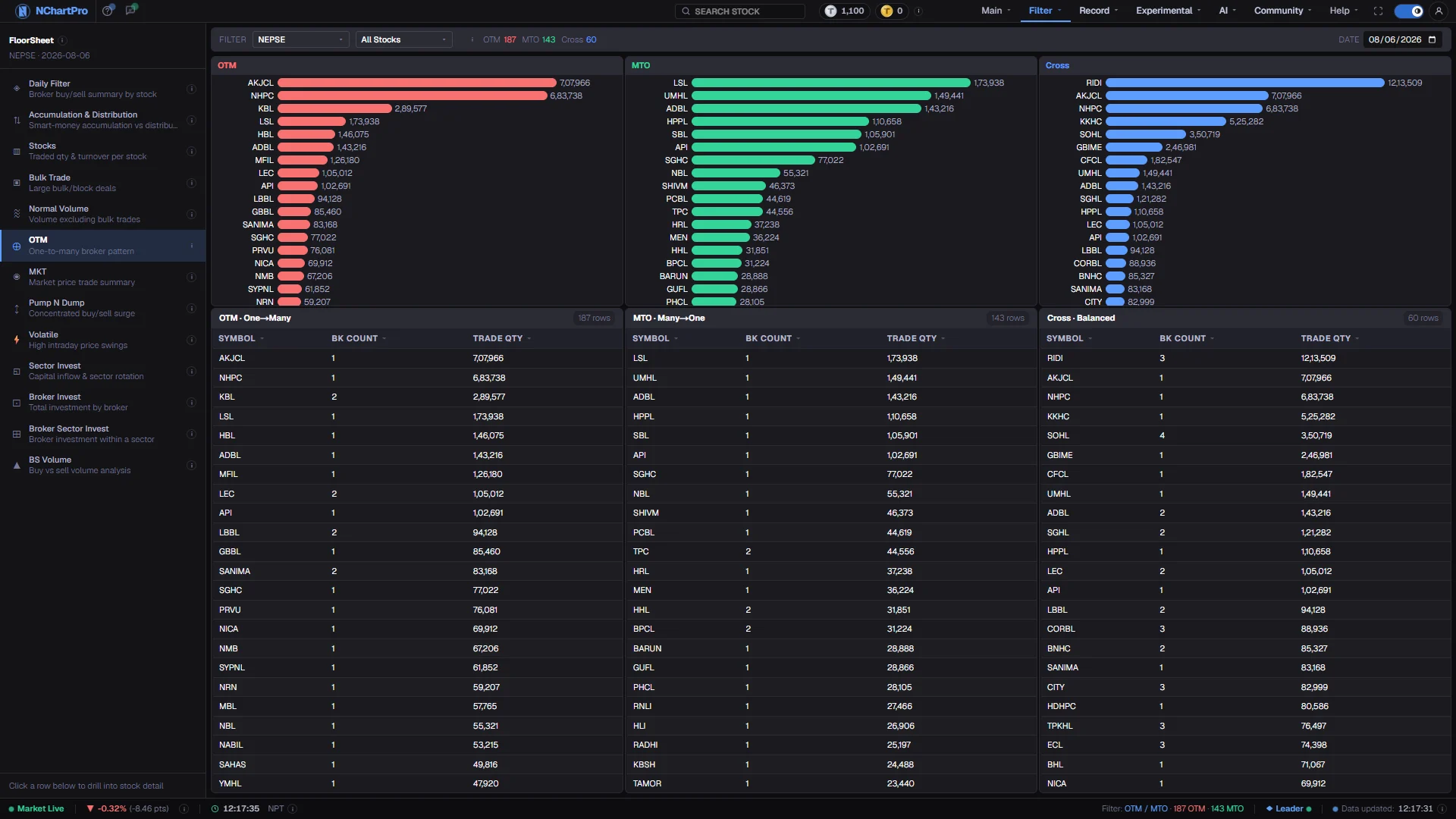
What this page is
OTM stands for One-To-Many: one broker on one side of the trade facing many brokers on the other. For each stock and each broker the day's floor sheet gives a buy ratio — that broker's buy quantity divided by the stock's total traded quantity — and a sell ratio the same way. Brokers under 100 shares on both sides are ignored.
The market then splits into three columns. OTM is seller-concentrated: one broker sold 21% or more of the day's quantity while buying less than 21%. MTO is the mirror on the buy side. Cross holds brokers that traded roughly equally on both sides, with buy ÷ sell between 1.0 and 1.2, at a buy price below their own sell price.
Why it helps you
- Concentration is the useful signal, not the label. A stock whose entire day rested on one broker will behave differently when that broker stops.
- Step the date across several consecutive sessions on the same symbol. The same stock sitting in the MTO column day after day is a pattern; one appearance is a client order.
- Take a Cross row to Daily Filter for the same date, where that broker's exact buy and sell quantities in the stock are visible side by side.
- Of limited use over a long horizon. This measures one day of execution concentration, which says nothing about the business or its price over years.
- The one case worth noting is a stock you already hold appearing in the OTM column repeatedly over weeks — worth investigating, not worth acting on alone.
When to use it, and where to find it
- After the close, once the full floor sheet for the day has arrived. The whole page is built from broker numbers, so it is empty for the current session until then.
- Across a run of days rather than on one, since a repeated pattern is the only thing here worth much.
- After Accumulation & Distribution flags a stock, as a second, differently-shaped look at the same question.
Try it — a short walkthrough
- 1Pick one completed dayA single Date box, no range. Set it to a session that has closed and whose full floor sheet has arrived, otherwise the three columns will be short.See this part in detail →
- 2Read the three columns as a setOTM in red is seller-concentrated, MTO in green is buyer-concentrated, Cross in blue is both sides at once. The counts in the toolbar tell you how many stocks landed in each.See this part in detail →
- 3Check what Trade Qty actually isIt is the stock's total traded quantity for the day — the denominator of the ratio — not the broker's own quantity. Reading it as the broker's figure is the easiest mistake on this page.See this part in detail →
- 4Follow one symbol across daysClick a stock to highlight it in all three columns, then step the date back several sessions and watch which column it lands in each time.See this part in detail →
Every part of the page
In the order you meet them on screen, each with a close-up of the real thing. The numbers match the dots on the figure above.
The floor-sheet filter menu
Every floor-sheet filter has its own page, all listed here. OTM is the one highlighted.
How — Click any name to jump to that filter. Your sector, stock and date choices carry across.
How concentration is measured
Per stock, per broker, from the day's floor sheet: buy ratio = that broker's buy quantity ÷ the stock's TOTAL traded quantity; sell ratio is the same on the sell side. Tiny brokers (under 100 shares on both sides) are ignored.
How — The counts here — OTM, MTO and Cross — tell you how many stocks landed in each bucket after your sector and stock pickers are applied.
One trading day
OTM is a single-day view — one Date box, no From/To range.
How — Step through consecutive days on the same stock. A pattern that repeats matters far more than one day's reading.
OTM — seller-concentrated (red)
Stocks where one broker SOLD 21% or more of the day's total traded quantity while buying less than 21%. One seller, many buyers.
How — The bar graph on top is the same list drawn by Trade Qty, biggest first. Click a bar or a row to highlight that stock in all three columns.
- OTM day after day on the same stock is often read as distribution — but a broker acts for many clients, so it is a hint, never a conclusion.
MTO — buyer-concentrated (green)
The mirror image: one broker BOUGHT 21% or more of the day's traded quantity while selling less than 21%. Many sellers, one buyer.
How — Compare this column with OTM for the same stock across several days.
- MTO repeating on a stock is often read as quiet accumulation — again a hint, not proof.
Cross — both sides (blue)
A broker that traded roughly the same amount on both sides — buy ÷ sell between 1.0 and 1.2 — at a buy price below its sell price. That is the classic crossed-trade pattern.
How — Cross rows are worth checking against the Daily Filter page, where you can see that broker's exact buy and sell in the stock.
The two table columns — read this carefully
Bk Count = how many different brokers in that stock showed the pattern. Trade Qty = the STOCK'S TOTAL traded quantity that day — the denominator above — not the broker's own quantity.
How — Sort by Trade Qty to put the most heavily traded names first; sort by Bk Count to find stocks where several brokers were concentrated at once.
- Mistaking Trade Qty for the broker's quantity is the easiest error to make on this page.
Reading the numbers
- The threshold is 21% of the stock's total traded quantity for the day, measured separately on each side.
- Bk Count is how many different brokers in that stock showed the pattern. It can be more than one — several brokers can each clear 21% of the same day.
- Trade Qty is the stock's total traded quantity, in shares. It is the same number for every broker in that stock, because it is the denominator.
- The Cross rule is a ratio band, 1.0 to 1.2 on buy ÷ sell, combined with a buy price below that broker's own sell price.
- The bar graph above each column is the same list drawn by Trade Qty, largest first. Clicking a bar or a row highlights the stock in all three columns.
- Every column heading sorts, with a dim arrow on inactive columns and an accent arrow on the active one.
What it does not do
- This page describes concentration, and concentration is not intent. A broker acts for many clients simultaneously, so one house holding 30% of a day's selling may be thirty unrelated people who all chose the same firm.
- The common readings — repeated OTM as distribution, repeated MTO as accumulation — are conventions among traders, not conclusions the data supports. Treat them as hints.
- Cross is a shape, not an allegation. Buying and selling the same stock on the same day is ordinary broker business when two clients are on opposite sides.
- Twenty-one percent is an arbitrary line. A broker at 20.5% does not appear at all, and one at 21.5% does; nothing changes materially between those two.
- Thinly traded stocks reach the threshold on very little money, so a small name in the OTM column may represent a few lakh rupees. Check its size in Stocks first.
Questions people ask
Because it is the stock's own total for the day, not the broker's. It is shown so you can judge whether 21% of that day was a large amount of money or a trivial one.
Yes. Different brokers in the same stock can each show a different pattern, so a symbol can sit in OTM and in Cross on the same day.