

Normal Volume
A stock can post its biggest volume in months on two negotiated blocks and almost no real demand, and this is the page that separates the two.
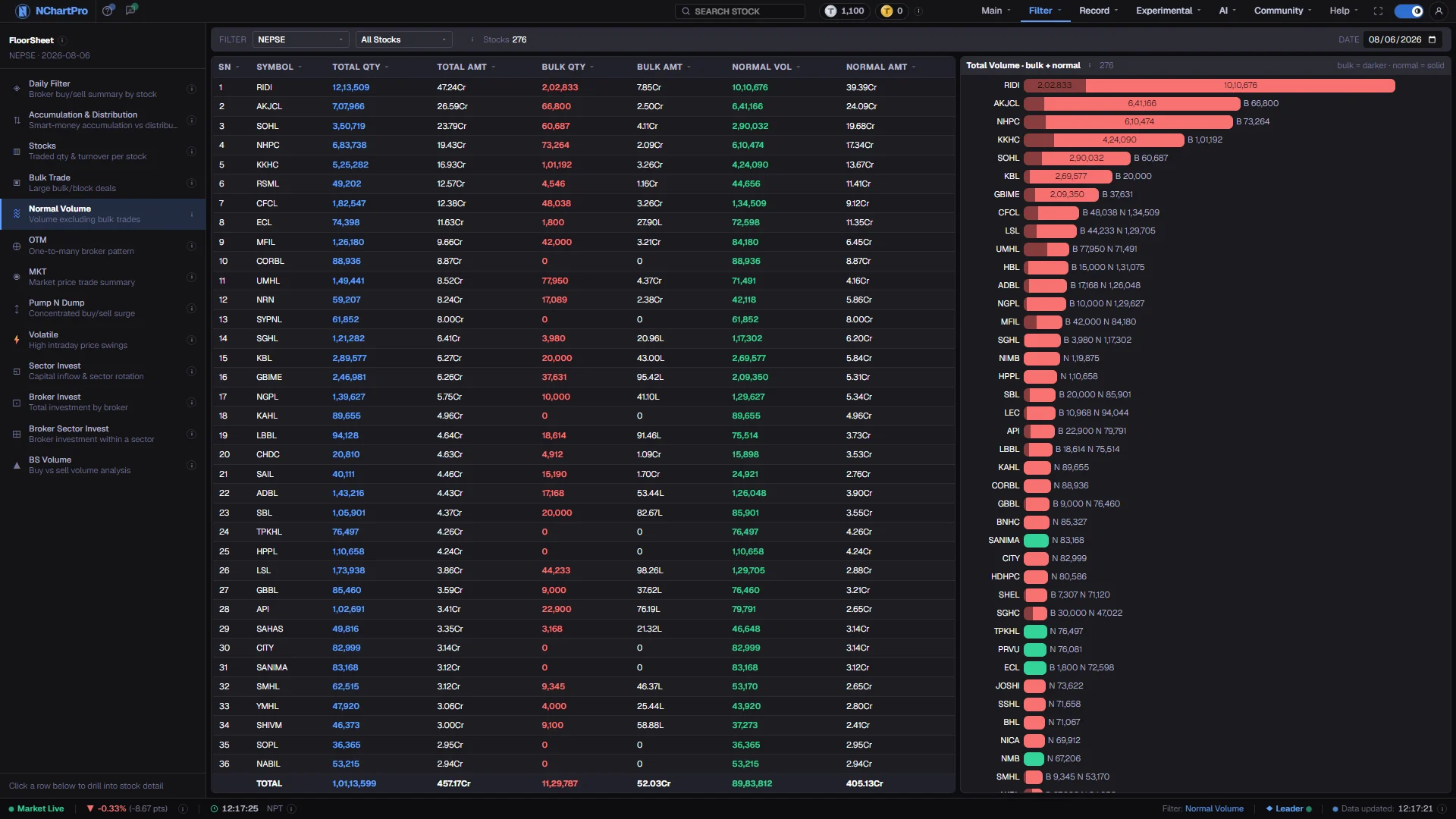
What this page is
Normal Volume takes the day's total for each stock and subtracts the part that came from bulk deals — single floor-sheet trades of Rs 20,00,000 or more. What is left is ordinary flow: the everyday trading of people taking positions in normal sizes.
The table shows three pairs of columns, quantity and amount for each of Total, Bulk and Normal, tinted blue, red and green. A stacked bar list beside it draws each stock's total quantity with the bulk portion in the darker shade, so a bar that is nearly all dark is almost pure block trading.
Why it helps you
- This is the check that stops you chasing a volume spike that was one deal. A stock whose day was 90% bulk has not suddenly found broad demand.
- The reverse case is the more interesting one: high total volume with a low bulk share means many separate hands were involved, which is what genuine participation looks like.
- Sort by Bulk Qty to find the names most dominated by block deals, then open Bulk Trade for the same date to see who was on each side.
- Occasionally useful as a liquidity check on a stock you intend to hold: if its volume is habitually block-driven, the everyday market in it is thinner than the headline figure suggests.
- It has no bearing on the value of the business, and a single day's split should not influence a long-term decision.
When to use it, and where to find it
- After the close, when both the day's floor-sheet summary and the bulk-trade summary have landed for the same session.
- Any day a stock you follow appears near the top of a volume list, before you read anything into it.
- Immediately before or after Bulk Trade — the two pages use the same threshold and answer adjacent questions.
Try it — a short walkthrough
- 1Set the trading dayOne Date box, no range. Bulk deals are individual trades on a given day, so the split is only meaningful within one session.See this part in detail →
- 2Sort by Bulk QtyClick the Bulk Qty heading to bring the block-dominated stocks to the top, then read their Normal Vol column to see how little ordinary trading was left.See this part in detail →
- 3Read the stacked bars for the shapeScan the bar list for bars that are almost entirely in the darker shade. That is the visual version of the same finding, and it is faster than reading numbers.See this part in detail →
- 4Narrow to a sector and read the TOTALSet the sector picker and read the bottom row. It gives that industry's bulk-versus-normal balance for the day rather than one stock's.See this part in detail →
Every part of the page
In the order you meet them on screen, each with a close-up of the real thing. The numbers match the dots on the figure above.
The floor-sheet filter menu
Every floor-sheet filter has its own page, all listed here. Normal Volume is the one highlighted.
How — Click any name to jump to that filter. Your sector, stock and date choices carry across.
How the split is made
A bulk trade is ONE floor-sheet trade worth Rs 20,00,000 (20 lakh) or more; those trades are collected per stock into a bulk total. Normal = Total − Bulk.
How — The sector and stock pickers here narrow the table; the ⓘ repeats the definitions and "Stocks" counts the rows on screen.
- Total comes from the day's broker-wise floor-sheet summary; bulk from the bulk-trade summary. Both are the same day.
One trading day
Normal Volume is a single-day view — one Date box, no From/To range, because bulk deals are individual trades on a given day.
How — Change the date to compare the same stock on a quiet day and a busy one.
The three pairs of columns
Total Qty / Total Amt cover the whole day. Bulk Qty / Bulk Amt cover only the deals of 20 lakh or more. Normal Vol / Normal Amt are what is left — ordinary trading.
How — Click any column heading to sort. Sorting by Bulk Qty finds the stocks most dominated by block deals.
- Total is tinted blue, Bulk red and Normal green so the three pairs are easy to keep apart.
Quantity versus amount
Qty is a SHARE COUNT, shown in full with commas. Amounts are money, using Cr = crore (1,00,00,000) and L = lakh (1,00,000).
How — The TOTAL row at the bottom sums whatever is currently on screen, so it follows your sector and stock filters.
The stacked bar list
Each stock's TOTAL quantity as one bar, biggest first, with the bulk part drawn in the darker shade. The green or red family is the stock's own up/down for the day, not the bulk share.
How — Click a bar to select that stock, the same as clicking its table row. A bar that is nearly all dark is almost pure block trading.
Reading the numbers
- Normal = Total − Bulk, computed per stock. Bulk is the sum of that stock's trades of Rs 20,00,000 or more; Total is the day's whole floor-sheet activity in it.
- Qty columns are share counts (कित्ता), written out in full with commas. Amt columns are money, with Cr for crore and L for lakh.
- The three colour tints are labels for the three pairs — blue Total, red Bulk, green Normal. They are not up and down.
- In the bar list, the darker segment is the bulk share; the green or red family is the stock's own price direction for the day, which is a separate thing entirely.
- The TOTAL row sums whatever is on screen and follows your sector and stock pickers.
- Every column heading sorts, with a dim arrow on inactive columns and an accent arrow on the active one.
What it does not do
- A high bulk share is a description of how the volume arrived, not a judgement on it. Institutions genuinely accumulate through blocks, and doing so is ordinary.
- Total and Bulk come from two different daily summaries. If one of them has not been generated for a date, the split for that day will look wrong rather than empty — check the Bulk Trade page for the same date before trusting a reading.
- The Rs 20 lakh line is fixed, so on a very expensive stock ordinary trades can cross into the bulk bucket, and on a cheap one genuinely large orders may stay out of it.
Questions people ask
Probably not. It means no single trade reached twenty lakh — the volume was made of many ordinary-sized transactions, which is what the Normal column is showing you.