

MKT
A limit order waits for your price and a market order does not, and the floor sheet shows that impatience as a run of consecutive trades by one broker.
What this page is
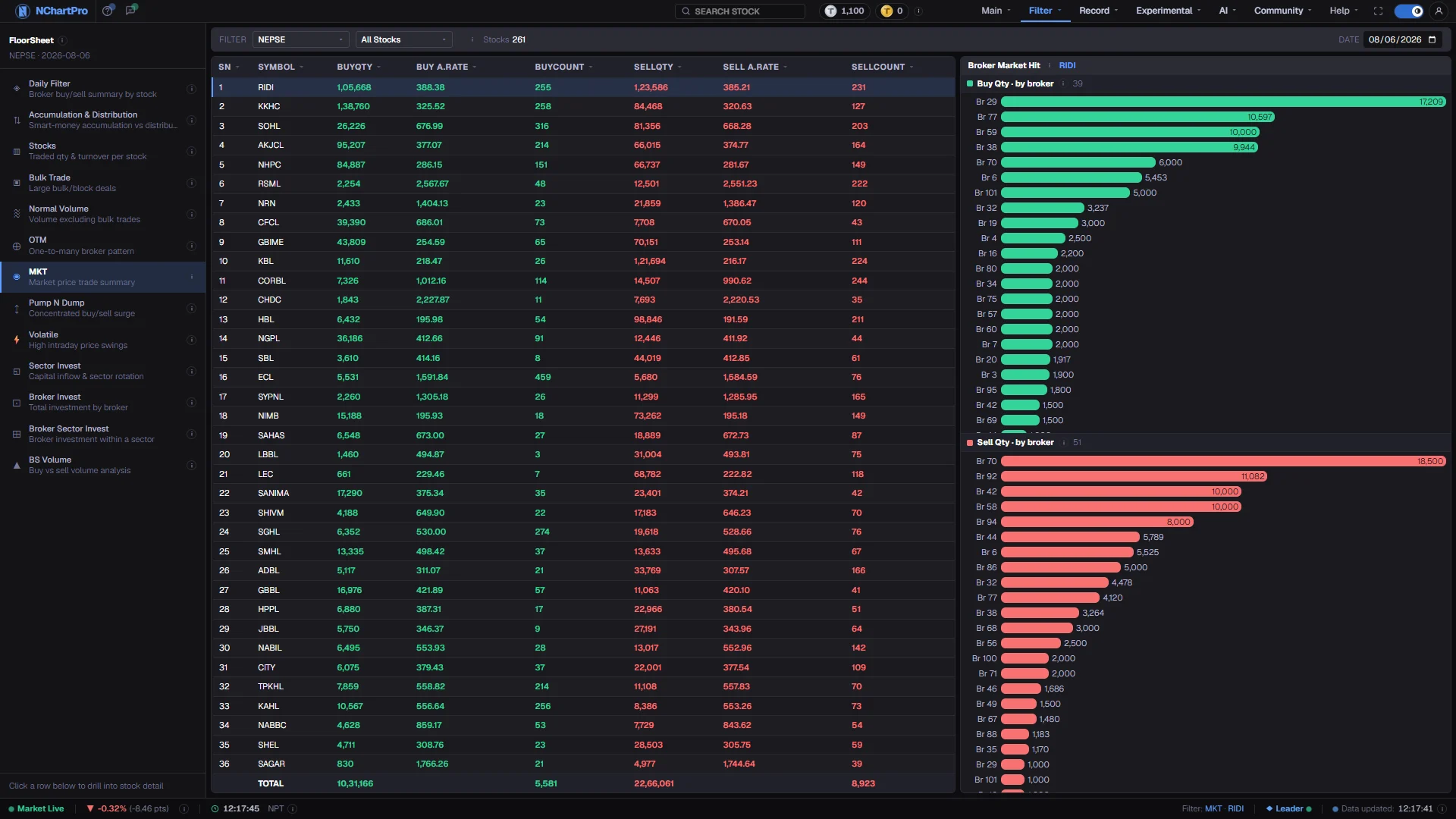
A market hit is a burst: the same broker, on the same side, filling several trades in a row in one stock rather than queueing patiently. The detector scans the day's floor sheet for runs of consecutive transaction numbers by one broker on one side, and counts a run of three or more as a hit.
The table lists one row per stock, with the buy and sell quantities taken in those bursts summed across all brokers, and how many individual transactions the bursts contained. Selecting a stock breaks the same quantity down by broker house in the panel on the right.
Why it helps you
- Heavy buy-side hitting with almost no sell hits is the pattern people look for here — someone taking whatever was on offer rather than waiting for a better price.
- It is intraday urgency, so it dates fast. A hit two weeks ago tells you very little; a stock hit on four consecutive days is worth a closer look.
- Read the average rates alongside the quantities. Aggressive buying at prices well above the day's average means the buyer accepted a worse fill to get filled.
- Very little to offer a long horizon. This is a measure of order-placement style within a single session.
- The one indirect use is liquidity: a stock where a modest order can only be filled by hitting several prices in a row is a stock you will not exit quietly.
When to use it, and where to find it
- After the close, once the full floor sheet has brought the broker numbers — bursts are counted per broker, so the page cannot be built without them.
- On a day a stock moved sharply, to see whether one house did the pushing.
- Over several consecutive days on the same symbol, since repeated hitting is what carries meaning.
Try it — a short walkthrough
- 1Set one completed dayA single Date box, no range. The bursts are sequences within one session, so they are never summed across days.See this part in detail →
- 2Compare the green columns with the redThe three green columns are the buying side and the three red ones the selling side. Look for stocks that are heavy on one and almost empty on the other.See this part in detail →
- 3Sort by BuyQty and take the top fewClick the heading to bring the most aggressively bought names to the top, then check each one's ordinary daily volume in Stocks before reading anything into it.See this part in detail →
- 4See which broker did the hittingClick a stock. The right-hand panel splits the market-hit quantity by broker house, aggressive buyers in green above and aggressive sellers in red below.See this part in detail →
Every part of the page
In the order you meet them on screen, each with a close-up of the real thing. The numbers match the dots on the figure above.
The floor-sheet filter menu
Every floor-sheet filter has its own page, all listed here. MKT is the one highlighted.
How — Click any name to jump to that filter. Your sector, stock and date choices carry across.
How a hit is found
The day's floor sheet is scanned for runs of CONSECUTIVE transaction numbers by the same broker on the same side. A run of 3 or more trades counts as one market hit.
How — The sector and stock pickers here narrow the list; the ⓘ repeats the rule and the column meanings, and "Stocks" counts the rows on screen.
One trading day
MKT is a single-day view — one Date box, no From/To range.
How — Change the date to check whether the same stock keeps showing up day after day. Repeated hitting is more meaningful than a single day.
One row per stock
BuyQty / SellQty are the total shares taken in those bursts, summed over ALL brokers — so one row is one stock, not one broker. BuyCount / SellCount are how many individual floor-sheet trades those bursts contain.
How — Click a column heading to sort. Click a stock to see which broker numbers did the hitting in the panel on the right.
- Buy A.Rate / Sell A.Rate = amount ÷ quantity, the average price paid or received in those bursts.
Green is buying, red is selling
The three green columns are the buying side, the three red ones the selling side.
How — Look for heavy buy-side hitting with very few sell hits — that pattern often marks aggressive accumulation.
- It is a clue, not a guarantee. A broker acts for many clients at once.
Which broker did the hitting
For the stock selected on the left, this breaks the market-hit quantity down by broker house — aggressive buying in green on top, aggressive selling in red below.
How — Click a different stock in the table to redraw both lists.
- Only brokers that actually appear in a market-hit burst are listed, so this is NOT the full list of brokers who traded the stock.
Reading the numbers
- A hit is a run of three or more consecutive floor-sheet transaction numbers by the same broker on the same side. Two trades in a row do not qualify.
- BuyQty and SellQty are share counts taken in those bursts, summed over all brokers. One row is one stock, not one broker.
- BuyCount and SellCount are how many individual transactions those bursts contained, so a large count with a small quantity means many small fills.
- Buy A.Rate and Sell A.Rate are amount ÷ quantity — the average price paid or received inside the bursts, not the day's average.
- These figures cover only the burst trades, so they are smaller than the stock's full-day volume.
- Every column heading sorts, with a dim arrow on inactive columns and an accent arrow on the active one.
What it does not do
- Consecutive transaction numbers are evidence of order flow, not of a plan. A broker sweeping the book is normal execution for a client who asked to be filled now.
- The broker panel lists only houses that appear inside a burst. It is not the full list of brokers who traded that stock, and it should not be read as one.
- A run of three is a low bar. On a busy stock, ordinary trading produces such runs constantly, so the counts matter more than the presence of a row.
- Broker numbers come only with the full floor sheet after the close. Some older days were saved without them, so old dates may be empty.
Questions people ask
Usually not. On heavily traded names, runs of three consecutive trades by one broker happen by chance. Compare the hit quantity with the stock's full-day volume in Stocks before treating it as a signal.