

Daily Filter
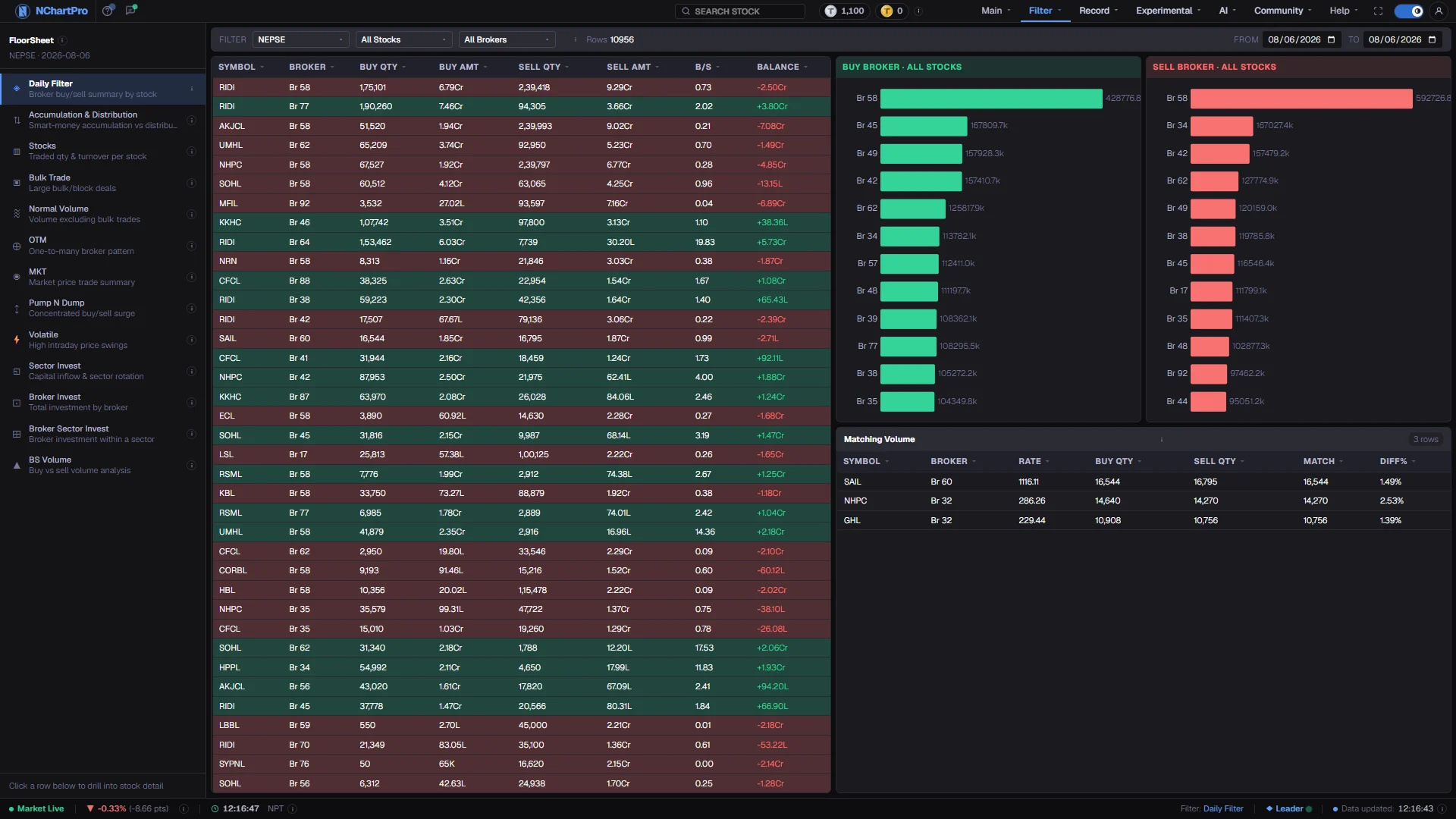
Thousands of individual trades collapse into a table you can actually read, where a single line tells you everything one broker did in one stock.
What this page is
The floor sheet is NEPSE's record of every executed trade of the day: which broker bought, which sold, how many shares and at what rate. Daily Filter is that record grouped. Each row is one stock and one broker, carrying that broker's buy quantity, sell quantity and the rupee value of each side.
Three pickers narrow it — a sector, a single stock, a single broker — and two date boxes set the period. Over a range the quantities and amounts are summed per stock and broker first, then the ratio and balance are recomputed from those totals.
Why it helps you
- It answers the question the other filters only hint at: exactly what did this broker do in this stock. When OTM or Accumulation flags a name, this is where you confirm the numbers behind the flag.
- Pin one stock and step the date forward a few days. A broker that keeps appearing on the same side is a pattern; one heavy day is a client order.
- The Matching Volume panel is worth a look on any stock that suddenly turned busy — it catches a broker buying and selling almost the same quantity of the same stock on the same day.
- Occasionally useful, at a slow cadence. Set a month-long range on a stock you own and read whether the largest brokers were net buyers or net sellers of it.
- It says nothing about the business you own. Broker flow is client money passing through, and NEPSE never publishes who the client was.
When to use it, and where to find it
- After the close, once the full floor sheet for the day has been downloaded from a paid market-data feed. Broker numbers come only with it, so an afternoon visit does not show the broker picture for today yet.
- Straight after any other filter flags a stock — this is the page that shows the underlying buy and sell quantities.
- At the end of a week or month, with the range opened, to see who carried the flow in a name you follow.
- The ↗ on the Buyer and Seller cards of Main → Kundali opens this page with that stock already in focus.
Try it — a short walkthrough
- 1Set the day firstPut the same trading date in both From and To. Start with a single completed day before you open a range, because a range hides which day the activity happened on.See this part in detail →
- 2Narrow to one stockPick the symbol in the toolbar. The table drops to that stock's brokers only, and the row count beside the pickers tells you how many are left.See this part in detail →
- 3Sort by Balance and read the two endsClick the Balance heading. The top of the list is the money that went into the stock, the bottom is the money that came out, and the green and red row tints follow the same figure.See this part in detail →
- 4Compare the two broker chartsClick a row to put that stock in focus: every table then shows only that stock, and a second click shows all stocks again. Read Buy Broker against Sell Broker. A house that is large on one side only is more telling than one that is busy on both.See this part in detail →
Every part of the page
In the order you meet them on screen, each with a close-up of the real thing. The numbers match the dots on the figure above.
The floor-sheet filter menu
Every floor-sheet filter has its own page and they all live in this list — Daily Filter, Accumulation & Distribution, Stocks, Bulk Trade, Normal Volume, OTM, MKT, Pump N Dump, Volatile and the invest breakdowns.
How — Click any name to jump to that filter. Your sector, stock and date choices follow you from page to page, so you can compare the same day across filters.
Narrow it down
Three pickers narrow the table: a sector (or Mutual Fund / Debenture / Promoter), a single stock, and a broker. Beside them the ⓘ explains the columns and "Rows" counts what is currently shown.
How — Pick a sector to see only that industry, a stock to see only its brokers, or a broker to see only what that firm did. Leave a box on its default to ignore it.
- NEPSE in the sector box means all ordinary stocks — mutual funds, debentures and promoter shares are separate choices.
From and To
Two date boxes. Set both to the same trading day for a single day, or open a range.
How — Over a range the quantities and amounts are summed per (stock, broker), and B/S and Balance are recalculated from those totals.
- Only real NEPSE trading days can be picked — the market runs Monday to Friday.
One row per stock and broker
Symbol is the stock; Broker is the NEPSE broker number ("Br 58"). Buy Qty / Sell Qty are the SHARES that broker bought and sold in that stock; Buy Amt / Sell Amt are the rupee value (K thousand, L lakh, Cr crore).
How — Click any column heading to sort by it, and click again to flip the direction. Clicking a row puts that stock in focus for the graphs on the right.
- B/S = Buy Qty ÷ Sell Qty. Above 1 the broker bought more shares than it sold; below 1 it sold more.
- Balance = Buy Amt − Sell Amt. A green row means the broker put more money into that stock than it took out; red is the reverse.
Buy Broker
The brokers that spent the most rupees buying whatever stock is in focus, biggest first. It is built from the same rows in the table — no separate data.
How — Click a row in the table (or pick a stock in the toolbar) to change which stock these bars describe. With no stock in focus they cover the whole sector.
Sell Broker
The same ranking on the selling side — who took the most money out of that stock.
How — Compare the two charts. A broker that is large on one side only is more telling than one busy on both.
- A broker appearing high on both sides is usually just matching its own clients, not taking a view.
Matching Volume
Cases where the SAME broker both bought and sold almost the same number of shares of the same stock on the same day. Shares effectively went round in a circle through one broker.
How — Read Diff% — the closer to 0%, the more exactly the two sides cancel out. Rate is the average price across both sides.
- A pair is kept only when BOTH sides are over 10,000 shares and the two sides differ by no more than 3%.
- It can be ordinary client-to-client matching, or an attempt to create the look of activity. Shown for the To date only.
Reading the numbers
- Buy Qty and Sell Qty are share counts (कित्ता). Buy Amt and Sell Amt are rupees, abbreviated K for thousand, L for lakh and Cr for crore.
- B/S is Buy Qty ÷ Sell Qty. Above 1 the broker took in more shares than it released; below 1 the reverse. It is a ratio of quantities, not of money.
- Balance is Buy Amt − Sell Amt, in rupees. A green row means that broker put more money into the stock than it took out on the day; red is the opposite.
- Broker is the NEPSE broker number, shown as "Br 58". It identifies the firm that executed the trade, never the person behind it.
- Matching Volume keeps a pair only when both sides exceed 10,000 shares and differ by no more than 3%, and it is computed for the To date only.
- Every column heading sorts. A dim arrow marks an inactive column; the accent-coloured arrow marks the one in use and its direction.
What it does not do
- A broker is an execution venue, not an opinion. One firm can hold both sides of the same trade simply because two of its own clients matched, and a large balance can be a single institutional order.
- Broker numbers appear only after the market closes, when the full floor sheet is downloaded. Some older days were saved without broker numbers, so an old date may show trades with no broker breakdown.
- Matching Volume describes a shape in the data. It can be ordinary client-to-client matching within one house, and it is not evidence that anyone was creating the appearance of activity.
- Rows are capped for large ranges. If a total looks short, narrow the sector or the dates rather than assuming trades are missing.
Questions people ask
They were the two sides of the same deal. One firm's buy is another firm's sell, so large single trades show up twice — once on each broker's row.
Some older days were saved without broker numbers. The trades are there, but the record of which broker made them is missing for that day.