

BS Volume
Two stocks can both close up two percent; this page tells you whether buyers had to chase the price to get there, or sellers simply let it go.
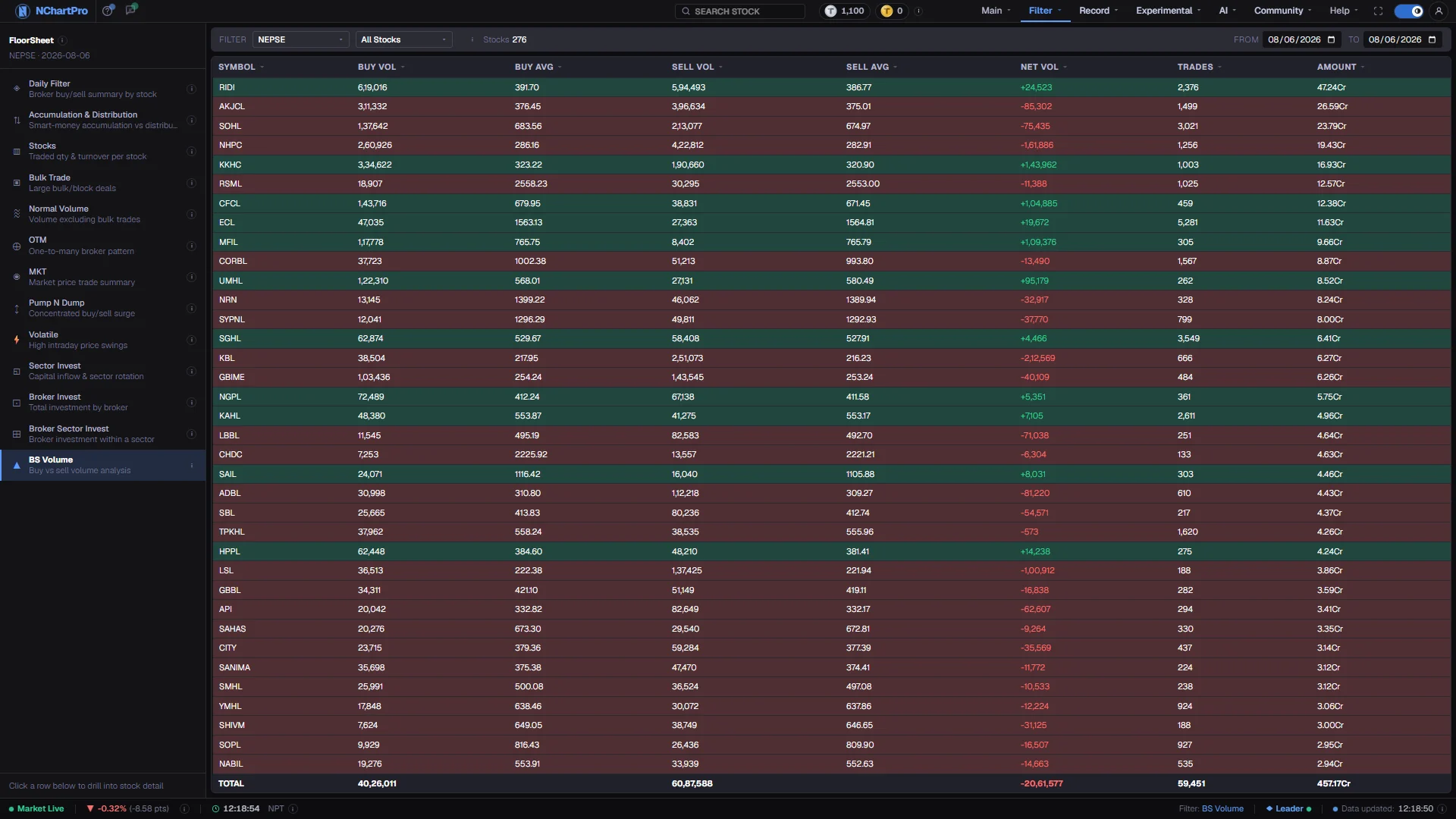
What this page is
BS stands for buy and sell. Every trade on the day's floor sheet is tagged by the tick rule: a trade struck at a higher price than the stock's previous trade counts as a buy, a lower price counts as a sell, and an unchanged price keeps whichever side was last. Each stock's day is then split along that line.
The table gives volume and average price on each side, the net between them, the trade count and the day's turnover. A sticky TOTAL row sums whatever is on screen, so setting the sector picker gives you a whole industry's buy-versus-sell balance in one line.
Why it helps you
- Net Vol is the fastest read on who was in control. Sort by it to put the most one-sided stocks at the top of the list.
- The pair of average prices is the subtler signal. A large buy volume with a buy average well above the sell average means buyers were paying up rather than waiting.
- Use it to test a price move you do not trust: a stock that rose on more aggressive selling than buying rose on something other than demand.
- Of little use on its own timeframe. This is an intraday pressure reading, and one session's aggressor split has no bearing on a holding measured in years.
- Set a month-long range on a stock you own if you want a slower version. Even then, treat it as market texture rather than as information about the company.
When to use it, and where to find it
- After the close, when the day's full trade sequence exists — the tick rule needs each trade's predecessor, so a partial day gives a partial split.
- On any day a stock moved more than you expected, to see which side did the work.
- Alongside Accumulation & Distribution, which asks a similar question from the broker side rather than the tick side.
Try it — a short walkthrough
- 1Set a day or a periodSame date in both boxes for one session, or open a range. Over a range every column is summed per stock across each trading day inside it.See this part in detail →
- 2Understand the tick rule before reading anythingHigher than the previous trade counts as a buy, lower as a sell, unchanged keeps the previous side. The same shares are counted once, on whichever side was the aggressor.See this part in detail →
- 3Sort by Net VolClick the heading to bring the most one-sided stocks first. Green rows mean buyers dominated the period, red rows mean sellers did.See this part in detail →
- 4Narrow to one sector and read the TOTALSet the sector picker and read the bottom row. It gives that industry's buy-versus-sell balance rather than a single stock's.See this part in detail →
Every part of the page
In the order you meet them on screen, each with a close-up of the real thing. The numbers match the dots on the figure above.
The floor-sheet filter menu
Every floor-sheet filter has its own page, all listed here. BS Volume is the one highlighted.
How — Click any name to jump to that filter. Your sector, stock and date choices carry across.
Sector and stock
The two pickers narrow the list to one industry or one stock. The ⓘ beside them repeats the column meanings, and "Stocks" counts the rows on screen.
How — Leave both on their defaults to see the whole market.
- NEPSE in the sector box means all ordinary stocks; Mutual Fund, Debenture and Promoter are separate choices.
From and To
Set both boxes to the same trading day for one day, or open a range.
How — Over a range every column is summed per stock across each trading day inside it.
How a trade is called a buy or a sell
Every trade on the day's floor sheet is tagged by the tick rule: a trade done at a HIGHER price than the previous trade of that stock counts as a BUY, a LOWER price counts as a SELL, and the same price keeps the previous side.
How — That is why the two sides rarely match: the same shares are counted once, on whichever side was the aggressor.
- This is an inference from prices, not a label NEPSE publishes.
Reading the columns
Buy Vol / Sell Vol are share counts (quantity), not rupees. Buy Avg / Sell Avg are the average price paid on that side — that side's turnover divided by that side's shares.
How — Click any column heading to sort by it; click again to flip highest-first / lowest-first.
- Trades = number of transactions. Amount = the day's total turnover in rupees (K thousand, L lakh, Cr crore).
- A large Buy Vol with a Buy Avg well above the Sell Avg means buyers were paying up.
Net Vol and the row colour
Net Vol = Buy Vol − Sell Vol. A green row means buyers dominated the day, a red row means sellers did.
How — Sort by Net Vol to put the most one-sided stocks at the top of the list.
The TOTAL row
The sticky row at the bottom sums whatever is currently on screen, so it follows your sector, stock and date filters.
How — Set the sector to one industry and read the TOTAL to get that industry's buy-versus-sell balance for the period.
Reading the numbers
- Buy Vol and Sell Vol are share counts (कित्ता), not rupees. They rarely match, because each trade is assigned to one side only.
- Buy Avg and Sell Avg are that side's turnover divided by that side's shares — the average price paid or received by the aggressor, not the day's overall average.
- Net Vol is Buy Vol − Sell Vol, in shares. The row tint follows its sign.
- Trades is the number of transactions. Amount is the day's total turnover in rupees, with K for thousand, L for lakh and Cr for crore.
- The TOTAL row sums only the visible rows, so it changes with your sector, stock and date choices.
- Every column heading sorts, with a dim arrow on inactive columns and an accent arrow on the active one.
What it does not do
- The buy and sell labels are inferred from prices. NEPSE does not publish which side initiated a trade, so this is a convention rather than a fact recorded anywhere.
- The tick rule misreads quiet stocks. With few trades and long gaps, a single price change can flip a large block onto the wrong side, and unchanged-price trades simply inherit whatever came before.
- A dominant buy side does not mean net buying happened. Every share bought was sold by someone; this measures who moved first, not who ended up holding.
- The page reads prices only, so it does not need broker numbers and does not wait for the full floor sheet after the close.
Questions people ask
They should be close, but the first trade of the day has no predecessor to compare against and some trades carry the previous side rather than a fresh one. For the exact traded quantity, use Stocks.
That page reads the broker side — whether the ten largest brokers were net buyers. This one reads the price side, trade by trade. They can disagree, and when they do, both are worth a second look.