

Stock Average
Bought the same stock four times at four prices? This collapses them into the one number your profit and loss is measured from.
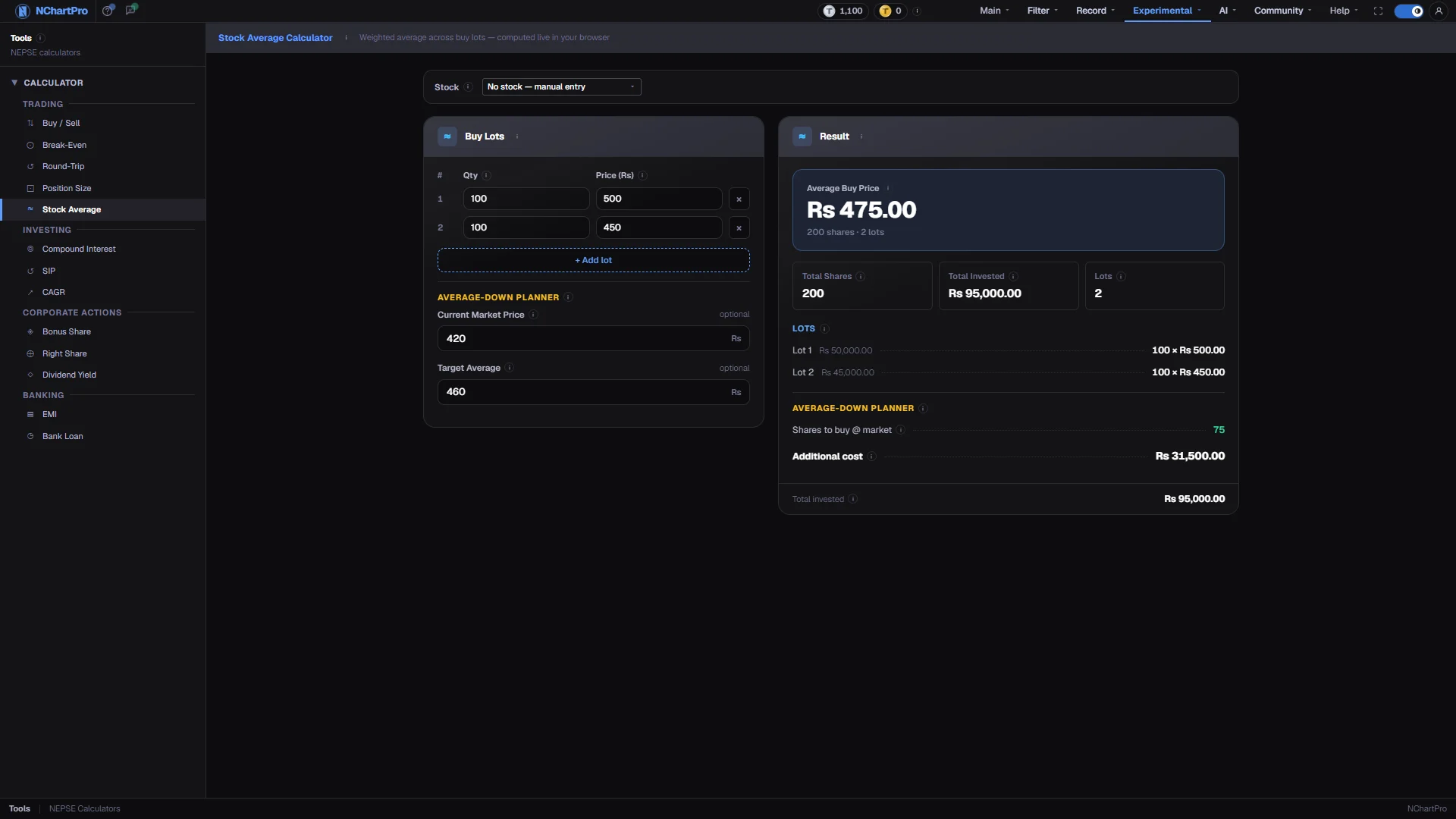
What this page is
The top half is a weighted average. Each row is one purchase — a quantity and a price — and the result is total money spent divided by total shares held. Because it is weighted, a large lot pulls the average much harder than a small one.
The bottom half is an average-down planner. Give it today's market price and the average you would like to end up with, and it works out how many more shares that takes and what they cost.
Why it helps you
- The planner turns "I will average down" from an instinct into a number. Seeing that pulling your average from 475 to 460 needs another 300 shares often ends the discussion.
- It is also a position-size check in disguise: the additional cost line shows how much more of your capital the idea would tie up in one name.
- For a staged entry over months this is the running record of what you have actually paid, which is the figure you need at tax time and for any yield-on-cost calculation.
- A bonus issue is best entered here as an extra lot at price 0 — it will pull the average down exactly as the bonus does in reality.
When to use it, and where to find it
- After any additional purchase, to update your true cost.
- When a holding is down and you are deciding whether to add rather than wait.
Try it — a short walkthrough
- 1Enter one row per purchaseType the quantity and the price you paid for each buy. Order does not matter. Use + Add lot for each extra purchase.See this part in detail →
- 2Read the weighted averageThe headline figure is your single cost per share. Sell above it and you are ahead on price alone; the chips beside it give total shares and total money spent.See this part in detail →
- 3Plan the average downFill in the current market price and the average you want. The planner returns the extra shares needed and what they cost.See this part in detail →
Every part of the page
In the order you meet them on screen, each with a close-up of the real thing. The numbers match the dots on the figure above.
Your buy lots
One row per purchase you made: how many shares (kitta), and the rate you paid for one share in that purchase.
How — Enter the traded rate, not the total bill. The order of the rows does not matter. The × on a row deletes it.
- Cost of a lot = Qty × Price. A bigger lot pulls the overall average closer to its own price.
Add another purchase
Adds an empty row so you can enter as many separate buys as you actually made.
How — Click "+ Add lot" once per extra purchase. There is no limit, and you cannot delete the last remaining row.
Average Buy Price
Your single cost per share across every lot. Sell above this and you are in profit on price; sell below and you are in loss.
How — Compare it with the current market price to see where you really stand.
- Average = total money spent ÷ total shares held.
- It is WEIGHTED by size: 900 shares at Rs 500 and 100 at Rs 100 average to Rs 460, not Rs 300.
Average-Down Planner — market price
"Averaging down" means buying more while the price is below your average, so your average cost falls. This is the price you could buy more at right now.
How — Enter the last traded price. It must be BELOW your target average for the plan to be possible.
- Averaging down increases the money you have at stake in one stock — it is not a guaranteed way to recover.
Average-Down Planner — target
The average cost per share you would like to end up with after buying more.
How — It must sit BETWEEN the current market price and your present average — otherwise the plan is impossible and the result shows 0.
- Shares needed = total shares × (current average − target) ÷ (target − market price), rounded UP.
Shares to buy, and what it costs
How many extra shares to buy at the market price so your overall average lands on the target, and the extra money that takes.
How — If it shows 0 with a note about the target, fix the two prices: market must be below target, and target below your current average.
- Additional cost = shares to buy × Current Market Price.
- That cost excludes broker commission, SEBON fee and DP charge, so the real outlay is a little higher.
Reading the numbers
- Average buy price = Σ (lot quantity × lot price) ÷ Σ lot quantity.
- Shares to buy = total quantity × (current average − target average) ÷ (target average − market price), rounded UP to a whole share.
- That formula only has a solution when the market price is below the target and the target is below your current average. Outside those bounds the planner shows 0 and says the target must sit between market and current average.
- Additional cost = shares to buy × current market price.
- No charges are applied anywhere on this page. Broker commission, the SEBON fee and the DP charge are all excluded — this is a share-price average, not a settlement. Use Buy / Sell for the money that actually moved.
What it does not do
- Lot prices are warned about but never snapped into range when a stock is selected in the context bar, and deliberately so: lots are usually bought on different days, and clamping would overwrite a correct cost with an unrelated day's high.
- The planner assumes you can buy the whole additional quantity at exactly the market price you typed. In a thin stock you will not.
- Averaging down increases how much of your money sits in one company. The calculator has no opinion about whether that is wise.
- Nothing is saved. Your lot rows are gone when you leave the page.