

Break Even
Selling above what you paid is not the same as making money. This finds the price where you actually walk away flat.
What this page is
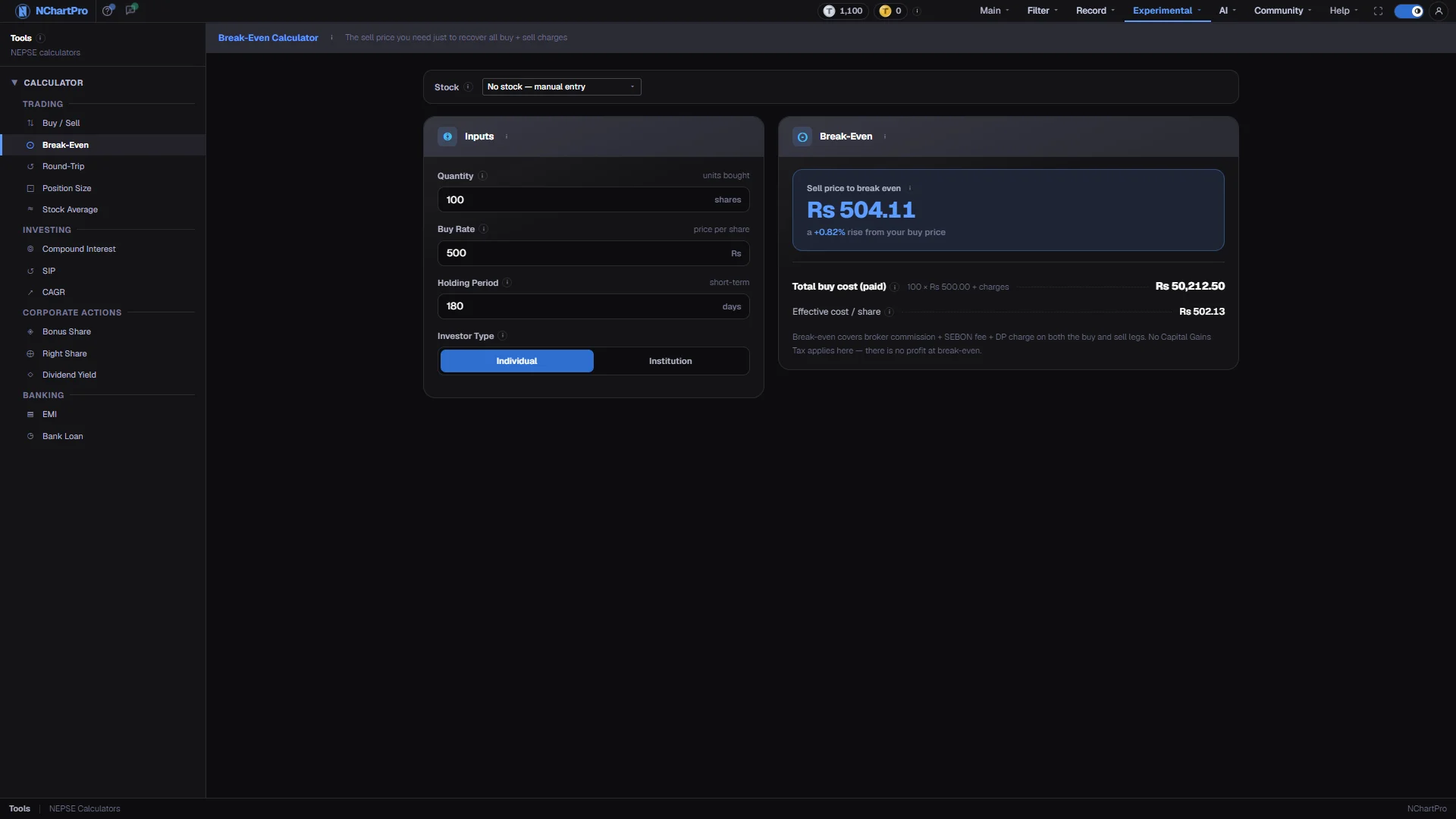
Break-Even answers one question with two inputs: given this quantity at this buy rate, what is the lowest price I can sell at without losing money? It accounts for broker commission, the SEBON fee and the DP charge on both the buy and the sell.
The result always sits above your buy price, and it sits further above on small trades, because the flat Rs 25 DP charge on each leg and the Rs 10 minimum commission do not shrink with the position.
Why it helps you
- This is the line below which a stop-loss is not a stop-loss but a guaranteed cost. Knowing it before you enter changes where you place the stop.
- On a position you are already holding, it is the price at which the trade stops costing you anything to abandon.
- Rarely relevant on a multi-year holding, where the break-even price is a fraction of a percent above cost and the price has long since moved past it.
- It is useful once: after buying a small starter position, to see how much of it the fixed charges ate.
When to use it, and where to find it
- Immediately after a buy, so you know your true floor before deciding anything else.
- When a position is roughly flat and you are wondering whether closing it is cost-free.
Try it — a short walkthrough
- 1Enter quantity and buy rateThese are the only two inputs that move the answer. Use your average cost if you bought across several lots.See this part in detail →
- 2Read the required riseUnder the break-even price is the percentage the stock must gain from your buy rate to reach it. On small trades that figure is startling.See this part in detail →
- 3Compare effective cost per shareThe bottom row spreads the buy-side charges across every share, which is the honest version of what you paid.See this part in detail →
Every part of the page
In the order you meet them on screen, each with a close-up of the real thing. The numbers match the dots on the figure above.
Quantity and Buy Rate
Only these two actually move the break-even price. Quantity is the shares (kitta) you bought; Buy Rate is what you paid per share — use your average cost if you bought in lots.
How — Raise the Quantity and watch the break-even price ease down slightly: a bigger trade qualifies for a lower commission slab.
- Buy amount = Quantity × Buy Rate. The Rs 25 DP charge and the Rs 10 minimum commission weigh much more heavily on a small trade.
Holding Period does NOT move this
Days held only sets the Capital Gains Tax rate, and at break-even there is no profit — so no tax is charged either way. Same for the Investor Type switch below it.
How — Leave them alone here; they matter in the Buy / Sell and Round-Trip calculators where there is a real profit to tax.
- For reference: under 365 days → CGT 10%, 365 days or more → 7.5%, institutions flat 10%.
The break-even sell price
Sell below this and you lose money, even if the price is higher than what you paid. Sell above it and you start making a real profit.
How — Read the percentage underneath — that is how far the price must rise from your buy rate just to get level.
- Formula used: (total buy cost + Rs 25 DP) ÷ (Quantity × (1 − sell commission rate − 0.015% SEBON)).
- No Capital Gains Tax is in it, because at break-even there is no profit to tax.
Total buy cost
The full amount that left your bank account to buy these shares — the share value plus all three buy-side charges.
How — Compare it with Quantity × Buy Rate to see exactly what the charges added.
- Total buy cost = (Quantity × Buy Rate) + broker commission + SEBON 0.015% + DP Rs 25.
Effective cost per share
What one share really cost you once the buy charges are spread over every share — always slightly more than your buy rate.
How — Note that the break-even price sits above even this, because the SELL charges still have to be paid.
- Effective cost per share = total buy cost ÷ Quantity.
Reading the numbers
- Total buy cost = (quantity × buy rate) + broker commission + SEBON 0.015% + Rs 25 DP.
- Broker commission = amount × slab rate, floored at Rs 10. Slabs: 0.36% up to Rs 50,000, 0.33% to Rs 5 lakh, 0.31% to Rs 20 lakh, 0.27% to Rs 1 crore, 0.24% above.
- Break-even sell price = (total buy cost + Rs 25) ÷ (quantity × (1 − sell commission rate − 0.015%)). The extra Rs 25 is the DP charge on the sell leg; the divisor strips the sell commission and SEBON fee out of the proceeds.
- Effective cost per share = total buy cost ÷ quantity.
- No Capital Gains Tax appears anywhere in this calculation. At break-even there is no profit, so there is nothing to tax.
- Rates are hardcoded in the app; confirm them against your broker's current schedule.
What it does not do
- Holding Period and Investor Type are on the page but do NOT move the break-even price. They only set a tax rate, and the tax is zero at break-even. They are shown for context only.
- The commission slab for the sell leg is taken from the total buy cost rather than from the eventual sell amount, so a trade sitting near a slab boundary can be a rupee or two out.
- Broker-specific extras and settlement rounding are not modelled.