

Buy / Sell Calculator
The difference between your buy price and your sell price is not your profit. This calculator itemises everything that stands between the two.
What this page is
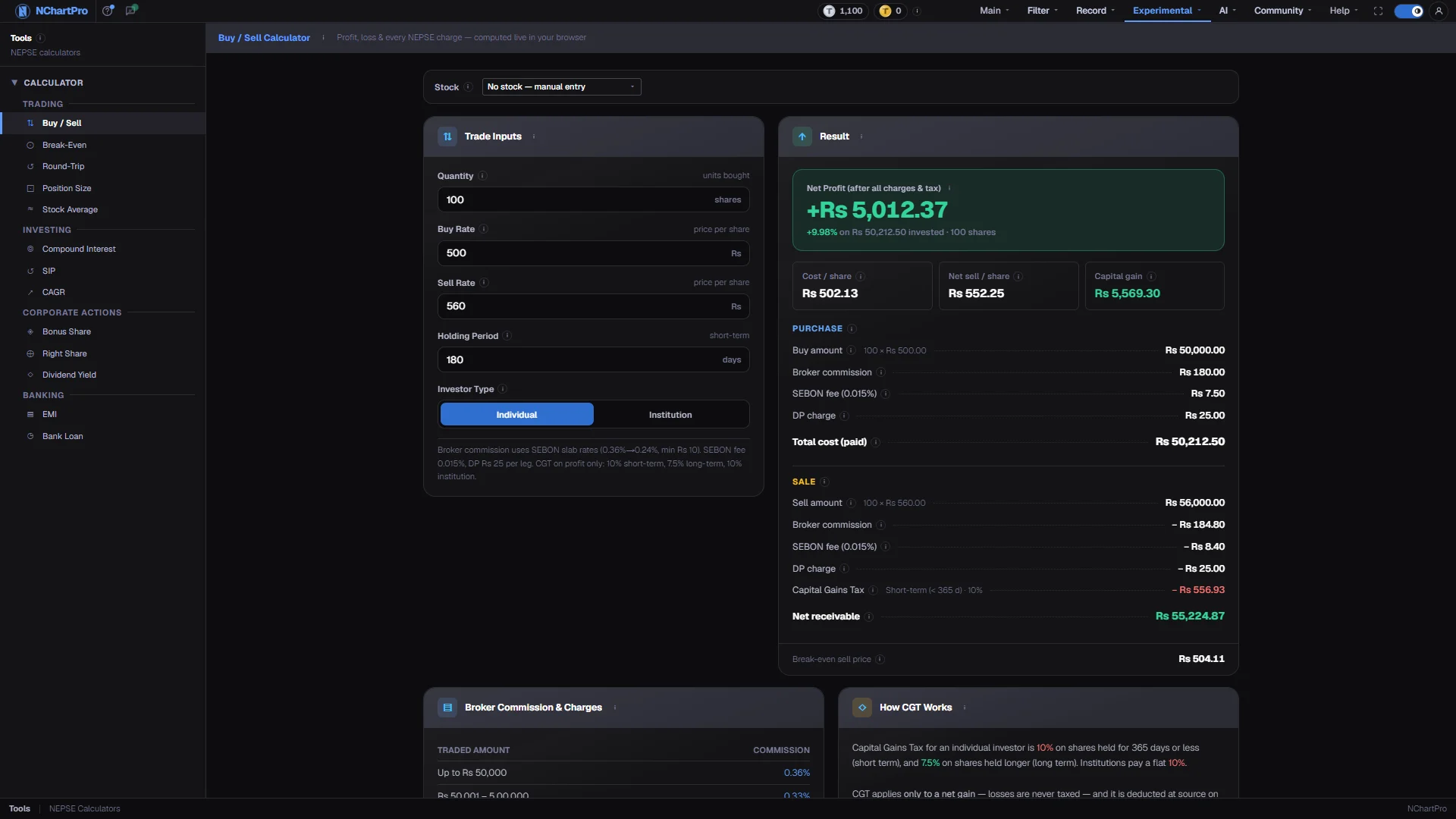
Buy / Sell settles one complete trade. You give it the quantity, the price you bought at, the price you sold or plan to sell at, how long you held and whether the account is an individual's or an institution's. It returns the money that left your pocket, the money that reaches your account, and the difference.
Every charge is itemised on both legs rather than lumped together, so you can see exactly where a thin profit went. The rate card at the bottom of the page is the same schedule the app uses everywhere else.
Why it helps you
- It shows the break-even sell price alongside the result, which is the number you actually need before placing a short-horizon trade.
- Try the same trade at 100 shares and at 1,000. Watching the charge percentage fall is the clearest argument against scalping tiny positions.
- Set the holding period to 365 or more and the tax rate drops from 10% to 7.5%. On a large gain that difference is worth planning a sale around.
- Run it once a year on a position you are thinking of trimming, so the tax and charges are part of the decision rather than a surprise afterwards.
When to use it, and where to find it
- Before you sell, to check that the price you have in mind actually clears your costs.
- After a contract note arrives, to confirm what your broker charged you.
Try it — a short walkthrough
- 1Enter the tradeType the quantity and your buy and sell rates. The result on the right updates as you type — there is no submit button.See this part in detail →
- 2Set the holding period and account typeThese two change only the Capital Gains Tax rate. Anything under 365 days is taxed at 10%; 365 days or more drops it to 7.5% for an individual.See this part in detail →
- 3Read the break-even line lastThe footer shows the lowest sell price that returns your money in full. If your target is below it, the trade loses money even though the price rose.See this part in detail →
Every part of the page
In the order you meet them on screen, each with a close-up of the real thing. The numbers match the dots on the figure above.
The five inputs
Quantity is how many shares (kitta) you bought. Buy Rate is what you paid per share — use your average cost if you bought in lots. Sell Rate is the price you sold or plan to sell at.
How — Change any box and every number on the right updates instantly. Try raising Quantity to see a bigger trade drop into a cheaper commission slab.
- Buy amount = Quantity × Buy Rate · Sell amount = Quantity × Sell Rate, both before charges.
- Commission is charged on the traded amount, so the slab depends on how big the trade is.
Holding Period and Investor Type
Days between buying and selling. It decides ONLY your Capital Gains Tax rate — it changes no other charge. The Investor Type switch just below it does the same.
How — Watch the hint flip between "short-term" and "long-term" as you cross 365 days.
- Individual, under 365 days → CGT 10% of the profit. Individual, 365 days or more → 7.5%.
- Institution → flat 10%, no matter how long it was held.
Net profit — the honest number
What you actually gain or lose once every charge and the tax are paid.
How — Compare it with the raw price difference: if it looks small, the charges ate the gain.
- Net profit = net receivable on the sell − total cost paid on the buy.
- The % underneath is net profit ÷ total cost paid × 100.
- It can be NEGATIVE even when the sell price is above the buy price, if the gain is smaller than the charges.
Per-share reality check
Cost / share is what one share truly cost you with the buy charges spread over every share. Net sell / share is what one share actually put back in your account. Capital gain is the TAXABLE profit.
How — Sell above the cost/share figure, not above your Buy Rate — that is the line that matters.
- Cost / share = total cost paid ÷ Quantity, always a bit above your Buy Rate.
- Capital gain = (sell amount − sell charges) − total cost paid. If it is zero or negative no CGT is charged; a loss is never taxed.
Break-even sell price
The lowest price you can sell at without losing money. Sell below this and you are down, even if the price is above what you paid.
How — Use it as your floor before you place a sell order.
- Formula used: (total buy cost + Rs 25 DP) ÷ (Quantity × (1 − sell commission rate − 0.015% SEBON)).
- No Capital Gains Tax is included — at break-even there is no profit to tax.
The rate card
The official NEPSE / SEBON rates this calculator uses. It is a reference table — nothing in it depends on your inputs.
How — Check which slab your trade size falls into to see why the commission came out as it did.
- Commission: 0.36% up to Rs 50,000 · 0.33% to 5 lakh · 0.31% to 20 lakh · 0.27% to 1 crore · 0.24% above, minimum Rs 10.
- SEBON fee 0.015% of the traded amount · DP charge Rs 25 flat per scrip on EACH leg.
- CGT 10% under 365 days, 7.5% at 365 days or more, and it is deducted at source on the sell.
Reading the numbers
- Buy amount = quantity × buy rate. Sell amount = quantity × sell rate.
- Broker commission on each leg = amount × slab rate, floored at Rs 10. The slabs are 0.36% up to Rs 50,000, 0.33% to Rs 5 lakh, 0.31% to Rs 20 lakh, 0.27% to Rs 1 crore, and 0.24% above.
- SEBON fee = amount × 0.015%, on each leg. DP charge = a flat Rs 25 per leg.
- Total cost paid = buy amount + buy commission + buy SEBON + Rs 25.
- Capital gain = (sell amount − sell charges) − total cost paid. Capital Gains Tax = capital gain × rate, and zero whenever the gain is zero or negative. The rate is 10% for an individual under 365 days, 7.5% at 365 days or more, and a flat 10% for an institution.
- Net receivable = sell amount − sell commission − sell SEBON − Rs 25 − CGT. Net profit = net receivable − total cost paid, and the percentage beneath it is net profit ÷ total cost paid × 100.
- Break-even sell price = (total buy cost + Rs 25) ÷ (quantity × (1 − sell commission rate − 0.015%)). No tax is included, because at break-even there is no gain to tax.
- These rates are hardcoded in the app. They match the schedule Nepali retail calculators use, but confirm them against your own broker's current rates before relying on the number.
What it does not do
- The commission slab for the break-even figure is chosen from the total buy cost rather than from the eventual sell amount, so on a trade that straddles a slab boundary the break-even price can be a rupee or two out.
- Broker-specific extras and settlement rounding are not modelled. Expect small differences against a real contract note.
- Nothing is saved. Leaving the page resets the fields to the worked example.