

Tools
Most of what people get wrong about a share trade is arithmetic, not judgement. These thirteen calculators do that arithmetic with the charges Nepal actually levies.
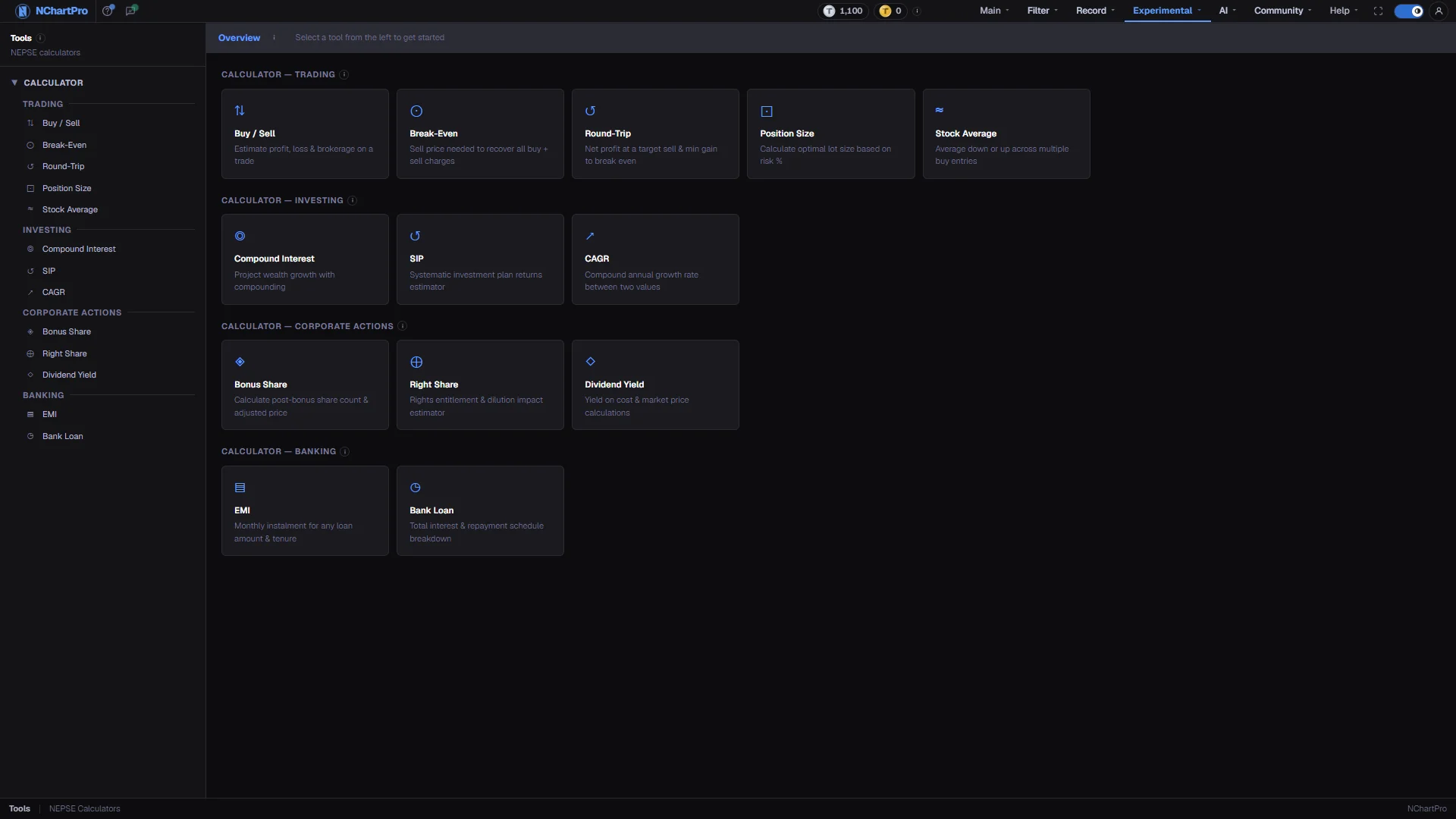
What this page is
Tools is a set of thirteen small calculators in four groups. Trading covers a single share trade and applies every NEPSE charge. Investing covers long-term growth on numbers you assume. Corporate Actions covers what a bonus, a rights issue or a dividend does to your holding. Banking covers loan instalments.
They share one rate card, defined in a single file, so the commission slab used by Buy / Sell is the same one used by Round-Trip and Break-Even. Change a rate there and every calculator moves together.
Everything runs inside your browser. Nothing is saved and nothing you type is sent to a server — the page itself still needs you to be signed in, as every page but the home and About pages does. Refreshing a page clears whatever you typed into it.
The five Trading calculators share an optional stock and date bar. Pick a symbol and the price fields are checked against that day's real candle, so a mistyped rate is caught before it reaches the result.
Why it helps you
- Buy / Sell is the one to keep open. The gap between a raw price difference and what actually lands in your account is larger than most people assume, especially on trades under a lakh.
- Break-Even and Round-Trip together tell you the minimum move a trade has to make before it is worth placing. On small positions the flat Rs 25 DP charge per leg and the Rs 10 minimum commission make that threshold surprisingly high.
- Position Size is the discipline tool. Deciding the share count from your risk budget rather than from your bank balance is the single change that most reliably survives a bad month.
- Stock Average settles the argument about averaging down before you place the order, by showing exactly how many more shares the plan actually needs.
- Compound Interest, SIP and CAGR are the group that matters if you hold for years. CAGR in particular lets you compare a three-year holding against a seven-year one on the same footing.
- Dividend Yield is the one calculator that answers the question a long-term holder actually asks: what is this share paying me, against what I paid for it rather than against today's price.
- Bonus Share and Right Share explain the two events that silently change your cost basis. Running them when a company announces saves you from misreading a perfectly normal ex-date price drop as a loss.
- The Banking pair is worth a visit before borrowing against shares — put the loan rate next to the return you honestly expect.
When to use it, and where to find it
- Before you place an order, not after the contract note arrives.
- When a company announces a bonus, a rights issue or a dividend and you want to know what it does to your holding.
- When you are planning a monthly investment and want a realistic figure rather than a hopeful one.
- Any time — none of these calculators need the market to be open or the data to be fresh.
Try it — a short walkthrough
- 1Read the rate card onceOpen the ⓘ on the Overview bar and read the charge rules. You will meet the same slabs and fees inside every Trading calculator, so understanding them once is enough.See this part in detail →
- 2Pick a calculatorChoose one from the list on the left or from the cards in the middle. On a narrow screen the list becomes a floating Calculators pill at the bottom of the screen.See this part in detail →
- 3Start with Buy / SellIt is the fullest of the trading tools and shows every individual charge on both legs. Once you have read one settlement in full, the other four make immediate sense.See this part in detail →
- 4Type over the defaultsEvery field opens with a worked example already in it. Click a field and type your own number — the result updates as you type, with no submit button.
Every part of the page
In the order you meet them on screen, each with a close-up of the real thing. The numbers match the dots on the figure above.
The calculator list
Every calculator, grouped the same way as the cards on the right. The one you are on is highlighted with an accent bar.
How — Click any name to open it. The "Calculator" heading collapses the whole list if you want more room.
- On a narrow screen this list becomes a floating "Calculators" pill at the bottom of the screen instead.
The charge rules
The ⓘ on this bar holds the rate card every trading calculator on this page uses, so you can check the assumptions before trusting a result.
How — Open it once, and you will recognise the same figures inside each individual calculator.
- Broker commission slabs: 0.36% up to Rs 50,000 · 0.33% to 5 lakh · 0.31% to 20 lakh · 0.27% to 1 crore · 0.24% above, never less than Rs 10.
- SEBON fee 0.015% of the traded amount, and a flat DP charge of Rs 25 on EACH of the buy and the sell.
- Capital Gains Tax on a profit only: 10% if held under 365 days, 7.5% at 365 days or more, flat 10% for institutions. A loss is never taxed.
Trading calculators
Five tools for one share trade — what it really costs and what you actually take home after every NEPSE charge.
How — Buy / Sell for the full settlement · Break-Even for the price that just returns your money · Round-Trip for the profit at a target price · Position Size for how many shares to buy for a chosen risk · Stock Average for your average cost across several buys.
- These are the only calculators that apply the commission slabs, SEBON fee, DP charge and Capital Gains Tax.
Investing calculators
Three long-term growth tools: Compound Interest for a one-time amount, SIP for a fixed amount invested every month, and CAGR for turning "X grew to Y in N years" into one yearly rate.
How — Type the amount, the yearly return you assume and the number of years.
- The return rate is a number YOU assume — it is not a NEPSE forecast.
- They are plain compound-growth formulas and ignore brokerage, tax and inflation.
Corporate Actions calculators
What a company announcement does to your holding: Bonus Share for free extra shares, Right Share for new shares you must pay for, and Dividend Yield for the cash a share pays you.
How — Enter your shares held, your cost, and the percentage or ratio the company declared.
- In NEPSE a bonus and a cash dividend are both quoted as a % of the Rs 100 PAR value, not of the market price.
- Bonus and rights both increase your share count and pull your cost per share down; the market price is adjusted down on the ex-date so your total value does not jump.
Banking calculators
Loan maths: EMI gives the fixed monthly instalment and how much of your total repayment is interest; Bank Loan adds a year-by-year schedule of interest paid and loan left.
How — Enter the loan amount, the yearly rate and the tenure.
- EMI = P × i × (1+i)^n ÷ ((1+i)^n − 1), where P = loan amount, i = annual rate ÷ 12 ÷ 100, n = tenure in months.
- Useful before borrowing against shares — compare the loan rate with the return you actually expect.
Reading the numbers
- Broker commission is slab-based on the traded amount of each leg: 0.36% up to Rs 50,000, 0.33% up to Rs 5 lakh, 0.31% up to Rs 20 lakh, 0.27% up to Rs 1 crore, and 0.24% above that. It is never less than Rs 10.
- The SEBON regulatory fee is 0.015% of the traded amount, charged on both the buy and the sell.
- The DP charge is a flat Rs 25 per scrip per leg — once when you buy and once when you sell — regardless of trade size.
- Capital Gains Tax applies to a profit only. For an individual it is 10% when the holding is under 365 days and 7.5% at 365 days or more. For an institution it is a flat 10%. A loss is never taxed, and the broker deducts the tax at source on the sell.
- All of the above are hardcoded in the app, in a single file. They match the figures the common Nepali retail calculators use, but rates are revised from time to time — check them against your own broker's current schedule before relying on a result.
- Only the five Trading calculators apply charges at all. The Investing, Corporate Actions and Banking groups deliberately ignore brokerage, tax and inflation, because they answer a different question.
- In NEPSE both a bonus and a cash dividend are declared as a percentage of the Rs 100 par value, not of the market price. A 15% cash dividend pays Rs 15 per share whatever the share is trading at.
- Every numeric field is clamped as you type: 99,999 shares, Rs 99,999 per share, Rs 1 crore for an investment amount, Rs 10 crore for whole-account capital, 20% for an assumed return, 25% for a loan rate, and 20 years.
What it does not do
- The rates are fixed in the app, not fetched from anywhere. If SEBON or your broker changes a figure, this page will keep using the old one until the code is updated.
- Real broker statements sometimes carry small extras this rate card does not model — settlement rounding, or a house charge specific to your broker. Treat a result as an accurate estimate, not as a contract note.
- Nothing you type is saved. Leaving a calculator and coming back resets it to the worked example.
- Only the Trading group knows about the stock and date bar. The Investing and Banking calculators take pure numbers and have no market context at all.
Questions people ask
Only the five under Trading: Buy / Sell, Break-Even, Round-Trip, Position Size and Stock Average. Position Size and Stock Average deal in share prices only, so read their own notes.
No. Every calculation happens in your browser and nothing is transmitted or stored. That is also why refreshing clears your inputs.
No. The stock and date bar is optional. Left on "No stock", the calculators accept any price you type and simply cap it at Rs 99,999.