

Test Yourself
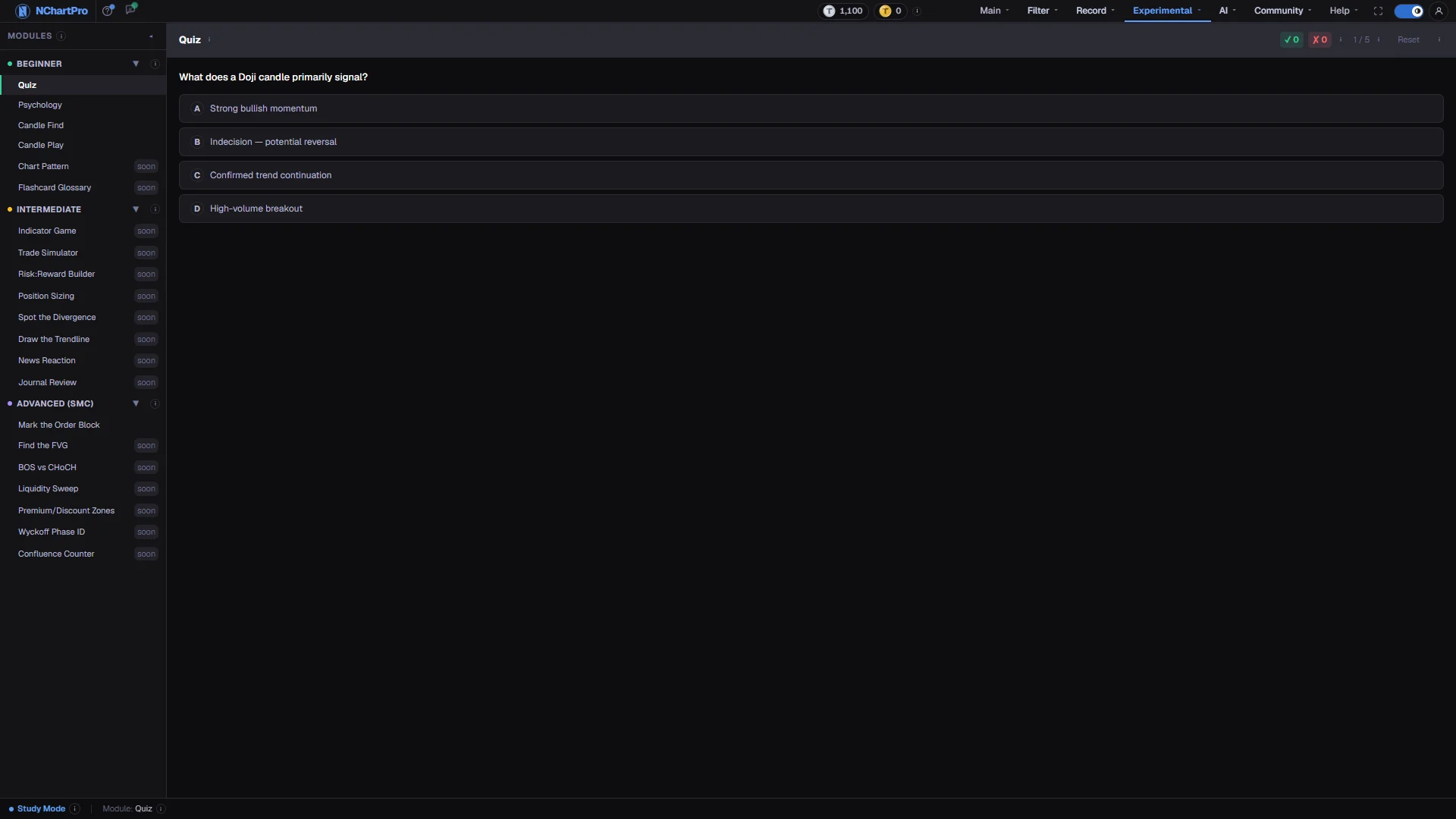
When to use it, and where to find it
Every part of the page
In the order you meet them on screen, each with a close-up of the real thing. The numbers match the dots on the figure above.
The module list
Exercises grouped by difficulty. Beginner covers market words, reading candles and beginner mistakes. Intermediate covers indicators, risk sizing and trade planning. Advanced (SMC) is Smart Money Concepts — reading charts for the zones where large institutional orders sat.
How — Click a group heading to fold it, and a module name to open it. The ◂ button collapses the whole list; a thin ▸ strip brings it back.
- Five modules are built today: Quiz, Psychology, Candle Find, Candle Play and Mark the Order Block.
- Everything tagged "soon" is not built yet — clicking it shows a card describing what it will do.
- Once you start a module, its score appears beside its name as right/total.
The exercise itself
One question at a time. Answer it, and the page tells you immediately whether you were right and explains why before you move on.
How — In a multiple-choice module click an option; in a candle module click the numbered candle or drag a zone on the chart. You must be signed in to submit an answer.
- The charts here are teaching examples built by the backend, not real NEPSE price history — the point is the shape, not the company.
- Exercises repeat in a loop, so you can keep practising as long as you like.
Your score in this module
✓ is how many you got right, ✗ how many you got wrong, and the percentage beside them is right ÷ (right + wrong) × 100.
- 🔥 ×N appears once you get 3 or more right in a row; one wrong answer sends the streak back to 0.
- The score lives only in this browser session — reloading the page clears it.
Question counter
Which exercise you are on, out of how many this module has.
- After the last one it loops back to the first, so practice never runs out.
Reset
Clears this module's score back to zero and starts again from the first exercise.
How — Use it when you want a clean run at a topic you have already seen. You need to be signed in to reset.
- Only this module is affected; your other modules keep their scores.
Session total
The bar shows Study Mode, which module you are in, and once you have answered something, your running ✓ / ✗ total across every module you have tried.
- That total is not saved either — reloading the page starts a fresh session.