

Share Here
Two people can look at the same chart and mark it up completely differently, and seeing the second version is often more useful than drawing the first one again.
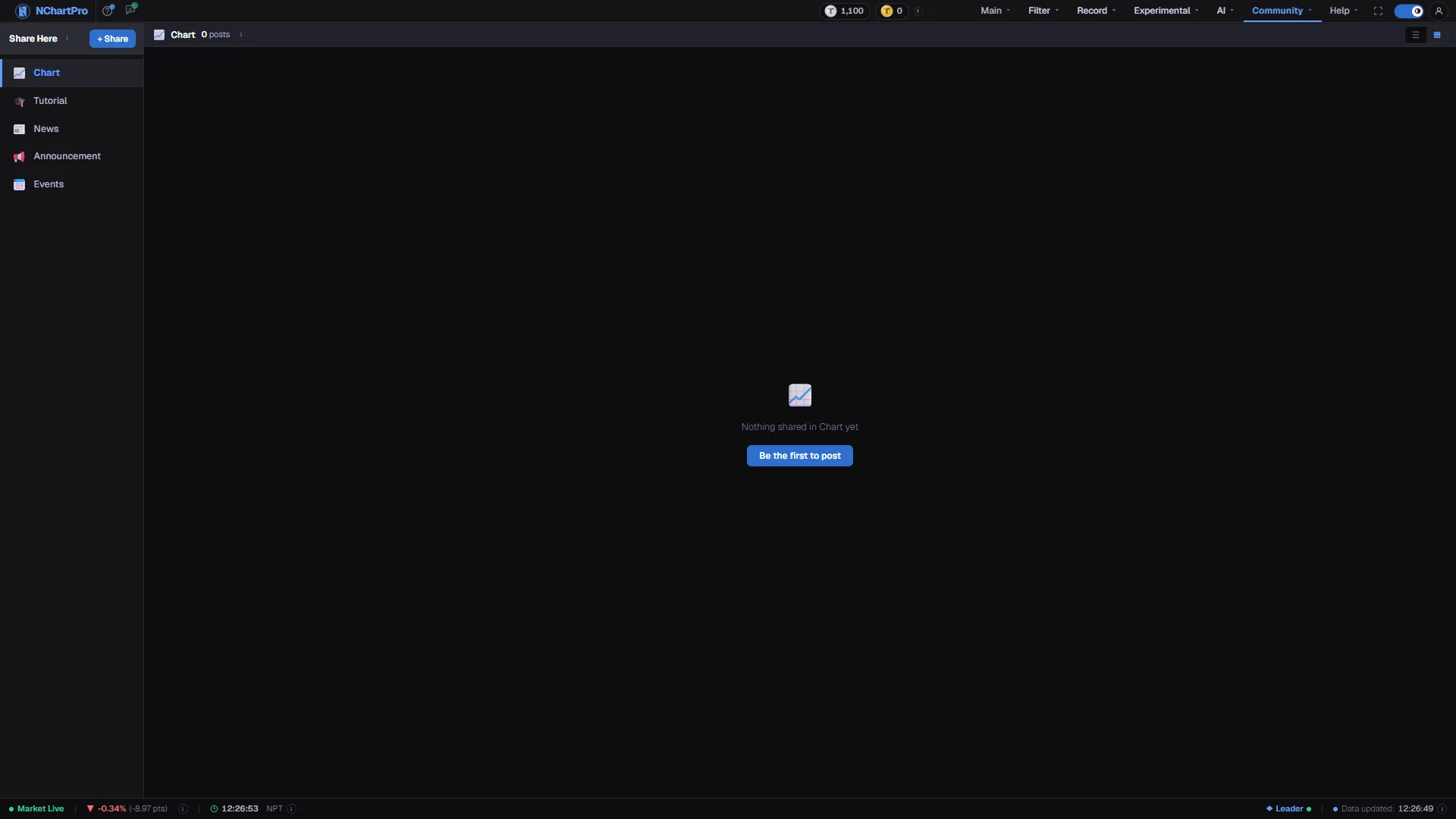
What this page is
Share Here is the app's public posting board. A post is a title plus one of three things: plain text, a link, or an uploaded image. Chart posts are additionally filed under a stock symbol, which is why the compose dialog asks for one.
The page is divided into five sections down the left: Chart, Tutorial, News, Announcement and Events. Each one is its own newest-first feed. Announcement holds notices from the NChartPro team, and only team accounts can post there. An event post carries its date, time and place. A tutorial written one step per line is shown as numbered steps.
Everything here is written by other members under their own account name. None of it is produced or checked by NChartPro, and none of it is a signal. Read a shared chart the way you would read a stranger's notebook: interesting, occasionally sharp, and not a reason on its own to do anything.
Why it helps you
- The useful post is the one that shows a level, not a conclusion. Someone marking the same support you were watching, from a different starting point, is a genuine second opinion; someone posting a target price is not.
- Chart posts are filed by symbol, so a name you are already in is worth a look after the close to see whether anyone drew the same thing you did.
- Posting your own chart forces you to state a level in public before the fact. That is a discipline you cannot get from a private screenshot, and it is the main reason to use this page at all.
- Almost nothing on a page like this is aimed at you. The posting rhythm is intraday and the horizon is days, so crowd sentiment here should move a multi-year decision very little — which in practice means not at all.
- Where it does earn its place is education. A well-annotated chart of a company you own explains what short-term holders are reacting to, which is useful context for a price move you were otherwise going to ignore.
- If you post, post the reasoning rather than the price. A note explaining why a sector re-rated survives being read six months later; a screenshot of a single day does not.
When to use it, and where to find it
- After the close, when people post the day's charts and there is something new to look at.
- When a stock you follow has moved for no reason you can find, to see whether anyone else has an explanation.
- Right after you finish marking up a chart of your own, while the reasoning is still fresh enough to write down.
Try it — a short walkthrough
- 1Pick a sectionChart, Tutorial, News, Announcement and Events each open their own feed. A section nobody has posted to yet says so.See this part in detail →
- 2Choose how you want to readThe two small buttons on the right switch between a list and a grid, and your choice is kept per section. Grid is better for scanning images, list for reading titles.See this part in detail →
- 3Open a post rather than judging the thumbnailClick a card to see the image at full size. The description the author wrote is where the actual argument is, and it never fits on a card.See this part in detail →
- 4Post one of your ownPress + Share, pick the section, give it a title, then choose Text, Link or File. A chart post also needs a symbol. Images are PNG, JPG, WEBP, GIF or PDF up to 10 MB.See this part in detail →
- 5Fix it afterwards from your own postYour own posts carry Edit and Delete. You can change the title, the text and a chart post's stock, but not swap the uploaded file — delete and post again for that.
Every part of the page
In the order you meet them on screen, each with a close-up of the real thing. The numbers match the dots on the figure above.
The five sections
The section switcher. Chart, Tutorial, News, Announcement and Events each have their own posts.
How — Click a name to switch the area on the right.
- Announcement is for notices from the NChartPro team. Only team accounts can post there.
- Events show a date, a time and a place. Tutorials show numbered steps.
- For real market headlines use Record → News instead; this page does not carry them yet.
What you are looking at
The section you are in and how many posts it has, the page buttons, and the ☰ / ▦ buttons that switch between list and grid.
How — Posts are shown newest first in both layouts — use ◀ ▶ or a page number to move through them. Your list/grid choice is remembered for each section.
The shared charts
One card per uploaded image. The strip under each thumbnail is who uploaded it and when; blue text is the topic they typed.
How — Click a card to open the image full size in a window you can drag by the corner to resize.
- These are personal opinions posted by other users, not analysis by NChartPro — treat them as such.
Post your own
One dialog for all five sections. Pick the section, give it a title, then share it as plain text, a link, or a file.
How — Chart posts are filed under a stock, so Chart also asks for a symbol. Files are PNG, JPG or WEBP, up to 10 MB.
- You must be signed in — the sign-in box opens here if you are not.
- It goes live at once under your account name, so do not leave anything private in it.
Reading the numbers
- The strip under each post is the author's account name and how long ago it was posted, shown as "3m ago" up to a month and then as a plain date.
- A post marked as edited was changed by its author after posting. The original text is not kept.
- Link posts show the title and description fetched from the linked site, but never its picture. That is deliberate: loading a remote image would send every viewer's address to whatever site was linked.
- Posts are always newest first, in both the list and the grid layout. There is no way to sort them another way.
What it does not do
- Only the NChartPro team can post to Announcement. A member does not see it in the compose dialog, and the server refuses it too.
- An event date and time are Nepal time. An event that has already started is marked Past; it is not removed.
- Everything posted is public and immediate. There is no draft, no private mode and no delay — it appears under your name the moment you press post, so do not leave account details or personal information in an image.
- Posts are checked automatically before they are stored, and a refused post comes back with the reason and a notice on the form. Nothing is stored when that happens; edit the text and try again.
- There is no way to report another member's post from this page. Moderation happens before a post is published, not by member flagging afterwards.
- Posting earns TPoints, and deleting your own post takes those points back. If the post earned nothing because you were already at the daily community cap, nothing is deducted, and the dialog tells you which happened.
- Nothing here is verified. A chart can be mislabelled, a level can be wrong, and a link can go anywhere. Check anything you intend to act on against the actual chart.
Questions people ask
No. Browsing is open to everyone. Posting, editing and deleting need you to be signed in, and the sign-in box opens on the page rather than sending you elsewhere.
Link previews carry the title, description and site name but never the image. Loading a picture from another site would leak every reader's address to that site, so the app does not do it.
No. The section is fixed once the post is saved, and the edit dialog shows it locked. Delete the post and share it again in the right place.
No, that is Comment / Suggestion under the Help menu. This page is for market content. For a written argument about a stock rather than a picture, use Discussion.