

Discussion
A chart tells you what a stock did; it never tells you what anyone believed while it was doing it, and this is the only page in the app where that is written down.
What this page is
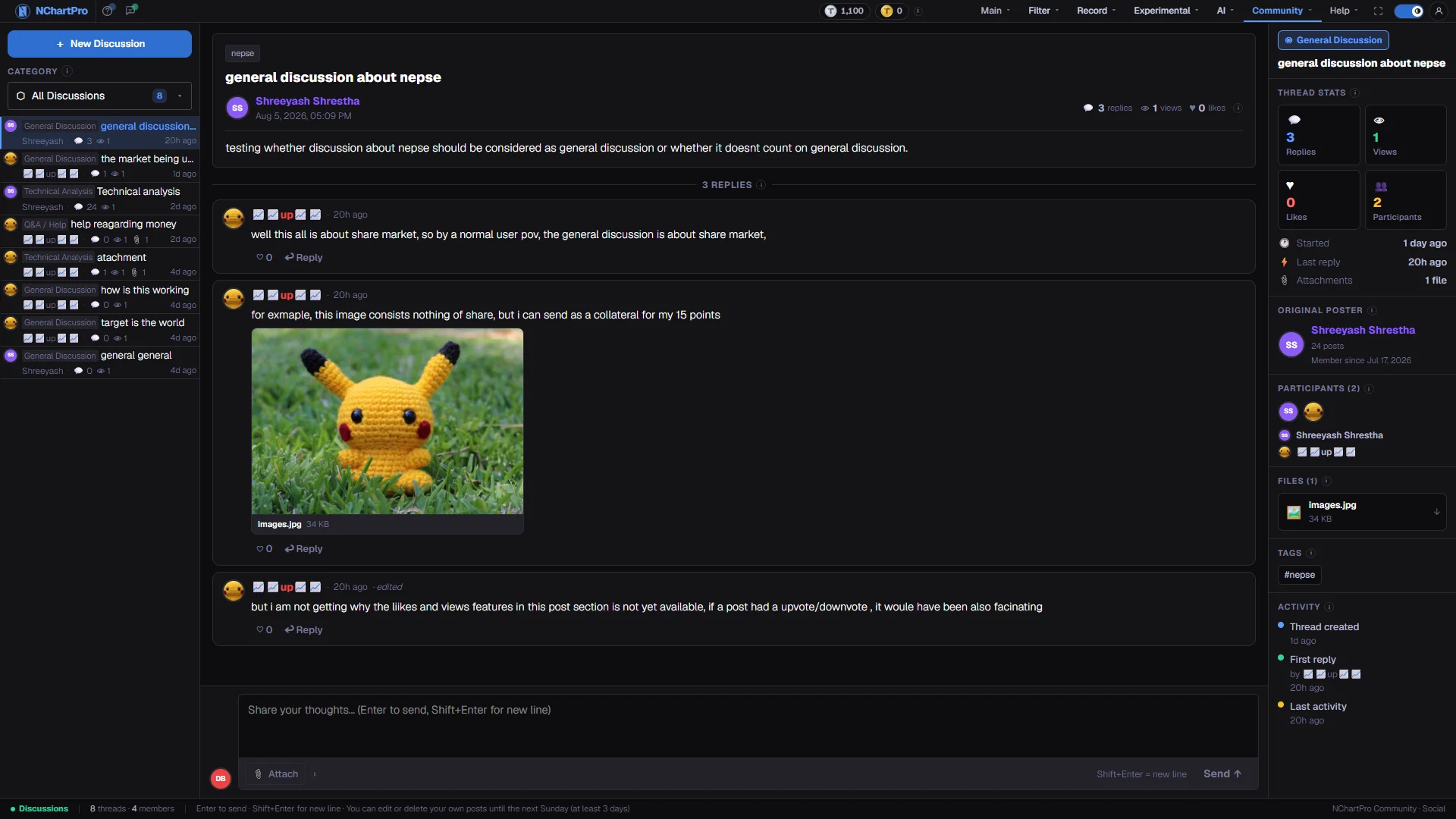
Discussion is a threaded public board. Someone opens a thread with a title, a body and up to six tags; everyone else answers, and an answer can be attached to a specific message rather than to the bottom of the page, so a conversation nests up to three levels deep.
Threads are filed into eight categories, from General through Technical Analysis, Fundamental Analysis, IPO & Right Share, Q&A / Help, News & Updates and Sector Talk. The category is chosen by the author and is the only way the board is narrowed — tags are labels, and do not filter anything.
Everything is public and permanent. Your own posts can be changed for a short window after you write them; once that window closes, what you wrote stays as written. That is the trade-off the board makes: nobody can quietly rewrite an argument after the market proved it wrong.
Why it helps you
- The value is in speed of disagreement, not in agreement. A thread where two people are arguing about the same level is worth more than ten posts all calling the same direction, because only the argument tells you what would have to happen for you to be wrong.
- Q&A / Help is the fastest route to a mechanical answer — how a settlement date falls, why a price looks odd on the floor sheet — that would otherwise cost you an hour.
- Read the timestamps before the text. On a fast day a thread three hours old is describing a market that no longer exists.
- Take the crowd here as information about sentiment, not about value. The board turns over in hours; a decision you intend to hold for years should barely register it, and usually should not move at all.
- What is worth your time is Fundamental Analysis and IPO & Right Share, where somebody has usually already read the report or the prospectus you were about to open, and the thread will tell you which pages to read closely.
- The one genuinely useful habit is writing your own thesis into a thread and letting people attack it. If nobody can find the hole, that is worth more than any number of agreeing replies.
When to use it, and where to find it
- After the close, when the day's threads have replies rather than just openers.
- When a company announcement lands and you want to know how it is being read before the price shows you.
- When you are stuck on how something in the market mechanically works — that belongs in Q&A / Help, not in a chart page.
- Before you act on a conviction, to see whether anyone has already written the counter-argument.
Try it — a short walkthrough
- 1Narrow the board before you read itPick a category rather than scrolling All Discussions. The number beside each name is how many threads it holds, so you can see where the activity actually is.See this part in detail →
- 2Pick a thread by its last activity, not its titleThe time on each row is the last reply, not the opening post. A thread from last week with a reply an hour ago is the live one.See this part in detail →
- 3Read the opening post in full firstThe middle panel carries the title, the tags and the whole body. Replies only make sense against it, and the opening post is where the claim actually is.See this part in detail →
- 4Answer the message, not the threadPress Reply on the specific message you are answering before you type. Your answer then nests under it and the argument stays readable, instead of landing at the bottom with no context.See this part in detail →
- 5Check the thread summary before you commit timeThe right panel tells you how many distinct members are actually in the conversation. Two people replying twenty times is a different thing from twenty people replying once.See this part in detail →
- 6Fix your own words while you still canEdit and Delete appear on your own posts with a countdown beside them. Once it runs out the server refuses the change and says so in the bar at the bottom.See this part in detail →
Every part of the page
In the order you meet them on screen, each with a close-up of the real thing. The numbers match the dots on the figure above.
Start a discussion
Opens the compose form: category, title, the body text, up to 6 tags, and optional file or link references.
How — You need to be signed in — clicking this while signed out opens the login box instead of the form.
- The body must be at least 10 characters before Post is enabled.
- Tags are free text (usually a stock symbol). They are labels only — they do not filter the board.
Choose a category
Eight buckets: All Discussions plus General, Technical Analysis, Fundamental Analysis, IPO & Right Share, Q&A / Help, News & Updates and Sector Talk.
How — Click the box to open the list and pick one; the list below reloads to that category.
- The number beside each name is how many threads it holds; "All Discussions" is the whole board.
The thread list
Every thread in the selected category, pinned ones first and then the most recently active.
How — Click a row to open it in the middle.
- PIN = a pinned thread, always sorted to the top. HOT = a thread flagged as busy.
- Row meta: 💬 total replies (nested ones included) · 👁 the stored view count · 📎 attached files · time of the last reply.
- A greyed, italic title is a thread its author deleted — the replies underneath are kept, so the discussion is not lost.
The opening post
The thread's title, its tags, who wrote it and when, and the full text. "· edited" next to the time means the author changed it after posting.
How — If this is your own post and the window is still open, an Edit / Delete row appears at the bottom of this card with a countdown beside it.
- You may edit or delete your own thread only until the next Sunday 00:00 Nepal time after you posted, and never for less than 3 days.
- So a Monday post is editable for about 6 days; a Saturday post still gets a full 3 days. The server enforces this, not just the button.
- Deleting a thread that has replies keeps those replies and leaves a "DELETED" tombstone. A thread with nothing under it is deleted outright.
- Admins may delete anything, but they never edit another member's text.
The three counters
Numbers sent with the thread itself. Only one of them is a live count.
- 💬 replies — counted from the actual reply tree, nested answers included. This one is always exact.
- 👁 views and ♥ likes are stored fields; the server does not currently increment them as people read or like, so read them as informational only.
- A coloured ring on an avatar marks a role: red ADMIN, amber MOD, green ANALYST. No ring = ordinary member.
The replies
A threaded conversation. ↩ Reply on any message answers that message, so answers nest underneath it (up to 3 levels deep) instead of going to the bottom.
How — Click "▼ collapse" on a reply to fold its whole branch away. Edit / Delete appear only on your own replies, and only inside the same window as the thread.
- ♡ likes a single reply, but it is only a highlight in your own browser — it is never sent to the server.
- "[deleted by author]" means the author removed the text; nested answers under it are kept.
Write a reply
Posts a reply into the thread you are reading. Your reply is saved on the server under your account name and everyone can read it.
How — Enter sends, Shift+Enter starts a new line. Without a "Replying to @…" chip above the box it posts as a new top-level reply; click ↩ Reply on a message first to answer that message instead.
- You must be signed in — the login box opens here if you are not.
- The 📎 Attach button only shows the file name: sending posts your TEXT only, so the file is not uploaded. Attachments on a reply are not wired up yet.
Thread details
A summary of the SELECTED thread only — its counters, who started it, everyone who has written in it, files, tags and a short timeline.
- Replies and Participants are real counts; Participants = distinct members who wrote the thread or any reply in it.
- Views and Likes here are the same stored fields as above, so they do not tick up either.
- "Last activity" is what the thread list on the left sorts and timestamps by.
The bar at the bottom
How many threads and members the board has, plus the reminder about the edit window.
- A rejected edit or delete shows up here in red with the server's own reason — most often that the window has closed.
- So if Edit stops working on an old post of yours, it is the deadline, not a bug.
Reading the numbers
- Of the three numbers on a thread, only the reply count is measured. It is counted from the actual reply tree, nested answers included.
- A coloured ring on an avatar is a role — red for admin, amber for moderator, green for analyst. No ring means an ordinary member, which is almost everyone.
- A greyed, italic title is a thread whose author deleted it. The replies underneath are kept on purpose, so a discussion is never lost because one person changed their mind.
- Tags are free text and usually a stock symbol. They label a thread but do not filter the board, so searching by tag is not something the page can do.
What it does not do
- The view count and the like count on a thread are stored fields that the server does not currently increase as people read or like. Treat them as decoration, not as a measure of reach.
- The heart on an individual reply is a highlight in your own browser only. It is never sent anywhere and nobody else sees it.
- The attach button on the reply box shows the file name but sends only your text. Attachments on a reply are not built yet, so put a link in the message instead.
- Your edit window is derived on the server as the next Sunday at midnight Nepal time, and never less than three days. So a Monday post gets about six days and a Saturday post gets three, and the deadline is enforced by the server rather than by the button.
- Every post is checked automatically before it is stored. A refused post is shown back to you with the reason and a notice on the form, and nothing is saved — edit and send again.
- There is no way to report another member's post. Admins can delete anything, but they never edit another member's text.
- Nothing on this board is advice, and nobody's claim here is checked. Assume every number in a post is unverified until you have looked at it yourself.
Questions people ask
The window closed. It runs to the next Sunday at midnight Nepal time after you posted, with a minimum of three days, and the server enforces it. A rejected attempt shows the reason in the bar at the bottom.
A thread with replies leaves a marker so the answers underneath survive. Only a thread with nothing under it is removed outright.
No. Reading is open. Starting a thread or replying needs you to be signed in, and the login box opens on the page.
Comment / Suggestion, under the Help menu. This board is for the market. For a chart image rather than text, use Share Here.