

Where the numbers come from
Two very different clocks feed this app: a live tick stream that moves through the session, and the official record of the day that only settles after the close.
What this page is
Everything originates with the Nepal Stock Exchange. Prices, the indices, the floor sheet that records every completed trade, and the disclosures companies file are all exchange data. They reach us through the MDP (Market Data Provider) API by Source Code Pvt. Ltd., which we pay for under a contract. A second feed is kept as a backup and is used only when the main feed is late, and only one record is ever kept for each moment.
After the close, the whole day’s floor sheet is downloaded again and the minute candles are rebuilt from it, so the last minute candle closes where the day closed. Trades under 10 shares are left out, as in the exchange’s own figures. Every reply from the feed is stored as it came, day by day, so a day can be checked again later.
During trading hours live prices arrive about every 15 seconds, a little wider than the session itself so the opening range is already on screen at 11:00 and the closing print still lands. Those ticks update prices, the growing last candle, the gainer and loser lists, and the breadth counts. Live streaming is the only thing that stream does.
Everything else is a request the page makes and the server answers: candle history, filters, indicator snapshots, fundamentals, the floor sheet, news. Heavy datasets are compressed on the way to you and cached, which is why a page that took a moment on the first visit opens immediately on the second.
Why it helps you
- Live and completed-day data sit side by side on the same screen. Prices, volume and breadth are live. Anything involving broker numbers is the previous completed day, because brokers are only attached to trades in the floor sheet published after the close.
- The last candle on an open market is unfinished. Its high, low and close will still change, so a pattern read at 11:30 on a daily candle is a guess about a bar that has four hours left to run.
- When ticks stop, the app holds the last snapshot rather than blanking. Check the Updated stamp before treating a still screen as a quiet market.
- Fundamental figures come from what companies actually filed, quarter by quarter, so they change on a reporting calendar rather than continuously. A stale-looking number usually means no new filing, not a broken feed.
- Corporate actions such as bonus shares, right issues and dividends move price and share count in ways a raw chart does not explain on its own. The Knowledge Base pages under Record are where those events are recorded.
- Long-run analysis runs off the daily candles, which are rebuilt after each close. That is the series to trust for anything measured in months.
When to use it, and where to find it
- Read it before you first disagree with a number. Almost every apparent contradiction in the app is one of the differences described here.
- Read it again the first time a broker figure looks a day behind, or the first time a volume column reads in a unit you did not expect.
Try it — a short walkthrough
- 1Find the As-of date on any page that has oneIt names the trading day the data belongs to. On a page fed by the floor sheet it will normally be the previous session, even while today is trading.
- 2Compare a live figure with a completed oneOn the Dashboard, look at Top Turnover and then at the broker cards. The first is today and moving, the second is the last completed day and fixed. Both are correct.
- 3Watch the last candle growOpen the Chart during trading hours on a one-minute timeframe. The rightmost candle extends as trades arrive, and the price beside the symbol moves with it rather than behind it.
- 4Check a volume column before you read itOn a stock, volume is a count of shares in kitta. On NEPSE or a sector sub-index, the same field is rupee turnover, because an index has no share count.
- 5Read the Updated stamp when something looks frozenBottom right of every page. If it stopped several minutes ago the connection dropped, and reloading the page lets this tab reconnect.
Every part, up close
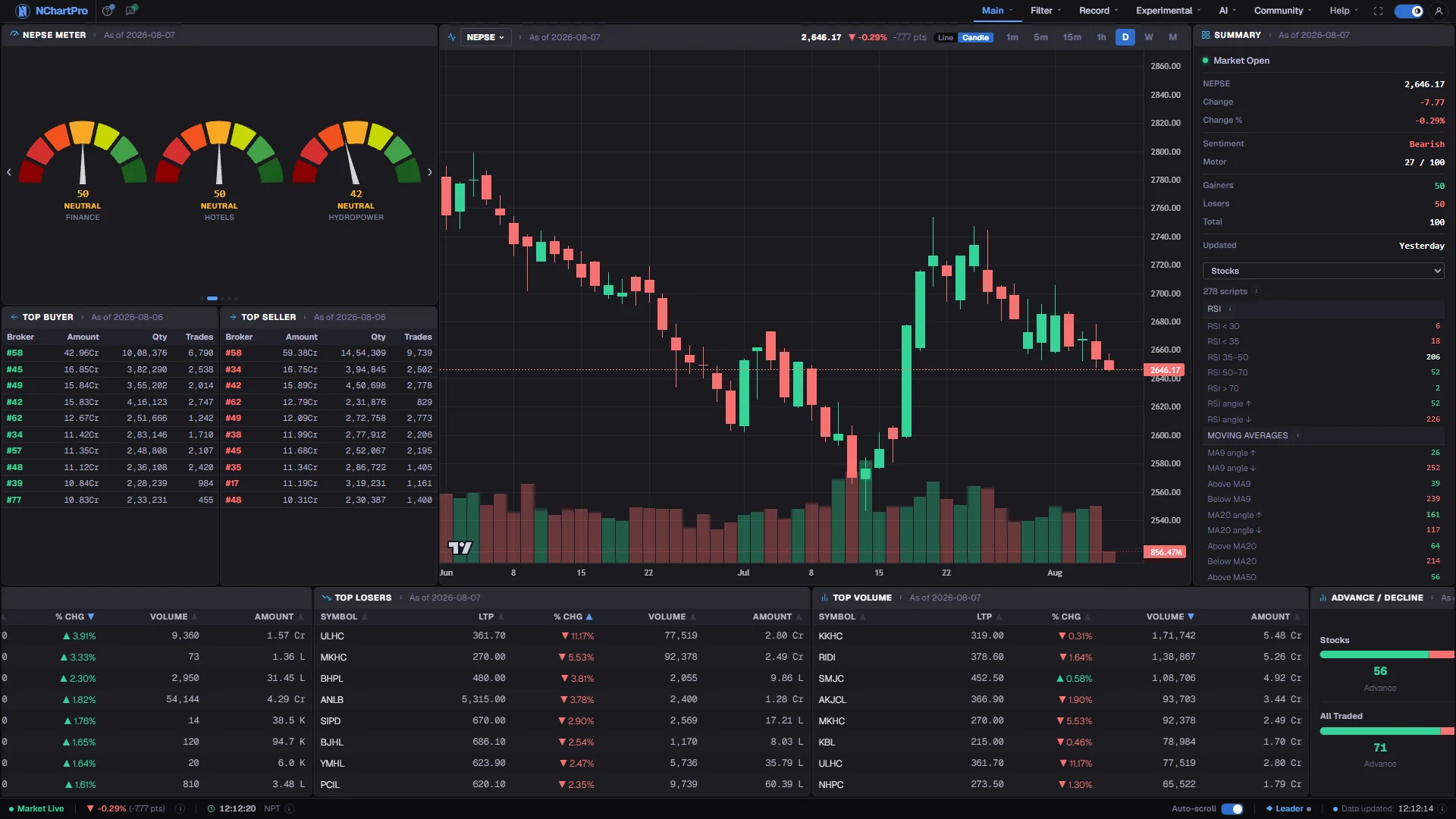
Live and completed-day data on the same screen. Each part with a close-up of the real screen; the numbers match the dots on the picture.
LIVE — the market bar
The pulsing dot means ticks are still arriving. The Updated stamp is how you tell a quiet market from a stopped feed.
LIVE — movers
Gainers, losers, volume and breadth all move with the tick stream while the session runs.
LIVE — the last candle
Unfinished while the market is open: its high, low and close will all still change before the close.
YESTERDAY — broker flow
Brokers are only attached to trades in the floor sheet published after the close, so anything with a broker number on it is the previous completed day.
Reading the numbers
- Rupee amounts use Nepali units: K is a thousand, L is a lakh, Cr is a crore, where one crore is Rs 1,00,00,000. Share counts are kitta and are not scaled the same way.
- Change and change percentage everywhere in the app are measured against the previous day closing price, not against the open.
- All timestamps are Nepal time, UTC plus five hours forty-five minutes. Data is stored in a neutral timezone and converted for display, so nothing shifts when you travel.
- One browser tab owns the live connection at a time. Open the app in several tabs and only one of them is streaming; the others follow it. The badge in the bottom bar shows which.
What it does not do
- Broker identity is not available while the market is open. Any page that names a broker is showing a completed day, and no version of it exists for the session in progress.
- Exchange holidays are not tracked. The session label is derived from the clock and the day of the week, corrected by the arrival of real ticks.
- Where a company has not filed a figure, the app shows nothing rather than estimating one. A blank fundamental cell means no disclosure, not a value of zero.
- A dropped tick stream leaves the last received values on screen. Nothing on the page announces staleness except the Updated stamp, so it is worth glancing at.
Questions people ask
Brokers are only attached to trades in the floor sheet the exchange publishes after the close. Until that arrives, the most recent complete broker picture is the previous trading day.
Both start from the exchange, so a difference is usually timing — our prices refresh about every 15 seconds. Compare the Updated stamp here with the tick time there before assuming an error, and treat the exchange published figures as final.
The chart can show both: prices as traded, and prices adjusted for bonus and right shares. Adjustment is applied stock by stock by our team and is not yet automatic for every new event, so look up the event on the Knowledge Base pages under Record before reading a sudden gap on an old chart as a crash.
Wide tables abbreviate to stay readable and detail panels do not. The underlying value is identical; only the formatting differs.