

Suggestions
A short list of things worth re-checking, each raised by a stated threshold you can read for yourself — no forecast, no stock tip, nothing traded on your behalf.
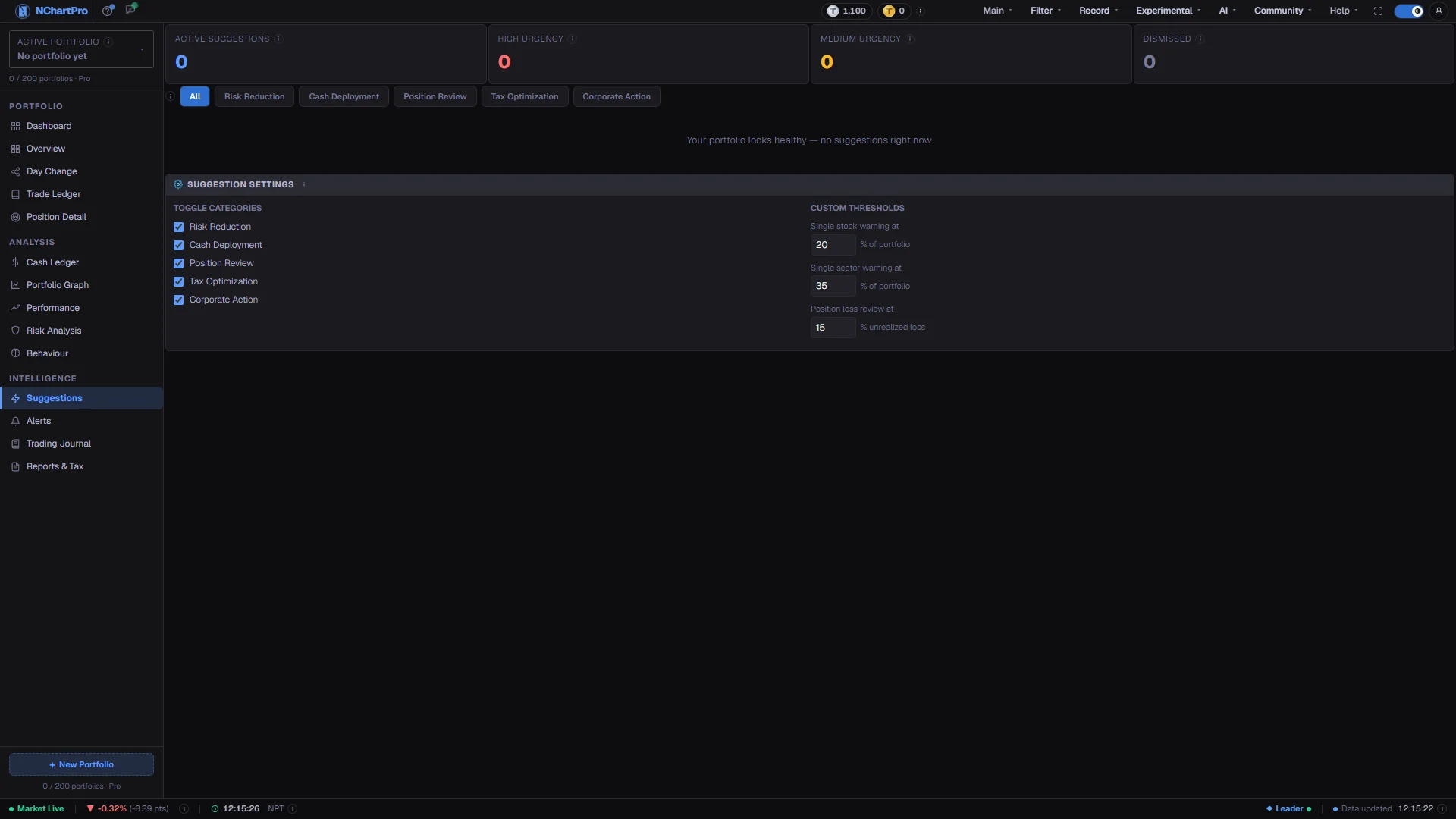
What this page is
Suggestions runs a handful of fixed rules against your current holdings, your cash and your overall risk score, and lists whatever tripped one. Every card can be traced back to a number printed on the page, which is why there is nothing to take on faith.
There is no AI here and no price prediction. A card says "this stock is now more than a fifth of your portfolio", not "this stock will fall".
When nothing trips a rule the page says your portfolio looks healthy and shows no cards. That is a genuine result rather than an empty screen.
Why it helps you
- The High counters are almost always concentration. On a fast-moving name a position that grew past 20 percent of your portfolio was usually not a decision — it was a winner you never trimmed.
- Position Review flags any holding more than 15 percent below your average cost. That is the prompt to re-check the reason you bought, before the position becomes something you hold out of hope.
- Cash Deployment is the mirror image. Money sitting idle after you sold is a position too, and the rule flags it once it passes a fifth of your total.
- The sector rule at 35 percent is the one that matters most for a long holder. A portfolio that is a third banking looks diversified stock by stock and is not diversified at all when policy changes.
- Because the list is recomputed from live prices, a holding you never touched can trip a rule simply by rising. Reading it quarterly catches drift you did not choose.
- Nothing here should be acted on the same day. Take the flagged item, read the underlying split on Overview, and decide over your normal review cycle.
When to use it, and where to find it
- At a weekly or monthly review, as the first page you open.
- After a stock of yours has run hard, to see whether it has quietly become your largest position.
- After selling, when a large cash balance is sitting undeployed.
- Before adding to a position you already hold heavily.
Try it — a short walkthrough
- 1Start with the High countRead the four counters at the top and deal with High first. Those are usually genuine concentration problems rather than housekeeping.See this part in detail →
- 2Narrow to one kind of issueClick a category button to see only those cards, or All to go back. Only categories that actually flagged something get a button, so you never open onto an empty list — and when there is only one kind of issue the row does not appear at all.See this part in detail →
- 3Read the explanation before the actionOn each card, read the body text first and the Suggested Action line second. The point is to make you re-check a decision, not to hand you an instruction.See this part in detail →
- 4Check the number on another pageFor a concentration card, open Risk Analysis and confirm the weight in the Top Holdings list. For a cash card, open the Cash Ledger. Never act on the card alone.See this part in detail →
- 5Dismiss only what you have actually consideredDismiss is permanent. It blocks the whole subject of the card — the stock, the sector, or the rule — and saves that to your account, so nothing about it is raised again. Use it for a position you hold deliberately and do not want re-flagged every visit.See this part in detail →
- 6Undo a block from the Block List tabOnce you have dismissed anything, a Block List tab appears alongside the categories. It lists every subject you have blocked with the date, and Unblock puts it straight back into the checks.See this part in detail →
- 7Read the thresholds so nothing is a surpriseOpen Suggestion Rules to see the exact levels the rules use. The values shown are read from the backend that ran them, so they cannot drift from the real rules.See this part in detail →
Every part of the page
In the order you meet them on screen, each with a close-up of the real thing. The numbers match the dots on the figure above.
The list follows this portfolio
Like the rest of this section, the checks run against whichever portfolio is named here. Switch the box and the whole list is recomputed for that portfolio.
How — If you keep several portfolios, check each one — a weight that is fine in your long-term account can be a concentration problem in a smaller trading account.
- Your Block List is per portfolio too: blocking a stock here does not silence it in your other portfolios.
- Everything in this section is private to your account.
Active, High, Medium and Blocked
Four counters. Active is how many items are showing right now; High and Medium split them by urgency; Blocked is how many subjects you have permanently silenced.
How — Deal with High first — those are usually genuine concentration problems rather than housekeeping.
- High urgency is raised when one stock exceeds 20% of your portfolio, when one sector exceeds 35%, or when your overall risk score reaches 7 out of 10.
- Medium is raised when a stock is between 15% and 20% of your portfolio, when a holding is more than 15% below your cost, or when over 20% of your money is sitting in idle cash.
- The list changes on its own as prices move and as you buy or sell.
The category tabs, and the Block List
One tab per kind of issue — but only for categories that actually flagged something. A category with nothing in it gets no tab, so you can never open onto an empty list. If only one kind of issue was raised, the whole row is hidden.
How — Click a category to see only those items, or All to go back. The ⓘ at the start of the row spells out the rule behind each category.
- Risk Reduction covers a single stock over 20% (or 15–20%), a sector over 35%, or an overall risk score of 7+/10.
- Cash Deployment flags cash sitting undeployed, raised as Medium once it passes 20% of your total.
- Position Review flags a holding more than 15% below what you paid for it — worth re-checking your original reasoning.
- Tax Optimization and Corporate Action have no rule behind them yet, so they never produce a card and never get a tab.
- A "Block List" tab joins the row once you have dismissed something. It is where you unblock.
The suggestion cards
Each card carries its urgency, its category, the stock it concerns if any, a plain explanation, and a "Suggested Action" line.
How — Read the explanation before the action line — the point is to make you re-check a decision, not to follow an instruction.
- The border colour matches the urgency: red for High, amber for Medium, green for Low.
- Every card repeats the same footnote, and it is true: NEPSE TMS does not support automatic stop-loss orders, so any action must be executed manually.
Dismiss blocks the subject for good
Dismiss does not just hide the card. It blocks that card's SUBJECT — the stock, the sector, or the rule — and saves it to your account, so nothing about it is raised again on this portfolio.
How — Use it for something you hold deliberately and do not want re-flagged every visit. To undo it, open the "Block List" tab and press Unblock; the card comes back at once if the condition still holds.
- Blocking a stock silences EVERY suggestion about that stock — its concentration card and its loss-review card alike, because both come from the same holding.
- A block hides a real condition rather than fixing it. A stock that is a third of your portfolio still is one after you block it.
- Blocks are per portfolio, so the same stock can stay flagged in your other accounts.
Suggestion Rules — the exact trigger levels
Every level each rule fires at, read from the backend that actually ran them, so this card cannot drift from the real rules.
How — Read it as documentation. The levels are fixed for every account and are not editable — to stop a card, change the holding or Dismiss it, which blocks its subject.
- Single stock warning at 20% — one company holding more than a fifth of your portfolio (15% raises the Medium version).
- Single sector warning at 35% — one industry holding more than a third, so a sector-wide fall hits you hard.
- Position loss review at 15% — a holding this far below your average buy price is flagged for a re-think.
- Idle cash at 20% of holdings plus cash, and a composite risk score of 7/10, are the other two.
Reading the numbers
- High urgency is raised when one stock exceeds 20 percent of your portfolio, when one sector exceeds 35 percent, or when your overall risk score reaches 7 out of 10.
- Medium urgency is raised when a stock sits between 15 and 20 percent of your portfolio, when a holding is more than 15 percent below your cost, or when over 20 percent of your money is idle cash.
- The card border takes its colour from the urgency: red for High, amber for Medium, green for Low.
- Risk Reduction covers the stock and sector weight rules and the overall risk score. Cash Deployment covers idle cash. Position Review covers a holding more than 15 percent below what you paid.
- The Active counter is how many cards are showing now; Blocked is how many subjects you have permanently silenced. Active changes on its own as prices move and as you buy or sell.
- Every card repeats the same footnote, and it is accurate: NEPSE TMS does not support automatic stop-loss orders, so any action has to be placed manually.
What it does not do
- These are rule outputs, not advice. Each one is a threshold applied to positions you entered yourself — if a holding is missing from your ledger, the weights are wrong and so is the suggestion.
- Dismiss blocks the SUBJECT, not the single card. Dismissing a concentration card for a stock also stops that stock being flagged for a loss, because both come from the same holding. Blocking a sector or a rule silences only that rule.
- A block hides a real condition. A stock that is a third of your portfolio still is one after you block it — the page simply stops saying so. Review the Block List occasionally rather than treating a short list of cards as an all-clear.
- The Suggestion Rules card is read-only by design. The levels are fixed for every account and are not editable, so the way to stop a card is to change the holding or to block its subject.
- Tax Optimization and Corporate Action have no rule behind them yet, so they never produce a card and never get a tab.
- The rules know nothing about your income, your other assets, or why you bought. A 25 percent position you hold deliberately will be flagged every single visit.
Questions people ask
No. Dismissing moves the subject to your Block List, which is saved to your account for the selected portfolio, so it survives closing the tab and signing back in. It only returns if you unblock it from the Block List tab.
Because a block applies to the stock, not to the single card. That is what makes it stick: the same holding can raise a concentration card one week and a loss-review card the next, and blocking one at a time would never quieten it.
It only exists while something is blocked. Unblock the last entry and the tab disappears with it.
No. The levels in Suggestion Rules are fixed for every account. If a heavy position is deliberate, dismiss its card — that blocks the stock and stops the warning without changing the rule for anything else.
No. It means nothing tripped a concentration, cash or position-loss rule. The rules say nothing about whether the companies you own are worth owning.
Never. Nothing in NChartPro places an order, and NEPSE has no automatic stop-loss, so every action is one you place yourself through your broker.