

Cash Ledger
The Trade Ledger records shares; this screen records rupees, laid out as a bank statement with a running balance after every movement.
What this page is
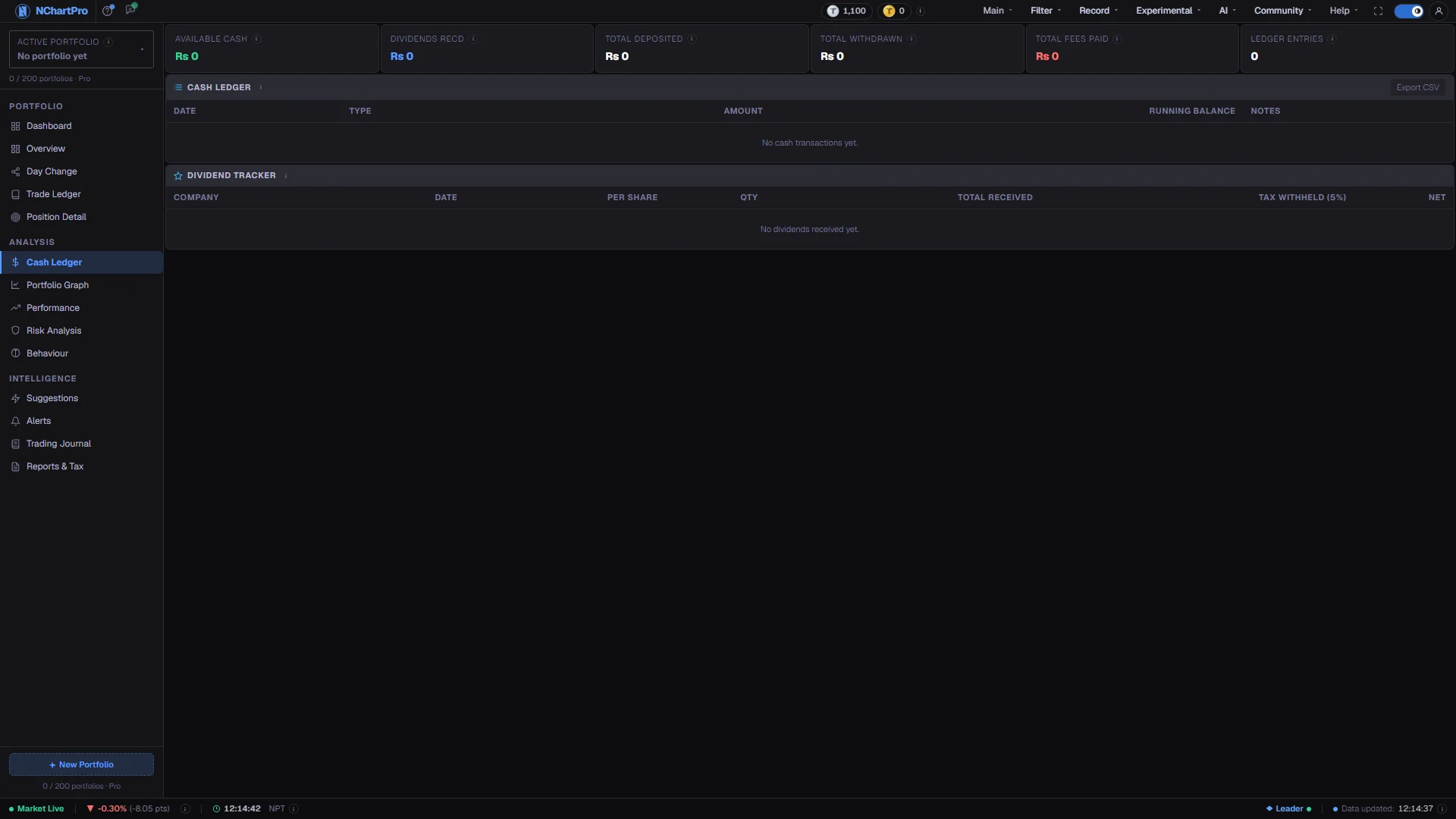
Cash Ledger is the cash half of the same records. Six tiles summarise the position — available cash, dividends received, deposits, withdrawals, total fees and the number of entries — and below them every movement appears in date order, newest first, with the balance left after it.
You do not maintain it by hand. Each trade you record creates its matching cash entry automatically, and the whole ledger is rebuilt in date order whenever you add, edit or delete a trade. That is why the balance and your holdings can never drift apart.
The page also carries a Dividend Tracker: cash paid to you for owning the shares, shown gross, with the withholding tax and the net that reached your balance.
Because the balance is derived rather than entered, you cannot edit a row here. The trade behind it is the thing to change.
Why it helps you
- Total Fees Paid is the number this page exists to show you. It is money that left the account and bought you nothing, and set against Realized Gain it prices your trading frequency exactly.
- Available Cash is what you can actually deploy. Proceeds from a recent sale are not free until settlement, so a plan built on the headline balance can fail at the order screen.
- Reading the ledger backwards through a busy month shows the rhythm of your trading — long runs of buy and sell rows with the balance oscillating and going nowhere is a recognisable pattern.
- Deposits minus withdrawals is the capital you have genuinely committed. Judge results against that, not against a net worth inflated by profit you have not withdrawn.
- Dividends are half the return on a bank or insurance holding, and they are invisible on a price chart. The tracker is where that income becomes countable.
- The dividend rows also give you the withholding tax already deducted, which is what a year-end summary of your investment income needs.
- Deposits and withdrawals over the years are your real savings record: what you put in, what you took out, and how long the money has been working.
- A fee total that stays small relative to your portfolio is one of the quieter signs that a buy-and-hold approach is being followed rather than merely intended.
When to use it, and where to find it
- After entering a batch of trades, to confirm the resulting balance matches your broker account.
- When a dividend lands in your bank — record it so this page and your income record stay complete.
- Monthly, to look at Total Fees Paid against what you actually made.
- Before planning a purchase, to see what cash is genuinely available.
Try it — a short walkthrough
- 1Confirm the portfolioEach portfolio keeps its own cash, fees and dividends; nothing is pooled. Check the name in the sidebar before reading the balance.See this part in detail →
- 2Work out what you actually committedSubtract Total Withdrawn from Total Deposited. That is your own money in this portfolio, which is a more honest base for judging returns than net worth.See this part in detail →
- 3Price your trading habitRead Total Fees Paid, then compare it with Realized Gain on the Overview page. If charges are a large share of the profit, you are trading too often for the size of the account.See this part in detail →
- 4Follow the balance down the ledgerRead the Amount column by colour — green means cash came in, red means it went out — and use the running balance to find the point where the account looks wrong.See this part in detail →
- 5Record a dividend you were paidGo to Trade Ledger, choose + Add Trade, pick the Dividend type and enter the stock, date and amount per share. It then appears in the tracker and credits your balance.See this part in detail →
Every part of the page
In the order you meet them on screen, each with a close-up of the real thing. The numbers match the dots on the figure above.
Which portfolio's cash you are seeing
This ledger belongs to the portfolio named here. Each portfolio keeps its own cash balance, its own fees and its own dividends — nothing is pooled.
How — Click the box to switch portfolio; the ledger below reloads for the one you pick.
- Portfolios are private to your account, so nobody else can see this cash history.
The six cash tiles
Available Cash, Dividends Received, Total Deposited, Total Withdrawn, Total Fees Paid and the number of Ledger Entries. Each has an ⓘ with its exact definition.
How — Deposited minus Withdrawn is the net cash you have actually committed to this portfolio — a more honest measure of your own money than Net Worth alone.
- Available Cash is taken from the running balance on the NEWEST row of the ledger below.
- Total Deposited counts only rows of type "Deposit" — sale proceeds and dividends are not deposits and are excluded.
- Dividends Received sums the NET amount of every dividend entry, i.e. after the tax withheld on it.
Total Fees Paid — money spent on nothing you own
This tile adds up everything trading has cost you in charges: money that left your account without buying you anything.
How — Compare it with Realized Gain on the Overview page. If fees are a large share of your profit, you are trading too often for the size of your account.
- It adds the broker commission + SEBON fee + DP charge itemised on every one of your trades, plus any standalone fee/tax/charge row in the ledger.
- Broker commission is tiered on the trade amount: 0.36% up to Rs 50,000, easing to 0.24% on very large trades, with a Rs 10 minimum. SEBON fee is 0.015%. DP charge is a flat Rs 25 per stock per settlement, on BOTH the buy and the sell.
- Those fees are already built into the buy and sell amounts in the ledger, so they do not also appear as separate rows.
Cash Ledger
Every cash movement in date order, newest first: deposits, withdrawals, buys, sells and dividends, each with the balance left after it.
How — Read the Amount column by colour: green + means cash came in (deposit, sell, dividend), red − means cash went out (withdrawal, buy).
- A Buy debits the FULL cost: price × qty + broker commission + SEBON fee + DP charge.
- A Sell credits the net proceeds after those same fees and after capital-gains tax — 10% if held ≤365 days, 7.5% if held longer, on gains only.
- Running Balance is the cash left after that row; the newest row's balance is your Available Cash tile above.
Where these rows come from
Almost every row here is created for you by a trade. There is no "add a deposit" form on this page yet — the Dashboard's "Add Cash" shortcut simply brings you here, it does not open an entry box.
How — If your Available Cash looks wrong, the fix is on the Trade Ledger: correct the trade, and this ledger is rebuilt from scratch in date order.
- The Type chip names the movement — Deposit, Withdrawal, Buy, Sell, Dividend, IPO Refund — and is coloured by whether cash came in or went out.
- Because the balance is derived, you cannot edit a row here directly; the trade behind it is the thing to change.
Export CSV — not built yet
This button is a placeholder. Clicking it does nothing at the moment: there is no CSV download of the cash ledger yet.
How — For a document you can keep or hand to an accountant, use the Reports & Tax page instead — its CGT report lists every completed sale for a fiscal year on screen.
- The tour states this plainly rather than promising an export that does not exist.
Dividend Tracker
Cash dividends paid to you by the companies you hold. This is income for simply owning the shares — you keep it whether the share price went up or down.
How — Read a row across: Per Share × Qty gives Total Received, then Tax Withheld is subtracted to give the Net that reached your cash ledger.
- In Nepal a cash dividend to an individual carries a 5% final withholding tax, deducted by the company before you are paid — that is the "Tax Withheld (5%)" column.
- Net = Total Received − Tax Withheld, and that net amount is what gets credited to your cash ledger.
- Bonus shares are NOT here: they give you extra shares rather than cash, so they appear as a Bonus entry in the Trade Ledger and lower your average cost instead.
If a dividend you received is missing
This table shows only what you have recorded. A dividend the company actually paid you will not appear here by itself — nothing is fetched from your bank or your broker.
How — Go to Trade Ledger → + Add Trade, choose the Dividend type, and enter the stock, the date and the amount per share. It will then show up here and credit your cash balance.
- The table reads "No dividends received yet." until at least one dividend entry exists.
- Recording dividends matters for judging a bank or insurance holding, where a large part of the return arrives as cash rather than as price gain.
Reading the numbers
- Available Cash is taken from the running balance on the newest row of the ledger.
- Total Deposited counts only rows of type Deposit. Sale proceeds and dividends are cash coming in, but they are not deposits and are excluded.
- A Buy debits the full cost: price × qty + broker commission + SEBON fee + DP charge. A Sell credits the proceeds after those same fees and after capital-gains tax — 10% when held 365 days or less, 7.5% beyond, on gains only.
- Total Fees Paid adds the commission, SEBON fee and DP charge itemised on every trade, plus any standalone fee, tax or charge row. Those fees are already built into the buy and sell amounts, so they do not appear twice.
- On the Dividend Tracker, Per Share × Qty gives Total Received; a 5% final withholding tax on a cash dividend to an individual is deducted by the company, and Net is what reaches your balance.
- Bonus shares are not dividends. They pay in shares rather than cash, so they appear as a Bonus entry in the Trade Ledger and lower your average cost instead.
What it does not do
- There is no deposit or withdrawal entry form on this page yet. The Add Cash shortcut on the Dashboard simply brings you here — almost every row is created by a trade.
- Export CSV in the ledger header has no handler and does nothing.
- Nothing is fetched from your bank or your broker. A dividend the company actually paid you will never appear by itself; you record it or it is missing.
- Rows cannot be edited here. If the balance is wrong, correct the trade behind it on the Trade Ledger and the whole ledger rebuilds.
- Since deposits are only what you recorded, a portfolio entered as holdings without the funding behind it will show a negative balance. That is arithmetic, not an error.
Questions people ask
Because the buys were recorded but the deposits that funded them were not. The ledger only knows what you entered, so cash goes out without ever having come in.
There is no cash entry form yet. For now the ledger is driven by trades, so the balance reflects trading activity rather than your full bank history.
A cash dividend to an individual carries a 5% final withholding tax, deducted by the company before payment. The tracker shows the gross, the tax and the net separately.
No. Every trade carries commission, the SEBON fee and a Rs 25 DP charge, and the DP charge applies to the buy and again to the sell. On small, frequent trades those fixed costs add up quickly.