

Indicators
An indicator is arithmetic on the candles you are already looking at. The chart carries 276 of them, and this page explains how to find one, how to tune it, and how to read what it draws.
What this page is
Every indicator on the chart comes from one catalog of 276 entries. The button that opens it is the small fx on the chart toolbar, and the box it opens is titled Indicators. A search field across the top reads "Search 276 indicators", a row of rounded chips underneath filters by category, and each chip carries its own count: All 276, momentum 83, trend 69, other 46, volume 42, volatility 36. Typing matches the full name, the short name and the internal id at once, so both "moving average" and "SMA" find the same row.
Each row shows the full name, the short name the chart will use in the legend, a small badge reading either overlay or pane, and an action on the right. The action says Add while the indicator is not on the chart and Added, greyed out, once it is. A search that matches nothing says so rather than showing an empty list.
That overlay or pane badge is the single most useful thing on the row. An overlay is drawn on the price scale, straight over your candles, because its output is a price: a moving average, a band, a pivot level. A pane indicator is drawn in a strip below the chart with its own vertical scale, because its output is not a price at all but a ratio, a percentage or a count. A 0 to 100 oscillator plotted on the price scale of a rupee 500 stock would be a flat line at the bottom of the screen, which is why the two are kept apart.
Adding an indicator puts a row in the legend and, for a pane indicator, opens a pane for it. Nothing is fetched from the server: the catalog is a small file of plain metadata, and the calculation itself runs inside your own browser on the bars already loaded. That is why changing a parameter redraws immediately with no waiting.
The 276 are grouped into five categories, and this document has one page for each. Trend covers the moving averages, bands, channels, stops and pivots. Momentum covers the oscillators. Volatility covers how wide the market is swinging. Volume covers what the traded quantity is saying. Other holds the statistics, the cycle measures and the return and risk series that do not fit the four above.
Why it helps you
- Two or three indicators are a workspace; ten are a wall. The reason to have 276 available is that different markets ask different questions, not that any one chart should carry them all.
- The overlay and pane split maps onto how you work. Overlays answer where, and give you a level to trade against. Pane indicators answer how hard, and rarely give you a level at all.
- Save the set you settle on as a template. Once the same four indicators go on every chart you open, rebuilding them by hand each time is the part of the day that pays nothing.
- Everything recalculates when you change timeframe, so read the period as a length of time and not as a number. A 14 period RSI is three and a half hours on the fifteen minute chart and about three trading weeks on the daily.
- Most of the catalog is built for people trading inside the week and is noise at your horizon. The parts that are not are the long moving averages, the drawdown and return series on the Other page, and the volatility estimators that tell you how rough the ride has been.
- On a daily or weekly chart a 200 period average, a drawdown curve and a rolling risk adjusted return say more about whether a holding is working than any oscillator will.
- Indicators are also a decent sanity check on a story. If a company has been in the news for a month and its own price series shows no change in trend, volatility or volume, the story has not reached the market yet.
When to use it, and where to find it
- Read this page before the five category pages. It explains the dialogs, the source picker and the decorations, none of which the category lists repeat.
- Come back to it when an indicator you added is not visible. Nine times out of ten it is a pane indicator that landed below the chart, or an overlay whose values sit far off the price scale.
- Open the category page for whichever question you have. What direction is this in, and where are the levels, is trend. How hard is it moving, is momentum. How wide are the swings, is volatility. Is anyone actually trading it, is volume.
- The catalog is reached from the fx button on the chart toolbar, on Main, then Chart.
- The gear on any legend row opens that indicator settings box directly, without going back through the catalog.
Try it — a short walkthrough
- 1Open the catalog and filter it downClick fx on the chart toolbar. Click the momentum chip and the list narrows to 83 entries; the counter beside the title changes from 276 of 276 to 83 of 276. Clear it again with the All chip.
- 2Add an overlay and a pane indicator, and see the differenceAdd Simple Moving Average, then add Relative Strength Index. The first draws a line through your candles; the second opens a strip below the chart with its own scale and a shaded band across the 70 and 30 levels. Both now show Added in the catalog.
- 3Tune it in the Inputs tabHover the RSI legend row and click the gear. The Inputs tab holds a Source row, then Parameters, then the Bands and Smoothing sections. Change Period from 14 to 7 and the line redraws as you type; there is no Save button because the chart is the preview.
- 4Stack one indicator on anotherWith the SMA still on the chart, open the RSI settings again and change Calculate on from Close to SMA 20. You are now reading the RSI of a moving average rather than of price. Only pane indicators offer this, and only single line overlays appear in the list.
- 5Restyle it in the Style tabSwitch to Style. Every line the indicator draws gets a visibility tick, a name and a colour button that also holds transparency, thickness and dash. Reset to Defaults puts the parameters, the source and the styling all back.
- 6Save the set as a templateClick the four box icon beside fx, then Save current, type a name and press Enter. The menu lists it with a count of how many indicators it holds. Applying it later REPLACES whatever is on the chart, so it is a whole workspace rather than an addition.
Every part, up close
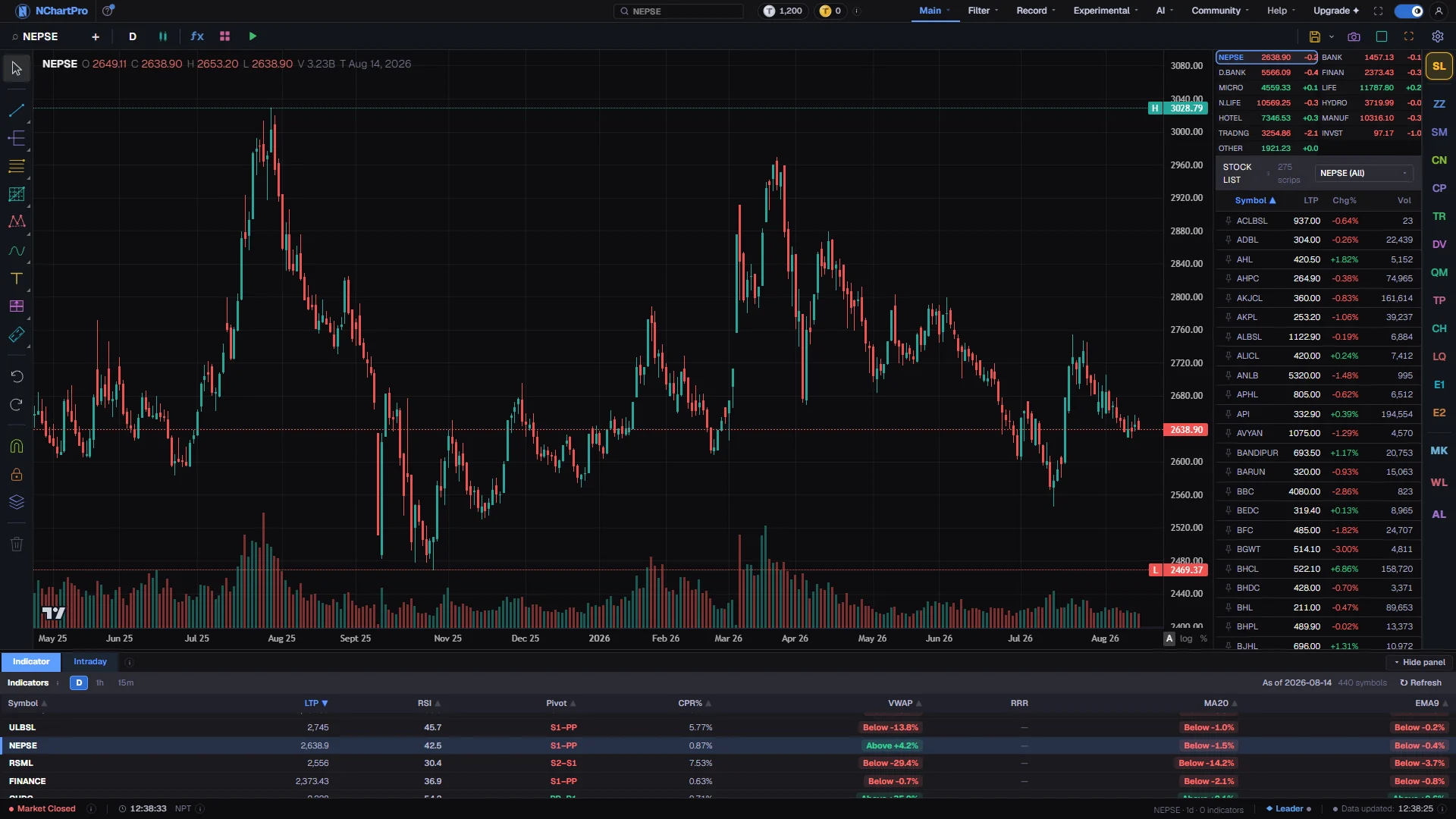
The Chart page — the screen all 276 indicators are added to and drawn on. Each part with a close-up of the real screen; the numbers match the dots on the picture.
The fx button
The catalog of 276 opens from here, and the four box icon beside it is where a set of them is saved as a template.
Where overlays land
An overlay is drawn straight across the candles, because what it produces is itself a price.
The Indicator tab
It lists this stock's readings on the daily, one hour and fifteen minute timeframes side by side, which is the clearest reminder that a period is a count of bars and not a length of time.
The shared axis
Overlays are plotted on this scale together with the candles, which is why one whose values sit far from price squeezes the chart into a sliver.
Reading the numbers
- THE LEGEND ROW. Each indicator gets a row in the legend over the top left of its pane. It shows the short name, the parameters in brackets and the live value under your cursor as you move across the chart. Hovering the row reveals five controls: an eye that hides and shows the plot without removing it, an up and a down arrow that move the indicator in the stacking order, a gear that opens the settings, and an x that removes it.
- PARAMETERS IN THE LEGEND. An RSI added on defaults reads RSI (14). The band levels and the smoothing length are deliberately left out of that caption even though they are editable, so the legend keeps naming the indicator rather than listing every setting it carries.
- SOURCE. Every pane indicator has a Calculate on row at the top of its Inputs tab. Under the Price heading are seven fields: Close, Open, High, Low, HL2 which is the midpoint of the bar, HLC3 which is the typical price, and OHLC4 which is the average of all four. Close is the default and is exactly what the indicator was always given.
- SOURCE, THE SECOND HALF. Under a second heading, On this chart, are the single line overlays currently on the chart: a moving average of any type, a linear regression, and the rest of that family. Pick one and the indicator is computed over that line instead of over price. Bollinger Bands and other multi line overlays are excluded, because an RSI of Bollinger Bands does not name a single series. Overlays themselves never get a Source row, which is what makes a loop impossible to build.
- BANDS. Bounded oscillators carry an editable overbought and oversold band, drawn as a shaded region behind the plot. The RSI band is 70 and 30, the Money Flow Index is 80 and 20, and so on. Only oscillators with an established convention get one; an indicator whose thresholds are a matter of taste is left bare on purpose rather than given an invented line.
- REFERENCE LEVELS. Oscillators that swing around zero rather than inside a range get a bare dashed line at zero instead of a shaded band. A MACD histogram crossing that line is the event; on a banded oscillator the equivalent event is entering or leaving the shading.
- SMOOTHING. Every indicator with a line to smooth also carries a Smoothing section: a length and a method. It is off by default, and while it is off the indicator has exactly the plots it always had. Turn it on and a moving average of the indicator output is drawn on top of it, in the same pane.
- FILLS AND THE CLOUD. Four band indicators are drawn with a tint between their edges: Bollinger Bands, ATR Channels, the Price Channel and the Moving Average Envelope. Ichimoku is the one whose fill carries meaning, because it is shaded green where the leading span is above the lagging one and red where it is below, and it is split exactly at the crossing rather than tinted as a block.
- DEFAULTS. Reset to Defaults in the settings footer restores the parameters, the source and the styling together. Beside it, Save as Default stores the current parameters and styling for that indicator type, so every RSI you add from then on starts there. It is filed per indicator, not per instance, so two RSIs already on the chart are untouched.
- TIMEFRAME. Every period is a count of bars, so the same number is a different span of time on every timeframe. A 20 period average is twenty minutes on the one minute chart, twenty days on the daily and twenty weeks on the weekly. When an indicator that has worked for months suddenly reads wrong, the first thing to check is whether the timeframe changed under it.
- WARM UP. A period of N needs N bars before it can produce anything, so the left edge of a long average is simply missing rather than broken. Some of the adaptive filters need noticeably more than their nominal length before they settle.
- THE FIVE CATEGORY PAGES. Trend, 67 indicators. Momentum, 77. Volume, 41. Volatility, 34. Other, 38. Each page is a searchable table of every entry in its category, grouped into families, with a numbered row carrying the full name, the short name the legend will use, the overlay or pane badge, what it measures and its default parameters.
- THE PREVIEW ON EVERY ROW. The small picture beside each name is that indicator actually computed, not an illustration: the same engine the chart runs, over 900 real daily bars of NABIL, on default parameters. Click one and it opens full size with a line by line description of everything it draws, and arrow keys walk you through the whole category from there. An overlay is drawn over the candles the way it will appear on your chart; a pane indicator is drawn with the candles above it and its own strip below, which is the split the chart itself uses.
What it does not do
- An indicator describes what price has already done. Not one of the 276 is a prediction, and none of them is a recommendation. A crossing is a fact about a calculation, not a reason to trade.
- Adding more indicators does not add more information. Most of the catalog is highly correlated with the rest of it, and running six oscillators that agree feels like confirmation while actually being one opinion counted six times.
- Several entries are honest approximations rather than the textbook formula, and the ones that are say so in their own description in the catalog. Volume Delta and Cumulative Volume Delta are the clearest case: real delta needs trade by trade data this chart does not carry, so buying and selling volume is estimated from where each bar closed inside its range. Read those two for divergence, never for an absolute figure.
- A few entries deliberately simplify a classic indicator, either because a piece of the original needs data the app does not have or because the full version is out of scope. Fractal Chaos Bands, Volatility Beta, the Payoff Index and the Rescaled Range Exponent are all in this group.
- Indicators are calculated on the bars currently loaded in the chart window. Scrolling far back loads more history and the values at the left edge fill in as it arrives.
- Templates are stored in your own browser, not on your account. Clearing site data removes them, and they do not follow you to another device.
Questions people ask
Check the badge on its catalog row. If it said pane, look below the chart rather than on it. If it said overlay, its values may sit a long way off the current price scale, which pushes the candles into a sliver at one edge; remove it and the scale returns.
Start with one from trend and one from momentum, and learn what those two do on the stocks you actually watch before adding a third. The category pages are written so you can pick a family first and an entry inside it second.
MACD, MACD Extended and MACD Fixed differ only in which parts you are allowed to change. The same holds for the pivot ladders and the moving averages. Where the catalog carries a selectable variant, its parameter list has a type dropdown rather than a separate entry per type.
Yes, through the Calculate on row in the settings. A pane indicator can be computed over any single line overlay on the chart, so an RSI of a 20 period EMA, or an RSI of an RSI-based average, is two clicks. Overlays cannot take a source, which is what prevents a circular chain.