

Trading Horizon
Trading Horizon answers one question about a rule: had you followed it exactly on this stock, would it have made money after every cost, and how hard would it have been to sit through?
What this page is
The page has two views, switched by the bar at the top. BUILD YOUR OWN is where you write a rule and test it. BUILT-IN STRATEGIES shows nine ready-made rules the server tests on every stock after each close.
In Build your own you pick a stock, write when to buy and when to sell, and set stops and costs. The result appears on its own a moment after each change: arrows on the chart, the account value under it, and the numbers below.
A rule row compares two things: an indicator, a price or a number. Every indicator on the chart can be used, with its own settings. "Crosses above" is true only on the day one side moves above the other.
Orders are realistic by default. A signal seen on today's close buys at the next day's open, a little worse than the quoted price. Broker commission by slab, the SEBON fee, the DP charge and capital gains tax are all paid. Nothing is sold before T+2, a locked circuit day does not trade, and a buy is never more than a tenth of the day's traded volume.
The page carries the Experimental warning for a reason. Nothing here places an order, and every trade is simulated on prices that have already happened.
Why it helps you
- Use the out-of-sample split. Tune the rule on the older part, then look at the newer part it never saw. A rule that only works on the part it was tuned on was fitted to noise.
- The trade list is more useful than the summary. Click a trade to see why it was bought — the values each rule saw that day — and what it cost.
- Max drawdown decides whether you could really run the rule. A good return with a deep drawdown is a rule most people give up on at the worst time.
- The Optimise tab tries a range of numbers. Prefer a wide area of good results over one bright cell — a single best value is usually luck.
- Compare the rule with buy and hold, which is shown beside every result and drawn under the chart. If the rule does worse than buying and waiting, that is the finding.
- The monthly table shows when the rule made and lost its money. A rule whose whole profit came from one month is not a steady rule.
When to use it, and where to find it
- Before you trade a rule, not after. The point of a backtest is to be disappointed in advance.
- When someone tells you a strategy works. Build it here, test it on three or four stocks, and read the trade count.
- In Built-in, any time after the close — those results are rebuilt once a day.
Try it — a short walkthrough
- 1Open Build your ownGo to Experimental → Trading Horizon. The bar at the top has two buttons. BUILD YOUR OWN is where you test your own rule; it opens by default. BUILT-IN STRATEGIES is the older view with nine ready-made rules tested on every stock.

- 2Choose the stock and the yearsUse the bar just above the chart. Click the stock box, or simply start typing a name anywhere on the page, for example NABIL — the same search as the Chart page opens, with tabs for stocks, indices, mutual funds and debentures. Keep ADJ on, so a bonus share is not read as a price fall; click it off to use the prices that really traded. The years box says how much history to test: All years, the last 10, 5, 3 or 1, or Your dates.

- 3Load a ready-made ruleOpen the box beside BUY RULES. It holds 74 samples in nine groups — trend following, momentum, mean reversion, pullback, breakout, volume, volatility, several conditions, and ways to exit — and then My saved strategies, the ones you saved. Each sample has a one-line note that explains its idea. Samples marked (tuned) use numbers we tested on 19 NEPSE stocks; the note says so. The result appears by itself about a second later.
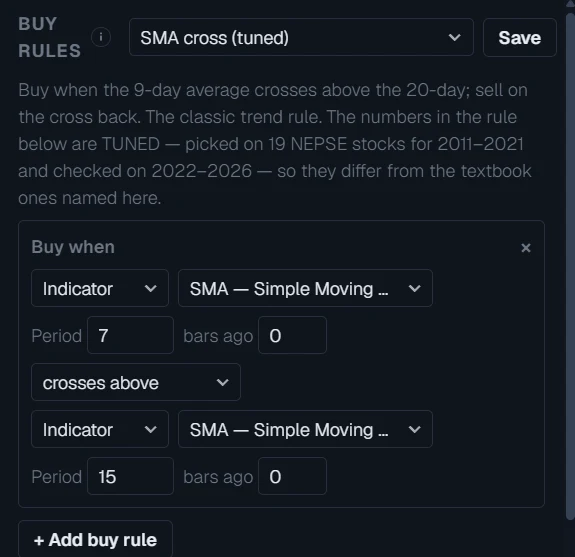
- 4Change the rule, or write your ownEach row is "left side, comparison, right side". Change Indicator to Price or Number on either side, pick any indicator from the chart, and change its numbers. "bars ago" reads an older value: 1 means yesterday. Press + Add buy rule for a second row, then choose ALL agree (both must be true) or ANY one. The × removes a row.
- 5Test your own ScriptA Script you saved on the Script page is in the indicator list here too, under your own scripts, and its lines can be used in any rule. To learn how, open Script → Examples: the 15 "Signal" samples are written for this page and explain every part in comments. Each one draws a line called signal: 1 on a buy day, -1 on a sell day. Open one, save it, come back, and add two rows: Buy when signal ≥ 1, Sell when signal ≤ -1.
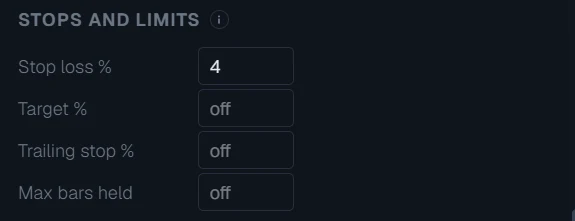
- 6Add a stop lossUnder STOPS AND LIMITS, type 4 in Stop loss %. A trade now sells if the price falls 4% below where it was bought. Target % sells at a profit, Trailing stop % sells after a fall from the highest price since buying, and Max bars held sells after that many days. Leave a box empty to switch it off.
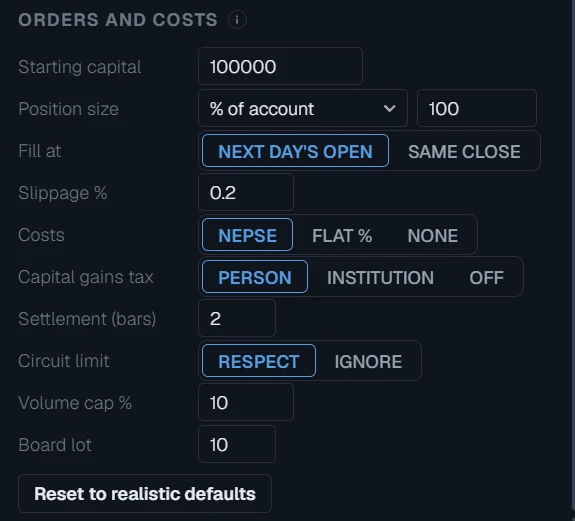
- 7Check the orders and costsORDERS AND COSTS already holds the realistic settings: 1 lakh to start, the whole account in each trade, buy at the next day’s open with 0.2% slippage, NEPSE broker commission, SEBON fee and DP charge, 10% capital gains tax for a person, T+2, circuit limits respected, at most 10% of the day’s volume, and a board lot of 10 shares. Change any of them, or press Reset to realistic defaults.
- 8Read the trades on the chartB marks each buy and S each sale by the sell rule. SL is a stop loss, TS a trailing stop, TP a target and T the time limit. The lines are the indicators your rule reads. The pane at the bottom of the chart is your account, in % gained since the start (blue), and the same money simply bought on the first day and held (grey). It pans and zooms with the candles; drag the line between the chart and the tabs to give it more room.
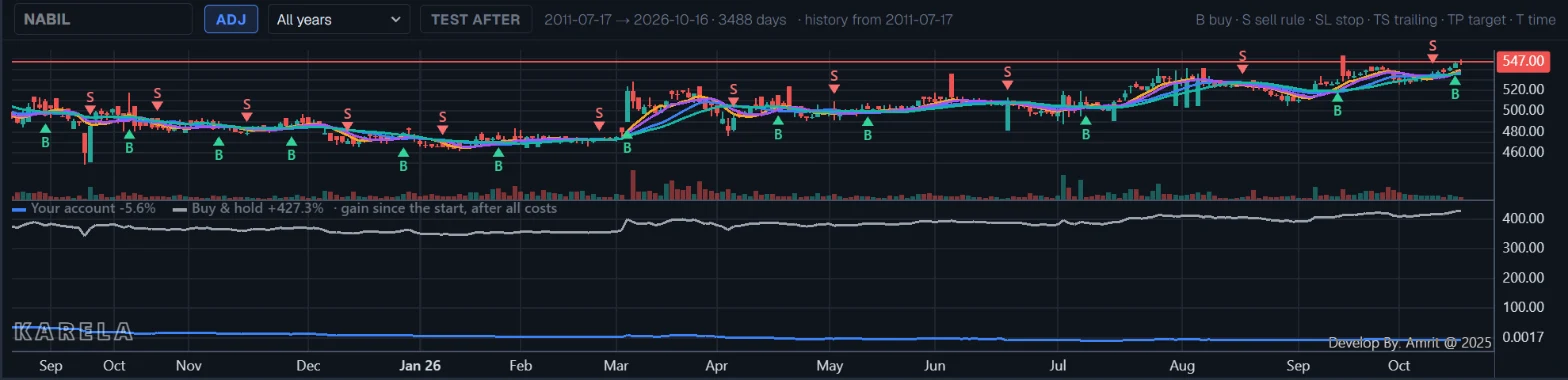
- 9Read the summaryStart with Total return next to Buy & hold, then Max drawdown — the worst fall you would have sat through. Trades tells you how much evidence there is; under 30, the page warns you. The note under the cards says if any order could not be filled in full, for example because the day traded too few shares.

- 10Look at every tradeOpen the TRADES tab. Each row is one trade: the buy and sell dates and prices, the shares, the days held, the profit after all costs, the best and worst move while held, and why it ended. Click a row to see why it was bought — the values the rule saw that day — and every charge.

- 11See which months made the moneyOpen MONTHLY. Each cell is the account’s change in that month, and the last column is the year. A rule whose whole profit came from one month is a lucky rule, not a steady one.
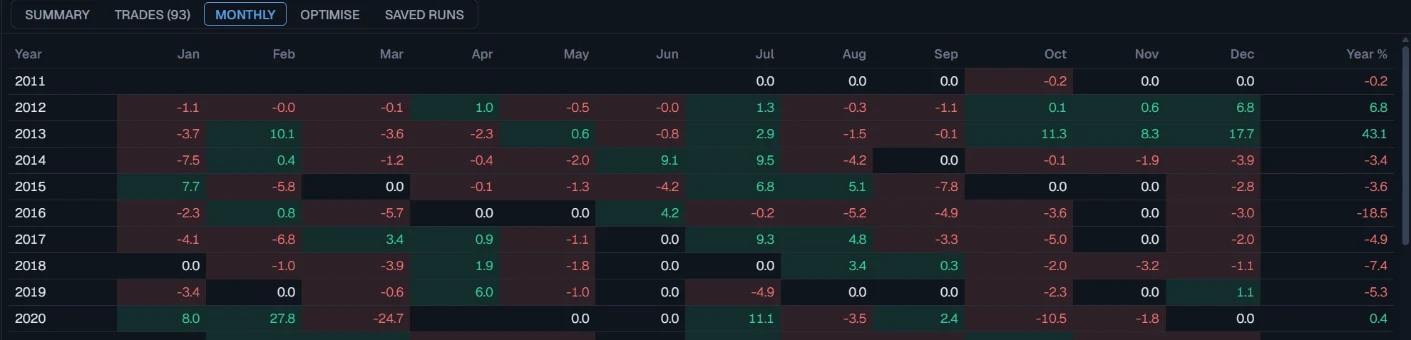
- 12See how much of the result was luckOpen SIMULATION. Your test is only one way its trades could have come. This tab plays the same trades thousands of times — picked again at random (RANDOM PICK) or in a new order (NEW ORDER) — and shows the range: the middle result, a bad case and a good case (1 in 20 each), the chance of ending with a loss, and the chance of a big fall. The chart shows the spread trade by trade, with your own trades as a dashed line. Set Missed trades % to see what happens if you miss some buys, and Extra cost % to see what higher costs do. A rule whose bad case is still fine is a stronger rule. The simulation never adds new trades, so a good result here is not a promise.
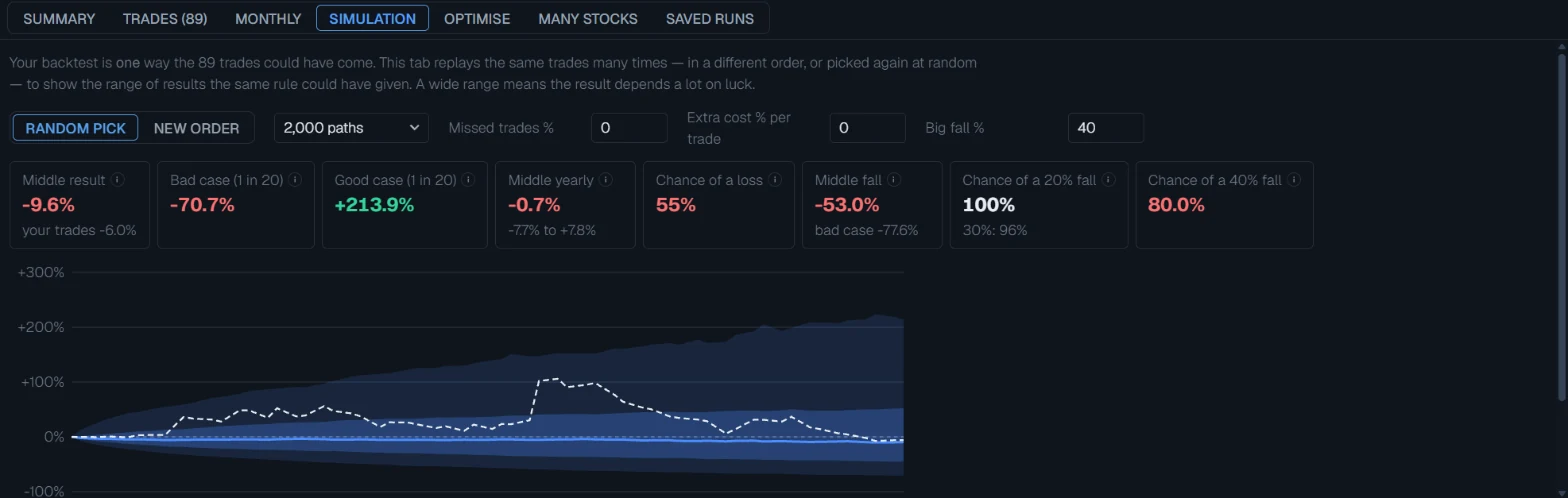
- 13Try other numbers with a sweepOpen OPTIMISE and keep SWEEP. Choose the number to tune — for example the 9 of the first SMA — and a range: from 3 to 15, step 2. Press + Second number to tune the 20 as well. Press Run. With two numbers you get a grid: green is a good score, red a bad one, and the outlined cell is the best. Click a cell to use those numbers.
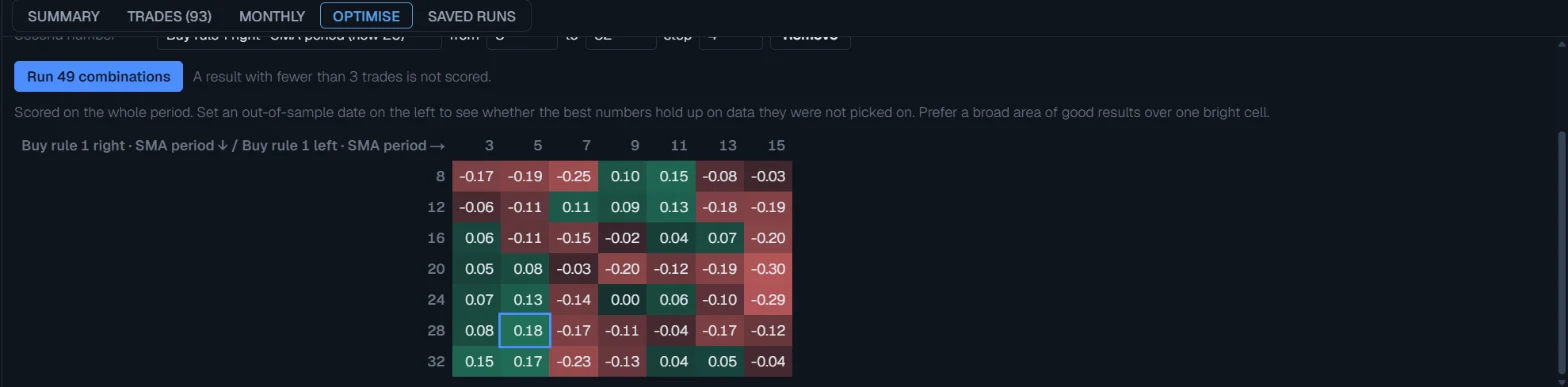
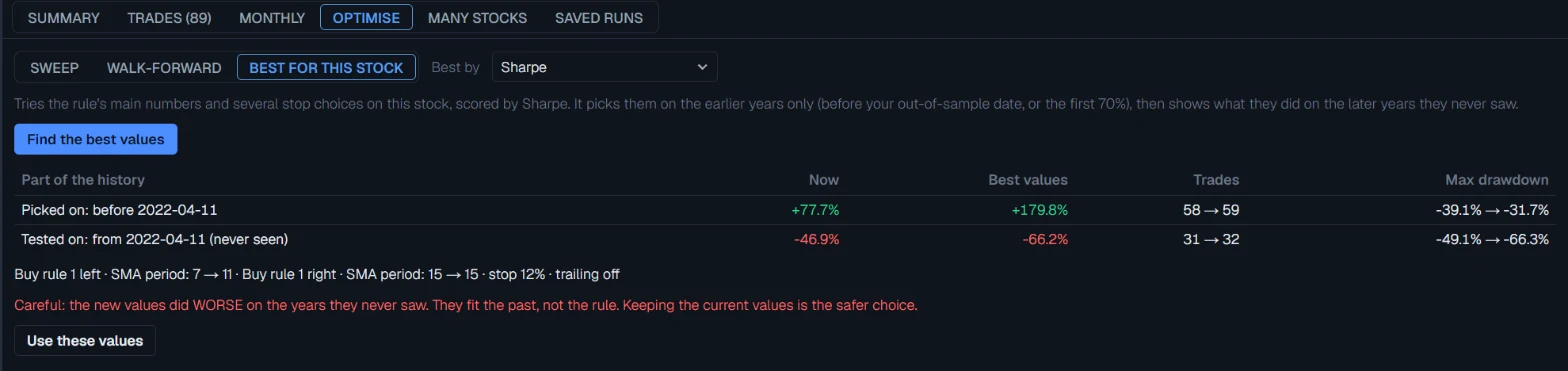
- 14Find the best values for this stockIn OPTIMISE, press BEST FOR THIS STOCK, then Find the best values. It tries the rule’s main numbers and several stops on the stock on screen. It picks them on the earlier years only, then shows what they did on the later years they never saw. If they also did well there, press Use these values, then Save. If they did worse, the page warns you: keep the old numbers.
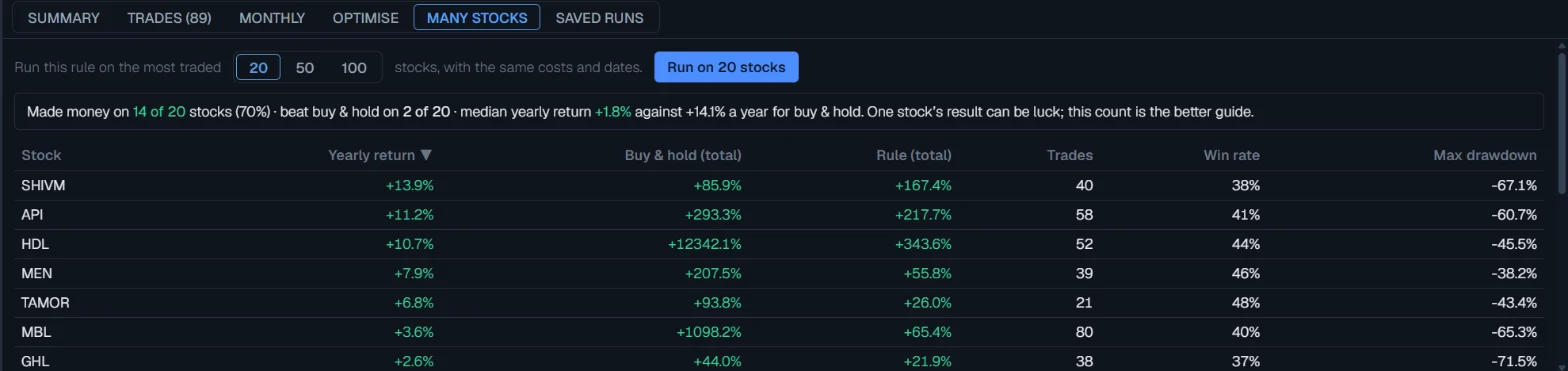
- 15Test the rule on many stocksOpen MANY STOCKS and press Run. The same rule, costs and dates run on the 20, 50 or 100 most traded stocks. The line at the top says how many stocks it made money on, and how it compares with buying and holding. One stock can be luck; this count is the better guide. Click a stock to open it above — the list stays until you run again.
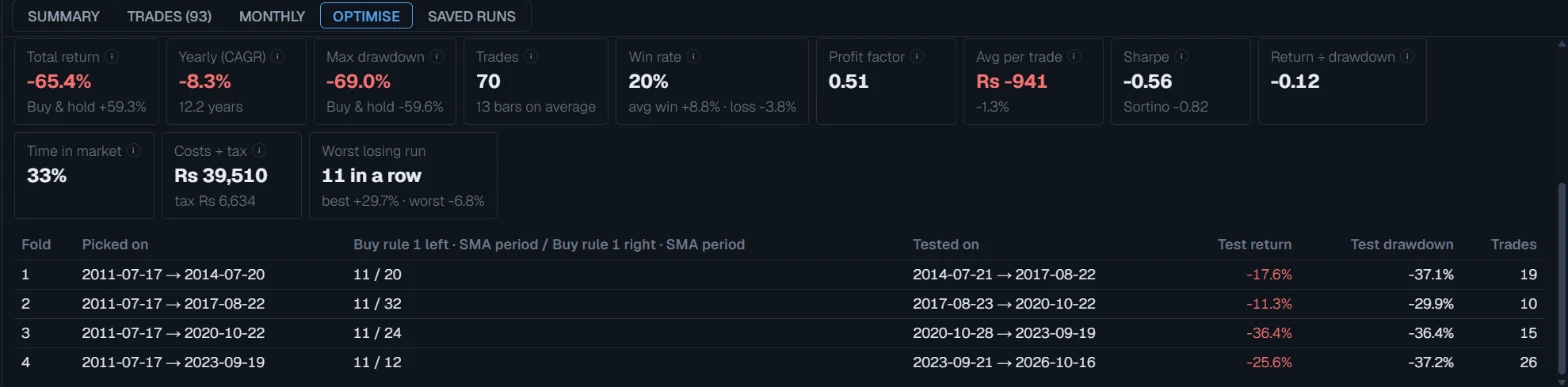
- 16Make sure it is not luck: walk-forwardPress WALK-FORWARD and Run. The page splits the years into parts. For each part it picks the best numbers using only the years BEFORE it, then tests them on that part, which it has never seen. The cards show all the test parts joined together — this is the honest result. If the folds pick very different numbers, the best setting is not stable.
- 17Save the runPress Save beside the strategy box, type a name and press Save (or use Save run on the SUMMARY tab). It keeps everything: the stock, the rules, the stops, the costs and the dates. It then appears under My saved strategies in the same box, and in the SAVED RUNS tab, on every device you sign in on. Picking it runs it again on today’s data and tells you if the answer has changed since you saved it — new days, or a corrected price, can change it.

- 18Or read the built-in strategiesSwitch to BUILT-IN STRATEGIES. Click a rule in the list on the left; the chart and the panel below show it on the loaded stock. The BUY and SELL tabs list the stocks each rule points at today.See this part in detail →
- 19Make roomDrag the line between the left panel and the chart to make the panel wider or narrower, and the line between the chart and the tabs to give either more height. The page remembers both sizes in this browser.
Every part of the page
In the order you meet them on screen, each with a close-up of the real thing. The numbers match the dots on the figure above.
Two views
BUILD YOUR OWN tests your own rule on one stock. BUILT-IN STRATEGIES shows nine ready-made rules the server tests on every stock after each close, with today's buy and sell lists.
How — Click to switch. The page remembers your choice.
- The built-in rules fill at the signal day's close with 1 kitta and a flat 0.4% cost, so their numbers are not comparable with Build your own.
Stock and period
The bar above the chart holds the stock, the price basis and the years to test. TEST AFTER splits the period in two: tune the rule on the older part, judge it on the newer part.
How — Click the stock box or just start typing a name. ADJ on removes the drop a bonus or right share causes; off shows the prices that really traded.
- A rule that only works on the part it was tuned on was fitted to noise. The split is how you find out.
Buy and sell rules
Each row compares two things: an indicator, a price or a number. Every indicator on the chart can be used, with its own settings. Start from a ready-made rule in the box, or build your own.
How — Press + Add buy rule. Choose what goes on each side and how they compare. With two or more rows, choose ALL agree or ANY one.
- "crosses above" is true only on the day the left side moves from below to above the right side.
- "bars ago" reads an older value — 1 means yesterday's.
- The result updates by itself a moment after each change.
Stops and limits
Exits that do not need a sell rule: stop loss, target, trailing stop and a time limit. Empty means off.
How — Type a percent, or a number of days for the time limit.
- A stop that the price gaps through sells at the open, not at the stop price.
- Nothing can be sold before T+2. A stop touched in those days is checked again on the first day you can sell.
Orders and costs
How each trade fills and what it costs. The defaults are the realistic ones: next day's open, a little slippage, the NEPSE costs and capital gains tax.
How — Change any line. Reset to realistic defaults puts them back.
- NEPSE costs are the broker commission by slab, the SEBON fee and the Rs 25 DP charge, on both buy and sell — the same maths as Experimental → Tools.
- Volume cap: never buy more than this share of the day's traded volume. Board lot: fewer than 10 shares is skipped.
- A day locked at the circuit limit does not trade in that direction.
Every trade on the chart
B marks a buy. S marks a sale by the sell rule; SL, TS, TP and T are the stop, the trailing stop, the target and the time limit. The indicators are the ones your rules read. The pane at the bottom is your account value (blue) against buying and holding (grey).
How — Scroll and drag the chart to read the trades in context.
Results, testing and saved runs
SUMMARY has the main numbers. TRADES lists every trade — click one to see why it was bought and what it cost. MONTHLY shows when the money was made. OPTIMISE sweeps a number or walks the rule forward. SAVED RUNS keeps your tests.
How — In OPTIMISE, pick the number to tune and its range, then run. Prefer a wide area of good results over one bright cell.
- Under 30 trades, a result can be pure chance. The page warns you.
- Walk-forward picks the numbers on the past and tests them on the next period they never saw — the honest way to tune.
- Opening a saved run runs it again on today's data and tells you if the answer changed.
Reading the numbers
- Long only, one position at a time — NEPSE has no short selling. Rules are read on each day's close.
- A stop that the price gaps through sells at the open, not at the stop price. If one day reaches both the stop and the target, the stop is assumed to come first, because a daily candle does not say which came first.
- A stop touched during the T+2 days cannot be acted on. It is checked again on the first day the shares can be sold, against that day's prices.
- Total return and drawdown are of the whole account, cash included. Time in market says how much of the period the money was actually in the stock.
- Profit factor is money won on winning trades divided by money lost on losing ones. Sharpe and Sortino are per year, using the number of trading days the data really has.
- A trade still held at the end is valued at the last close and marked Still open. No tax is charged on it.
- The built-in strategies are tested differently: they buy and sell at the signal day's close, with 1 kitta, a flat 0.4% each side, no slippage and no tax. Nothing sells within 2 days; after that, a trade that closes 4% or more below the buy price is sold at that close (checked on the close only, so one loss can be bigger than 4%). Their numbers are not comparable with Build your own.
- The three built-in Simulation strategies (St-3, St-9, St-10) use their own rules: next-day-open buys, a Rs 1,00,000 book in 5 parts, adding on dips, and a 5–20% stop. St-3 is tuned per stock on trades before 2025, and its result includes those years, so it looks better than it would have in real time.
Every setting, explained
Stock and years
In the bar just above the chart.
| Stock box | Click it, or just start typing anywhere on the page, to search. Stocks, indices, mutual funds and debentures are in their own tabs. |
| ADJ | On: the drop a bonus or right share causes is removed. Off: the prices that really traded. Rules usually belong with ADJ on. |
| Years | All years uses every year the stock has traded. The last 10, 5, 3 or 1 years use the most recent ones. Your dates lets you type a start and an end. |
| TEST AFTER | On: the period is cut at a date (70% of the way in at first). Tune on the part before it, judge on the part after it. The summary then shows both parts separately. |
Buy and sell rules
When to buy and when to sell. Rules are read on each day’s close.
| Strategy box | Beside BUY RULES. Samples: SMA cross, EMA cross, MACD, Parabolic SAR, RSI bounce, trend pullback, channel breakout, or start empty. My saved strategies: everything you saved, loaded exactly as saved. |
| Save | Saves the whole strategy — stock, rules, stops, costs and dates — to your account, up to 200. |
| Indicator / Price / Number | What goes on each side of a row. Indicator offers every indicator on the chart, with its own numbers and, if it has more than one line, which line. |
| crosses above / below | True only on the day one side moves from below to above (or above to below) the other. |
| > < ≥ ≤ | True on every day the comparison holds. |
| bars ago | Read an older value. 1 means yesterday — "Close > High, 1 bar ago" means today’s close beat yesterday’s high. |
| ALL agree / ANY one | With two or more rows: whether every row must be true on the same day, or one is enough. |
| Empty sell rule | Allowed. Then only the stops, the target and the time limit close a trade. |
Stops and limits
Exits that work without a sell rule. Empty means off.
| Stop loss % | Sell when the price falls this far below the buy price. If the price opens below the stop, it sells at the open. |
| Target % | Sell when the price rises this far above the buy price. |
| Trailing stop % | Sell when the price falls this far below the highest price since buying. |
| Max bars held | Sell after this many days, whatever happens. |
| Same day | If one day reaches both the stop and the target, the stop is counted first, because a daily candle does not say which came first. |
Orders and costs
How each trade fills and what it costs. The defaults are the realistic ones.
| Starting capital | The money the account starts with. |
| Position size | % of account, fixed rupees, fixed kitta, or % risked to the stop (the loss if the stop is hit is this share of the account). |
| Fill at | NEXT DAY’S OPEN buys and sells the morning after the signal — what a real trader can do. SAME CLOSE is optimistic: nobody knows the close before it happens. |
| Slippage % | How much worse than the quoted price each order fills. |
| Costs | NEPSE charges broker commission by slab (minimum Rs 10), the 0.015% SEBON fee and the Rs 25 DP charge on every buy and sell — the same as Experimental → Tools. FLAT % or NONE for comparison. |
| Capital gains tax | On each profitable sale: 7.5% if held a year or more, 10% otherwise, for a person; 10% for an institution. OFF to compare. |
| Settlement (bars) | Days after buying before shares can be sold. NEPSE T+2 is 2. |
| Circuit limit | RESPECT: no buy on a day locked at the upper limit, no sale on a day locked at the lower limit. |
| Volume cap % | Never buy more than this share of the day’s traded volume. A thin stock cannot take a big order. |
| Board lot | A buy smaller than this is an odd lot, which trades separately, so it is skipped. |
Results
The tabs under the chart.
| Total return | What the account gained after every charge and tax, beside the same money bought and held. |
| Yearly (CAGR) | The steady yearly return that gives the same end value. |
| Max drawdown | The biggest fall from a high point of the account to a later low. |
| Win rate, Profit factor, Avg per trade | How often trades made money, money won ÷ money lost, and the average result of one trade. |
| Sharpe, Sortino, Return ÷ drawdown | Return measured against how bumpy the ride was. Higher is better. |
| Time in market | How much of the period the money was in the stock. |
| TRADES | Every trade. Click one to see why it was bought and what it cost. |
| MONTHLY | The account’s change in each month and each year. |
| SIMULATION | Plays this test’s own trades thousands of times in a different order or picked at random, and shows the range of results: middle, bad case, good case, the chance of a loss and of a big fall. |
| OPTIMISE | SWEEP tries a range of one or two numbers. WALK-FORWARD picks numbers on the past and tests them on the next period, repeatedly. BEST FOR THIS STOCK finds the best numbers and stop for the stock on screen and shows how they did on years they never saw. |
| MANY STOCKS | The same rule on the 20, 50 or 100 most traded stocks, with how many it made money on. |
| SAVED RUNS | Your saved tests. Open runs one again on today’s data. |
What it does not do
- This page describes what already happened. A rule that did well on this history can lose money on the next trade. Nothing here is advice.
- Even with slippage, a volume cap and circuit days, a backtest is kinder than real trading. Real orders can wait in a queue, part-fill, or never fill on a thin day.
- A few trades say almost nothing. Under 30 trades, a result can be pure chance — the page warns you below that.
- Testing many settings and keeping the best one finds luck as easily as skill. That is what the out-of-sample split and walk-forward are for.
- Build your own uses daily candles only. It tests one stock at a time.
- Bonus and right adjustment is done stock by stock by our team, not yet automatically. On a stock with a recent bonus, compare Adjusted with As traded before trusting a result.
Questions people ask
Because a signal seen on the close can only be acted on the next morning. Choose SAME CLOSE under Fill at to see the optimistic version.
Commission, the SEBON fee, the DP charge and slippage are paid on both the buy and the sell. A small rise is eaten by them. Click the trade to see each cost.
The summary says why: a locked upper circuit, the volume cap, or too little money for a board lot of 10 shares.
Not yet in Build your own. The built-in strategies are tested on every stock; see their STOCKS tab.
Use Script for that today. The rule builder covers rules made of comparisons between indicators, prices and numbers.