

AI Analysis
Numbers on a screen still have to be put together before most people can weigh them. This page lays out one company's numbers side by side and adds a few plain sentences about what they say.
What this page is
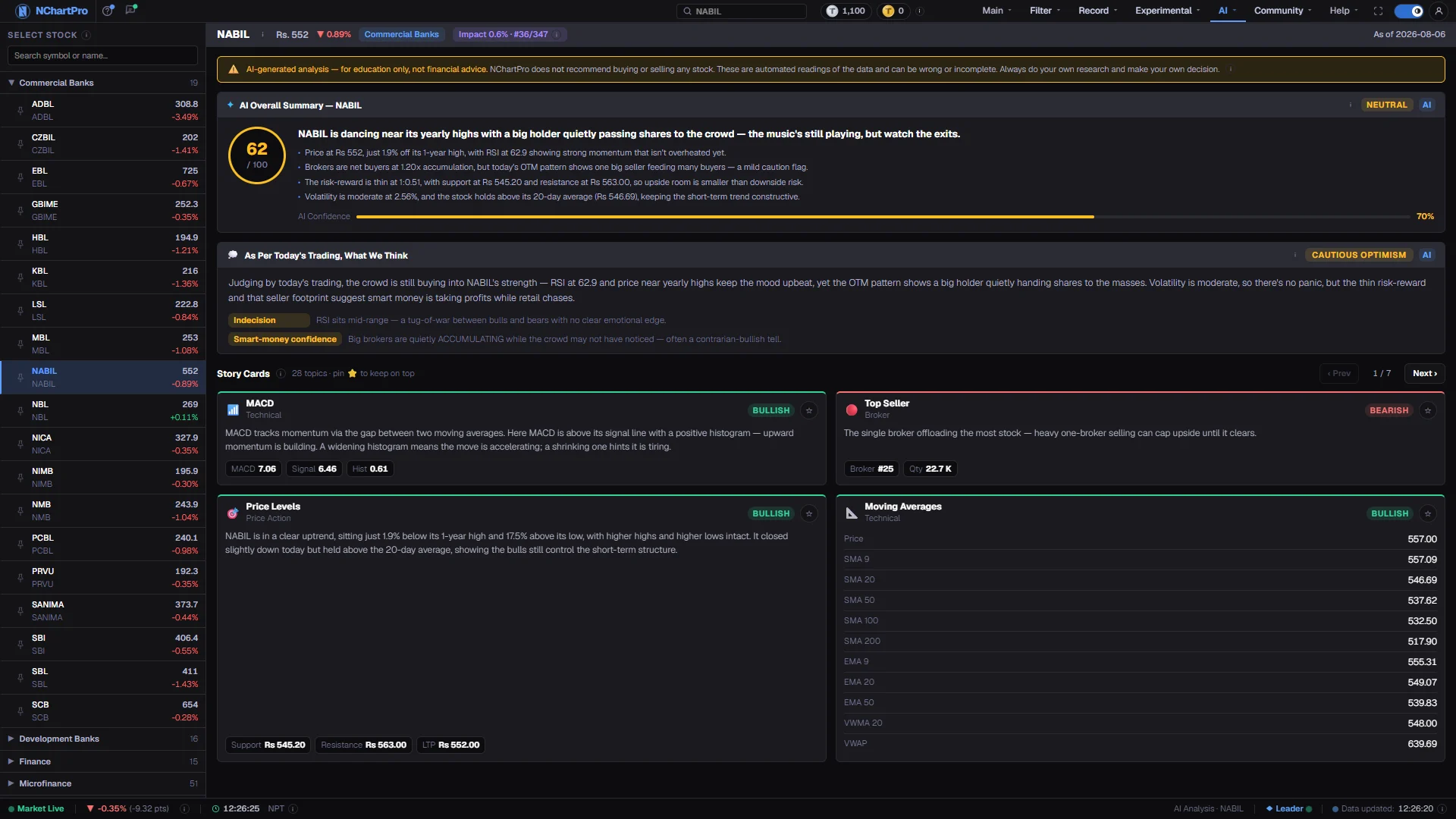
Most of the page is data. The price, the charts, the 101 score, the broker flow, the company figures and the comparison are all calculated by NChartPro from NEPSE data, and they are live.
A small part is written by an AI: a headline, a short summary, the points for and against, a note on broker activity, and a longer review with one paragraph each on price, money flow, company numbers and the sector. Text the AI wrote is set in a serif font.
The AI text describes the last settled session. The first visitor of the day writes it with one click, and everyone after reads the same copy until the next session settles.
Every number the AI writes is checked against our data before it is shown. A sentence with a number we do not have, or with advice words such as buy, sell or target, is removed.
NEPSE and the sub-indices have their own page: how many stocks rose and fell, the biggest movers, where the money went, the sector moves or the strength against NEPSE, and an AI summary written for an index.
Why it helps you
- Start with the 101 score and look for the families that disagree with the stance. A stance that leans up while Money flow reads low is worth a second look.
- The price chart shows the nearest support and resistance and a shaded fan of the usual 5-session move. The fan is a range, not a forecast.
- Money flow shows which brokers kept the shares they bought. Delivery (est.) is our own measure from the floor sheet; NEPSE publishes none.
- The numbers are live, but the AI text is about the last settled session. During market hours, read the text as yesterday's story and the numbers as today's.
- The company section compares P/E, P/B, ROE and, for banks, bad loans and capital with the median of the same sector.
- Compare puts the stock beside its closest peer, or NEPSE, on the same rows, with both prices starting at 100.
- The score describes recent market behaviour. It says nothing about whether a business is worth owning for five years.
When to use it, and where to find it
- After the 15:30 settle, when the text for the day can be written.
- Before opening a stock's chart, as an overview of what the numbers say together.
- When choosing between two stocks in the same sector — use Compare.
- The ↗ on the AI Analysis card of Main → Kundali opens this page on the stock you had picked there.
Try it — a short walkthrough
- 1Pick a companyOpen a sector heading and click a company, or type its symbol or part of its name into the search box above the list. NEPSE and the 12 sub-indices are under "Indices" at the top.See this part in detail →
- 2Read the scoreThe radar shows the seven 101 families on a 0–100 scale. The stance under it is computed from those checks, never by the AI.See this part in detail →
- 3Write or read the AI textIf the text for the latest session is not there yet, press "Write the AI text". It takes about 12 seconds. While it is written, the older text stays on screen in grey with its date.See this part in detail →
- 4Check who tradedIn Money flow, switch between Today, 7 days and 30 days. Large trades where the same broker is on both sides add volume but no new owner.See this part in detail →
- 5ComparePick a peer with the buttons. The stronger side of each row is marked with ▲.See this part in detail →
- 6Share a picturePress "Page image" at the top to save the whole page, as you see it. It comes out as 2 or 3 pictures, each cut between sections and sized for Facebook (2048 px), so you can post them together in one post. "Card image" saves a short summary picture (1080 × 1350, the size Facebook shows best) with the price, the 101 score, the chart and the AI summary. In the mobile app both open the phone’s share menu instead.See this part in detail →
Every part of the page
In the order you meet them on screen, each with a close-up of the real thing. The numbers match the dots on the figure above.
Select the stock
Every listed company grouped under its NEPSE sector, with its latest traded price and change for the day on each row.
How — Click a sector heading to open or close it, then click a company to load its analysis on the right. The pin icon keeps a stock at the top of every list across the app.
- On a narrow screen this list is a drawer — open it with the ☰ button in the bar on the right.
Find a company fast
Filters the list by ticker symbol or company name instead of scrolling through the sectors.
How — Type NABIL, or part of a name. While you are searching every sector stays open so matches are visible; clear the box to go back to the grouped list.
The stock bar
The chosen symbol with its last traded price, the day's change and its sector.
How — The ⓘ explains where the numbers and the words on this page come from.
The numbers at a glance
Price, day range, volume, turnover, market cap, the 52-week range and the circuit limits. "Delivery (est.)" is the share of today's traded shares that the buyers kept.
How — Use Detailed / Simple to show every section or only the main ones. The buttons under the header jump to a section. "Page image" saves the whole page as 2 or 3 pictures to post together on Facebook; "Card image" saves a short summary picture.
- Delivery (est.) is our own measure from the floor sheet. NEPSE does not publish one.
101 Score
The seven families of the 101 checks — direction, momentum, volume, money flow, location, timing and risk — on a 0–100 scale, and the overall stance.
How — Look for the families that disagree with the stance. Those are the reasons to be careful.
- The score and the stance are computed from the checks, never by the AI. They match the 101 panel on the chart.
- 60 and above shows green, 40 and below red, in between amber. A high score is not a buy signal.
Price, levels and normal range
The last 60 sessions with the 20- and 50-day averages, the nearest support and resistance, and a shaded fan after the last candle.
How — The fan shows how far the price usually moves in 5 sessions. It is not a forecast.
The AI text
A short summary of the last settled session, with the points for and against. Text written by the AI is in a serif font.
How — If the text for the latest session is not written yet, press the button. The first visitor writes it and everyone after reads the same copy.
- Every number the AI writes is checked against our data. An answer with an unknown number or advice words is thrown away.
- While the new text is being written, the older text is shown in grey with its date.
Money flow
Which brokers bought and sold the most, how much of the traded quantity was kept, and the large single trades.
How — Switch between Today, 7 days and 30 days. A trade where the same broker is on both sides adds volume but no new owner.
Compare
This stock next to its closest peer, or NEPSE, on the same numbers, with both prices starting at 100.
How — Pick a peer with the buttons. ▲ marks the stronger side on each row.
Reading the numbers
- Scores run 0 to 100. 60 and above shows green, 40 and below red, and in between amber.
- The stance reads LEANING UP, MIXED or LEANING DOWN. It never says buy or sell.
- Delivery (est.) is the share of the day's traded quantity that buyers kept. "Same broker both sides" is quantity a broker crossed with itself.
- The circuit limits in the header are 10% either side of the previous close.
- A dash (—) means we have no figure for that field. It is never filled with a guess.
What it does not do
- For education only, not financial advice. NChartPro does not recommend buying or selling any stock.
- The AI text can lag the numbers by up to one session, and it is written once per session, so news from this morning is not in it.
- Each person can start a limited number of new AI texts per day. Texts someone else already started are free to read.
- On an index page, breadth and movers use the live prices of the member stocks; the AI text for an index is about the last settled session.
- If an AI answer fails our number check twice, the page shows the data only and says so.
Questions people ask
The text is about the last settled session, after the 15:30 settle. The price and charts are live.
No. The score and the stance come from the 101 checks. The AI only describes the numbers.
Every number it writes is checked against our data. An answer with a number we do not have is thrown away.
Yes. The picture carries the site name, the session date and the line "For study only". Please keep that line when you post it.
No. It is educational. Use it to organise your own reading of the data, not to replace it.